
1. Киришүү
Сатып алганыңыз үчүн рахматasing the Audio Array SB-01 Bluetooth Soundbar. This manual provides essential information for setting up, operating, and maintaining your device. Please read it thoroughly before use to ensure proper functionality and to maximize your audio experience.
2. Пакеттин мазмуну
Төмөндө тизмеленген нерселердин баары пакетиңизге камтылганын текшериңиз:
- Audio Array SB-01 Sound Bar
- Заряддоо кабели
- User Manual
3. Продукт бүтүп калдыview
The Audio Array SB-01 is a versatile Bluetooth soundbar designed to enhance your audio experience across various devices. It features multiple connectivity options, dynamic RGB lighting, and a portable design.

Сүрөт: бүттүview of the Audio Array SB-01 Soundbar, highlighting its LED lights synced with music, wide connectivity options, stylish portable design, and full-range drivers for immersive sound.
Негизги өзгөчөлүктөрү:
- 25W RMS Stereo Sound: Күчтүү жана так аудиону берет.
- 2.0 Channel Setup: Provides an enhanced audio experience.
- Dual Open Radiators: Produces clear surround sound and heightened bass.
- 8 сааттык ойнотуу: Equipped with a 2000mAh battery for extended use (at 60% volume).
- Көп туташуу: Supports Bluetooth, AUX, FM, and TF Card.
- Эргономикалык жана портативдик дизайн: Easy to carry and suitable for various settings.
- Max Loudness 90dB: Ensures crystal clear clarity at high volumes.
- Динамикалык RGB жарыктары: LED lights sync with music for visual enhancement.
- Камтылган микрофон: Enables hands-free calls.
- TWS Функциясы: Allows pairing with another SB-01 for True Wireless Stereo sound.

Image: Detailed diagram of the Audio Array SB-01 Soundbar's control buttons (Play Backward, Play/Pause, Play Forward, Mute) and connection ports (Power On/Off, AUX, TF Card, USB, Type-C charging).
4. Орнотуу
4.1 Саундбарды кубаттоо
Before initial use, fully charge the soundbar using the provided Type-C charging cable. Connect the cable to the Type-C port on the soundbar and a compatible USB power adapter (not included).

Image: The Audio Array SB-01 Soundbar displaying its dimensions (36cm length, 9cm depth, 8cm height) and illustrating the Type-C charging cable connection.
4.2 Күйгүзүү/өчүрүү
- To power on, long press the Power On/Off button located on the back panel.
- To power off, long press the Power On/Off button again.
5. Иштөө нускамалары
5.1 Режимди тандоо
Single tap the 'M' button on the control panel to cycle through available modes: Bluetooth, AUX, USB, TF Card, and FM Radio.
5.2 Bluetooth режими
The soundbar will automatically enter Bluetooth pairing mode when powered on or when Bluetooth mode is selected. The LED lights will indicate pairing status.
- Ensure the soundbar is in Bluetooth mode.
- Түзмөгүңүздө (смартфон, планшет, ноутбук) Bluetooth иштетиңиз жана жеткиликтүү түзмөктөрдү издеңиз.
- Select "Audio Array" from the list of devices.
- Once connected, the soundbar will indicate successful pairing, and you can begin playing audio.
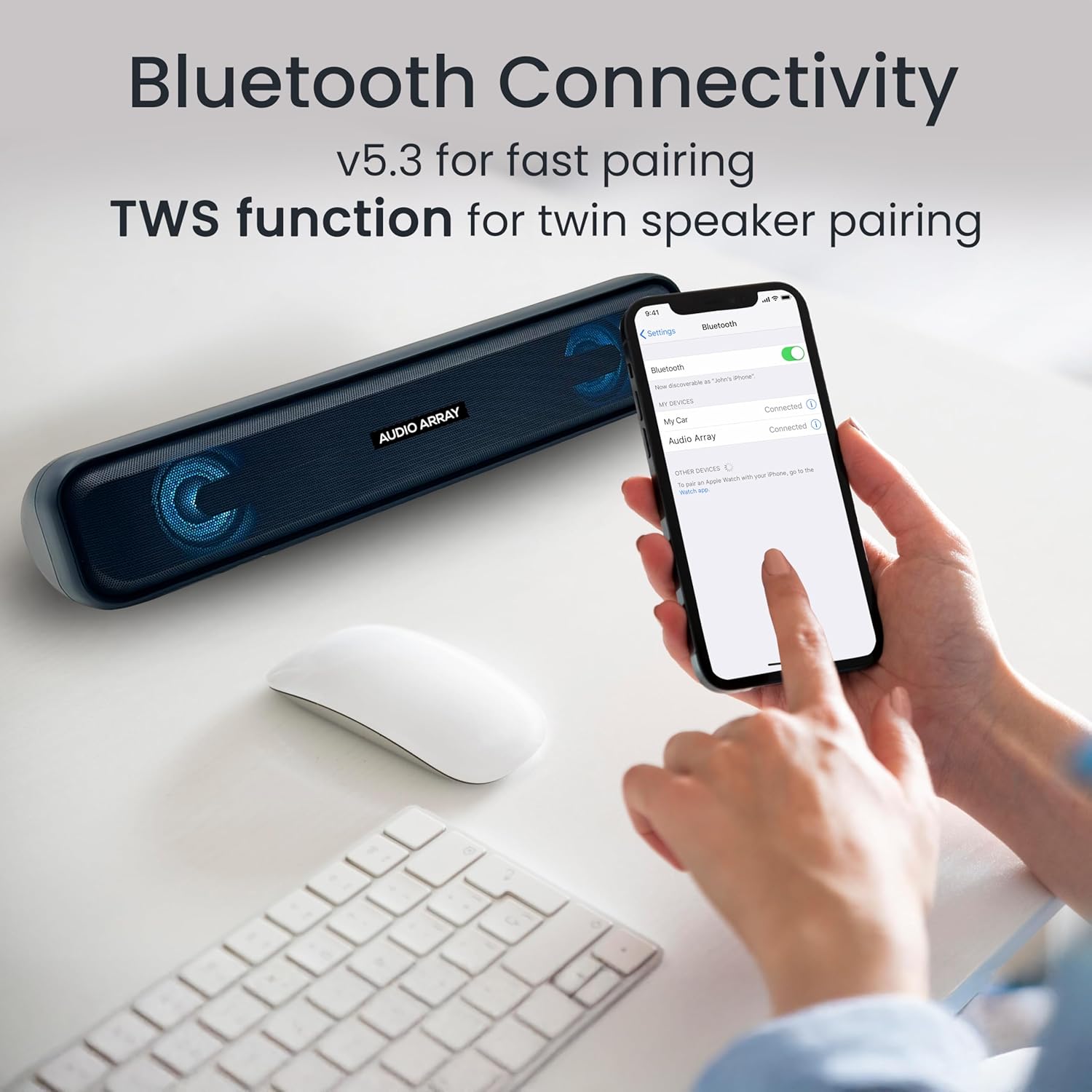
Image: A smartphone screen displaying the successful Bluetooth connection to the "Audio Array" soundbar, illustrating the pairing process.
5.3 TWS (чыныгы зымсыз стерео) функциясы
To achieve a wider stereo sound, you can pair two Audio Array SB-01 soundbars together.
- Ensure both SB-01 soundbars are powered on and in Bluetooth mode.
- On one soundbar, long press the Play/Pause button until you hear a pairing tone.
- The two soundbars will automatically connect to each other.
- Once paired, connect your device to one of the soundbars via Bluetooth as described in section 5.2. Audio will now play through both soundbars in stereo.

Image: Two Audio Array SB-01 soundbars connected wirelessly, demonstrating the TWS (True Wireless Stereo) feature for enhanced audio output.
5.4 AUX режими
Connect an external audio device using a 3.5mm AUX cable (not included).
- Connect one end of the 3.5mm AUX cable to the AUX port on the soundbar.
- Экинчи учун түзмөгүңүздүн аудио чыгаруу уячасына туташтырыңыз.
- Select AUX mode on the soundbar by single tapping the 'M' button.
5.5 USB ойнотуу
Аудио камтыган USB флэш-дискти салыңыз files USB портуна киргизиңиз. Саундбар автоматтык түрдө USB режимине которулуп, ойнотуу башталат.
5.6 TF картасын ойнотуу
Аудио камтылган TF (MicroSD) картасын салыңыз files into the TF Card slot. The soundbar will automatically switch to TF Card mode and begin playback.
5.7 FM радио режими
To use the FM radio function, follow these steps:
- Connect an AUX cable to the soundbar before turning on FM Radio mode. This cable acts as an antenna to improve radio frequency reception.
- Single tap the 'M' button to select FM Mode.
- Long press the Play & Pause button to initiate an automatic scan for FM radio channels.
- Once scanning is complete, single tap the Play & Pause button to select a scanned radio channel.
- Use the Previous or Next buttons to navigate between channels.

Image: A detailed guide on connecting and operating the FM Radio feature of the Audio Array SB-01 Soundbar, showing button functions and the need for an AUX cable as an antenna.
5.8 Башкаруу
- Ойнотуу/тындыруу: Single tap the Play/Pause button to play or pause audio.
- Көлөмү: Long press the Play Forward button to increase volume.
- Үнүн азайтуу: Long press the Play Backward button to decrease volume.
- Кийинки трек/канал: Single tap the Play Forward button.
- Мурунку трек/канал: Single tap the Play Backward button.
- Үнсүз: Single tap the Mute button.
5.9 Колсуз чалуулар
Bluetooth аркылуу смартфонго туташканда, орнотулган микрофон колсуз чалууларды жүргүзүүгө мүмкүндүк берет.
- Чакырууга жооп берүү: Ойнотуу/Пауза баскычын бир жолу таптаңыз.
- Чакырууну аяктоо: Single tap the Play/Pause button during a call.
- Чакырууну четке кагуу: Play/Pause баскычын көпкө басыңыз.

Image: A woman using the Audio Array SB-01 Soundbar for hands-free communication, highlighting the functionality of its built-in microphone for clear conversations.
6. Техникалык тейлөө
- Clean the soundbar with a soft, dry cloth. Do not use abrasive cleaners or solvents.
- Аппаратты экстремалдык температурага, тике күн нуруна же жогорку нымдуулукка дуушар кылуудан алыс болуңуз.
- Do not disassemble the soundbar. This will void the warranty.
- Keep the device away from water and other liquids. The soundbar is moisture resistant, but not waterproof.
7. Кыйынчылыктарды
| Көйгөй | Мүмкүн себеп | Чечим |
|---|---|---|
| Күч жок | Батарея түгөндү; Кубат кабели туташтырылган эмес. | Charge the soundbar; Ensure power cable is securely connected. |
| Үн жок | Volume too low; Incorrect mode selected; Device not connected. | Increase volume; Select correct input mode (Bluetooth, AUX, etc.); Reconnect device. |
| Bluetooth жупташтырылган жок | Soundbar жупташтыруу режиминде эмес; Аппарат өтө алыс; Интерференция. | Ensure soundbar is in Bluetooth pairing mode; Move device closer; Turn off other Bluetooth devices. |
| FM радиосунун кабыл алуусу начар | No AUX cable connected; Weak signal. | Connect an AUX cable to act as an antenna; Try repositioning the soundbar. |
8. Техникалык шарттар
| Өзгөчөлүк | Деталь |
|---|---|
| Бренд | Audio Array |
| Модель номери | SB-01 |
| Динамиктин максималдуу чыгаруу күчү | 25 Ватт |
| Frequency Response | 20000 Гц |
| Байланыш технологиясы | Bluetooth |
| Аудио чыгаруу режими | Стерео |
| Монтаж түрү | Shelf Mount |
| Коргоочу материал | Акрилонитрил бутадиен стирол (ABS), металл |
| Динамик түрү | Саундбар |
| Продукт өзгөчөлүктөрү | Built In Microphone, LED Light, Portable, USB Port |
| Түс | Көк |
| Максималдуу диапазон | 10 метр |
| Башкаруу ыкмасы | тийүү |
| Сууга туруктуулук деңгээли | Нымга туруктуу |
| Bluetooth диапазону | 10 метр |
| Аудио каналдардын саны | 2.0 |
| Connectivity Protocol | AUX, Bluetooth, USB |
| Аудио драйвер түрү | Динамикалык драйвер |
| Элементтин өлчөмдөрү D x W x H | 9D x 36W x 8H Сантиметр |
| Элемент Салмагы | 700 грамм |
| Шайкеш түзмөктөр | Компьютер, ноутбук, смартфон, планшет, телевизор |
9. Кепилдик жана колдоо
9.1 Кепилдик маалыматы
The Audio Array SB-01 Bluetooth Soundbar comes with a 1 жылдык өндүрүүчү кепилдик from the date of purchase. Please retain your proof of purchase for warranty claims. The warranty covers manufacturing defects and does not cover damage caused by misuse, accidents, or unauthorized modifications.
9.2 Кардарларды колдоо
For any support, feedback, or warranty-related inquiries, please contact Audio Array customer service:
- Электрондук почта: support@audioarray.in
- Телефон: +91 93721 46440
- Өндүрүүчү: Cambium Retail Pvt Ltd
- Дарек: 109, Hubtown Solaris, N S, B 203, Professor NS Phadke Rd, Andheri East, Mumbai, Maharashtra 400069, India