
Introduction
Welcome to the user manual for your new Auusda 14.1'' FHD Laptop. This guide provides essential information for setting up, operating, maintaining, and troubleshooting your device. Please read this manual thoroughly to ensure optimal performance and longevity of your laptop.
Продукт бүттүview
The Auusda 14.1'' FHD Laptop (Model A146G) is a lightweight and efficient notebook designed for everyday computing tasks, including work, study, and entertainment. It features a Celeron J4125 Quad-Core processor, 8GB of RAM, and a 256GB SSD for responsive performance.
Пакеттин мазмуну
- Auusda 14.1'' FHD Laptop
- Кубат адаптери/заряддагыч
- User Manual
- Keyboard Membrane (may include multiple language options)

Сүрөт: алдыңкы view of the Auusda 14.1 inch FHD Laptop, displaying its screen with specifications overlay including 14.1" size, 1080p Full HD, J4125 processor, 8GB RAM, and 256GB SSD.
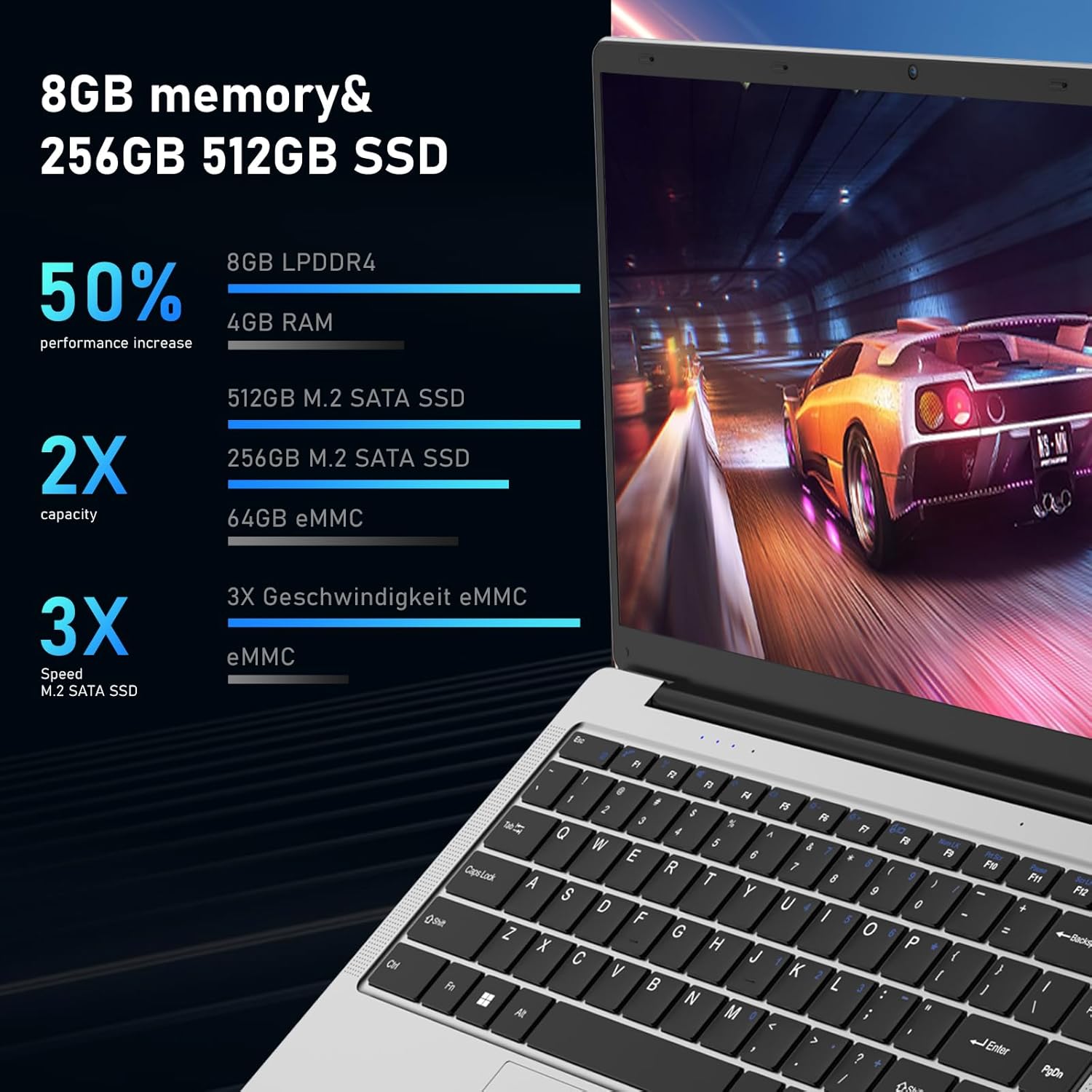
Сүрөт: түз фронт view of the Auusda laptop, showcasing its keyboard and touchpad.

Сүрөт: арткы view of the Auusda laptop, showing the hinge and the rear chassis design.
Компоненттер жана порттор
Familiarize yourself with the various components and ports on your laptop.

Image: An overhead diagram of the laptop's sides, labeling the USB-A 2.0, Headphone Jack, Micro SD Card Slot, Charging Port, USB-A 3.0, and Mini HDMI ports.
- USB-A 2.0 порту: Чычкан, клавиатура же тышкы сактагыч сыяктуу USB түзмөктөрүн туташтыруу үчүн.
- Гарнитура уячасы: Наушниктерди же тышкы динамиктерди туташтыруу үчүн.
- Микро SD карта слоту: For expanding storage or transferring data from Micro SD cards.
- Заряддоо порту: Ноутбукту заряддоо үчүн кубат адаптерин туташтыруу үчүн.
- USB-A 3.0 порту: Жогорку ылдамдыктагы USB 3.0 түзмөктөрүн туташтыруу үчүн.
- Мини HDMI порту: Тышкы дисплейлерге же проекторлорго туташуу үчүн.

Image: Close-up images of both sides of the laptop, detailing the location of the 3.5 mm DC charging port, USB 3.0, Mini HDMI, 3.5 mm headphone jack, and Micro SD slot.
Жайгашуу
Баштапкы заряддоо
Before first use, fully charge your laptop.
- Ноутбуктун кубаттоо портуна кубат адаптерин туташтырыңыз.
- Кубат адаптерин розеткага сайыңыз.
- The charging indicator light will illuminate. Allow the laptop to charge until the indicator shows a full charge.
Биринчи жолу күйгүзүү
- Ноутбуктун капкагын ачыңыз.
- Баскычтопто жайгашкан кубат баскычын басыңыз.
- Windows 11 Pro орнотуу процессин аягына чыгаруу үчүн экрандагы көрсөтмөлөрдү аткарыңыз, анын ичинде тилди тандоо, тармакка туташуу жана колдонуучу аккаунтун түзүү.
Иштөө нускамалары
Негизги операция
- Күйгүзүү/өчүрүү: Күйгүзүү үчүн кубат баскычын басыңыз. Өчүрүү үчүн, "Старт" баскычын чыкылдатып, андан соң "Өчүрүү" баскычын чыкылдатып, "Өчүрүү" дегенди тандаңыз.
- Уйку режими: Уйку режимине өтүү үчүн капкакты жабыңыз же кубат баскычын кыскача басыңыз.
- Сенсордук тактанын колдонулушу: Use the touchpad for navigation. Tap to click, two-finger tap for right-click, and two-finger scroll for scrolling.
- Баскычтоп: The laptop features a full-sized keyboard. Function keys (F1-F12) can be accessed by pressing the Fn key in combination with the desired function key.
Wi-Fi'га туташууда
- Тапшырмалар тилкесиндеги Wi-Fi сөлөкөтүн чыкылдатыңыз.
- Тизмеден каалаган тармакты тандаңыз.
- Enter the network password if prompted, then click "Connect".

Image: A visual representation of the laptop's wireless capabilities, showing icons for 2.4G+5G Wi-Fi and Bluetooth 5.1, along with an indication of two speakers.
Bluetooth түзмөктөрүн туташтыруу
- барыңыз Орнотуулар > Bluetooth жана түзмөктөр.
- Bluetooth күйгүзүлгөнүн текшериңиз On.
- Тандоо Түзмөк кошуу жана тандаңыз Bluetooth.
- Тизмеден түзмөгүңүздү тандап, жупташтыруу көрсөтмөлөрүн аткарыңыз.
Using External Displays (Mini HDMI)
- Connect one end of a Mini HDMI cable to the laptop's Mini HDMI port.
- Connect the other end to the HDMI input of your external display.
- Басыңыз Windows баскычы + P to open the Project menu and select your desired display mode (e.g., Duplicate, Extend, Second screen only).
Техникалык тейлөө
Тазалоо
- Экранды жана корпусту тазалоо үчүн жумшак, мамыксыз чүпүрөктү колдонуңуз.
- Өжөр белгилер үчүн, dampen the cloth slightly with water or a screen cleaner.
- Катуу химиялык заттарды же абразивдүү материалдарды колдонуудан алыс болуңуз.
Батареяга кам көрүү
- Батареянын иштөө мөөнөтүн узартуу үчүн, бат-баттан батарейканы толук зарядсыздандырбаңыз.
- Ноутбукту узак убакытка колдонбогондо салкын, кургак жерде сактаңыз.
- If storing for a long time, charge the battery to about 50-60% before storage.
Программалык камсыздоо жаңыртуулары
Оптималдуу иштөө жана коопсуздукту камсыз кылуу үчүн Windows операциялык тутумуңузду жана драйверлериңизди үзгүлтүксүз жаңыртып туруңуз.
- барыңыз Орнотуулар > Windows жаңыртуу.
- Click Жаңыртууларды текшериңиз жана жеткиликтүү жаңыртууларды орнотуу.
Сактагычты башкаруу
Мезгил-мезгили менен керексиз тазалоо files to free up storage space and improve performance.

Image: An image illustrating the laptop's support for TF card and M.2 2280 SSD expansion, including a view of the laptop's bottom panel.

Image: A screenshot of the laptop's display showing a file explorer window, accompanied by text indicating the potential for storage upgrades.
Проблемаларды чечүү
Жалпы маселелер жана чечимдер
| Көйгөй | Мүмкүн болгон себеп / Чечим |
|---|---|
| Ноутбук күйбөйт. |
|
| Экран бош же кара. |
|
| Wi-Fi туташуу маселелери. |
|
| Жай аткаруу. |
|
Техникалык шарттар
Detailed technical specifications for the Auusda 14.1'' FHD Laptop (Model A146G).

Image: A graphic detailing the Celeron J4125 processor, its 2.7 GHz maximum clock speed, and integrated UHD 600 graphics.

Image: A visual representation of the laptop's 14.1-inch IPS screen, highlighting its 1920x1080 resolution, 178-degree viewing angle, and 180-degree hinge flexibility.
| Өзгөчөлүк | Деталь |
|---|---|
| Модель аты | A146G (Series T141J) |
| Дисплей | 14.1 Inches FHD (1920x1080) IPS Display |
| Процессор | Intel Celeron J4125 Quad-Core (up to 2.7 GHz) |
| RAM | 8 ГБ DDR4 |
| Сактагыч | 256GB SSD (M.2 2280) |
| Графика | Интеграцияланган Intel UHD Graphics 600 |
| Операция системасы | Windows 11 Pro |
| Порттар | 2x USB 3.0, 1x Mini HDMI, 1x Micro SD Card Slot, 1x 3.5mm Headphone Jack, 1x DC Charging Port |
| Зымсыз байланыш | Dual-Band Wi-Fi (2.4G+5G), Bluetooth 5.1 |
| Webcam | Ооба |
| Аудио | Two Stereo Speakers, HD Audio |
| Батарея | 31920mWh (1x 9V battery included) |
| Өлчөмдөрү (LxWxH) | 12.6 x 8.3 x 0.7 дюйм |
| Салмагы | 2.9 lb (1.3 kg) / 3.99 pounds (product data) |
| Түс | Silver |
Кепилдик жана колдоо
Кепилдик маалымат
Your Auusda laptop comes with a 2-year warranty. During this 24-month warranty period, Auusda will provide free repair or return/exchange services for the computer.
Кардарларды колдоо
For any questions, technical assistance, or warranty claims, please contact Auusda customer support.
- Электрондук почта колдоо: Send your order number and a video of the problem to Auusda.ltd@gmail.com
- Amazon колдоо: Log in to your Amazon account, navigate to "Your Orders", and select "Ask questions" for your purchase.

Image: A graphic outlining the available after-sale service channels, including Amazon's order support and direct email contact, along with warranty duration.