
Introduction
The Lexon Flip Classic Luminous Alarm Clock is an iconic, reversible alarm clock designed for intuitive use. This updated version features a rechargeable battery and a redesigned user interface, making it a practical addition to your bedside table. This manual provides instructions for setting up, operating, maintaining, and troubleshooting your device.

Image: Lexon Flip Classic Luminous Alarm Clock, showcasing анын дизайны жана дисплей.
Жайгашуу
- Алгачкы заряддоо: Before first use, fully charge the alarm clock using the included USB-C cable. Connect the USB-C cable to the charging port on the back of the device and plug the other end into a compatible USB power adapter (not included). The battery indicator on the display will show charging status. A full charge provides up to 6 months of battery life.
- Күйгүзүү/өчүрүү: Locate the power button on the back of the device. Press and hold to turn the alarm clock on or off.
- Убакытты жана ойготкучту орнотуу: Use the 'SET' button and the arrow buttons (up/down) on the back of the device to adjust the time, date, and alarm settings. Follow the on-screen prompts to cycle through hours, minutes, 12/24-hour format, date, and alarm time.
- Экран орнотуулары: The arrow buttons can also be used to adjust the screen's light intensity. There are three light intensity settings available.

Image: Discreet control buttons located on the back of the alarm clock for power, charging, and settings.
Иштөө нускамалары
Ойготкучту активдештирүү жана өчүрүү
- To activate the alarm, simply flip the clock so the side marked 'ON' is facing upwards. The alarm icon will appear on the display.
- To deactivate the alarm, flip the clock so the side marked 'OFF' is facing upwards. The alarm icon will disappear from the display.
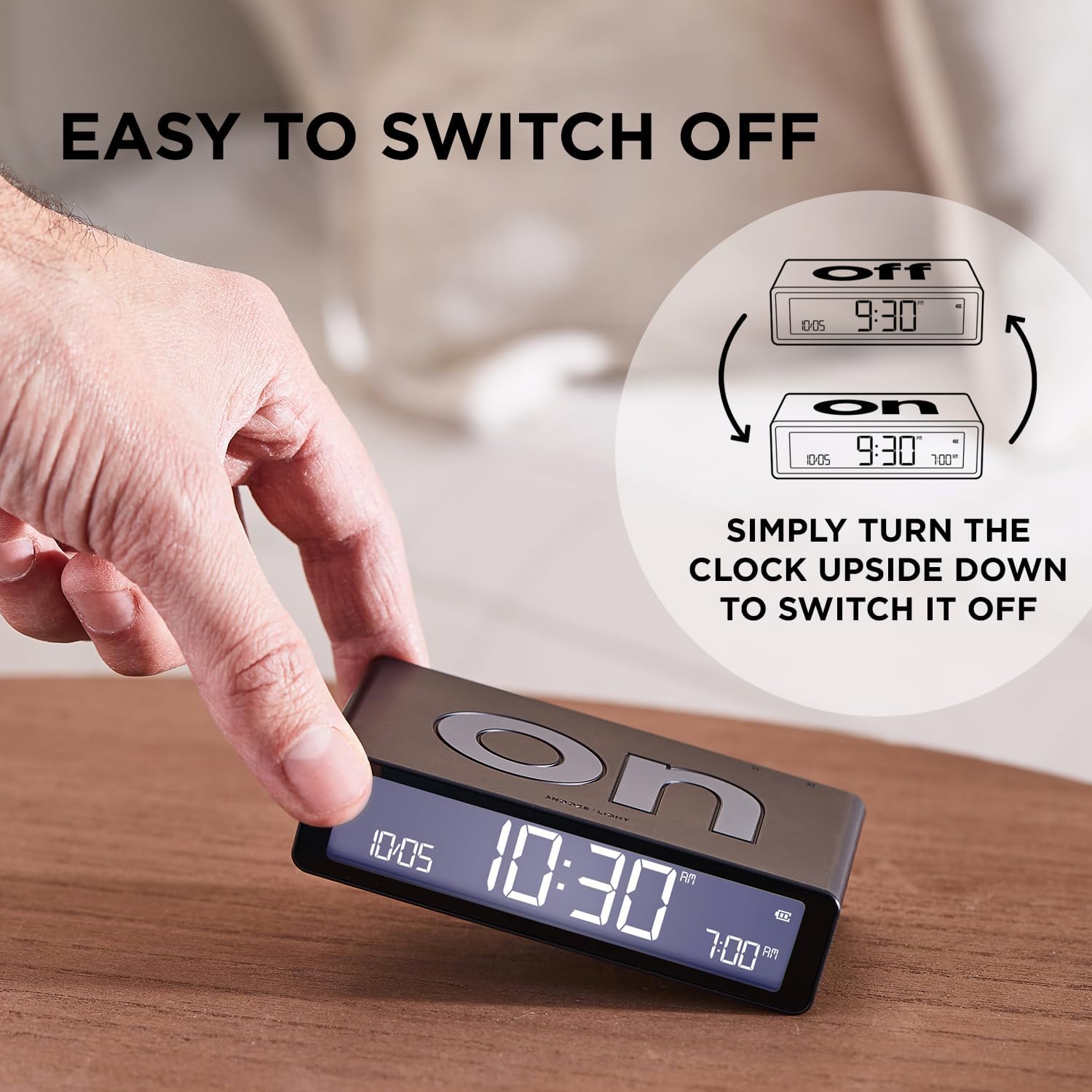
Image: Visual guide demonstrating the simple flip mechanism to switch the alarm on or off.
Snooze Function and Display Light
- When the alarm sounds, gently touch the top surface of the clock to activate the snooze function. The alarm will pause and sound again after a short interval.
- To illuminate the LCD display in the dark, touch the top surface of the clock. The display will light up at the set intensity.

Image: The alarm clock's display and features, including the touch sensor for snooze and light.
Дисплейди түшүнүү
The LCD display provides clear information at a glance:
- Учурдагы убакыт: Shown prominently in the center.
- Дата дисплей: Month and day are displayed.
- Ойготкуч дисплей: The set alarm time is visible.
- Батарея Персенtage: An icon indicates the remaining battery life.
- 12/24 сааттык формат: You can select your preferred time format during setup.

Image: An intuitive interface showing the date, current time, alarm time, and battery percentage.
Техникалык тейлөө
- Тазалоо: Ойготкуч сааттын бетин жумшак, кургак же бир аз кургак аарчы менен сүртүңүзamp кездеме. Абразивдүү тазалагычтарды, эриткичтерди же катуу химиялык заттарды колдонуудан алыс болуңуз, анткени алар финишке жана электрондук компоненттерге зыян келтириши мүмкүн.
- Батареяга кам көрүү: To prolong battery life, avoid fully discharging the device frequently. Recharge the clock when the battery indicator shows low power.
- Сактагыч: If storing the alarm clock for an extended period, ensure it is fully charged and then turn it off. Store in a cool, dry place away from direct sunlight and extreme temperatures.
Проблемаларды чечүү
- Саат күйбөй жатат: Ensure the device is charged. Connect it to a USB-C power source and allow it to charge for at least 30 minutes before attempting to power it on again.
- Сигнал чыкпай жатат: Verify that the clock is flipped to the 'ON' side. Check that the alarm time is correctly set.
- Display not visible/dim: Touch the top surface to activate the backlight. If still dim, adjust the light intensity settings using the buttons on the back. Ensure the battery is sufficiently charged.
- Баскычтар жооп бербейт: Try restarting the device by holding the power button until it turns off, then turn it back on. If the issue persists, ensure the device is charged.
Техникалык шарттар
| Бренд | Лексон |
| Модель номери | LR157PT-S |
| Продукциянын өлчөмдөрү | 4.09"W x 1.02"H |
| Элемент Салмагы | 125 грамм |
| Өзгөчөлүктөр | Digital, Indoor, Multifaced, Luminous, Reversible, Touch Sensor |
| Power Source | USB-C аркылуу кайра заряддоого болот |
| Батарея түрү | 1 Литий Полимердик батарейка (кошулган) |
| Камтылган компоненттер | USB-C cable, user manual |

Image: The compact dimensions and light weight of the Lexon Flip Classic alarm clock.
Кепилдик жана колдоо
This Lexon product is covered by a manufacturer's warranty. For detailed warranty information, please refer to the documentation included with your purchase or visit the official Lexon webсайт.
For further assistance, support, or to explore other Lexon products, please visit the Amazon'догу Lexon дүкөнү.