
Baseus MC1 Pro
Baseus Bowie MC1 Pro Wireless Earphones Instruction Manual
Model: MC1 Pro
Introduction
Thank you for choosing the Baseus Bowie MC1 Pro Wireless Earphones. These open-ear ear cuff earphones are designed to provide a comfortable listening experience with high-fidelity audio and advanced features. This manual will guide you through the setup, operation, and maintenance of your device to ensure optimal performance.
Пакеттин мазмуну
- Baseus Bowie MC1 Pro Wireless Earphones (Left and Right)
- Заряддоо кутусу
- USB-C заряддоо кабели
- User Manual
Продукт бүттүview
The Baseus Bowie MC1 Pro features an innovative open-ear design for comfort and situational awareness. Key components include the earphone units with physical control buttons and the charging case.

Image: Baseus Bowie MC1 Pro earphones shown with their charging case. The earphones are black and feature an ear-hook design, while the case is a sleek grey oval shape.

Сүрөт: жарылган view of the earphone's internal components, highlighting the 3-Magnet Dynamic Driver and 3-Layer Composite Diaphragm. Text indicates Hi-Res audio, LDAC support, and sound leakage prevention.
Жайгашуу
1. Наушникти жана капты заряддоо
Биринчи колдонуудан мурун наушникти жана кубаттоочу кутучаны толук заряддаңыз.
- Кулакчындарды заряддоо кутусуна салыңыз.
- USB-C заряддоо кабелин корпустагы кубаттоо портуна жана кубат булагына туташтырыңыз.
- The indicator light on the case will show charging status. It will turn solid when fully charged.

Image: The Baseus Bowie MC1 Pro charging case with a USB-C cable connected, indicating the charging process. The case is grey with the 'baseus' logo.
2. Bluetooth түзмөгү менен жупташуу
- Кубаттоочу кутучаны ачыңыз. Кулакчындар автоматтык түрдө жупташтыруу режимине өтөт (индикатор жарыктары күйүп-өчөт).
- Түзмөгүңүздө (смартфон, планшет ж.б.) Bluetooth иштетиңиз.
- Издөө "Baseus Bowie MC1 Pro" in the list of available devices and select it to connect.
- Туташтырылгандан кийин, кулакчындардагы индикатор жарыктары күйүп-өчүүнү токтотот.
Иштөө нускамалары
Наушник тагынуу
Gently hook the earphone over your ear, ensuring the speaker is positioned correctly near your ear canal for optimal sound without blocking it. The C-ring structure is adjustable for a secure and comfortable fit.
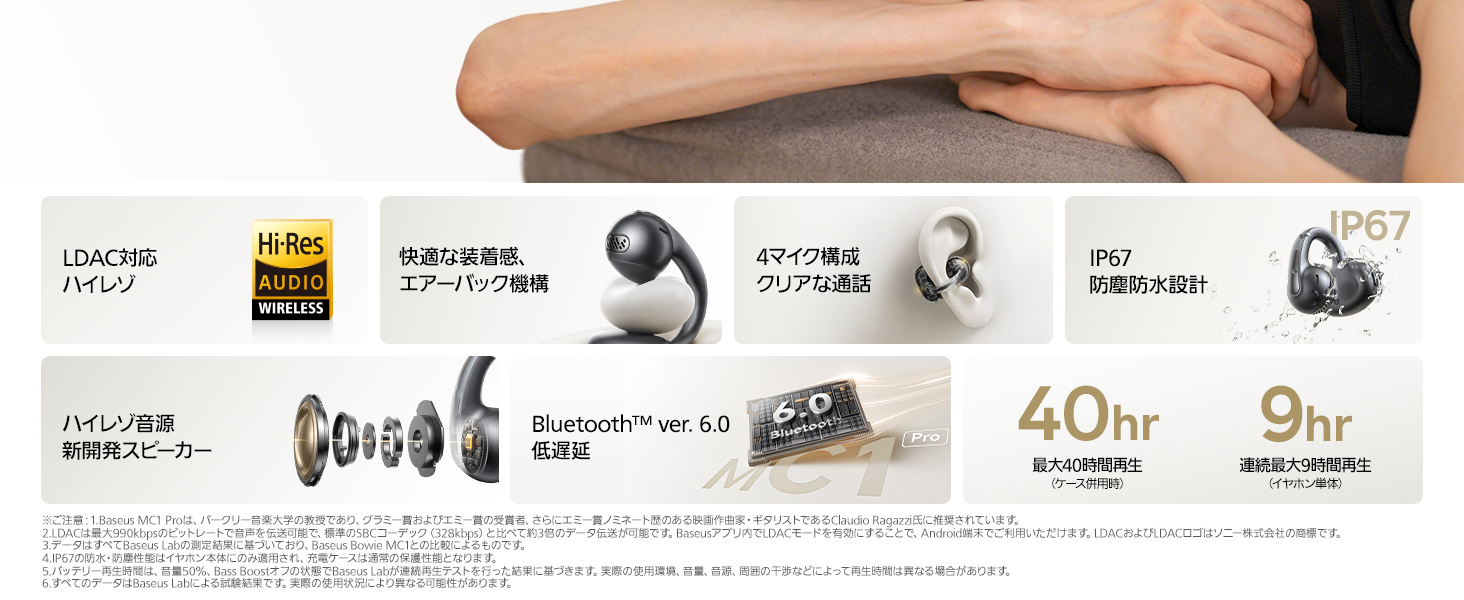
Image: A woman wearing the Baseus Bowie MC1 Pro earphones, demonstrating the comfortable and secure fit of the open-ear design.
Physical Button Controls
The MC1 Pro features physical buttons to prevent accidental touches and provide precise control.
| Акция | Control |
|---|---|
| Ойнотуу/Тыныгуу | Single tap (either earphone) |
| Кийинки трек | Double tap (right earphone) |
| Мурунку трек | Triple tap (left earphone) |
| Үндү көтөрүү | Press and hold (right earphone) for 1.5 seconds |
| Үндү төмөндөтүү | Press and hold (left earphone) for 1.5 seconds |
| Чалууга жооп берүү/аяктоо | Single tap (either earphone) |
| Чакырууну четке кагуу | Press and hold (either earphone) for 1.5 seconds |

Image: A detailed diagram illustrating the physical button controls on the Baseus Bowie MC1 Pro earphones, showing single tap, double tap, triple tap, and long press functions for music and call management.
Аудио өзгөчөлүктөрү
Hi-Res Audio with LDAC
Experience high-resolution audio with LDAC support, delivering clear and detailed sound. The unique triple-magnet driver and 3-layer composite diaphragm provide an immersive listening experience.

Image: A graphic highlighting the Hi-Res Audio Wireless certification and the internal HiFi14 acoustic architecture of the Baseus Bowie MC1 Pro, emphasizing detailed and rich sound quality.
SuperBass 2.0
AI-driven SuperBass 2.0 technology automatically adjusts bass frequencies, enhancing low-end pressure and detail for a powerful, immersive sound. This feature provides a concert-like experience, making your daily listening feel like a live stage аткаруу.

Image: A graphic detailing SuperBass 2.0, showing 2X increased bass impact, 3X enhanced sound detail, and 96,000 adaptive bass corrections per second (in LDAC mode).
Sound Leakage Prevention
Despite their open-ear design, the MC1 Pro minimizes sound leakage through directional audio technology and automatic beam adjustment. This ensures your privacy and consideration for those around you.

Image: A woman wearing the earphones, with diagrams illustrating directional sound design and chamber reflection to prevent sound leakage. It shows standard mode for optimal listening and noise environment mode for adjustment.
Чакыруу өзгөчөлүктөрү
The Baseus Bowie MC1 Pro ensures clear communication even in noisy environments.
DNN Adaptive Noise Reduction & 4-Mic AI Call Noise Cancelling
Equipped with Baseus's proprietary DNN adaptive noise reduction and a 4-microphone AI call noise-canceling system, these earphones accurately capture your voice while filtering out ambient noise. This results in clear call quality, whether you're cycling or in a busy intersection.

Image: A diagram showing the earphone positioned on an ear, with indicators for the four microphones and a phone icon, illustrating the call quality enhancement features.
Durability & Comfort
Cloud-like Fit and Lightweight Design
The innovative 'Cloud' Air Cushion Pro technology and ultra-light 5g design provide a soft, pressure-free fit. The adjustable C-ring structure and four-point support ensure stability, even during active use. The earphones are designed to feel almost imperceptible, allowing for long hours of comfortable wear.

Image: A graphic showing a single earphone resting on a feather, with a large '5g' text, emphasizing its ultra-lightweight design for stress-free comfort.
IP67 суу жана чаң өткөрбөйт
With an IP67 rating, these earphones are protected against sweat, rain, splashes, and dust. This makes them ideal for workouts, outdoor activities, and daily commutes, providing peace of mind in various conditions.

Image: Two Baseus Bowie MC1 Pro earphones being splashed with water, demonstrating their IP67 waterproof and dustproof capabilities.
Батареянын иштөө мөөнөтү
The Baseus Bowie MC1 Pro offers extended playback time:
- Up to 9 hours of continuous playback on a single charge (earphones only).
- Up to 40 hours of total playback with the included charging case.
A quick 10-minute charge provides approximately 2 hours of use.
Image: The Baseus Bowie MC1 Pro charging case with a USB-C cable connected, highlighting the '40H' for 40 hours of total playback and 'BRC' for Baseus Rapid Charge.
Колдонмону ыңгайлаштыруу
Enhance your listening experience by customizing settings through the dedicated Baseus app. The app allows you to adjust the equalizer, activate low-latency mode, locate your earphones, and personalize controls.
- Бассты күчөтүү функциясы: Enhance low frequencies for a more powerful sound.
- Мадам: Аудио профиfileсиздин каалооңуз боюнча.
- Low-Latency Game Mode: Reduce audio delay for gaming and video playback.
- Earphone Finder Function: Жоголгон кулакчындарды табыңыз.

Image: A smartphone screen displaying the Baseus app interface with various customization options for the Bowie MC1 Pro, including bass boost, equalizer, low-latency mode, and earphone location.
Көп чекиттүү туташуу
The Baseus Bowie MC1 Pro supports multipoint connection, allowing seamless switching between two connected devices, such as your smartphone and PC. This feature is convenient for both work and personal use.

Image: A smartphone and a tablet connected simultaneously to the Baseus Bowie MC1 Pro earphones, illustrating the multipoint connection feature for seamless device switching.
Техникалык тейлөө
- Тазалоо: Наушниктерди жана заряддоо кутусун жумшак, кургак чүпүрөк менен дайыма сүртүп туруңуз. Катуу химиялык заттарды же абразивдүү материалдарды колдонуудан алыс болуңуз.
- Сактагыч: Колдонулбаганда, кулакчындарды коргоо жана кубаттоо үчүн кубаттоо кутусуна сактаңыз.
- Заряддоо: Use the provided USB-C cable and a compatible power adapter for charging.
- Суу таасири: While IP67 rated, avoid prolonged submersion in water. Ensure earphones are dry before placing them back in the charging case.
Проблемаларды чечүү
| Көйгөй | Чечим |
|---|---|
| Кулакчындар күйбөйт. | Ensure the earphones are charged. Place them in the charging case and connect the case to a power source. |
| Түзмөк менен жупташтыруу мүмкүн эмес. | Make sure Bluetooth is enabled on your device. Ensure earphones are in pairing mode (flashing indicator lights). Try forgetting the device in your Bluetooth settings and re-pairing. |
| Үн жок же үнү төмөн. | Check the volume levels on both your device and the earphones. Ensure earphones are properly connected. |
| Чалуу сапаты начар. | Микрофондор тоскоол болбогонун текшериңиз. Мүмкүн болсо тынчыраак чөйрөгө көчүңүз. |
| Кулакчындар тез-тез үзүлүп калат. | Ensure your device is within the Bluetooth range (typically 10 meters/33 feet) and there are no major obstructions. Try restarting both the earphones and your device. |
Техникалык шарттар
| Өзгөчөлүк | Деталь |
|---|---|
| Бренд | Baseus |
| Модель аты | MC1 Pro |
| Түс | Кара |
| Наушник стили | Open-ear ear cuff |
| Байланыш технологиясы | Зымсыз (Bluetooth 6.0) |
| Аудио кодек | LDAC, Hi-Res Audio Wireless certified |
| Noise Canceling | DNN Adaptive Noise Reduction, 4-Mic AI Call Noise Cancelling |
| Суу өткөрбөйт рейтинги | IP67 |
| Наушник Салмагы | Approx. 5g per earphone |
| Батареянын иштөө мөөнөтү (наушник) | 9 саатка чейин |
| Батареянын иштөө мөөнөтү (корпусу менен) | 40 саатка чейин |
| Заряддоо порту | USB-C |
| Шайкеш түзмөктөр | iPhone, Galaxy, Sony, Google, Huawei, Honor, OPPO, OnePlus, Xiaomi ж.б. |
| GTIN | 00810196181298 |
| Radio Equipment Technical Standards Compliance Number | 222-251561 |
Кепилдик жана колдоо
The Baseus Bowie MC1 Pro comes with a 24 айлык кепилдик from the date of purchase. In case of any malfunction or defect under normal use, we offer exchange or refund services.
For warranty claims or technical support, please contact Baseus Japan Official Store customer service through your purchase platform (e.g., Amazon).
Ask a question about this manual
Ask about setup, troubleshooting, compatibility, parts, safety, or missing instructions. Manuals+ will review the question and use this page’s manual context to help answer it.