
1. Бүттүview
The Google Pixel 10 Pro is an advanced unlocked Android smartphone designed for seamless performance and intelligent features. It integrates the powerful Gemini AI, boasts an exceptional triple rear camera system, offers fast-charging capabilities with a 24+ hour battery life, and features a vibrant 6.3-inch Super Actua Display. This manual provides essential information for setting up, operating, and maintaining your device.

Image: The Google Pixel 10 Pro, showcasing its modern design and prominent camera bar.
2. Кутуда эмне бар
Google Pixel 10 Pro топтомуңуз төмөнкү нерселерди камтыйт:
- Google Pixel 10 Pro уюлдук телефону
- USB-C Cable (1 meter, USB-C to USB-C 2.0)
- Колдоо, коопсуздук жана кепилдик китепчеси
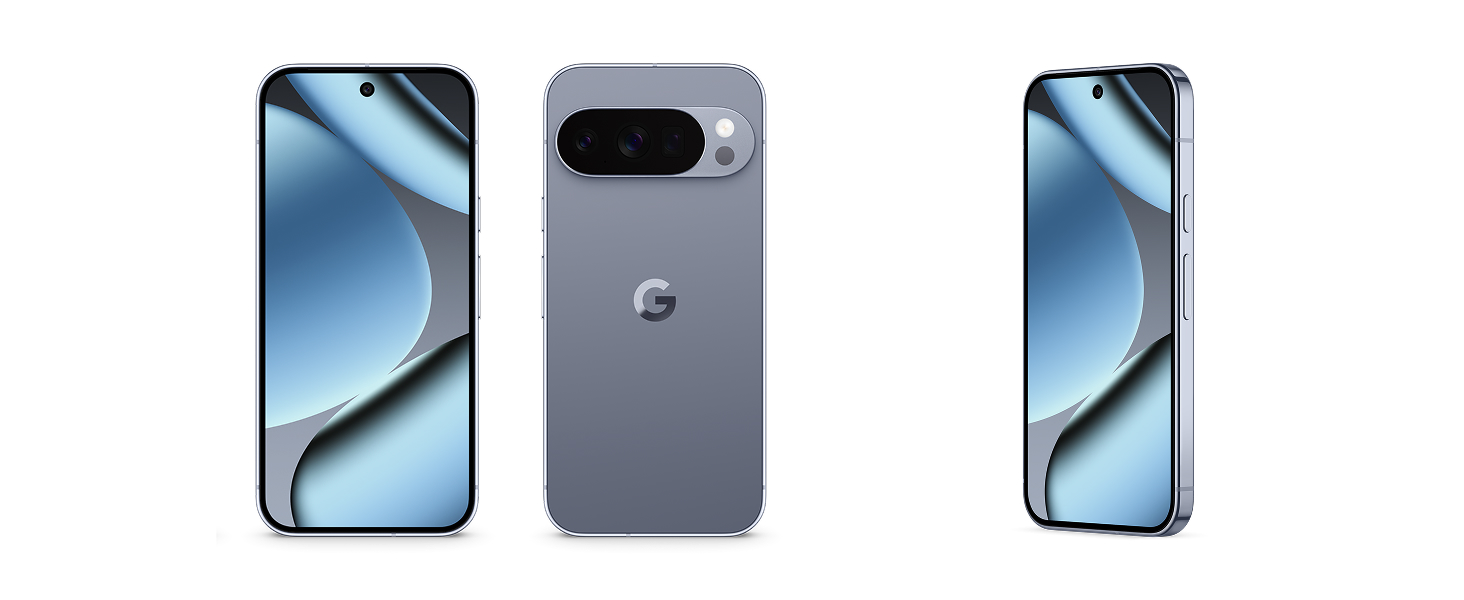
Image: The Google Pixel 10 Pro phone and its accompanying USB-C cable, as typically found in the product packaging.
3. Физикалык бүтүрүүview
Familiarize yourself with the key physical components of your Pixel 10 Pro:
- Дисплей: 6.3-inch Super Actua Display with 120 Hz refresh rate and 1280 x 2856 pixel resolution.
- Camera Bar: Houses the triple rear camera system (50 MP main, 48 MP ultrawide, 48 MP telephoto) and flash.
- Алдыңкы камера: 42 MP front photo sensor.
- Баскычтар: Power button and volume rocker on the side.
- Порттор: Кубаттоо жана маалыматтарды өткөрүп берүү үчүн USB Type-C порту.
- SIM Slot: eSIM only, no physical SIM card slot.
- Узактыгы: Built with durable aluminum and Corning Gorilla Glass Victus 2, offering scratch and drop resistance.

Сүрөт: Жакын план view of the Google Pixel 10 Pro highlighting its durable construction and the integrated camera bar.
4. Орнотуу
Жаңы Google Pixel 10 Pro телефонуңузду орнотуу үчүн төмөнкү кадамдарды аткарыңыз:
- Күйгүзүү: Google логотиби пайда болгонго чейин Кубат баскычын басып, кармап туруңуз.
- Баштапкы конфигурация: Follow the on-screen prompts to select your language, connect to Wi-Fi, and accept terms and conditions.
- eSIM-картаны иштетүү: The Pixel 10 Pro is eSIM-only. During setup, you will be guided to activate your eSIM digitally. This allows you to switch plans and store multiple numbers without a physical SIM card.
- Google аккаунту: Sign in with your Google Account or create a new one to access Google services and apps.
- Маалыматтарды өткөрүү: You can transfer data from your old phone during the setup process. This typically takes about 20 minutes.
- Коопсуздукту орнотуу: Configure your preferred biometric security features, such as fingerprint recognition.
Image: A close-up of the Google Pixel 10 Pro's back, emphasizing its eSIM capability for digital plan switching.
5. Аппаратыңызды иштетүү
The Pixel 10 Pro runs on Android 16, offering an intuitive and customizable user experience.
- Навигация: Use gestures or on-screen buttons to navigate the interface.
- Чалуулар жана билдирүүлөр: Make calls and send messages using the default phone and messaging apps.
- Интернетке кирүү: Connect to Wi-Fi or use 5G cellular technology for internet browsing.
- Колдонмо башкаруу: Google Play Дүкөнүнөн колдонмолорду жүктөп алып, башкарыңыз.
- Персоналдаштыруу: Customize your home screen, widgets, and settings to suit your preferences.
Видео: Кыскачаview of the Google Pixel 10 Pro's interface and general operation, demonstrating its responsiveness and ease of use.
6. Камера системасы
The Pixel 10 Pro features a powerful triple rear camera system (50 MP Wide, 48 MP Ultrawide, 48 MP Telephoto) and a 42 MP front camera, enhanced by advanced Google AI models.
- 100x Pro Res Zoom: Capture incredible details from a distance with Pixel's best zoom quality ever.
- Super Steady Videos: The upgraded 50 MP camera can transform high-motion scenes into stable, cinematic 8K videos.
- Камеранын машыктыруучусу: Utilize Gemini to receive helpful suggestions for framing and capturing your best photos.
- Төмөн жарык аткаруу: The camera system excels in low-light conditions, ensuring amazing results.

Image: A visual representation of the Google Pixel 10 Pro's 100x Pro Res Zoom, showing a distant object captured with high clarity.

Image: A dynamic shot illustrating the Google Pixel 10 Pro's ability to record super steady videos, even during high-motion activities.
7. Эгиздер белгиси боюнча жасалма интеллект жардамчысы
The Pixel 10 Pro integrates Gemini, Google's advanced AI, to enhance your daily interactions and productivity.
- Gemini Live: Engage in natural, free-flowing conversations with Gemini. Point your camera at objects to get information or chat with Gemini to brainstorm ideas and complete tasks across apps.
- Google Tensor G5 чипи: The next-gen Google Tensor G5 chip powers breakthrough AI performance, making your device faster and more responsive.

Image: A user interacting with Gemini Live on the Google Pixel 10 Pro, pointing the camera at a shark in an aquarium to receive real-time information.
Video: A short demonstration of the Google Pixel 10's "Pixelsnap" feature, showcasing its AI capabilities and seamless user experience.
8. Коопсуздук жана купуялуулук
The Pixel 10 Pro is designed with robust security features to protect your data and privacy:
- Spam, Scams, and Phishing Protection: Pixel helps protect you against unwanted and malicious communications.
- Коопсуздук жаңыртуулары: Receive regular security and software updates for 7 years, ensuring your device remains protected against emerging threats.
- Lost or Stolen Device Protection: Your phone will automatically lock if it's lost or stolen, safeguarding your personal information.
- Өзгөчө кырдаалдардын өзгөчөлүктөрү: Pixel has you covered in case of emergency, even when offline.

Image: Icons representing the security features of the Google Pixel 10, including protection against spam, regular updates, and lost device locking.
9. Батареяны башкаруу
The Google Pixel 10 Pro is equipped with a 4870 mAh battery, providing over 24 hours of usage on a single charge. With Extreme Battery Saver, it can last over 30 hours.
- Тез кубаттоо: Түзмөгүңүздү тез кубаттоо үчүн тез кубаттоону колдойт.
- PixelSnap Wireless Charging: Compatible with Qi2-certified PixelSnap wireless charging for convenient power-ups.
- Батареяны оптималдаштыруу: The device intelligently adapts to your usage patterns to optimize battery life.

Image: The Google Pixel 10 Pro being wirelessly charged, illustrating its long-lasting battery and efficient power management.
10. Байланыш
Your Pixel 10 Pro offers versatile connectivity options:
- Уюлдук: Supports 5G cellular technology for fast mobile data. It is unlocked for all major carriers including Google Fi, Verizon, T-Mobile, and AT&T.
- Wi-Fi: Integrated Wi-Fi for high-speed internet access.
- Bluetooth: Connect to wireless accessories like headphones and smartwatches.
- NFC: Байланышсыз төлөмдөр жана тез жупташтыруу үчүн жакынкы байланыш.
- USB Type-C: Кубаттоо жана зымдуу маалыматтарды өткөрүп берүү үчүн.
11. Техникалык тейлөө жана кам көрүү
To ensure the longevity and optimal performance of your Pixel 10 Pro, follow these care guidelines:
- Тазалоо: Экранды жана денени тазалоо үчүн жумшак, түксүз чүпүрөктү колдонуңуз. Катуу химиялык заттардан алыс болуңуз.
- Суу каршылык: The device is water resistant, but not waterproof. Avoid prolonged exposure to water or submersion.
- Температура: Бузулуп калбашы үчүн, шайманды сунушталган температура аралыгында иштетиңиз.
- Программалык камсыздоо жаңыртуулары: Regularly install software updates to benefit from performance improvements and security enhancements.
12. Кыйынчылыктарды
If you encounter issues with your Pixel 10 Pro, try these common troubleshooting steps:
- Түзмөктү кайра иштетүү: Жөнөкөй кайра иштетүү көптөгөн майда программалык мүчүлүштүктөрдү чечет.
- Жаңыртууларды текшерүү: Түзмөгүңүздүн программалык камсыздоосу жаңыртылганын текшериңиз.
- Кэшти тазалоо: If an app is misbehaving, try clearing its cache.
- Заводдун баштапкы абалга келтирүү: As a last resort, a factory reset can resolve persistent software issues (back up your data first).
- Колдоо кызматы менен байланышуу: For complex issues, refer to the Warranty & Support section.
13. Техникалык шарттар
| Өзгөчөлүк | Деталь |
|---|---|
| Бренд | Гугл |
| Модель аты | Pixel 10 Pro |
| Операция системасы | Android 16 |
| CPU модели | Google Tensor G5 |
| CPU ылдамдыгы | 3.78 ГГц |
| RAM эс тутуму | 16 ГБ |
| Сактоо сыйымдуулугу | 256 GB (up to 1TB options available) |
| Screen Size | 6.3 дюйм |
| Дисплей түрү | OLED Super Actua Display |
| Резолюция | 1280 x 2856 pixels (3118 x 1440 max) |
| Жаңыртуу ылдамдыгы | 120 Гц |
| Арткы камера | 50 MP (Wide), 48 MP (Ultrawide), 48 MP (Telephoto) |
| Алдыңкы камера | 42 депутат |
| Видео тартуунун резолюциясы | 8K |
| Батарея сыйымдуулугу | 4870 mAh (24+ hour average life) |
| SIM карта уячасы | eSIM |
| Байланыш | 5G, Bluetooth, NFC, Wi-Fi |
| Сууга туруктуулук деңгээли | Сууга чыдамдуу (IP68) |
| Биометрикалык коопсуздук | Манжа изин таануу |
| Модель жылы | 2025 |
14. Кепилдик жана колдоо
Your Google Pixel 10 Pro comes with a 1-Year Manufacturer Warranty. For detailed warranty information, troubleshooting, and additional support, please refer to the included Warranty Booklet or visit the official Google Pixel support webсайт.
Онлайн колдоо: g.co/pixel/support
Мыйзамдуу маалымат: g.co/pixel/legal