
Introduction
This user manual provides comprehensive instructions for the Chieftec AS-02B-TG-OP Midi Tower PC Case. It covers essential information regarding product features, installation procedures, operational guidelines, maintenance tips, and technical specifications. Please read this manual thoroughly before installing or operating your PC case to ensure proper functionality and longevity.
Продукт бүттүview
The Chieftec AS-02B-TG-OP is a Midi Tower PC case designed for optimal cooling and a modern aesthetic. It features a sleek brushed front panel, a tempered glass side panel, and a pre-installed 120mm PWM fan for efficient heat dissipation.
Негизги өзгөчөлүктөрү:
- Sleek brushed front panel design.
- Tempered glass side panel for component visibility.
- Optimized interior layout for efficient cooling.
- Pre-installed 120mm PWM fan at the rear.
- Support for various motherboard form factors (ATX, micro ATX, Mini-ITX).
- Multiple expansion bays for storage devices.
- Front I/O panel with USB 2.0, USB Type-C, and audio ports.
Компоненттин идентификациясы:

1-сүрөт: Алдыңкы-сол view of the Chieftec AS-02B-TG-OP PC case, showcasing the brushed front panel and the tempered glass side panel.

2-сүрөт: Түз алдыңкы бет view of the Chieftec AS-02B-TG-OP PC case, highlighting the brushed finish of the front panel.

3-сүрөт: Front-right angle view of the Chieftec AS-02B-TG-OP PC case, showing the subtle design elements.
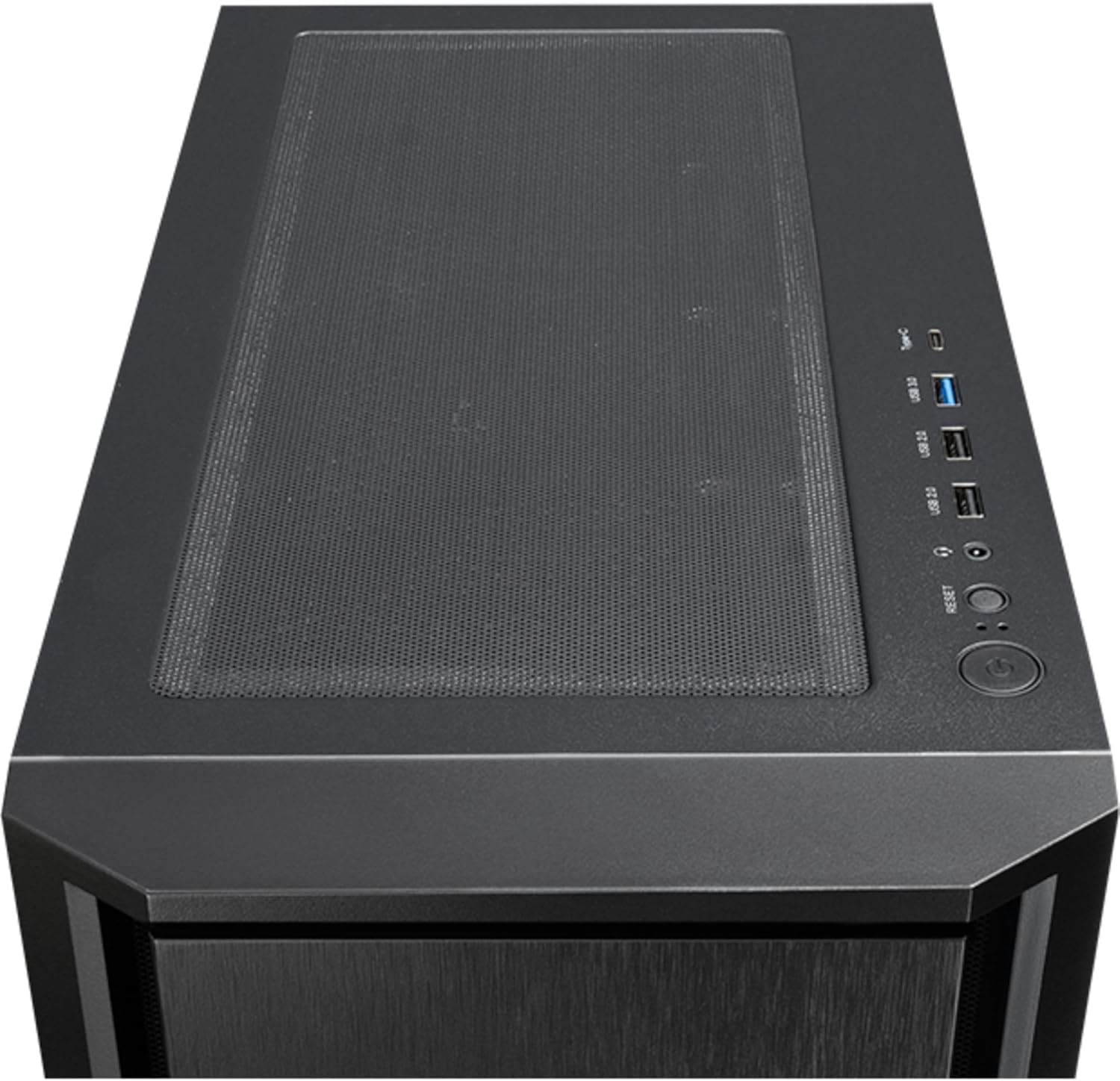
4-сүрөт: Жогорку view of the Chieftec AS-02B-TG-OP PC case, showing the top ventilation and the front I/O panel with USB ports and audio jacks.

5-сүрөт: Арткы view of the Chieftec AS-02B-TG-OP PC case, detailing the expansion slots, rear fan mount, and PSU opening.

6-сүрөт: Төмөнкү view of the Chieftec AS-02B-TG-OP PC case, showing the case feet and bottom dust filter area.
Орнотуу жана орнотуу
This section guides you through the process of installing components into your Chieftec AS-02B-TG-OP PC case.
1. Ишти даярдоо:
- Корпусту туруктуу, тегиз бетке коюңуз.
- Carefully remove the tempered glass side panel by unscrewing the thumb screws at the rear.
- Кабелди башкаруу аймагына жетүү үчүн карама-каршы капталдагы панелди алып салыңыз.
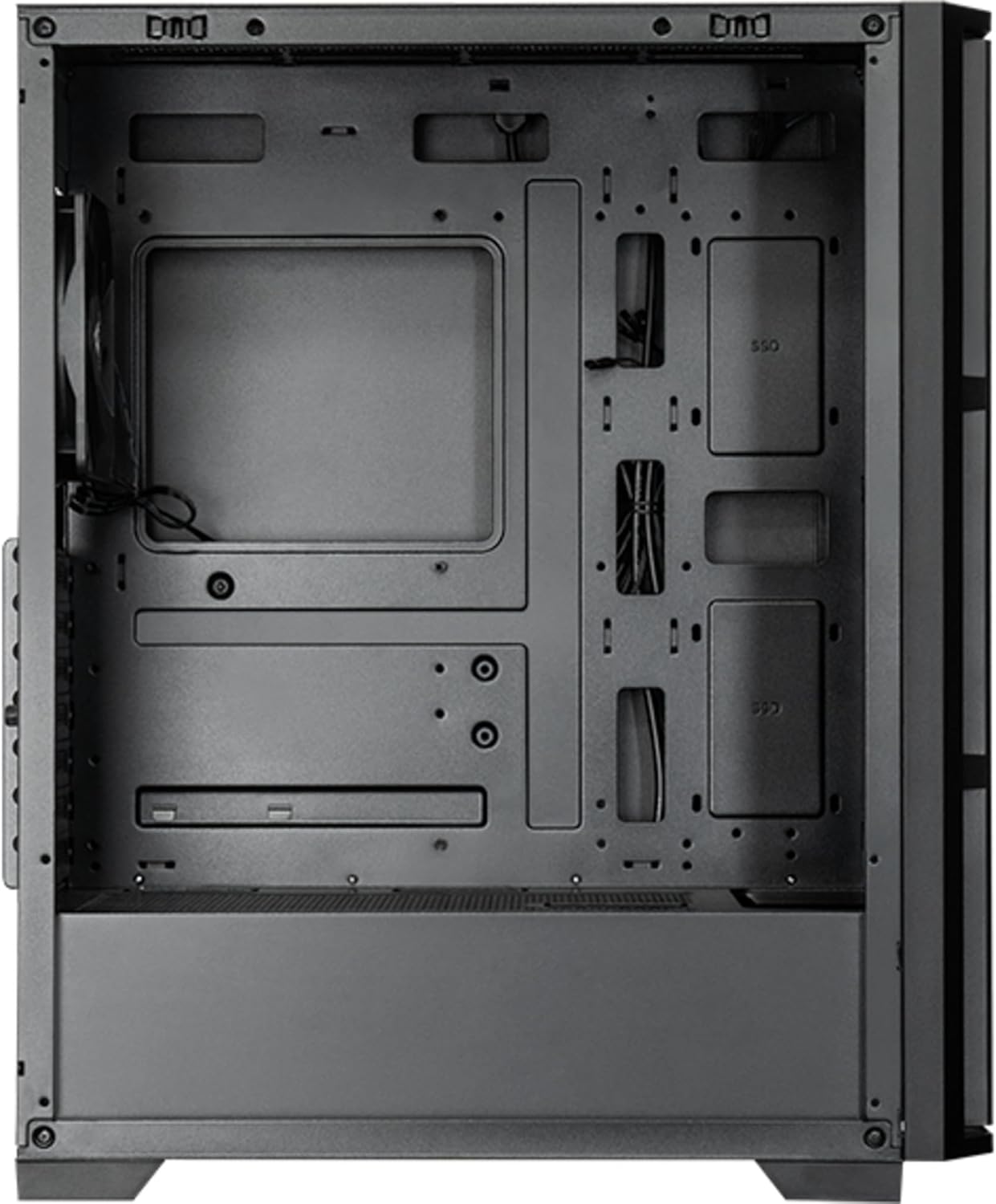
7-сүрөт: Интерьер view of the main compartment, showing the motherboard tray and fan mounting points.
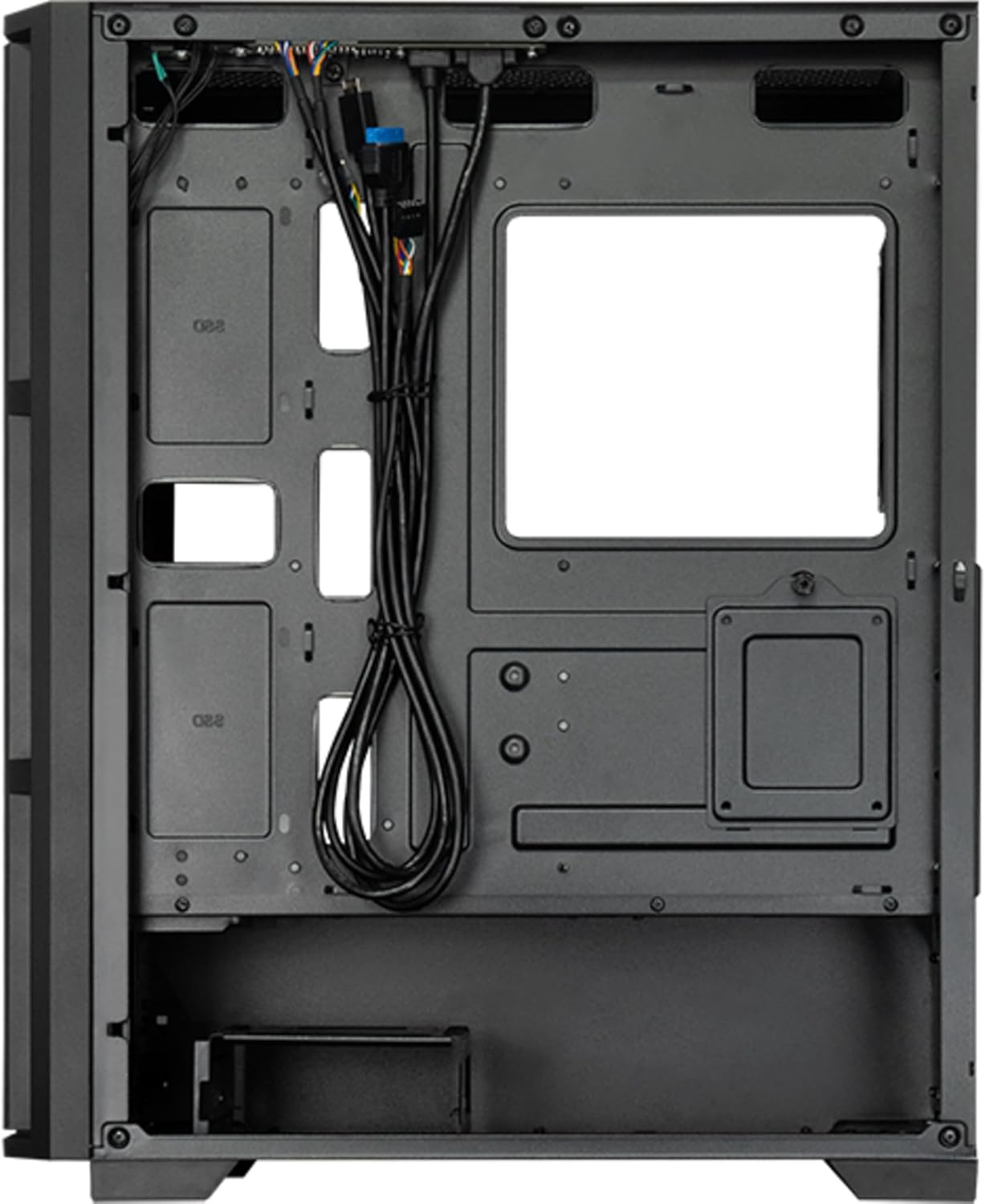
8-сүрөт: Интерьер view from the backside, illustrating the cable management routes and drive mounting locations.
2. Motherboard орнотуу:
- Киргизүү/чыгаруу калканчын корпустун арткы тешигине орнотуңуз.
- Align your ATX, micro ATX, or Mini-ITX motherboard with the standoffs inside the case.
- Берилген бурамалар менен энелик тактаны бекитиңиз.
3. Power Supply Unit (PSU) Installation:
- The PSU is not included. Install your ATX power supply into the dedicated compartment at the bottom rear of the case.
- PSUну корпустун артындагы бурамалар менен бекитиңиз.
4. Storage Drive Installation:
- Install 3.5" HDDs into the drive cages located at the bottom.
- Install 2.5" SSDs/HDDs into the dedicated mounting points behind the motherboard tray.
- Бардык дисктерди тиешелүү бурамалар менен бекитиңиз.
5. Graphics Card and Expansion Cards:
- Корпустун арткы жагындагы керектүү кеңейтүү уячасынын капкактарын алып салыңыз.
- Insert your graphics card or other expansion cards into the PCIe slots on the motherboard.
- Карталарды бурамалар менен бекитиңиз.
6. Кабелди башкаруу:
- Route all power and data cables through the cutouts and tie-down points behind the motherboard tray.
- Connect the front panel I/O cables (USB, audio, power switch, reset switch, LED indicators) to the corresponding headers on your motherboard.
- Ensure cables do not obstruct airflow.
7. Желдетүүчү жана муздатуу системасын орнотуу:
- The case includes one pre-installed 120mm PWM fan at the rear.
- Additional fans can be installed at the front (up to 3x 120mm/140mm) and top (up to 2x 120mm/140mm).
- Radiators up to 360mm can be installed at the front and up to 280mm at the top.
- Connect fan power cables to the motherboard fan headers.
Иштөө нускамалары
Once all components are installed and secured, and the side panels are reattached, your PC is ready for operation.
Күйгүзүү:
- Connect the power cable from your power supply to a wall outlet.
- Корпустун жогорку киргизүү/чыгаруу панелинде жайгашкан кубат баскычын басыңыз.
- The system should boot up, and any installed lighting will illuminate.
Алдыңкы I/O панелинин колдонулушу:
- USB 2.0 порттору (x2): For connecting peripherals such as keyboards, mice, and USB drives.
- USB Type-C порту (x1): Заманбап USB-C түзмөктөрүн туташтыруу үчүн.
- Audio Jacks (Headphone/Microphone): Кулакчындарды, динамиктерди же микрофондорду туташтыруу үчүн.
- Калыбына келтирүү баскычы: To restart the computer.
Техникалык тейлөө
Компьютериңиздин компоненттеринин иштөө мөөнөтүн узартууга жана үзгүлтүксүз техникалык тейлөө анын оптималдуу иштешин камсыз кылууга жардам берет.
Тазалоо:
- Сырткы: жумшак колдонуу, damp сырткы беттерин сүртүү үчүн чүпүрөк. Абразивдүү тазалагычтардан алыс болуңуз.
- Чаң чыпкалары: The case features dust filters (e.g., on the top and bottom). Regularly remove and clean these filters with compressed air or by rinsing with water (ensure they are completely dry before reinstallation).
- Ички иштер: Periodically use compressed air to remove dust buildup from fans, heatsinks, and other internal components. Ensure the system is powered off and unplugged before cleaning the interior.
Аба агымы:
- Аба агымынын жакшы болушу үчүн, корпустун айланасында жетиштүү орун болушун камсыз кылыңыз.
- Вентиляция тешиктерин жаап коюудан качыңыз.
Проблемаларды чечүү
Бул бөлүм сиз кабылышы мүмкүн болгон жалпы көйгөйлөрдү карайт.
Кубат жок:
- Check if the power cable is securely connected to both the PSU and the wall outlet.
- Ensure the power switch on the PSU itself is in the "ON" position.
- Алдыңкы панелдин кубат которгучу кабели эне платасынын башына туура туташтырылганын текшериңиз.
Айланбаган күйөрмандар:
- Check if fan power cables are securely connected to the motherboard fan headers or a fan controller.
- Ensure fan speed settings in BIOS/UEFI or operating system are not set to zero RPM.
Алдыңкы панелдеги USB/аудио иштебейт:
- Verify that the USB and audio cables from the front panel are correctly connected to the corresponding headers on the motherboard.
- Check motherboard drivers for USB and audio functionality.
Техникалык шарттар
| Өзгөчөлүк | Деталь |
|---|---|
| Модель аты | AS-02B-TG-OP |
| Бренд | Chieftec |
| Форма фактору | Миди мунарасы |
| Продукт түсү | Кара |
| Supported Motherboard Form Factors | ATX, micro ATX, Mini-ITX |
| Өлчөмдөрү (W x D x H) | 215 мм x 390 мм x 485 мм (8.46" x 15.35" x 19.09") |
| Элемент Салмагы | 5.3 кг (болжол менен 11.68 фунт) |
| 3.5" Expansion Bays | 2 |
| 2.5" Expansion Bays | 2 |
| 5.25" Expansion Bays | 0 |
| Кеңейтүү уячалары | 7 |
| Каптал терезе | Yes (Tempered Glass) |
| Жарыктандыруу | Yes (Multi-color) |
| CPU муздаткычтын максималдуу бийиктиги | 16.5 см |
| Алдыңкы I / O порттору | 2x USB 2.0, 1x USB Type-C, Audio In/Out |
| Алдын ала орнотулган күйөрмандар | 1x 120mm PWM (Rear) |
| Supported Front Fans (Max) | 3x 120mm же 3x 140mm |
| Supported Top Fans (Max) | 2x 120mm же 2x 140mm |
| Supported Front Radiators | 120мм, 140мм, 240мм, 280мм, 360мм |
| Supported Top Radiators | 120мм, 140мм, 240мм, 280мм |
| Power Supply камтылган | Жок |
Кепилдик маалымат
The Chieftec AS-02B-TG-OP PC case comes with a 2 жылдык өндүрүүчүнүн кепилдиги from the date of purchase. This warranty covers defects in materials and workmanship under normal use. It does not cover damage caused by misuse, accident, modification, unauthorized repair, or improper installation.
Кепилдик дооматтары үчүн сатып алганыңыздын далилин сактап коюңуз.
Колдоо
For technical assistance, troubleshooting beyond this manual, or warranty inquiries, please contact Chieftec customer support.
- Webсайт: Refer to the official Chieftec webколдоо булактары жана байланыш маалыматы үчүн сайт.
- Электрондук почта/Телефон: Specific contact details can typically be found on the product packaging or the official Chieftec support page.
When contacting support, please have your product model (AS-02B-TG-OP) and proof of purchase readily available.