
Introduction
The RAPOO E9050L is a versatile wireless keyboard designed for seamless connectivity across multiple devices and operating systems. Its ultra-slim profile, quiet keys, and long-lasting rechargeable battery make it ideal for various environments, from office to travel. This manual provides detailed instructions for setup, operation, maintenance, and troubleshooting to ensure optimal use of your keyboard.
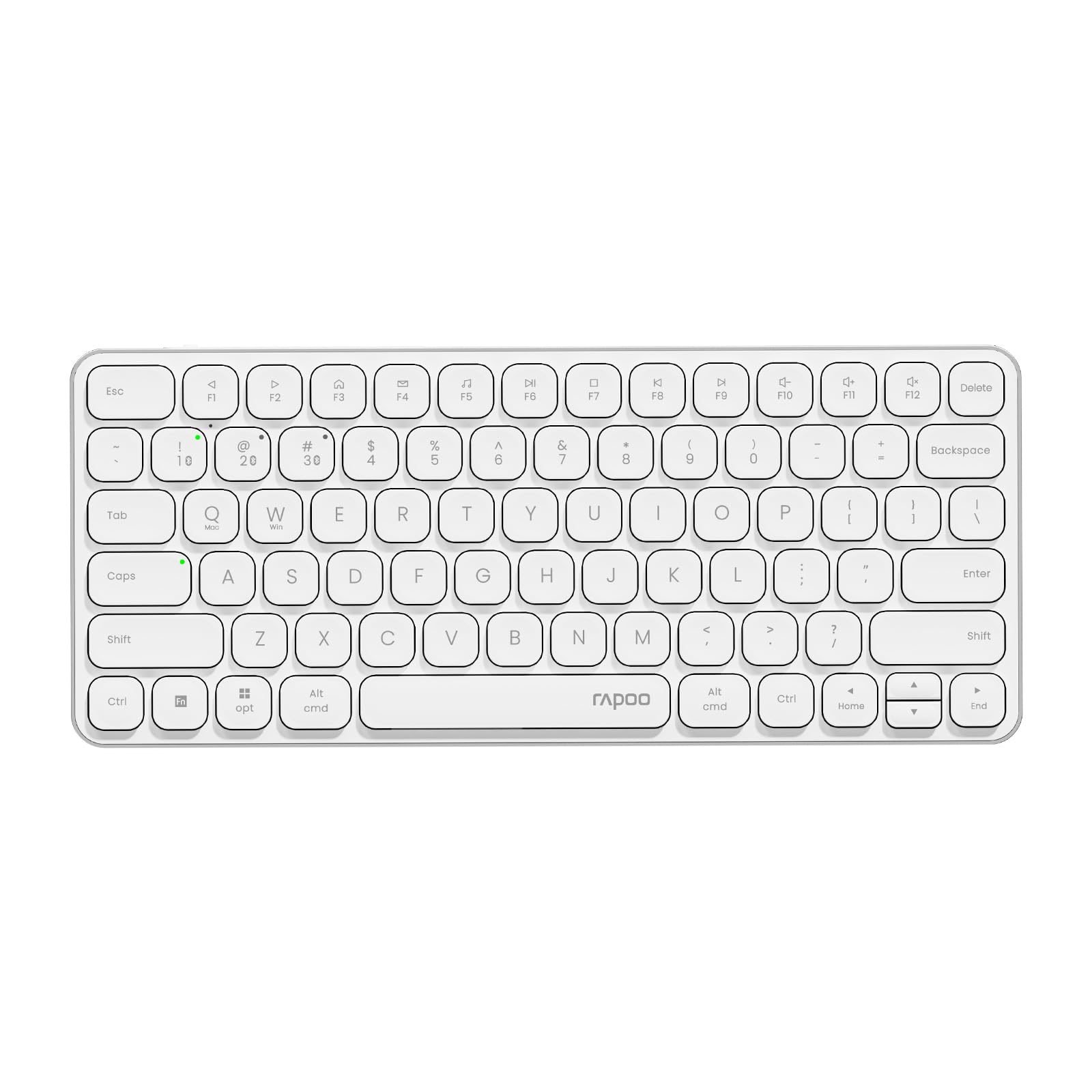
Image: The RAPOO E9050L Wireless Keyboard, showcasing анын кооз дизайны.
Жайгашуу
Пакеттин мазмуну
- RAPOO E9050L Wireless Keyboard
- USB-C заряддоо кабели
- User Manual
Баскычтопту заряддоо
The E9050L features a built-in rechargeable battery. Before first use, fully charge the keyboard using the provided USB-C cable. A full charge can provide up to 90 days of continuous use. A quick 10-minute charge can provide enough power for one day of use.

Image: Diagram illustrating the rechargeable battery and charging indicators.
Connecting to Devices (Multi-Device & Multi-OS)
The keyboard supports wireless connection via 2.4GHz USB receiver or Bluetooth 5.0/4.0, allowing connection to up to 4 devices simultaneously. You can seamlessly switch between a notebook PC, desktop PC, tablet, or smartphone.

Image: Visual representation of multi-device and multi-OS connectivity options.
- 2.4 ГГц зымсыз туташуу:
USB кабыл алгычты компьютериңиздеги жеткиликтүү USB портуна сайыңыз. Баскычтоп автоматтык түрдө туташышы керек. - Bluetooth байланыш:
Press and hold the Bluetooth pairing key (usually indicated by a Bluetooth icon or a specific Fn key combination) until the indicator light flashes. On your device (PC, tablet, smartphone), enable Bluetooth and search for "RAPOO E9050L". Select it to pair. - Түзмөктөрдүн ортосунда которулуу:
Use the dedicated device switching keys (e.g., Fn + 1, Fn + 2, Fn + 3, Fn + 4) to switch between your paired devices. The corresponding indicator light will show which device is currently active.

Image: Icons representing compatibility with various operating systems including Windows, Mac OS, Linux, iOS, Android, and Chrome OS.
Иштөө нускамалары
Key Functions and Multimedia Hotkeys
The E9050L features a compact 78-key layout with 12 multimedia hotkeys for quick access to common functions like play/pause, volume control, and email. These functions are accessed by pressing the Fn key in combination with the corresponding F-keys (F1-F12).

Image: Diagram showing the multimedia hotkeys and their functions when used with the Fn key.
OS Switching
The keyboard supports dual system compatibility. To switch between Windows and Mac OS layouts, use the following key combinations:
- Windows үчүн: баскычын басыңыз Fn + W
- Mac OS үчүн: баскычын басыңыз Fn + Q
Индикатор жарыктары
The keyboard includes indicator lights for device connection, Caps Lock status, and battery level. These lights provide clear visual feedback on the keyboard's current state, addressing user feedback for improved clarity.

Сүрөт: Жакын план view of the device indicator lights and Caps Lock indicator.
Терүү тажрыйбасы
The E9050L utilizes thin chiclet keycaps and a scissor-switch mechanism, providing a quiet and comfortable typing experience. The ultra-thin design (0.2 inches / 0.53 cm) reduces wrist strain, eliminating the need for a separate palm rest.

Сүрөт: деталдуу view of the thin chiclet keycaps and scissor-switch mechanism.
Техникалык тейлөө
To ensure the longevity and optimal performance of your RAPOO E9050L keyboard, follow these maintenance guidelines:
- Тазалоо: Бир аз жумшак, түксүз кездемени колдонуңуз dampened with water or a mild cleaning solution to wipe the keycaps and surface. Avoid harsh chemicals or abrasive materials.
- Чаңды тазалоо: Баскычтардын ортосундагы чаңды жана калдыктарды тазалоо үчүн кысылган абаны колдонуңуз.
- Суюктуктардан алыс болуңуз: Do not expose the keyboard to excessive moisture or submerge it in liquids. In case of spills, immediately disconnect the keyboard and allow it to dry completely before reuse.
- Сактагыч: Клавиатураны күн нурунан жана экстремалдык температурадан алыс, салкын, кургак жерде сактаңыз.
Проблемаларды чечүү
If you encounter issues with your RAPOO E9050L keyboard, refer to the following common solutions:
- Баскычтоп туташпай жатат:
- Баскычтоп кубатталганын текшериңиз.
- Verify that the 2.4GHz USB receiver is properly inserted or that Bluetooth is enabled and paired on your device.
- Try re-pairing the Bluetooth connection or re-inserting the USB receiver.
- Ensure you are on the correct device channel (Fn + 1/2/3/4).
- Keys Not Responding or Delayed Response:
- Check the battery level; low battery can affect performance.
- Ensure the keyboard is within range of your device (for Bluetooth/2.4GHz).
- Interference from other wireless devices can cause issues; try moving closer to your device or away from other wireless sources.
- Компьютериңизди же түзмөгүңүздү өчүрүп күйгүзүңүз.
- Incorrect Key Output (e.g., @ key types "):
- This often indicates an incorrect keyboard layout setting on your operating system. Ensure your device's keyboard settings match the US layout of the E9050L.
- Verify the correct OS mode is selected on the keyboard (Fn + W for Windows, Fn + Q for Mac).
- Caps Lock / Device Indicator Not Working:
- Клавиатуранын күйгүзүлгөнүн жана туташтырылганын текшериңиз.
- If the issue persists, try restarting the keyboard and your device.
Техникалык шарттар
| Өзгөчөлүк | Деталь |
|---|---|
| Бренд | РАПУ |
| Модель номери | E9050L |
| Шайкеш түзмөктөр | Smartphones, Tablets, Notebook PCs, Desktop PCs |
| Байланыш технологиясы | Bluetooth, USB (2.4GHz) |
| Keyboard Description | Интеграцияланган |
| Сунушталган Колдонуулар | Personal, Business, Student, Everyday Use |
| Өзгөчөлүктөр | Ergonomic, Silent |
| Түс | Ак |
| Продукциянын өлчөмдөрү (L x W x Y) | 28.4 см x 11.9 см x 1.3 см (11.18 дюйм x 4.69 дюйм x 0.51 дюйм) |
| Материал | Plastic (with aluminum frame) |
| Power Source | Батарея менен иштейт (кайра заряддалуучу) |
| Которуу түрү | Mechanical (Scissor-switch) |
| Баскычтоптун жайгашуусу | QWERTY (US Layout) |
| Колдоого алынган операциялык системалар | Linux, Windows, Mac OS, iOS, Android, Chrome OS |
| Ачкычтардын саны | 78 |

Image: Diagram showing the precise dimensions of the RAPOO E9050L keyboard.
Кепилдик жана колдоо
Кепилдик маалымат
The RAPOO E9050L Wireless Keyboard comes with a 1 жылдык өндүрүүчүнүн кепилдиги сатып алынган күндөн тартып. Бул кепилдик нормалдуу колдонуудагы материалдардагы жана жасалгадагы кемчиликтерди камтыйт. Кепилдик дооматтары үчүн сатып алганыңыздын далилин сактап коюңуз.
Кардарларды колдоо
For technical assistance, troubleshooting, or warranty inquiries, please contact RAPOO customer support through the official website or your retailer. Detailed contact information can typically be found on the product packaging or the RAPOO official support page.