

Image 0.1: Shanqiu FX-60P Mini UPS. This image shows the compact black Shanqiu FX-60P Mini UPS unit from an angled perspective, highlighting its ports and LED indicators.
1. Киришүү
This manual provides comprehensive instructions for the installation, operation, and maintenance of your Shanqiu FX-60P Mini UPS Battery Backup. This device is designed to provide uninterrupted power to various network and electronic devices during power outages, featuring Gigabit POE++ capabilities, USB, and DC outputs.
2. Коопсуздук маалыматы
- Тtage Шайкештик: Ар дайым тtage and current requirements of your device are compatible with the UPS output BEFORE connecting. Incorrect voltage can damage your equipment.
- Үй ичинде гана колдонуу: This device is intended for indoor use in a dry environment. Do not expose to water or excessive humidity.
- Вентиляция: Ensure adequate ventilation around the UPS to prevent overheating. Do not block ventilation openings.
- Батареяга кам көрүү: Do not attempt to open or replace the internal lithium battery. Refer to qualified service personnel for battery-related issues.
- Жоюу: Dispose of the device and its battery according to local regulations. Do not dispose of in general waste.
3. Пакеттин мазмуну
Пакетте бардык буюмдар бар экенин текшериңиз:
- 1 × Shanqiu FX-60P Mini UPS Battery Backup
- 1 × AC Charging Cable (EU / US plug)
- 1 × DC Output Cable (with 2 outputs)
- 6 × DC Port Converters
- 1 × Multi-language User Manual (this document)

Image 3.1: Package Contents. This image displays the Shanqiu FX-60P Mini UPS unit, one AC charging cable, one DC output cable with two connectors, and six different DC port converters, along with the user manual.
4. Продукциянын өзгөчөлүктөрү
- Uninterruptible Power Supply: Provides continuous power to connected devices during power outages, ensuring network and device uptime.
- Gigabit POE++ Port: Features a 48V~55V POE++ (Power over Ethernet) port (1000mbps, RJ45) for simultaneous data and power transmission to compatible devices like IP cameras or access points.
- Мульти-томtage Чыгуу: Includes a 5V USB port (3A) and two 12V DC ports (shared 3A) to power a wide range of devices such as routers, modems, security cameras, smartphones, and LED strip lights.
- Жогорку кубаттуулуктагы батарея: Built-in 20000mAh (74Wh) lithium battery pack for extended backup time.
- Комплекстүү коргоо: Equipped with multiple smart protections including short circuit protection, voltage fluctuation protection, overcharge protection, over-discharge protection, and temperature protection for safe operation.
- Ар тараптуу шайкештик: Comes with 6 DC port converters to ensure compatibility with various home and office devices.

Image 4.1: Device Compatibility. This image illustrates the Shanqiu Mini UPS as a central power source for multiple devices such as a router, security camera, printer, time clock, tablet, telephone, and modem, highlighting its versatility.

Image 4.2: Auto-Protections. An internal diagram of the UPS highlighting its four main protection features: chipset protection, temperature protection, battery protection, and voltage & current protection, ensuring safe and reliable operation.
5. Орнотуу нускамалары
- Charge the UPS: Connect the provided AC charging cable to the UPS input port (INPUT: 100-240V AC) and plug it into a wall outlet. The LED indicators on the UPS will show the charging status. Ensure the unit is fully charged before first use for optimal performance.
- Identify Device Requirements: Көлөмүн аныктаңызtage (V) and current (A) requirements of the device you intend to power. This information is usually found on the device's power adapter or label.
- Select Appropriate Output:
- For 5V USB devices: Use the USB output port.
- For 12V DC devices: Use the DC output cable and select the appropriate DC port converter if needed. Connect to one of the two 12V DC output ports.
- For POE++ devices (48V~55V): Connect an Ethernet cable from the UPS's POE LAN port to your POE-compatible device.
- Түзмөктөрдү туташтыруу: Connect your device to the selected output port on the UPS. For DC connections, ensure the DC port converter fits securely and the polarity is correct (if applicable, though most modern devices are protected).
- Күйгүзүү: Press the power button on the UPS to turn it on. The UPS will automatically provide power to the connected devices.
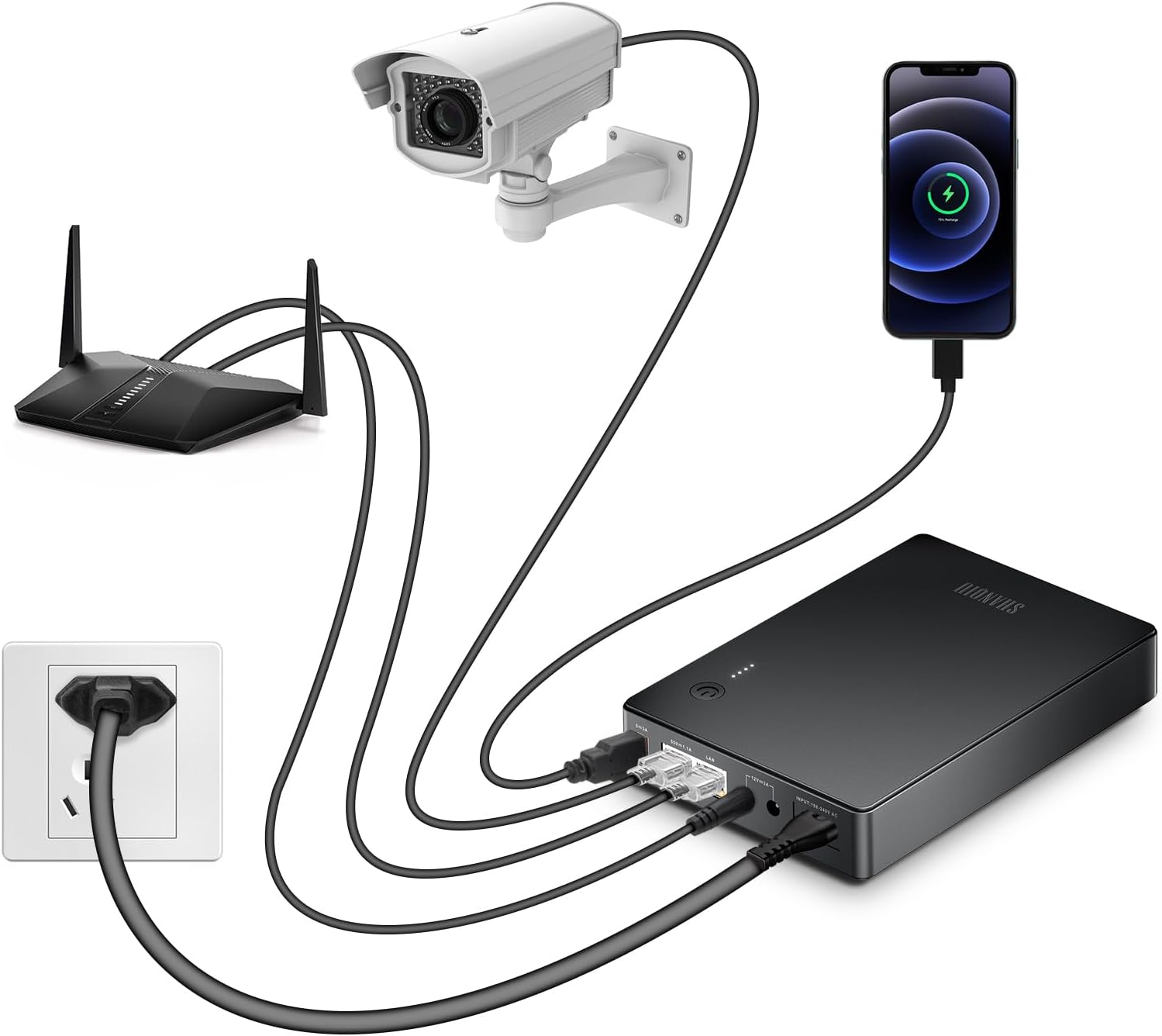
Image 5.1: Connection Diagram. This image illustrates the typical setup, showing the UPS connected to an AC power source, a router via a DC cable, a security camera via a POE Ethernet cable, and a smartphone charging via the USB port.
6. Иштөө нускамалары
- Кадимки операция: When the UPS is connected to AC power and turned on, it will charge its internal battery and simultaneously power connected devices.
- Power Outage: In the event of an AC power failure, the UPS will automatically switch to battery power, providing seamless operation for your connected devices. The transition is instantaneous, preventing interruptions.
- Батарея деңгээлинин көрсөткүчтөрү: The LED indicators on the UPS display the remaining battery capacity. Monitor these indicators to understand the available backup time.
- Өчүрүү: To turn off the UPS, press and hold the power button until the device powers down. Disconnect all devices before storing.
7. Техникалык тейлөө
- Тазалоо: Use a soft, dry cloth to clean the exterior of the UPS. Do not use liquid cleaners or solvents.
- Сактагыч: If storing the UPS for an extended period, ensure it is fully charged and store it in a cool, dry place. Recharge the unit every 3-6 months to maintain battery health.
- Батареяны алмаштыруу: The internal battery is not user-replaceable. Contact customer support if battery issues arise.
8. Кыйынчылыктарды
- UPS does not power on:
- - Ensure the UPS is charged. Connect it to AC power and allow it to charge for several hours.
- - Verify the AC charging cable is securely connected to both the UPS and the wall outlet.
- Connected device is not receiving power:
- - Check if the UPS is turned on.
- - Verify that the correct output port (USB, DC, POE) is being used for your device.
- - Voltage and current requirements of your device match the UPS output specifications.
- - For DC connections, confirm the DC port converter is correctly attached and making good contact.
- - For POE connections, ensure your device is POE compatible and the Ethernet cable is properly connected.
- Short backup time:
- - The UPS battery may not be fully charged. Allow it to charge completely.
- - The total power consumption of connected devices might exceed the UPS's capacity or expected runtime. Disconnect non-essential devices.
- - Battery degradation over time is normal. If the issue persists, contact customer support.
- UPS is overheating:
- - Ensure the UPS has adequate ventilation and is not covered. Remove any obstructions.
- - Reduce the load by disconnecting some devices if the total power draw is too high.
- - If overheating persists, discontinue use and contact customer support.
9. Техникалык шарттар

Image 9.1: Product Specifications. This image displays a detailed table outlining the technical specifications of the Shanqiu FX-60P Mini UPS.
| Өзгөчөлүк | Деталь |
|---|---|
| Модел | FX-60P |
| Турак жай материалы | Алюминий эритмеси |
| AC Input Voltage Диапазон | 100V~240V (85-265V AC) |
| Output Voltage (USB) | 5V |
| Output Current (USB) | 3A |
| Output Voltage (DC) | Two 12V ports |
| Чыгуу ток (DC) | Бөлүшүү 3A |
| Output Voltage (POE++) | 48V~55V |
| Output Current (POE++) | 1.1A (+1,2,4,5/-3,6,7,8) |
| Максималдуу чыгаруу күчү | 60 Вт |
| Батарея түрү | Литий полимери |
| Батарея сыйымдуулугу | 20000 74 мАч / XNUMX Вт |
| Продукциянын өлчөмдөрү | 178 × 122 × 32 мм (7.01 x 4.8 x 1.26 дюйм) |
| Таза Салмак | 0.79 KG (1.74 фунт) |
10. Кепилдик жана колдоо
For warranty information or technical support, please refer to the contact details provided with your purchase or visit the official Shanqiu webсайт. Сатып алуу квитанциясын кепилдик дооматтары үчүн сатып алуунун далили катары сактаңыз.
For further assistance, you may contact customer support via the details found on the manufacturer's webсайт же сатуучу аркылуу.