
1. Киришүү
Thank you for choosing Bluedee BD-SK900 Computer Speakers. This manual provides essential information for the proper setup, operation, and maintenance of your new speakers. Please read this guide thoroughly before use to ensure optimal performance and longevity of your device. These speakers are designed to deliver high-fidelity audio with versatile connectivity and dynamic RGB lighting for an enhanced audio-visual experience.
2. Пакеттин мазмуну
Төмөндө тизмеленген нерселердин баары пакетиңизге камтылганын текшериңиз:
- 1x Bluedee Computer Speaker (Pair)
- 1x USB/USB-C Cable
- 1x Ыкчам Баштоо Көрсөтмөсү
3. Продукциянын өзгөчөлүктөрү
The Bluedee BD-SK900 speakers are equipped with advanced features for a superior audio experience:
- Жогорку тактыктагы стерео үн: Features 2 tweeters, 2 full-range drivers, and 2 passive radiators for clear highs, rich mids, and powerful bass with a 20W output.
- All-in-One Control Knob: A single, intuitive knob allows for play/pause, volume adjustment, lighting control, and switching between connection modes.
- Bluetooth 5.4 туташуусу: Ensures a stable, low-latency wireless connection for seamless audio streaming. (Note: Requires USB power supply for operation).
- Plug & Play Дизайн: Connects easily via the included USB/USB-C cable for both audio and power, requiring no additional drivers or software.
- Динамикалык RGB жарыктандыруу: Offers 5 distinct RGB lighting modes, including dynamic color-shifting and static single-color glows, controllable via the knob.
- Unique Egg-shaped Acoustic Design: A minimalist and space-saving design (5.1"D x 5"W x 7.2"H) that enhances sound projection.
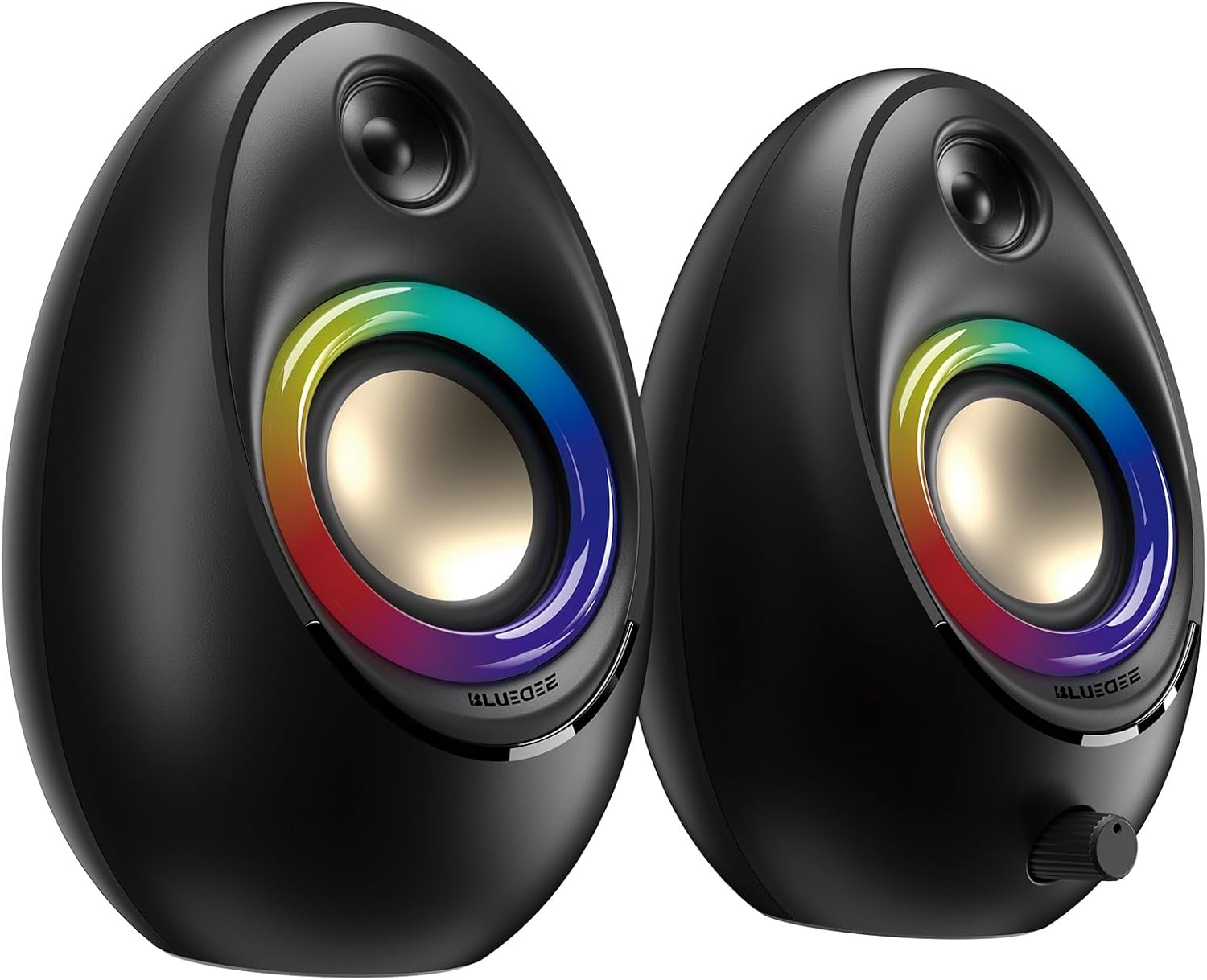
Figure 3.1: Bluedee BD-SK900 Computer Speakers, showcasinалардын дизайны жана RGB жарыктандыруу.

Figure 3.2: Internal acoustic architecture of the Bluedee BD-SK900 speakers.

Figure 3.3: The multi-functional control knob for easy operation.
4. Орнотуу нускамалары
Follow these steps to set up your Bluedee BD-SK900 speakers:
- Жайгашкан жери: Position the two speakers on your desktop or desired surface, ensuring they are spaced appropriately for optimal stereo sound.
- Кубат жана аудиону туташтырыңыз: Use the provided all-in-one USB/USB-C cable. Connect the USB-A or USB-C end to an available port on your computer (desktop, laptop) or a compatible USB power adapter (not included). The speakers will power on automatically.
- Баштапкы туташуу: Upon connecting, the speakers will typically default to USB audio mode. If your computer recognizes the speakers, audio will play directly through them.
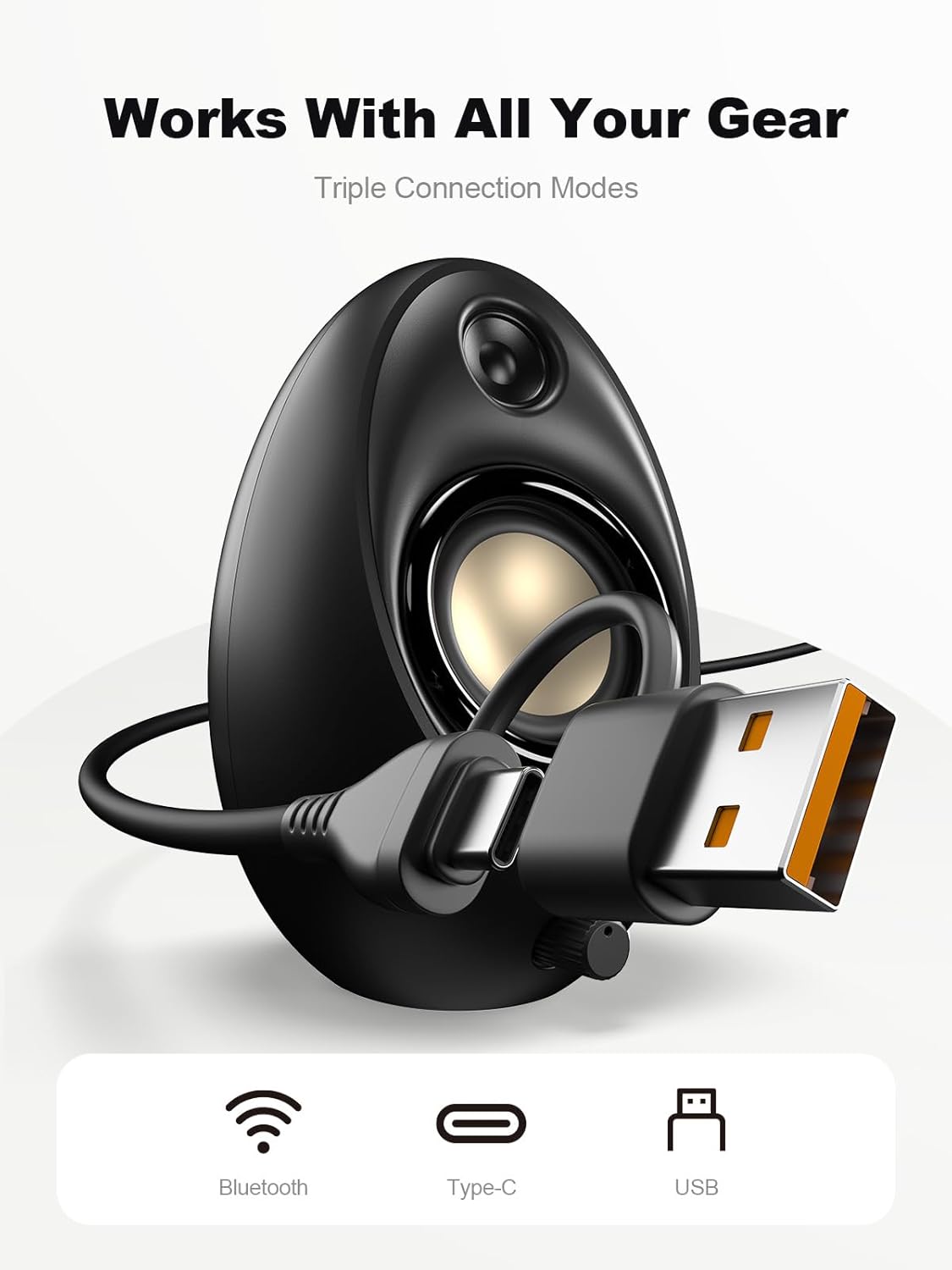
Figure 4.1: Connecting the speakers via USB/USB-C cable.
5. Иштөө нускамалары
5.1 Күйгүзүү/өчүрүү
The speakers power on automatically when connected to a USB power source. To power off, disconnect the USB cable.
5.2 Үндү башкаруу
Rotate the multi-functional knob clockwise to increase volume and counter-clockwise to decrease volume.
5.3 Bluetooth жупташтыруу
- Bluetooth режимине которулуу: Press and hold the multi-functional knob for approximately 2-3 seconds until the speaker indicates Bluetooth mode (e.g., a specific light pattern or audio prompt).
- Түзмөктө Bluetooth'ту иштетүү: Смартфонуңузда, планшетиңизде же ноутбукуңузда Bluetooth'ду иштетиңиз жана жеткиликтүү түзмөктөрдү издеңиз.
- Жупташуу: Select "Bluedee BD-SK900" from the list of devices. Once paired, the speakers will confirm the connection.
5.4 USB/Type-C Connection
When connected via the USB/USB-C cable, the speakers will automatically function as an audio output device for your computer. To switch back to USB mode from Bluetooth, press and hold the multi-functional knob again.
5.5 RGB жарыкты башкаруу
The speakers feature 5 dynamic RGB lighting effects. Briefly press the multi-functional knob to cycle through the available lighting modes. This allows you to customize the ambiance to your preference.

Figure 5.1: Dynamic RGB lighting effects.
6. Кыйынчылыктарды
If you encounter issues with your Bluedee BD-SK900 speakers, please refer to the following common solutions:
- Үн жок:
- Ensure the USB/USB-C cable is securely connected to both the speakers and your device/power source.
- Check the volume level on both the speakers (using the knob) and your connected device.
- Компьютериңиздин үн жөндөөлөрүндө туура аудио чыгаруу түзмөгү тандалганын текшериңиз.
- If using Bluetooth, ensure the speakers are in Bluetooth mode and successfully paired.
- Bluetooth ажыратуу/жупташтыруу маселелери:
- Ensure the speakers are within the 10-meter Bluetooth range of your device.
- Түзмөгүңүздөгү Bluetooth'ту өчүрүп, күйгүзүңүз, андан кийин кайра жупташтырып көрүңүз.
- Forget the device from your Bluetooth list and re-pair.
- Ensure the speakers are not connected to another device.
- RGB жарыктары иштебейт:
- Динамиктердин күйгүзүлгөнүн текшериңиз.
- Briefly press the multi-functional knob to cycle through lighting modes; the lights might be off or in a static mode.
- Бурмаланган аудио:
- Динамиктердин жана туташкан түзмөгүңүздүн үнүн азайтыңыз.
- Аудио булагы жакшы сапатта экенин текшериңиз.
- Check for any interference if using Bluetooth.
7. Техникалык шарттар
| Модель аты | BD-SK900 |
| Динамик түрү | Компьютер динамиги |
| Байланыш технологиясы | Bluetooth, USB |
| Bluetooth версиясы | 5.4 |
| Bluetooth диапазону | 10 метр |
| Power Output | 20 Вт |
| Ызы-чуунун катышы | 70 дБ |
| Frequency Response | 20 KHz (Upper limit, typical for full-range) |
| RGB жарык режимдери | 5 |
| Шайкеш түзмөктөр | Компьютер, ноутбук, смартфон, планшет |
| Продукциянын өлчөмдөрү (ар бир баяндамачы) | 5.1"D x 5"W x 7.2"H |
| Элемент Салмагы | 2.88 фунт |
| Power Source | Corded Electric (USB/Type-C) |

Figure 7.1: Speaker dimensions and design.
8. Техникалык тейлөө
Динамиктердин узак мөөнөттүү иштешин жана оптималдуу иштешин камсыз кылуу үчүн, төмөнкү техникалык тейлөө көрсөтмөлөрүн аткарыңыз:
- Тазалоо: Use a soft, dry cloth to clean the speaker surfaces. Avoid using abrasive cleaners, solvents, or strong chemicals, as they may damage the finish.
- Сактагыч: Узак мөөнөткө колдонулбаганда, динамиктерди күндүн тике тийген нурунан жана өтө температурадан алыс, салкын, кургак жерде сактаңыз.
- Колдонуу: Динамиктерди этияттык менен кармаңыз. Аларды түшүрүп албаңыз же катуу соккуга дуушар кылбаңыз.
- Вентиляция: Ensure proper ventilation around the speakers to prevent overheating. Do not block any vents.
9. Коопсуздук маалыматы
Сураныч, төмөнкү коопсуздук чараларын сактаңыз:
- Динамиктерди сууга, нымдуулукка же өтө жогорку температурага дуушар кылбаңыз.
- Do not attempt to disassemble or modify the speakers. This will void the warranty and may cause damage or injury.
- Keep the speakers away from heat sources, open flames, and direct sunlight.
- Use only the provided USB/USB-C cable for connection.
- Угуунун начарлашына жол бербөө үчүн, узак убакыт бою өтө катуу үн менен угуудан алыс болуңуз.
10. Кепилдик жана колдоо
Bluedee provides comprehensive support for your BD-SK900 Computer Speakers:
- Сапат кепилдик: Your speakers are covered by a 540-day quality warranty from the date of purchase.
- Өмүр бою колдоо: Bluedee offers lifetime customer support for this product.
- Байланыш: For any questions, technical assistance, or warranty claims, please contact us via Amazon Messages or refer to the contact details provided in your Quick Start Guide.