Introduction
This manual provides essential information for the safe and effective operation, maintenance, and troubleshooting of your DF Models Z-10 Competition Truggy BR. Please read this manual thoroughly before operating the vehicle.

Figure 1: The DF Models Z-10 Competition Truggy BR.
Коопсуздук маалыматы
Always prioritize safety when operating your RC vehicle. Failure to follow safety guidelines can result in injury or damage to the product or property.
- Операция үчүн сунушталган жаш курагы - 14 жаш жана андан жогору.
- Адамдардын, үй жаныбарларынын же тоскоолдуктардын жанында иштебеңиз.
- Ensure the battery is fully charged and securely installed before use.
- Avoid operating in wet conditions to prevent damage to electronic components.
- Колдонулбаган учурда унааны жана пультту дайыма өчүрүңүз.
- Колдорду жана кенен кийимдерди кыймылдуу бөлүктөрдөн алыс кармаңыз.
- The motor and electronic speed controller (ESC) can become hot during operation. Avoid touching them immediately after use.
Пакеттин мазмуну
Пакетте бардык компоненттер бар экенин текшериңиз:
- Z-10 Competition Truggy BR (RTR)
- 2.4 ГГц алыстан башкаруу
- NiMH 7.2 V 3500 mAh Battery
- USB заряддоо кабели
- Көрсөтмө (бул документ)
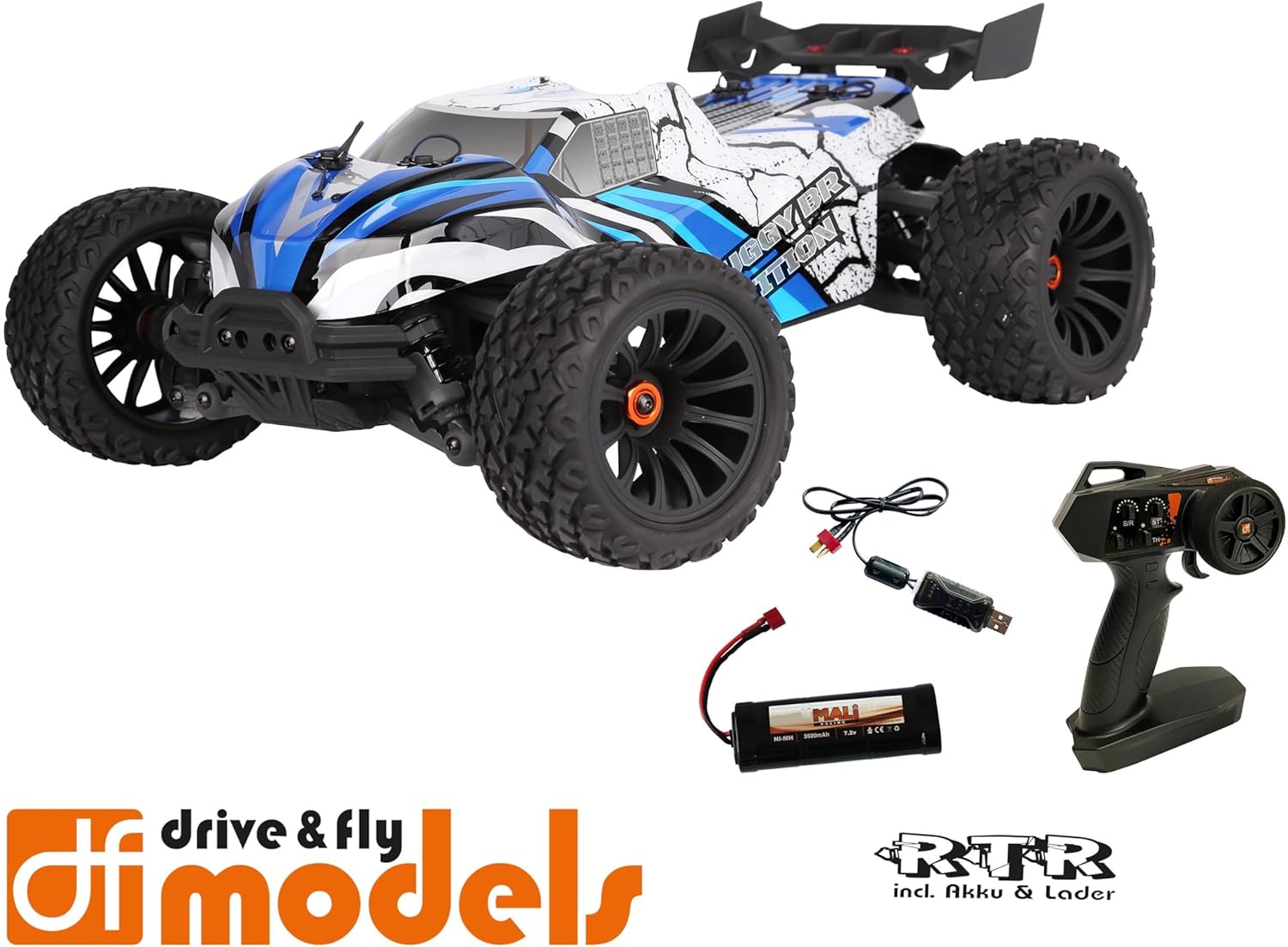
Figure 2: Included components: Truggy, remote control, battery, and USB charging cable.
Жайгашуу
1. Батареяны заряддоо
Before first use, fully charge the included NiMH 7.2V 3500 mAh battery using the provided USB charging cable. Connect the USB cable to a compatible USB power source (e.g., computer USB port, USB wall adapter) and the battery connector.
- Заряддоо убактысы кубат булагына жараша өзгөрүшү мүмкүн.
- Заряддоо учурунда батареяны кароосуз калтырбаңыз.
- Батарея толук заряддалгандан кийин заряддагычты ажыратыңыз.
2. Батареяны орнотуу
Locate the battery compartment on the Truggy. Securely insert the charged battery and connect it to the vehicle's power connector. Ensure the battery is properly seated and secured with the retention clip.

Figure 3: Battery retention clip for secure battery installation.
3. Алыстан башкаруу пультун даярдоо
Install the required batteries (not included) into the 2.4 GHz remote control. Ensure correct polarity. The remote control features a speed adjustment switch (100%, 75%, 50%) for different skill levels.

Figure 4: Remote control with adjustable speed settings (100%, 75%, 50%).
Иштөө нускамалары
1. Күйгүзүү
- Алгач алыстан башкарууну күйгүзүңүз.
- Then, turn on the power switch on the Truggy.
- The vehicle and remote control should automatically pair.
2. Driving the Truggy
- Use the trigger on the remote control to control forward and reverse movement.
- Use the steering wheel to control left and right turns.
- Adjust the speed limit switch on the remote control as needed (100% for maximum speed, 75% or 50% for reduced speed, ideal for beginners).
3. Өчүрүү
- Turn off the power switch on the Truggy first.
- Then, turn off the remote control.
- Disconnect the battery from the Truggy for storage.

Figure 5: The Truggy in operation on varied terrain.
Техникалык тейлөө
Regular maintenance ensures the longevity and optimal performance of your Truggy.
- Тазалоо: After each use, especially in dusty or dirty conditions, clean the vehicle to remove debris. Use a soft brush or compressed air. Avoid using water directly on electronic components.
- Текшерүү компоненттери: Regularly check for loose screws, damaged parts, or worn tires. Tighten any loose fasteners.
- Батареяга кам көрүү: Батареяларды салкын, кургак жерде сактаңыз. Ашыкча заряддабаңыз же ашыкча разряддабаңыз.
- Мотор жана ESC: Ensure proper ventilation. The motor and ESC can get hot; allow them to cool down between runs.
- Oil Pressure Shock Absorbers: Check for leaks and ensure smooth operation. Refill or replace oil as needed (advanced maintenance).
- Дифференциалдар: Inspect for smooth operation and proper lubrication.

Figure 6: Internal components including the motor and ESC, which require occasional inspection.
Проблемаларды чечүү
| Көйгөй | Мүмкүн себеп | Чечим |
|---|---|---|
| Vehicle does not respond. | Battery not charged or connected. Remote control batteries low/dead. Vehicle/remote not powered on. Not paired. | Charge vehicle battery. Replace remote control batteries. Ensure both are powered on. Re-pair vehicle and remote. |
| Reduced speed or power. | Low vehicle battery. Speed limit switch on remote set to 50% or 75%. | Recharge vehicle battery. Adjust speed limit switch to 100% for full power. |
| Steering issues. | Steering trim incorrect. Damaged steering servo or linkage. | Adjust steering trim on remote control. Inspect steering components for damage. |
| Мотор/ESC ысып кетти. | Continuous heavy use. Insufficient airflow. | Allow vehicle to cool down between runs. Ensure chassis is clear of debris for airflow. |
Техникалык шарттар
| Өзгөчөлүк | Деталь |
|---|---|
| Модел | DF Models Z-10 Competition Truggy BR |
| Модель номери | 3145 |
| Масштаб | 1:10XL RTR |
| Айдоо | 4WD Brushed |
| Узундук | 500 мм (50 см) |
| Туурасы | 360 мм (36 см) |
| Бийиктик | 230 мм (23 см) |
| Wheelbase | 300 мм |
| Макс. Ылдамдык | 40 км/саатка чейин |
| Батарея | NiMH 7.2 V 3500 mAh (included) |
| Руль серво | 10 kg with metal gear |
| ESC | 60A DF-1060 controller |
| Сунушталган Жаш | 14 жаш жана андан жогору |
| Материал | Пластик |

Figure 7: Key dimensions of the Truggy.
Кепилдик жана колдоо
For warranty information, technical support, or spare parts, please contact DF Models customer service. Refer to the official DF Models webБайланыш маалыматы үчүн сайтка же сатып алуу документтериңизге кайрылыңыз.
Эскертүү: Unauthorized modifications or improper use may void the product warranty.