
1. Киришүү
Сатып алганыңыз үчүн рахматasing the WLIVE Dresser with 4 Drawers and Modern TV Stand. This product combines a versatile storage dresser with a stylish entertainment center, designed to enhance your living space. This manual provides detailed instructions for assembly, operation, maintenance, and troubleshooting to ensure safe and optimal use of your new furniture.
Чогултуудан мурун бул колдонмону кылдат окуп чыгып, келечекте колдонуу үчүн сактап коюңуз.
2. Коопсуздук маалыматы
- Бардык нускамаларды окуңуз: Баштоодон мурун, бардык чогултуу кадамдарын жана коопсуздук эскертүүлөрүн түшүнгөнүңүздү текшериңиз.
- Балдарды алыс кармаңыз: Small parts can be a choking hazard. Keep children and pets away during assembly.
- Тегиз бетте колдонуңуз: Assemble the unit on a clean, flat, and stable surface to prevent damage or injury.
- Бурамаларды өтө катуу тартпаңыз: Overtightening can strip screws or damage components.
- Салмак чектөөлөрү: Do not exceed the specified weight limits for the dresser drawers or the TV stand top surface.
- Tip-over prevention: For the dresser, consider using anti-tip hardware (if included) to secure it to a wall, especially in homes with children.
- Туура жайгаштыруу: Place the TV stand on a stable, level surface. Ensure adequate ventilation around electronic devices.
3. Пакеттин мазмуну
Чогултуудан мурун, төмөндө көрсөтүлгөн бардык тетиктердин бар экенин жана бузулбаганын текшериңиз. Эгерде кандайдыр бир тетиктер жок болсо же бузулган болсо, кардарларды колдоо кызматына кайрылыңыз.
3.1 Dresser Components
- Steel Frame (various pieces)
- Wood Top Panel
- Кездеме тартмалар (4 даана)
- тартма туткалары
- Adjustable Feet/Levelers
- Монтаждоо жабдыктары (буроолор, Аллен ачкычы)
- Anti-tip Kit (optional, for wall mounting)
3.2 TV Stand Components
- Main Top Panel
- Side Panels (2 units)
- Төмөнкү панель
- Ортоңку текче
- Cabinet Doors (2 units)
- Metal Legs (4 units)
- Adjustable Feet/Levelers
- Assembly Hardware (screws, dowels, hinges, magnetic catches)
4. Монтаждоо боюнча нускамалар
Two adults are recommended for assembly. Please follow the steps carefully.
4.1 Dresser Assembly
- Бөлүктөрдү таңгактан чыгаруу жана аныктоо: Lay out all dresser components on a soft, clean surface to prevent scratches. Refer to the package contents list.
- Болоттон жасалган карканы чогултуңуз: Connect the vertical and horizontal steel bars using the provided screws and Allen wrench. Ensure all connections are secure but do not overtighten initially.
- Жыгачтан жасалган үстүнкү катмарды бекитүү: Place the wood top panel onto the assembled steel frame and secure it with the designated screws.
- Жөнгө салынуучу буттарды орнотуу: Screw the adjustable feet into the bottom of the steel frame. Adjust them later to level the dresser.
- Кездемеден жасалган шкафтарды даярдоо: Insert the bottom panel into each fabric drawer and attach the handles to the front of each drawer.
- Салгычтарды салуу: Slide the assembled fabric drawers into the designated slots in the steel frame.
- Акыркы бекемдөө жана тегиздөө: Once fully assembled, gently tighten all screws. Adjust the feet to ensure the dresser is stable and level.

Image 1: Assembled dresser with drawers open, demonstrating storage space.

Сүрөт 2: Детальдуу view of the fabric drawers and handles.
4.2 TV Stand Assembly
- Бөлүктөрдү таңгактан чыгаруу жана аныктоо: Lay out all TV stand components on a soft, clean surface.
- Негизги кадрды чогултуу: Connect the top, bottom, and side panels using the provided screws and dowels. Ensure the structure is stable.
- Ортоңку текчени орнотуу: Insert the middle shelf into its designated position within the main frame.
- Металл буттарды бекитүү: Secure the four metal legs to the bottom panel of the TV stand using the provided screws.
- Жөнгө салынуучу буттарды орнотуу: Screw the adjustable feet into the bottom of each metal leg.
- Шкаф эшиктерин бекитүү: Mount the cabinet doors using the hinges. Ensure they open and close smoothly. Install the magnetic catches to keep the doors closed.
- Акыркы бекемдөө жана тегиздөө: Gently tighten all screws. Adjust the feet to ensure the TV stand is stable and level.

Image 3: Assembled TV stand with a television, showcasing its function.

Сүрөт 4: Детальдуу view of the TV stand's cable management holes, magnetic cabinet closure, and adjustable feet.
5. Иштөө нускамалары
5.1 Комодду колдонуу
- Тарткычтын иштеши: Gently pull the handles to open the fabric drawers. Push them back in until fully closed. Avoid forcing drawers.
- Салмагын бөлүштүрүү: Distribute items evenly within the drawers. Avoid placing excessively heavy items in a single drawer.
- Жогорку бет: The wood top can be used for displaying lamps, clocks, books, or other decorative items. Ensure items do not exceed the weight capacity.
5.2 TV Stand Usage
- TV жайгаштыруу: Carefully place your television on the top surface of the TV stand. Ensure the TV's base is fully supported and centered. Refer to the specifications for maximum TV size and weight.
- Кабелдик башкаруу: Utilize the integrated cable holes at the back of the TV stand to route and organize power cords and AV cables, maintaining a tidy appearance and preventing tangles.
- Сактоочу шкафтар: Use the side cabinets and open shelf for storing media devices, remote controls, books, or other accessories. The magnetic catches ensure doors remain closed.
6. Техникалык тейлөө
- Тазалоо: Беттерди жумшак менен сүртүңүз, гamp кездеме. Катуу химиялык заттардан же абразивдүү тазалагычтардан алыс болуңуз, бул финишке зыян келтирет.
- Кездеме тартмалары: Токулган эмес кездемеден жасалган тартмаларды жумшак жуугуч каражат менен так тазалоого болотamp кездеме. Толугу менен кургатыңыз. Кир жуугуч машинада жуубаңыз.
- Үзгүлтүксүз текшерүүлөр: Мезгил-мезгили менен бардык бурамалар менен байланыштарды текшерип туруңуз, алар бекем бойдон калууда. Керек болсо кайра тартыңыз.
- Нымдуулуктан качыңыз: Keep the furniture away from excessive moisture or direct sunlight to prevent warping or fading.
7. Кыйынчылыктарды
| Көйгөй | Мүмкүн себеп | Чечим |
|---|---|---|
| Түзмөк солкулдап/туруксуз | Тегиз эмес пол; бош бурамалары; жөнгө салынуучу буттар туура эмес орнотулган. | Ensure all screws are tightened. Adjust the leveling feet until the unit is stable. Move to a level surface. |
| Тарткычтар жылмакай жылбайт | Drawer bottom not fully inserted; drawer overloaded; frame misalignment. | Ensure the drawer bottom is fully pushed down. Reduce drawer contents. Check frame assembly for proper alignment. |
| Шкафтын эшиктери жакшы жабылбайт | Hinges misaligned; magnetic catch not installed correctly. | Adjust hinges as needed. Ensure magnetic catches are securely installed and aligned with the door. |
| Жок бөлүктөрү же бузулган компоненттери | Таңгактоо катасы; жеткирүүдөгү бузулуу. | Do not proceed with assembly. Contact WLIVE customer support immediately for replacement parts. |
8. Техникалык шарттар
8.1 Dresser Specifications
- Жалпы өлчөмдөрү: Approximately 15.7" L x 11.8" W x 38.7" H (Refer to Image 5 for detailed dimensions)
- тартма өлчөмдөрү: Approximately 15" L x 11.8" W x 8.3" H (internal)
- Салмак сыйымдуулугу (үстүндө): 5.5 фунт
- Салмак сыйымдуулугу (ар бир тартманын): 66 фунт
- Материал: Steel frame, wood top, non-woven fabric drawers
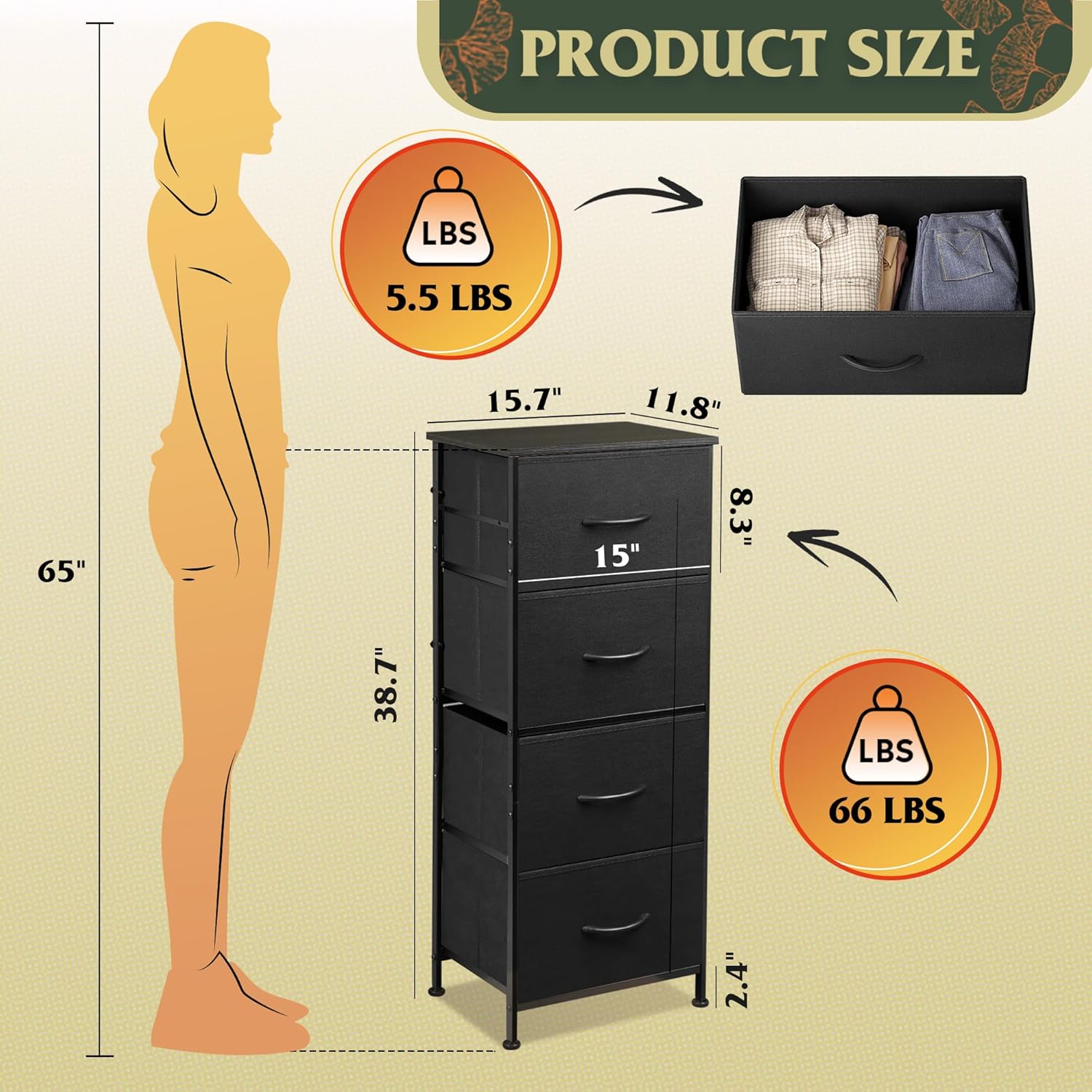
Image 5: Detailed dimensions and weight capacities for the dresser.
8.2 TV Stand Specifications
- Жалпы өлчөмдөрү: 57.9" L x 14.6" W x 17.7" H (Refer to Image 6 for detailed dimensions)
- Телевизордун максималдуу өлчөмү: 65 дюймга чейин
- Total Board Capacity: 110 фунт
- Материал: Wood panels, metal legs
- Өзгөчөлүктөрү: 3 Cable Holes, Magnetic Cabinet, Adjustable Feet

Image 6: Detailed dimensions and weight capacities for the TV stand.
9. Кепилдик жана Кардарларды колдоо
WLIVE products are designed for quality and durability. For specific warranty information, please refer to the documentation included with your purchase or visit the official WLIVE webсайт.
If you encounter any issues during assembly or use, or if you have questions about your product, please contact WLIVE customer support. Have your model number (B0FGD4YMP3) and purchase date ready when contacting support.
Thank you for choosing WLIVE.