
1. Киришүү
Thank you for choosing the Pecron E2400LFP Portable Power Station and 300W Foldable Solar Panel. This system is designed to provide reliable power for various applications, including home backup, outdoor camping, RV use, and emergency situations. The E2400LFP features a 2048Wh LiFePO4 battery and delivers a continuous 2400W AC output. This manual will guide you through the proper setup, operation, and maintenance of your device to ensure optimal performance and longevity.

Image 1.1: The Pecron E2400LFP Portable Power Station, showcasing its front panel with multiple output ports and digital display.
Видео 1.1: Бүттүview video demonstrating the features and design of the Pecron E2400LFP power station.
2. Орнотуу
2.1 Кутудан чыгаруу жана алгачкы текшерүү
Upon receiving your Pecron E2400LFP, carefully unpack all components. Verify that all items listed in the packing list are present and undamaged. If any items are missing or damaged, contact customer support immediately.
2.2 Электр станциясын заряддоо
The E2400LFP can be charged using multiple methods:
- AC дубалды заряддоо: Connect the provided AC charging cable to the AC input port on the power station and then to a standard wall outlet. The unit can charge from 0% to 100% in approximately 1.5 hours.
- Күн панелин заряддоо: Connect the 300W foldable solar panel to the DC input port using the provided solar charging cable. Ensure the solar panel is placed in direct sunlight for optimal charging efficiency.
- Унаа заряддоо: Use the car charging cable to connect the power station to your vehicle's 12V cigarette lighter port. This method is suitable for charging while on the go.

Image 2.1: The Pecron E2400LFP power station being charged by a 300W foldable solar panel, ideal for off-grid use with an RV.

Image 2.2: A portable solar generator setup, demonstrating the E2400LFP and solar panels in an outdoor environment.
3. Иштөө нускамалары
3.1 Күйгүзүү/өчүрүү
To power on the unit, press and hold the main power button for a few seconds until the LCD screen illuminates. To power off, repeat the process. Ensure the unit is off when not in use to conserve battery life.
3.2 Чыгуу портторун колдонуу
The E2400LFP offers a variety of output ports:
- Кондиционер розеткалары (3x 2400 Вт): Press the AC button to activate the AC outlets. These are suitable for high-power appliances like refrigerators, CPAP machines, and power tools.
- USB-C Ports (2x 100W Max): For fast charging compatible devices such as laptops and smartphones.
- USB-A Ports (4x 18W): For charging phones, drones, and other USB-powered devices.
- XT60 Output (1x 12V-30A Max): For specific DC devices requiring higher current.
- Cigar Port (1x 12V-10A): Standard car accessory port for devices like car refrigerators or air pumps.
- DC 5525 Output (1x 12V-5A): For various DC-powered electronics.
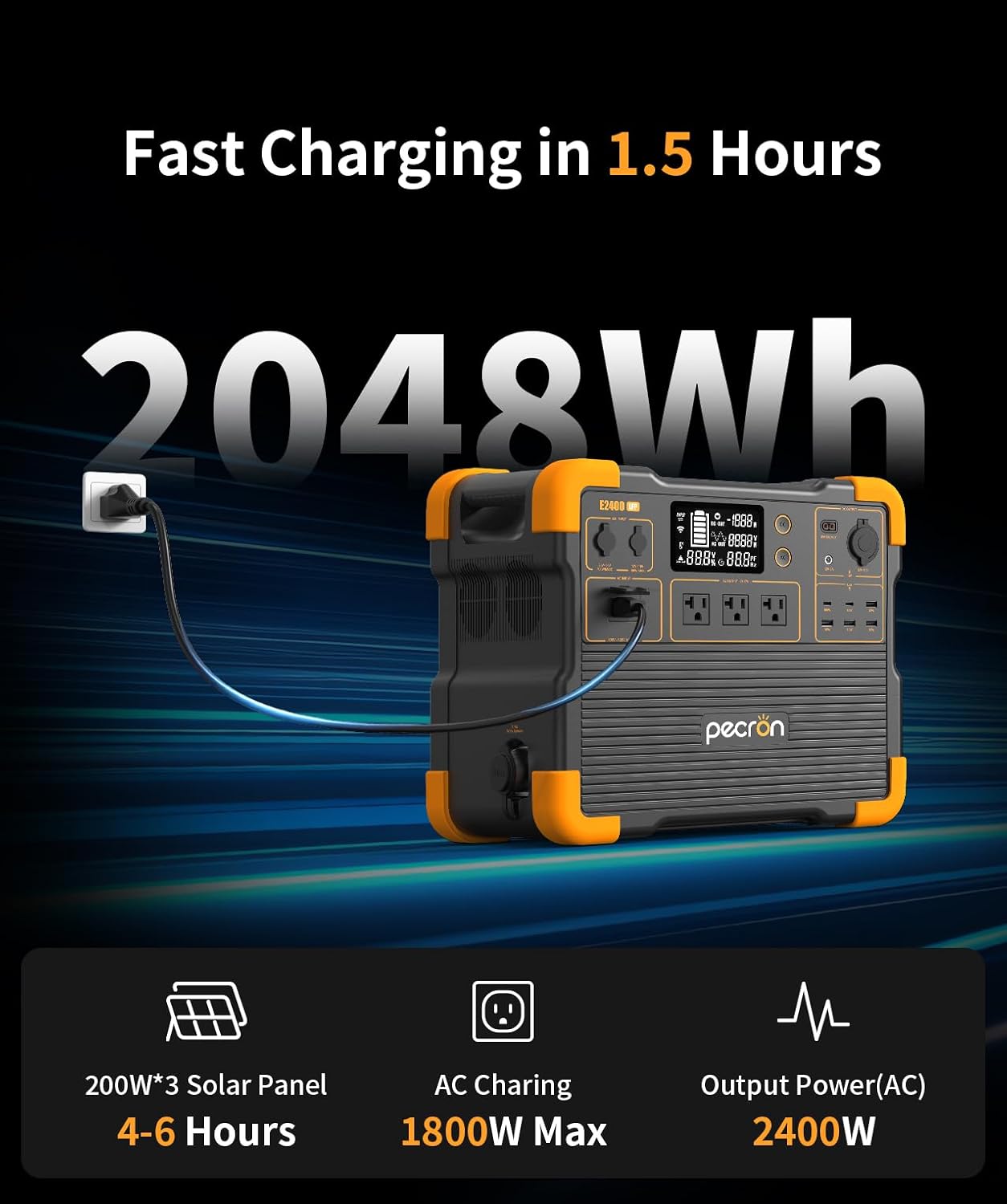
Сүрөт 3.1: Детальдуу view of the E2400LFP's versatile output ports, highlighting AC, USB, XT60, and DC options.

Image 3.2: The E2400LFP power station providing power for common appliances like a coffee maker, laptop, and mini-fridge during outdoor activities.
3.3 LCD дисплей
The LCD display provides real-time information on battery level, input/output wattage, and remaining runtime. Monitor this display to manage your power usage effectively.
3.4 Smart APP башкаруу
Download the Pecron app to remotely monitor and control your E2400LFP. The app allows you to:
- View battery status and power levels.
- Control AC and DC output switches.
- Customize charging power settings.
- Access alarm records and device user manual.

Image 3.3: The Pecron mobile application interface, demonstrating remote control and monitoring features for the power station.
3.5 UPS функциясы
The E2400LFP supports an Uninterruptible Power Supply (UPS) function, providing near-instantaneous protection (within 8-20ms) from unexpected power interruptions for connected loads. This is ideal for sensitive electronics like computers and data centers. Note: UPS function supports loads under 1800W (120V).

Image 3.4: The E2400LFP power station serving as a home backup power solution, illustrating its UPS capability.
4. Техникалык тейлөө
4.1 Батареяга кам көрүү
To maximize the lifespan of your LiFePO4 battery:
- Recharge the unit at least once every 3-6 months, even if not in use, to maintain battery health.
- Батареяны бат-баттан толук кубаттап калуудан алыс болуңуз.
- Электр станциясын салкын, кургак жерде күн нурунан жана экстремалдык температурадан алыс сактаңыз.
4.2 Тазалоо
Use a soft, dry cloth to clean the exterior of the power station. Do not use abrasive cleaners or immerse the unit in water. Keep all ports free of dust and debris.
4.3 Айлана-чөйрөнү коргоо
Operate the power station within the recommended temperature range specified in the technical specifications. Avoid exposing the unit to rain or excessive moisture.
5. Кыйынчылыктарды
If you encounter issues with your Pecron E2400LFP, refer to the following common problems and solutions:
| Көйгөй | Мүмкүн себеп | Чечим |
|---|---|---|
| Түзмөк күйбөйт | Battery fully discharged; Power button not held long enough | Charge the unit using AC or solar; Press and hold the power button for 3-5 seconds |
| AC чыгышы жок | AC output not activated; Overload; Low battery | Press the AC button; Reduce connected load; Recharge the power station |
| Күн кубаттоо иштебейт | Insufficient sunlight; Incorrect connection; Damaged solar panel/cable | Ensure direct sunlight; Check cable connections; Inspect solar panel and cable for damage |
| Дисплей ката кодун көрсөтөт | Internal fault; Over-temperature/Under-temperature | Refer to the full user manual for specific error codes; Move unit to a suitable temperature environment; Contact customer support if persistent |
For more detailed troubleshooting or issues not listed here, please consult the comprehensive user manual or contact Pecron customer support.
6. Техникалык шарттар
Below are the key technical specifications for the Pecron E2400LFP Portable Power Station and 300W Foldable Solar Panel:
| Өзгөчөлүк | Деталь |
|---|---|
| Бренд | пекрон |
| Модель аты | E2400 LFP+LL-YT300W |
| Батарея түрү | LiFePO4 |
| Кубаттуулугу | 2048 Wh |
| AC Output | 2400W (Continuous), 3 AC Outlets |
| Тtage | 51.2 вольт |
| Заряддоо убактысы (AC) | 1.5 саат (0% - 100%) |
| Күн панелинин кубаты | 300W (Foldable, IP67) |
| Продукциянын өлчөмдөрү | 14.8"L x 9.4"W x 13"H |
| Салмагы | 45 lbs (Power Station) |
| Өзгөчөлүктөр | APP Control, Fast Charging, Portable, USB Ports, UPS Function |
| Кеңейтүүчү кубаттуулук | Up to 8192Wh (with two EP3000-48V batteries) |
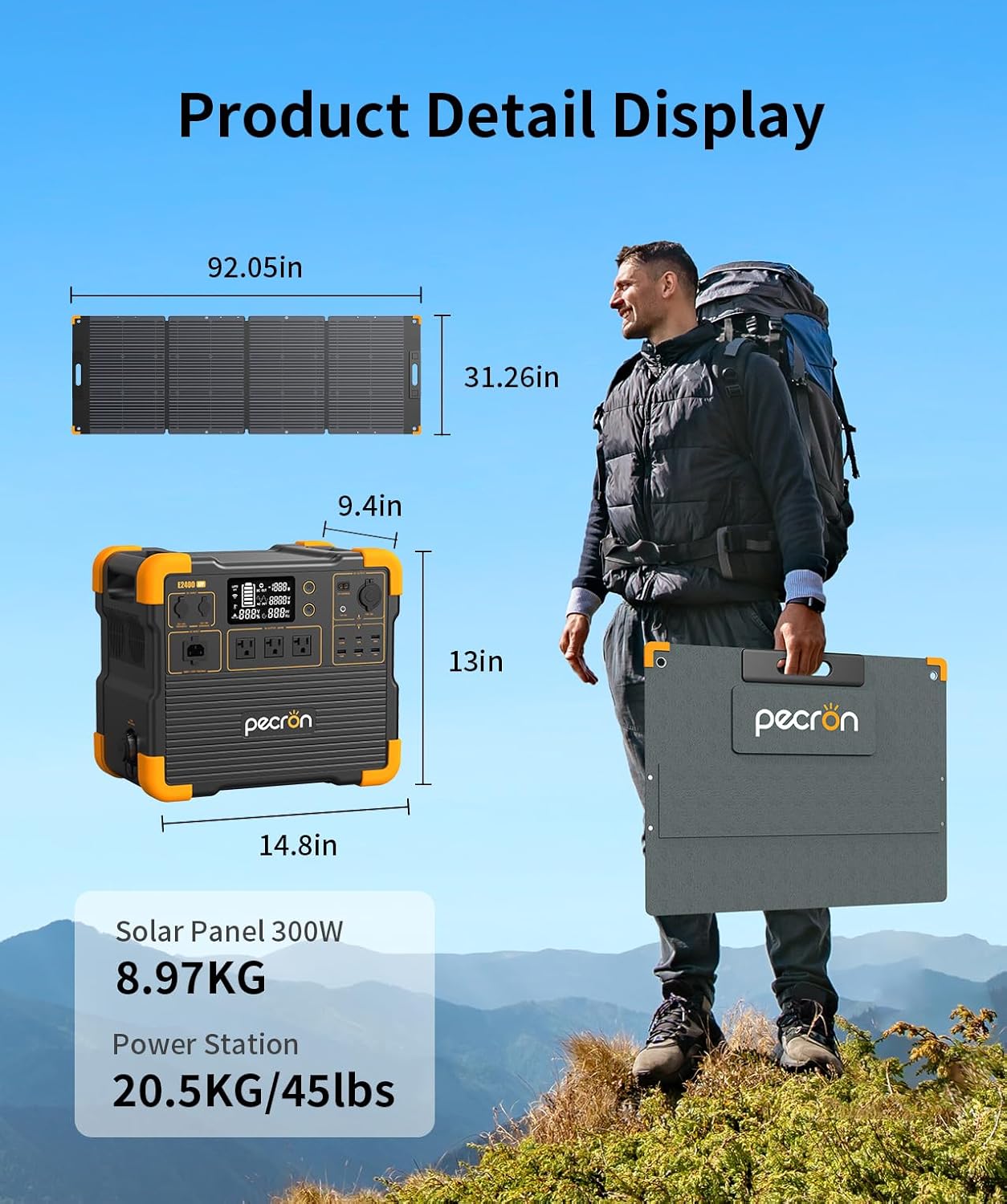
Image 6.1: Product detail display showing the dimensions and weight of the E2400LFP power station and 300W solar panel.

Image 6.2: The E2400LFP power station shown with an optional extra battery, demonstrating its expandable capacity feature.
7. Кепилдик маалыматы
The Pecron E2400LFP Portable Power Station comes with a 2+1 year warranty. This warranty covers defects in materials and workmanship under normal use. For specific terms, conditions, and to register your product, please refer to the warranty card included in your packaging or visit the official Pecron webсайт.
8. Кардарларды колдоо кызматы
If you have any questions, require technical assistance, or need to claim warranty service, please contact Pecron customer support. You can find contact information on the official Pecron webсайтында же продуктуңуз менен бирге берилген документтерде.
Эң акыркы маалымат жана колдоо булактары үчүн төмөнкү дарекке кириңиз: Pecron Official Store on Amazon


