
1. Киришүү
This user manual provides detailed instructions for the Bemi Cognita Tab 6+ E-Reader. Please read this manual carefully before using your device to ensure proper operation and to maximize your reading experience. Keep this manual for future reference.
1.1 Пакеттин мазмуну
- Bemi Cognita Tab 6+ E-Reader
- USB заряддоо кабели
Ensure all items are present and in good condition upon unboxing.
2. Түзмөк бүттүview
Familiarize yourself with the physical components of your Bemi Cognita Tab 6+ E-Reader.

2.1-сүрөт: Фронт view of the Bemi Cognita Tab 6+ E-Reader. The device features a 6-inch E-Ink display with the Bemi logo and model name visible. The screen is designed to mimic paper for a comfortable reading experience.

2.2-сүрөт: Алдыңкы жана арткы view of the Bemi Cognita Tab 6+ E-Reader. This image highlights the device's thin design and the textured back cover, which provides a secure grip.

2.3-сүрөт: Side view of the Bemi Cognita Tab 6+ E-Reader, illustrating the location of the power button and a small LED indicator. This button is used for turning the device on/off and waking it from sleep.
2.1 Негизги компоненттер:
- 6-inch E-Ink Touchscreen: Glare-free display for comfortable reading.
- Кубат баскычы: Located on the side for turning the device on/off and sleep/wake.
- USB-C порту: Заряддоо жана маалыматтарды өткөрүү үчүн.
- MicroSD картасынын уячасы: 256 ГБ чейин кеңейтилүүчү сактагыч.
- Side Control Buttons: For page turning and navigation.
- SMARTlight: Adjustable front light for reading in various conditions.
3. Орнотуу
3.1 Алгачкы заряддоо
Before first use, fully charge your Bemi Cognita Tab 6+ E-Reader. Connect the provided USB cable to the device's USB-C port and the other end to a compatible USB power adapter (not included) or a computer's USB port.
- Толук кубаттоо адатта болжол менен 2-3 саатты талап кылат.
- Заряддоо индикатору кубаттоо абалын көрсөтөт.
3.2 Күйгүзүү/өчүрүү
- Күйгүзүү үчүн: Press and hold the Power button (refer to Figure 2.3) for a few seconds until the screen activates.
- Өчүрүү үчүн: Өчүрүү менюсу пайда болгонго чейин Кубат баскычын басып туруңуз, андан кийин "Өчүрүү" дегенди тандаңыз.
- Уйку/ойгонуу үчүн: Түзмөктү уйку режимине өткөрүү же ойготуу үчүн Кубат баскычын кыскача басыңыз.
3.3 Wi-Fi туташуусу
Connecting to Wi-Fi allows you to download books, transfer files, and access online services.
- Башкы экрандан, баскычын басыңыз Орнотуулар сөлөкөтү.
- Тандоо Wi-Fi.
- Wi-Fi которгучун төмөнкүгө которуңуз: On.
- The device will scan for available networks. Select your desired network from the list.
- Эгер суралса, сырсөздү киргизиңиз, андан кийин таптаңыз Туташуу.
3.4 Баштапкы конфигурация
Upon first power-on, you may be guided through initial setup steps, including language selection and time zone settings. Follow the on-screen prompts.
4. Иштөө нускамалары
4.1 Интерфейсте навигация
The Bemi Cognita Tab 6+ features a touch-sensitive E-Ink screen and physical side buttons for navigation.
- Тийүү жаңсоолору: Tap to select, swipe to scroll, pinch to zoom (where supported).
- Каптал баскычтары: Use the physical buttons on the side to turn pages forward or backward during reading.
- G-сенсор: The device automatically rotates the screen orientation based on how you hold it, accommodating both right and left-handed users.
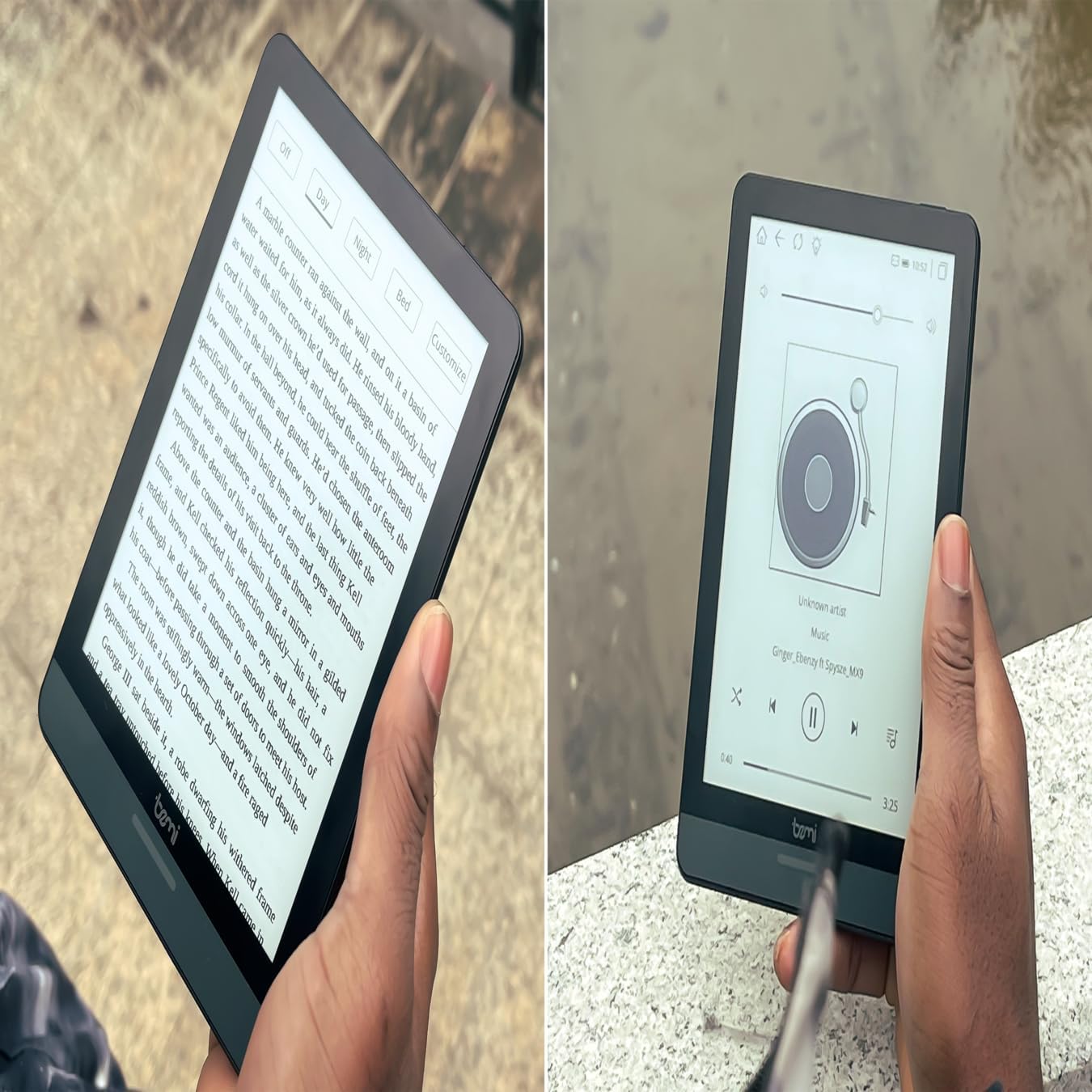
4.1-сүрөт: User holding the Bemi Cognita Tab 6+ E-Reader while reading. The image shows the clear text display on the E-Ink screen, highlighting the device's readability.
4.2 Китеп окуу
To open and read a book:
- From the home screen, tap on the Китепкана or Китептер сөлөкөтү.
- Browse your collection or use the search function to find a book.
- Tap on the book cover to open it.
- Use the touch screen or side buttons to turn pages.
4.3 Adjusting SMARTlight
The SMARTlight feature allows you to adjust both the brightness and color temperature of the screen's front light.
- During reading, tap the center of the screen to bring up the reading menu.
- издеңиз Жарык or SMARTlight сөлөкөтү.
- Adjust the sliders for brightness (intensity) and color temperature (warm to cool) to your preference.
4.4 Өткөрүп берүү Files
You can transfer e-books and other supported files to your device via Wi-Fi or USB cable.
- Wi-Fi аркылуу: If your device supports cloud services or direct Wi-Fi transfer, follow the specific application instructions.
- USB кабели аркылуу:
- Connect your E-Reader to a computer using the provided USB cable.
- The device will appear as a removable storage drive on your computer.
- Каалаганыңызды сүйрөп барып таштаңыз files (e.g., EPUB, PDF, MOBI) into the appropriate folders on the E-Reader (e.g., "Books" folder).
- Кабелди ажыратуудан мурун, түзмөктү компьютериңизден коопсуз ажыратыңыз.
4.5 Using MicroSD Card
To expand storage, insert a microSD card (up to 256GB) into the designated slot.
- Gently insert the microSD card with the gold contacts facing down until it clicks into place.
- Алып салуу үчүн, картаны сыртка чыкканча акырын ичкери түртүңүз.
- Files on the microSD card will be accessible through the device's file manager or library.
5. Техникалык тейлөө
5.1 Аппаратты тазалоо
- Түзмөктүн экранын жана корпусун акырын сүртүү үчүн жумшак, мамыксыз чүпүрөктү колдонуңуз.
- өжөр тактар үчүн, бир аз гampчүпүрөккө суу же электроника үчүн атайын иштелип чыккан экран тазалагыч.
- Катуу химиялык заттарды, абразивдүү материалдарды же ашыкча нымдуулукту колдонуудан алыс болуңуз.
5.2 Батареяга кам көрүү
- Батареянын иштөө мөөнөтүн узартуу үчүн, бат-баттан батарейканы толук зарядсыздандырбаңыз.
- Аппаратты узак убакыт бою колдонбогондо салкын, кургак жерде сактаңыз.
- Charge the device regularly, even if not used, to prevent deep discharge.
5.3 Сактоо
When not in use, store your E-Reader in a protective case to prevent scratches and damage to the screen.
6. Кыйынчылыктарды
If you encounter issues with your Bemi Cognita Tab 6+, refer to the following common solutions:
| Көйгөй | Чечим |
|---|---|
| Түзмөк күйбөй жатат. | Ensure the battery is charged. Connect the device to a power source for at least 30 minutes. If it still doesn't turn on, try a hard reset by holding the power button for 10-15 seconds. |
| Экран катып калган же жооп бербей жатат. | Perform a soft reset by holding the power button for 5-7 seconds until the device restarts. If the issue persists, try a hard reset. |
| Wi-Fi'га туташпай жатат. | Check if Wi-Fi is enabled in settings. Verify the Wi-Fi password. Restart your E-Reader and your Wi-Fi router. Ensure you are within range of the Wi-Fi signal. |
| Books are not appearing in the library. | камсыз кылуу files are in a supported format (e.g., EPUB, PDF). If transferred via USB, ensure they are in the correct folder. Try refreshing the library or restarting the device. |
| Батарея бат эле түгөнөт. | Reduce screen brightness. Turn off Wi-Fi and Bluetooth when not in use. Close background applications. Ensure the device is not constantly searching for networks. |
7. Техникалык шарттар
| Өзгөчөлүк | Деталь |
|---|---|
| Модель аты | Bemi Cognita Tab 6+ |
| Screen Size | 6 Inches (E-Ink Carta, 1024x758, 212 ppi) |
| Ички эс тутум | 32 ГБ |
| Кеңейтүүчү сактагыч | MicroSD карта уячасы, 256 ГБ чейин |
| Байланыш | Wi-Fi, Bluetooth |
| Операция системасы | Android 8.1 |
| Адам интерфейсинин киргизүү | Touchscreen, Side Control Buttons |
| Өзгөчөлүктөр | Adjustable SMARTlight, G-Sensor for auto-rotation, Glare-Free & Eye-Friendly E-Ink Display |
| Өлчөмдөрү (болжол менен) | 7 мм калыңдыгы |
| Камтылган компоненттер | USB кабели |
8. Кепилдик жана колдоо
8.1 Кепилдик маалыматы
Your Bemi Cognita Tab 6+ E-Reader comes with a standard manufacturer's warranty. Please refer to the warranty card included in your product packaging or visit the official Bemi webкепилдик камтууга жана узактыгына байланыштуу толук шарттар жана шарттар үчүн сайт.
Кеңейтилген камсыздандыруу үчүн кошумча коргоо пландары жеткиликтүү болушу мүмкүн. Чоо-жайын билүү үчүн сатуучуга кайрылыңыз.
8.2 Кардарларды колдоо
For technical assistance, troubleshooting beyond this manual, or warranty claims, please contact Bemi customer support:
- Webсайт: www.bemi-electronics.com
- Электрондук почта: Refer to the Bemi webбайланыш электрондук почта үчүн сайт.
- Телефон: Refer to the Bemi webбайланыш телефон номерлери үчүн сайт.
When contacting support, please have your device model (Cognita Tab 6+) and purchase information ready.