
1. Киришүү
Thank you for choosing the roborock Q10 S5 Robot Vacuum and Mop Cleaner. This manual provides essential information for setting up, operating, and maintaining your device to ensure optimal performance and longevity. Please read this manual thoroughly before using the product and keep it for future reference.
2. Коопсуздук маалыматы
To reduce the risk of injury, electric shock, fire, or damage, please observe the following safety precautions:
- Бул шайманды 8 жаштан жогорку балдар жана физикалык, сезүү же акыл-эс жөндөмү начар же тажрыйбасы жана билими жок адамдар колдонсо болот, эгерде алар көзөмөлгө алынган же шайманды коопсуз колдонуу боюнча нускама алган болсо жана келтирилген коркунучтарды түшүнсө. .
- Балдар шайман менен ойнобошу үчүн аларды көзөмөлгө алуу керек.
- Тазалоо жана колдонуучу тейлөөнү балдар көзөмөлсүз жасабашы керек.
- Do not use the robot in areas with open flames or fragile objects.
- Ensure the charging dock is placed on a level surface against a wall.
- Түзмөк менен кошо берилген оригиналдуу кубат адаптерин гана колдонуңуз.
- Do not expose the robot to direct sunlight or moisture.
- Before cleaning, remove power cords, small objects, and fragile items from the floor.
3. Продукт бүтүп калдыview
Familiarize yourself with the components of your roborock Q10 S5 robot vacuum.
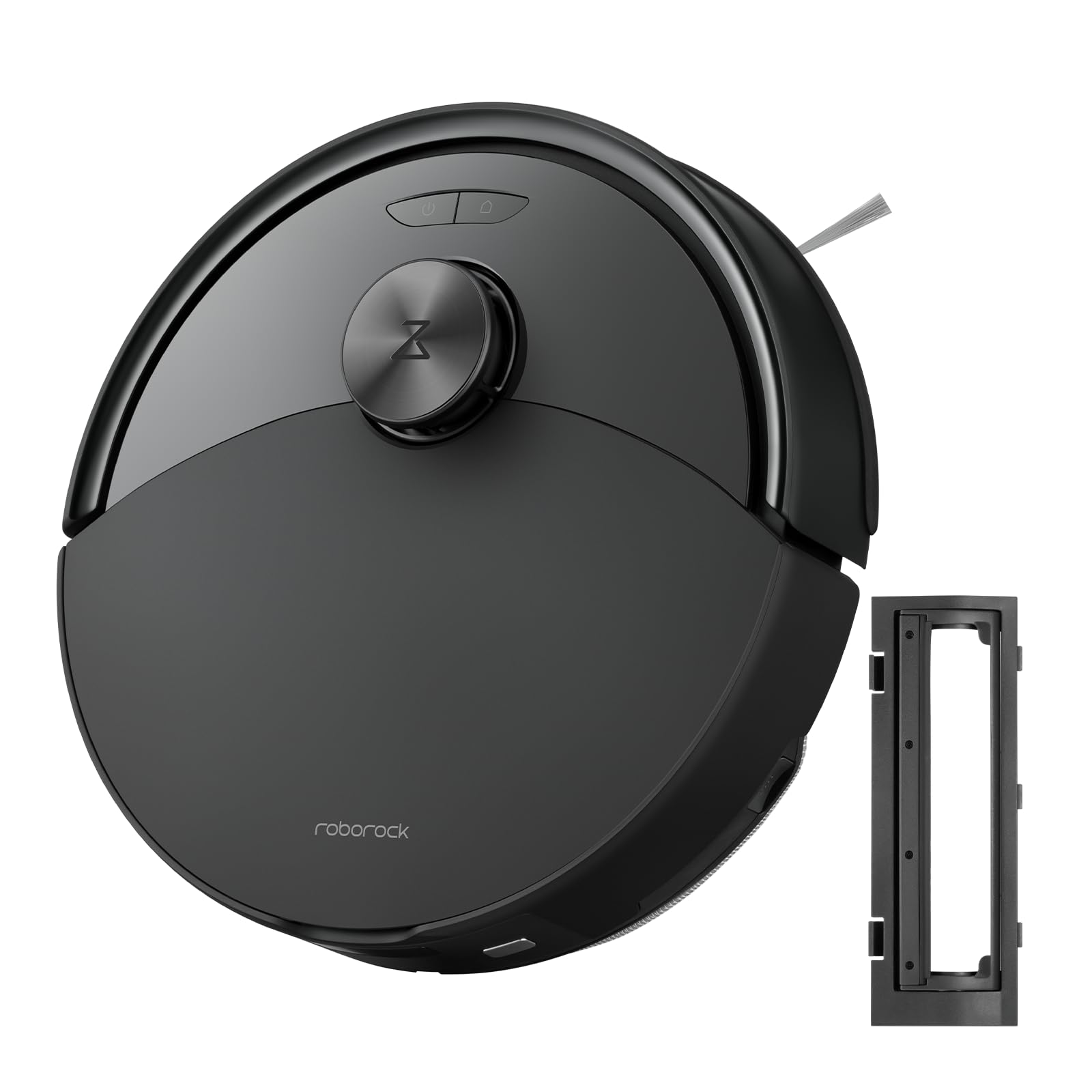
1-сүрөт: The roborock Q10 S5 Robot Vacuum and Mop Cleaner. This image shows the top view of the robot, highlighting its sleek black design and main control buttons.
Робот компоненттери:
- Жогорку мукабасы: Lifts to reveal the dustbin and Wi-Fi indicator.
- Кубат/Тазалоо баскычы: Press to start/pause cleaning, hold to turn on/off.
- Dock/Spot Clean Button: Press to send the robot back to the dock, hold for spot cleaning.
- LDS Sensor: Навигация жана картага түшүрүү үчүн.
- Бампер: Тоскоолдуктарды аныктайт.
- Каптал щетка: Четтерин жана бурчтарын таштандылардан тазалайт.
- Негизги щетка: Collects dirt and debris from floors. Features a floating design for better contact.
- Ар тараптуу дөңгөлөк: Кыймыл үчүн.
- Заряддоо байланыштары: Кубаттоочу докко туташат.
- Cliff сенсорлору: Роботтун тепкичтен кулашына жол бербейт.
- Суу резервуары жана сүртүүчү жай: Шыпырып тазалоо функциясы үчүн.
Заряддоо док:
- Dock Location Beacon: Helps the robot locate the dock.
- Заряддоо байланыштары: Роботко күчтү өткөрүп берет.
- Power Cable Port: Кубат адаптерин туташтырат.
4. Орнотуу
- Роботту таңгактан чыгаруу: Carefully remove the robot and all accessories from the packaging. Remove any protective films or shipping materials.
- Install the Side Brush: Press the side brush onto its post until it clicks into place.
- Заряддоочу докту жайгаштырыңыз:
- Заряддоочу докту дубалга каршы катуу, тегиз бетке коюңуз.
- Доктун эки тарабында тең кеминде 0.5 метр (1.6 фут) жана алдында 1.5 метр (4.9 фут) бош орун бар экенин текшериңиз.
- Connect the power cable to the charging dock and plug it into a wall outlet.
- Баштапкы төлөм: Place the robot on the charging dock. The robot will automatically turn on and begin charging. For first-time use, fully charge the robot before operation (approximately 4-6 hours). The power indicator light will breathe white during charging and turn solid white when fully charged.
- Колдонмону жүктөп алыңыз: Издөө "Roborock" in the App Store or Google Play Store, or scan the QR code on the packaging to download and install the app.
- Wi-Fi'га туташуу:
- Open the Roborock app and follow the on-screen instructions to add your device.
- Телефонуңуз 2.4 ГГц Wi-Fi тармагына туташып турганын текшериңиз.
- басып, кармап туруңуз Док жана Күч buttons simultaneously for 3 seconds until you hear the "Resetting Wi-Fi" voice alert.
- Follow the app's instructions to complete the connection.
5. Иштөө нускамалары
Тазалоону баштоо:
- Роботтон: басыңыз Күч button once. The robot will start cleaning.
- Колдонмодон: Open the Roborock app and tap the "Clean" button.
Pausing/Resuming/Stopping:
- Тыныгуу: Press any button on the robot or tap "Pause" in the app.
- Резюме: басыңыз Күч button or tap "Resume" in the app.
- Токтотуу: To stop a cleaning cycle, press the Док button to send the robot back to the charging dock, or tap "Stop" in the app.
Чыпкалоо функциясы:
- Сууну толтуруу: Open the water tank cover, fill with clean water, and close securely.
- Attach Mop Pad: Wet the mop pad and wring it out. Slide it into the mop pad slot until it is securely attached.
- Start Mopping: The robot will automatically detect the mop module and switch to mopping mode. You can adjust water flow levels in the app.
Колдонмонун өзгөчөлүктөрү:
- Картаны башкаруу: Create and save maps, set no-go zones, virtual walls, and invisible barriers.
- Бөлмөнү тандоо менен тазалоо: Choose specific rooms to clean.
- Пландаштырылган тазалоо: Set cleaning schedules for different times and days.
- Ыңгайлаштырылган тазалоо режимдери: Соруу күчүн жана суунун агымынын деңгээлин тууралаңыз.
- Алыстан башкаруу: Manually control the robot's movement.
6. Техникалык тейлөө
Regular maintenance ensures your roborock Q10 S5 operates efficiently. Always turn off the robot and unplug the charging dock before performing any maintenance.
Dustbin and Filter (Weekly):
- Lift the top cover of the robot.
- Таштанды салгычты алып салыңыз.
- Таштанды челектин капкагын ачып, анын ичиндегисин таштанды челекке төгүңүз.
- Remove the filter. Tap it gently to remove dust. The filter can be rinsed with water; ensure it is completely dry before reinstallation (allow 24 hours).
- Rinse the dustbin with water if necessary and allow it to dry completely.
- Reinstall the dry filter and dustbin.
Main Brush (Weekly):
- Роботту оодарыңыз.
- Press the tabs to remove the main brush cover.
- Негизги щетканы көтөрүңүз.
- Use the cleaning tool (if provided) or scissors to cut and remove any hair or debris tangled around the brush.
- Reinstall the main brush and cover, ensuring it clicks into place.
Side Brush (Monthly):
- Каптал щетканы бурап чыгарыңыз.
- Ар кандай чачты же таштандыларды алып салыңыз.
- Reattach and tighten the screw.
Sensors and Charging Contacts (Monthly):
- Роботтогу да, доктогу да бардык сенсорлорду (жар сенсорлору, дубал сенсору, LDS сенсорунун терезеси) жана кубаттоо контакттарын жумшак, кургак чүпүрөк менен сүртүңүз.
Mop Pad (After Each Use):
- Суу идишинен шыпыргычты алып салыңыз.
- Rinse thoroughly with water and allow it to air dry completely before next use.
7. Кыйынчылыктарды
If you encounter issues with your robot, please refer to the following table before contacting support.
| Көйгөй | Мүмкүн себеп | Чечим |
|---|---|---|
| Робот күйбөйт. | Батарея аз же заряддалган эмес. | Роботту кубаттоочу докко коюп, анын кубатталып жатканын текшериңиз. |
| Робот Wi-Fi'га туташа албайт. | Туура эмес Wi-Fi сырсөзү, 5 ГГц тармак же начар сигнал. | Ensure correct 2.4GHz Wi-Fi, reset Wi-Fi on robot, move closer to router. |
| Робот бат-баттан тыгылып калат. | Obstacles, tangled cables, or dirty sensors. | Clear floor, clean sensors, use no-go zones in app. |
| Начар тазалоо көрсөткүчү. | Full dustbin, dirty filter, tangled brushes. | Empty dustbin, clean/replace filter, clean main/side brushes. |
| Робот адаттан тыш ызы-чуу чыгарат. | Debris in main brush, side brush, or wheels. | Inspect and clean all brushes and wheels for obstructions. |
If the problem persists, please refer to the Roborock app for more detailed error messages or contact customer support.
8. Техникалык шарттар
| Өзгөчөлүк | Деталь |
|---|---|
| Модел | Q10 S5 |
| Өлчөмдөр | Болжол менен 353 x 350 x 96.5 мм (13.9 x 13.8 x 3.8 дюйм) |
| Салмагы | Болжол менен 3.7 кг (8.16 фунт) |
| Батарея | Lithium-Ion (Capacity not specified, typical for robot vacuums) |
| Номиналдуу кубаттуулук | Approx. 60W (Typical for robot vacuums) |
| Таштанды кутусунун сыйымдуулугу | Approx. 470 ml (Typical for robot vacuums) |
| Суу резервуарынын сыйымдуулугу | Approx. 300 ml (Typical for robot vacuums) |
| Соруу күчү | Up to 10,000 Pa (HyperForce Suction Power from feature bullets) |
| Wi-Fi туташуусу | 2.4 ГГц |
Эскертүү: Техникалык мүнөздөмөлөр эскертүүсүз өзгөртүлүшү мүмкүн.
9. Кепилдик жана колдоо
roborock products are manufactured to the highest quality standards. For detailed warranty information, please refer to the warranty card included in your product packaging or visit the official roborock website. For technical support, troubleshooting assistance, or to purchase replacement parts, please contact roborock customer service through the app or their official webсайт.
Официалдуу Webсайт: www.roborock.com