
1. Киришүү
The Cleyver DECT Office Duo is an ideal headset for professionals seeking comfort, sound quality, and freedom of movement. Its dual-ear design with leatherette ear cushions ensures effective passive isolation and a comfortable fit for all-day wear. Thanks to the noise-cancelling microphone and wideband audio technology, calls remain clear even in noisy environments.
This headset features a wireless range of up to 150 meters and up to 8 hours of talk time, supporting your workday without interruptions. Intuitive controls (volume, answer/end call, mute) are directly accessible on the headset or the base. Compatible with most desk phones on the market and Electronic Hook Switch (EHS) systems, it integrates easily into a business environment.
2. Пакеттин мазмуну
Сураныч, пакетте төмөнкү нерселерди текшериңиз:
- Cleyver DECT Office Duo Headset
- Базалык станция
- Connection Cable (e.g., power adapter, phone connection cable)
3. Продукт бүтүп калдыview
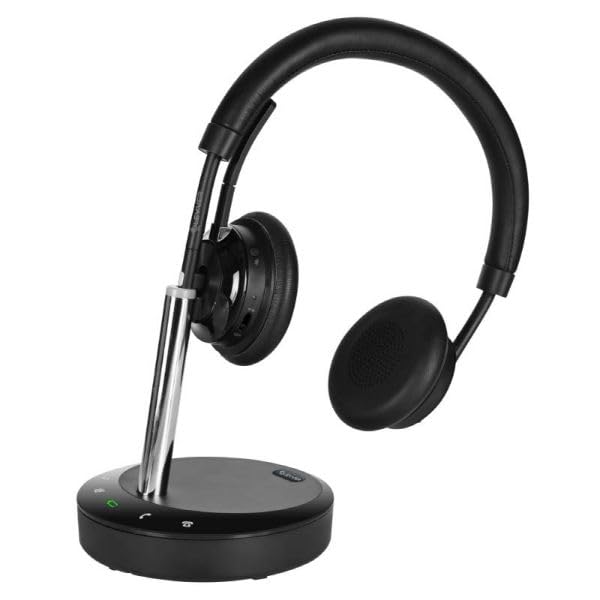
1-сүрөт: Cleyver DECT Office Duo Headset. This image shows the complete headset with its dual earcups, adjustable headband, and microphone boom arm.
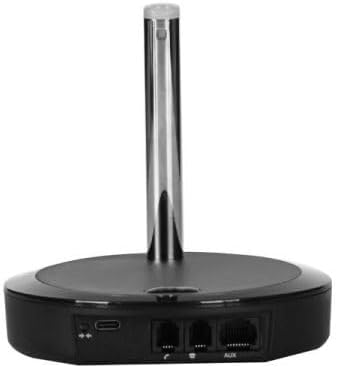
2-сүрөт: Cleyver DECT Office Duo Base Station. This image displays the rear view of the base station, highlighting the various connection ports for power and telephone lines.
Негизги өзгөчөлүктөрү:
- Comfortable Dual-Ear Headset: Soft headband and leatherette ear cushions for comfortable all-day wear.
- HD Stereo Audio: Wideband audio and noise-cancelling microphone for clear conversations, even in open-plan offices.
- Direct Controls: Answer/end call, volume, and mute accessible from the headset or base for seamless use.
- Wireless Range up to 150m: Move freely within your premises while staying connected.
- Compatible with Desk Phones and EHS: Works with most desktop phones and Electronic Hook Switch systems.
4. Орнотуу
- Базалык станцияны туташтыруу: Кубат адаптерин базалык станцияга туташтырып, аны розеткага сайыңыз.
- Connect to Telephone: Use the provided telephone cable to connect the base station to your desk phone. Refer to your phone's manual for specific port locations. For EHS compatibility, ensure proper EHS cable connection if applicable.
- Гарнитураны заряддоо: Place the headset onto the base station's charging cradle. Ensure the charging indicator light on the base station illuminates, indicating proper contact. Allow the headset to fully charge before first use (approximately 2-3 hours).
- Жупташтыруу (зарыл болсо): The headset and base are usually pre-paired. If pairing is required, consult the base station's pairing button instructions.
5. Иштөө нускамалары
5.1 Чакыруунун негизги функциялары
- Чалууга жооп берүү/аяктоо: Press the dedicated call control button on the headset or base station.
- Үндү тууралоо: Use the volume up/down buttons on the headset or the volume controls on the base station.
- Микрофондун үнүн басуу: Press the mute button on the headset or base station to temporarily disable the microphone. Press again to unmute.
5.2 Гарнитураны тагынуу
- Adjust the headband for a comfortable fit over your head.
- Position the microphone boom arm approximately two fingers' width from your mouth for optimal voice pickup.
6. Техникалык тейлөө
- Тазалоо: Use a soft, dry cloth to clean the headset and base station. Do not use liquid cleaners or aerosols.
- Сактагыч: When not in use, store the headset on its base station to ensure it remains charged and ready.
- Батареяга кам көрүү: Батареянын иштөө мөөнөтүн узартуу үчүн, гарнитуранын зарядын тез-тез толук түгөтпөңүз. Аны үзгүлтүксүз кубаттап туруңуз.
7. Кыйынчылыктарды
- Аудио жок/Үн сапаты начар:
- Ensure the headset is charged and properly seated on the base.
- Check all cable connections between the base and the phone.
- Verify the headset is within the operational range of the base station (up to 150m).
- Adjust the volume on both the headset and your desk phone.
- Гарнитура жупташкан жок:
- Refer to the pairing instructions in Section 4.
- Ensure no other DECT devices are causing interference.
- Микрофон иштебейт:
- Микрофондун үнү өчүрүлгөнүн текшериңиз.
- Ensure the microphone boom arm is correctly positioned.
8. Техникалык шарттар
| Өзгөчөлүк | Спецификация |
|---|---|
| Бренд | Cleyver |
| Модель аты | ODHW25V2 |
| Байланыш технологиясы | Зымсыз (DECT) |
| Форма фактору | Кулак үстүндө |
| Noise Control | Экологиялык чууну жокко чыгаруу |
| Түс | Кара |
| Зымсыз диапазон | 150 метрге чейин |
| Talk Time | 8 саатка чейин |
| Камтылган компоненттер | Кабель |
| Жаш курагы (сүрөттөмө) | Чоңдор |
| Элементтердин саны | 1 |
9. Кепилдик жана колдоо
This product comes with a standard manufacturer's warranty. For specific warranty terms and conditions, please refer to the documentation provided with your purchase or contact Cleyver customer support.
For technical assistance, troubleshooting, or further inquiries, please visit the official Cleyver website or contact their customer service department. Keep your purchase receipt and model number (ODHW25V2) handy when seeking support.