
Introduction
The Dubstep Flo-F2 Mini Handheld Cooling Fan is designed to provide personal comfort with its portable and versatile features. This innovative device features a sleek design with advanced turbine-powered performance and 5 adjustable speed settings for customized airflow. The built-in LED display provides clear visibility of settings, while the USB Type-C charging port ensures convenient power replenishment. The fan's versatile 90-degree adjustable design allows for optimal positioning, complemented by a durable lanyard clip for easy carrying. It also includes a unique aroma diffuser feature, adding a pleasant sensory dimension to your cooling experience. This manual provides essential information for the safe and efficient use of your device, including setup, operation, maintenance, and troubleshooting.

Image: The Dubstep Flo-F2 Mini Handheld Cooling Fan, highlighting its portable design and key features.
Кутуда эмне бар
Сураныч, кутудан чыгарганда пакеттин мазмунун текшерип, бардык буюмдар бар экенин текшериңиз:
- 1 x Колдук желдеткич
- 1 х USB-C кубаттоо кабели
- 1 x Lanyard
- 1 x Негизги стенд
- 1 x Aroma Diffuser (pre-installed or separate)
- 1 х Колдонуучунун колдонмосу (бул документ)

Image: All components included in the Dubstep Flo-F2 package.
Жайгашуу
1. Вентиляторду кубаттоо
Before first use, fully charge the fan. Connect the provided USB-C charging cable to the fan's Type-C port and the other end to a compatible USB power source (e.g., computer, wall adapter). The LED display will show charging status, with the power digit flashing during charging.

Image: Detail of the USB Type-C charging port and LED display.
2. Боону бекитүү
Thread the lanyard through the designated loop on the fan's body for convenient carrying. Ensure it is securely fastened.
3. Using the Base Stand
For desktop use, insert the fan's handle into the provided base stand. This allows the fan to stand upright for hands-free operation.

Image: The fan positioned in its base stand for desktop use.
4. Aroma Diffuser Preparation
To use the aroma diffuser feature, gently rotate the front grille of the fan counter-clockwise to unlock and remove it. Place a few drops of your preferred essential oil onto the aroma pad located inside. Reattach the grille by aligning and twisting clockwise until locked.

Image: Steps to open the fan and add fragrance to the aroma pad.
Иштөө нускамалары
1. Күйгүзүү/өчүрүү
Press and hold the power button (usually located on the handle) for a few seconds to turn the fan on or off.
2. Желдетүүчү ылдамдыгын тууралоо
Once powered on, short press the power button to cycle through the 5 available speed modes. The LED digital display will indicate the current speed setting (1-5).
- Gear 1: Whisper Wind
- Gear 2: Smooth Drift
- Gear 3: Cruise Cool
- Gear 4: Air Rush
- Gear 5: Beast Mode (Maximum Airflow)

Image: Visual representation of the five fan speed modes.
3. LED санарип дисплей
The integrated LED display shows the current fan speed (1-5) and the remaining battery level (1-100%). During charging, the power digit will flash, indicating the current power level.

Image: The LED digital display showing operational information.
4. Multi-Angle Adjustment
The fan head can be adjusted up to 90 degrees. Gently pivot the fan head to direct airflow as needed, whether handheld or placed on its stand.

Image: Demonstrating the 90-degree adjustable fan head.
Техникалык тейлөө
Желдеткичти тазалоо
To maintain optimal performance and hygiene, regularly clean your fan:
- Ensure the fan is powered off and disconnected from any charging cable.
- Gently twist the front grille counter-clockwise to unlock it.
- Carefully pull out the fan blades assembly.
- Wipe the fan blades and the interior of the grille with a soft, dry cloth. Do not use harsh chemicals or abrasive materials.
- Reinsert the fan blades assembly, ensuring it is properly seated.
- Align the grille and twist clockwise to lock it securely in place.

Image: Cleaning procedure for the fan blades and grille.
For the exterior, wipe with a soft, slightly damp кездеме. Ички компоненттерге суу кирбегенин текшериңиз.
Проблемаларды чечүү
| Көйгөй | Мүмкүн себеп | Чечим |
|---|---|---|
| Желдеткич күйбөйт. | Батарея түгөнүп калды. | Берилген USB-C кабелин колдонуп, желдеткичти кубаттаңыз. |
| Алсыз аба агымы. | Fan speed is too low; fan blades are dirty. | Increase fan speed. Clean the fan blades as per maintenance instructions. |
| Күтүүсүздөн күйөрман токтойт. | Low battery; internal safety mechanism triggered. | Recharge the fan. If issue persists, contact customer support. |
| Aroma diffuser not working. | Aroma pad is dry or incorrectly placed. | Add more essential oil to the aroma pad. Ensure the pad is correctly positioned. |
Техникалык шарттар
- Бренд: Дабстеп
- Модель аты: Flo-F2
- Түсү: Көк
- Электр желдеткич дизайны: Кийилүүчү желдеткич
- Кубат булагы: Батарея менен иштейт
- Продукциянын өлчөмдөрү (D x W x Y): 3.5 x 9 x 19 сантиметр
- Өзгөчөлүктөр: 5 Speed Settings, 8200 RPM, Aroma Diffuser, LED Digital Display, Lightweight and Portable, Multi-Angle Adjustment, Quiet Operation, Long-lasting Battery Life
- Ылдамдыктардын саны: 5
- Ызы-чуу деңгээли: 36 децибел
- Ватtage: 5 Ватт
- Ылдамдыгы: 8200 RPM
- Тtage: 5 вольт
- Туташтыргыч түрү: USB түрү C
- Материал түрү: Акрилонитрил бутадиен стирол (ABS)
- Элемент Салмагы: 115 грамм
- Кайра колдонууга жарамдуулугу: Зарядкалуу
- Келип чыккан өлкө: Кытай
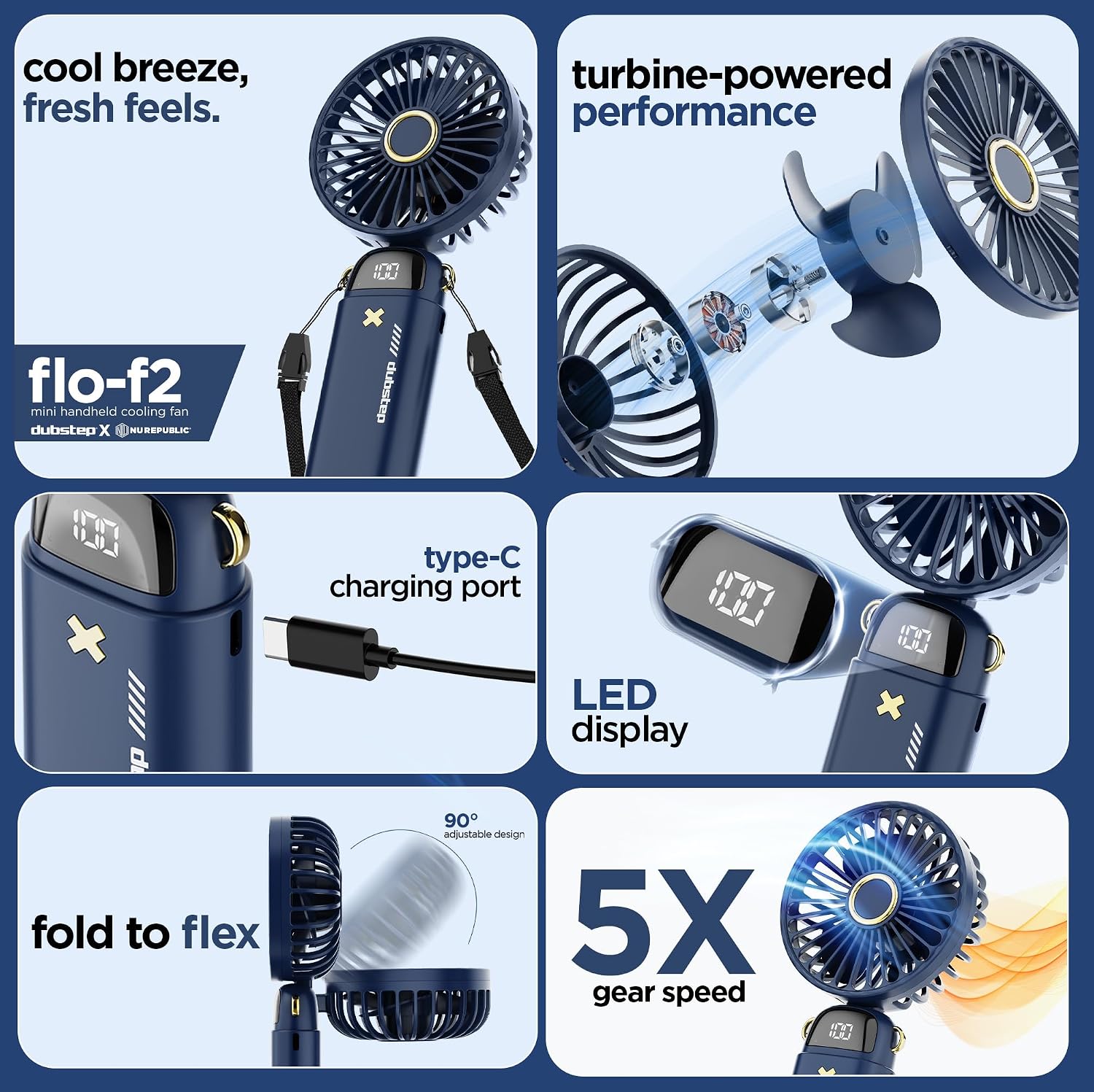
Image: Internal components highlighting turbine-powered performance.

Image: Safety features and battery technology.
Кепилдик маалымат
This product comes with a standard manufacturer's warranty. For specific details regarding warranty coverage, duration, and claims, please refer to the warranty card included in your product packaging or contact the manufacturer directly. Extended warranty options may be available from third-party providers.
Колдоо
For technical assistance, product inquiries, or warranty support, please contact the manufacturer:
Өндүрүүчү: Nuworld Retail Private Limited
Дарек: Plot No.17-18, Pole No.9, PO Dhoolsiras, Dwarka, Sector-28, New Delhi - 110077
Please have your product model number (Flo-F2) and purchase details ready when contacting support.