
1. Киришүү
This manual provides detailed instructions for the installation, operation, and maintenance of your Leadfan Car Stereo for Nissan Altima models from 2013 to 2018. Please read this manual thoroughly before installation and use to ensure proper functionality and safety.
2. Шайкештик жана маанилүү эскертүүлөр
This car stereo is designed for Nissan Altima vehicles manufactured between 2013 and 2018. It features an Android 12 system, 4-Core processor, 2GB RAM, 32GB ROM, and a 9-inch 2.5D IPS touch screen.
- Маанилүү: This unit does жок support factory amplifiers or factory cameras.
- Сатып алуудан мурунasing and installation, verify your car's model, year, dimensions, and the shape of the center console.
- The installation is designed to be plug-and-play, eliminating the need to cut existing cables.

Image 2.1: Leadfan Car Stereo installed in a Nissan Altima dashboard. This image illustrates the compatible dashboard configurations for the 2013-2018 Nissan Altima models, indicating which factory radio setups are supported (green checkmarks) and which are not (red cross).
3. Орнотуу жана орнотуу
The Leadfan Car Stereo is designed for straightforward installation. Ensure the vehicle's power is off before beginning. Refer to the wiring diagram provided in the package for specific connections.
3.1. Орнотууга чейинки текшерүү
- Confirm all components listed in the 'Package Contents' section are present.
- Электр зымдарынын кыска төшөлүшүнө жол бербөө үчүн унаанын аккумуляторун ажыратыңыз.
3.2. Зымдарды туташтыруу
- Connect the main power cable harness to the vehicle's wiring.
- Аудио чыгаруу жана кошумча киргизүү үчүн RCA кабелдерин туташтырыңыз.
- Attach the USB cables for external device connectivity.
- Connect the reverse input cable for the backup camera.
- GPS антеннасын ачык жерге орнотуңуз view асмандын.
- Радио антеннасын туташтырыңыз.
- Connect the included backup camera to the designated input.
- If applicable, connect the external microphone for improved call quality.
3.3. Агрегатты монтаждоо
- Secure the car stereo into the dashboard opening using the provided mounting brackets.
- Ensure all cables are neatly routed and not pinched.
3.4. Баштапкы кубаттуулук
- Унаанын аккумуляторун кайра туташтырыңыз.
- Turn on the vehicle's ignition and power on the car stereo.
- Баштапкы орнотуу үчүн экрандагы бардык көрсөтмөлөрдү аткарыңыз.
4. Иштөө нускамалары
4.1. Сенсордук экран интерфейси
The unit features a 9-inch 1280*720P HD capacitive touch screen. Navigate through menus and applications by tapping, swiping, and pinching gestures, similar to a smartphone or tablet. The system supports 1080P video playback.
4.2. Зымсыз CarPlay жана Android Auto
Connect your smartphone wirelessly via Bluetooth and Wi-Fi hotspot to access CarPlay (for Apple phones) or Android Auto (for Android phones). This allows for integrated navigation, music, calls, and messaging directly from the car stereo display.

Image 4.1: Wireless CarPlay and Android Auto functionality. This image displays the user interface for both Apple CarPlay and Android Auto, showing how smartphone applications like music, maps, and messaging are integrated into the car stereo display.
4.3. Күзгү шилтеме функциясы
Mirror Link allows you to display your phone's screen on the car stereo. Apple phones support one-way control (view only), while Android phones support two-way control (view and interact).
4.4. GPS Navigation and Wi-Fi Connectivity
The built-in GPS receiver supports both online and offline navigation. Connect to Wi-Fi to download offline maps or use online navigation services. Wi-Fi also enables internet browsing and downloading additional applications from the app store, such as YouTube or Spotify.

Image 4.2: GPS Navigation and Wi-Fi connectivity. This image highlights the GPS navigation interface with map display and various online applications accessible via Wi-Fi, such as social media and streaming services.
4.5. Bluetooth 5.0
Bluetooth 5.0 provides faster transfer speeds and a stable connection for hands-free phone calls and audio streaming. Pair your smartphone to play music and access your contacts book. An external microphone jack is included for clear voice communication.

Image 4.3: Built-in Bluetooth functionality. This image illustrates the Bluetooth interface for both music playback and hands-free calling, emphasizing seamless connectivity for audio and communication.
4.6. FM радиосу
The integrated FM radio allows you to listen to real-time traffic, news broadcasts, and weather forecasts. It supports manual and automatic station search with unlimited preset stations.
4.7. Арткы -view Камера киргизүү
The system includes an AHD backup camera with a 170° viewing angle. When reverse gear is engaged, the screen automatically switches to the reverse interface, providing a clear view коопсуз паркинг жана маневр үчүн.
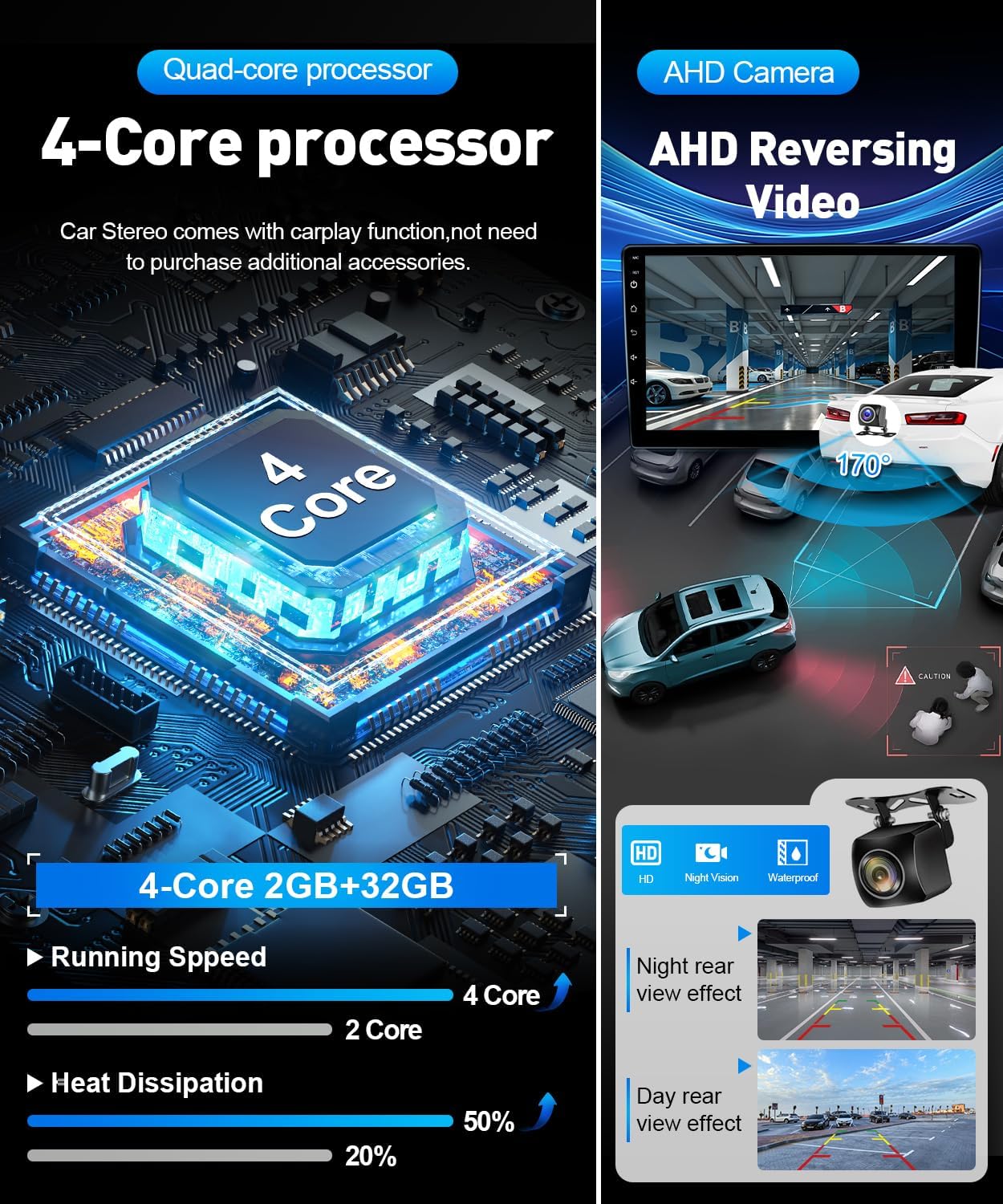
Image 4.4: AHD Reversing Video and system processor. This image details the AHD reversing video feature, showing both day and night rear-view effects, alongside information about the 4-Core processor and its performance benefits.
4.8. Бөлүнгөн экран функциясы
Бөлүнгөн экран өзгөчөлүгү бир эле убакта эки тиркемени иштетүүгө мүмкүндүк берет, мисалы, навигация жана музыка ойнотуу, көп тапшырмаларды аткаруу мүмкүнчүлүктөрүн жогорулатуу.
4.9. Рулду башкаруу элементтери (SWC)
The unit supports integration with your vehicle's existing steering wheel controls, allowing you to manage audio, calls, and other functions without taking your hands off the wheel. Configuration may be required in the system settings.

Image 4.5: EQ Setting, Split Screen, and Steering Wheel Controls. This image illustrates the graphical equalizer (EQ) settings, the split-screen view for simultaneous app usage, and the interface for configuring steering wheel controls.
4.10. Эквалайзерди жөндөө
Adjust audio output with the built-in Equalizer (EQ) settings to customize your listening experience.
5. Техникалык шарттар
| Өзгөчөлүк | Спецификация |
|---|---|
| Бренд | Leadfan |
| Модель номери | For Altima 2013-2018 (without AC Vent) |
| Операция системасы | Android 12 |
| Процессор | 4-өзөктүү |
| RAM | 2 ГБ |
| Эстутум сактоо сыйымдуулугу | 32 ГБ |
| Screen Size | 9 дюйм |
| Дисплей түрү | LED, 2.5D IPS Touch Screen |
| Резолюция | 1280*720P HD |
| Байланыш технологиясы | Bluetooth 5.0, USB, Wi-Fi |
| Supported Navigation System | GPS (North America, Worldwide maps) |
| Өзгөчөлүктөр | Wireless CarPlay, Android Auto, Mirror Link, Split Screen, FM Radio, Steering Wheel Control, EQ Setting |
| Камтылган компоненттер | Камера |
| Аудио чыгаруу режими | Стерео |
| Монтаж түрү | Куралдар тактасы |
| Элемент Салмагы | 2.5 фунт |
6. Пакеттин мазмуну
Төмөнкү нерселердин баары пакетиңизге камтылганын текшериңиз:
- Leadfan Car Stereo Unit
- Электр кабели
- RCA кабели
- USB кабели (x2)
- Reverse Input Cable
- GPS антеннасы
- Радио антенна
- Камера
- Арткы View Кирүү кабели
- Микрофон (МИК)
- Радио адаптер
- Монтаждоо кронштейндери
- Canbus Decoder (if applicable)
- User Manual
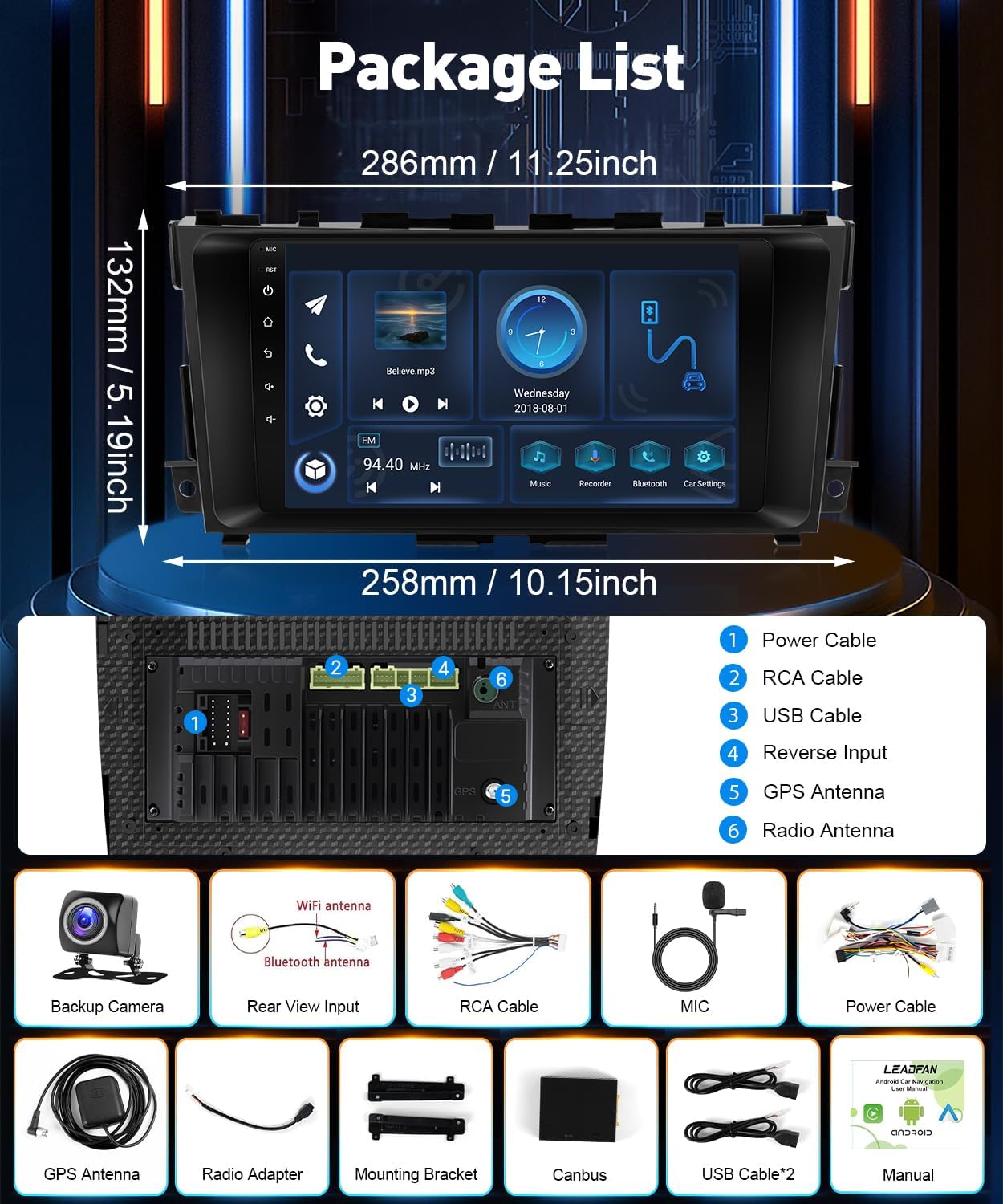
Image 6.1: Package contents and unit dimensions. This image provides a visual representation of all accessories included in the package, such as cables, antennas, and the backup camera, along with the main unit's dimensions.
7. Техникалык тейлөө
- Тазалоо: Экранды жана аппаратты тазалоо үчүн жумшак, кургак чүпүрөктү колдонуңуз. Абразивдүү тазалагычтардан же эриткичтерден качыңыз.
- Программалык камсыздоо жаңыртуулары: Мезгил-мезгили менен системанын жөндөөлөрү же өндүрүүчүнүн жаңыртууларын текшерип туруңуз webоптималдуу аткарууну жана жаңы функцияларга жетүүнү камсыз кылуу үчүн сайт.
- Экологиялык шарттар: Аппаратты экстремалдык температурага же түз күн нуруна узак убакытка калтыруудан сактаңыз.
8. Кыйынчылыктарды
| Көйгөй | Мүмкүн себеп | Чечим |
|---|---|---|
| Түзмөк күйбөйт | Бошоң электр туташуу, күйгөн сактагыч, унаанын аккумуляторунун көйгөйү. | Электр кабелдеринин туташууларын текшериңиз. Унаанын сактагычтарын текшериңиз. Унаанын аккумулятору заряддалганын текшериңиз. |
| Үн жок | Volume too low, incorrect audio source, loose speaker wires, incompatible factory ampөмүрлүү. | Increase volume. Select correct audio source. Check speaker wire connections. Note: Unit does not support factory ampаман калгандар. |
| GPS сигналы жоголду же так эмес | GPS antenna not properly installed, obstructed view асмандан. | Ensure GPS antenna is installed in a clear location. Check antenna connection. |
| Bluetooth байланышы көйгөйлөрү | Bluetooth иштетилген эмес, түзмөк жупташтырылган эмес, тоскоолдук бар. | Эки түзмөктө тең Bluetooth иштетилгенин текшериңиз. Түзмөктү кайра жупташтырыңыз. Түзмөккө жакыныраак жылыңыз. |
| Камдык камера көрсөтүлбөй жатат | Loose camera connection, incorrect reverse input wiring, incompatible factory camera. | Check camera cable and reverse input connections. Note: Unit does not support factory cameras. |
| Руль башкаруу элементтери иштебей жатат | Зымдар туура эмес туташтырылган, жөндөөлөрдө конфигурацияланган эмес. | Verify SWC wiring. Configure SWC in the unit's system settings. |
9. Кепилдик жана колдоо
This Leadfan Car Stereo comes with a 1 жылдык кепилдик from the date of purchase. For warranty claims, technical support, or further assistance, please contact Leadfan customer service through the retailer where the product was purchased or visit the official Leadfan webсайт.
Кепилдикти текшерүү үчүн сатып алганыңыздын далилин сактап коюңуз.