
1. Киришүү
Thank you for choosing the Aiandcc M8 MP3 Player. This device is designed for portable audio playback, featuring Bluetooth 5.3 connectivity, a 1.77-inch screen, and expandable storage. This manual provides detailed instructions for setup, operation, and maintenance to ensure optimal performance and longevity of your device.
2. Продукт бүтүп калдыview
2.1 Пакеттин мазмуну
- Aiandcc M8 MP3 Player
- USB Type-C кубаттоочу кабель
- Зымдуу наушниктер
- Armband
- User Manual
2.2 Түзмөктүн жайгашуусу жана башкаруу элементтери
Familiarize yourself with the buttons and ports on your Aiandcc M8 MP3 Player.

Сүрөт: Алдыңкы жана каптал view of the Aiandcc M8 MP3 Player, highlighting the 1.77" TFT screen, Previous Track Button, Play/Pause/Confirm Button, Next Track Button, Submenu Button, USB C charging Port, Headphone Jack, Power on/off, TF Card Slot, Volume -, Volume +, and Fast Forward/Retreat controls.
- 1.77" TFT Screen: Displays menus, track information, and settings.
- Мурунку трек баскычы: Single click to go to the previous track.
- Play / Pause / Confirm Button: Single click to play/pause, long press to confirm selection.
- Кийинки трек баскычы: Single click to go to the next track.
- Submenu Button: Контекстке сезгич менюларга кирет.
- USB C заряддоо порту: Аппаратты кубаттоо жана компьютерге туташтыруу үчүн.
- Гарнитура уячасы: Зымдуу кулакчындар үчүн 3.5 мм порт.
- Күйгүзүү/өчүрүү: Long press to power the device on or off.
- TF карта уячасы: Кеңейтилген сактагыч үчүн MicroSD картаны салыңыз.
- Көлөмү - / Көлөмү +: Ойнотуу үнүн тууралайт.
- Retreat / Fast Forward: Long press during playback to rewind or fast forward.
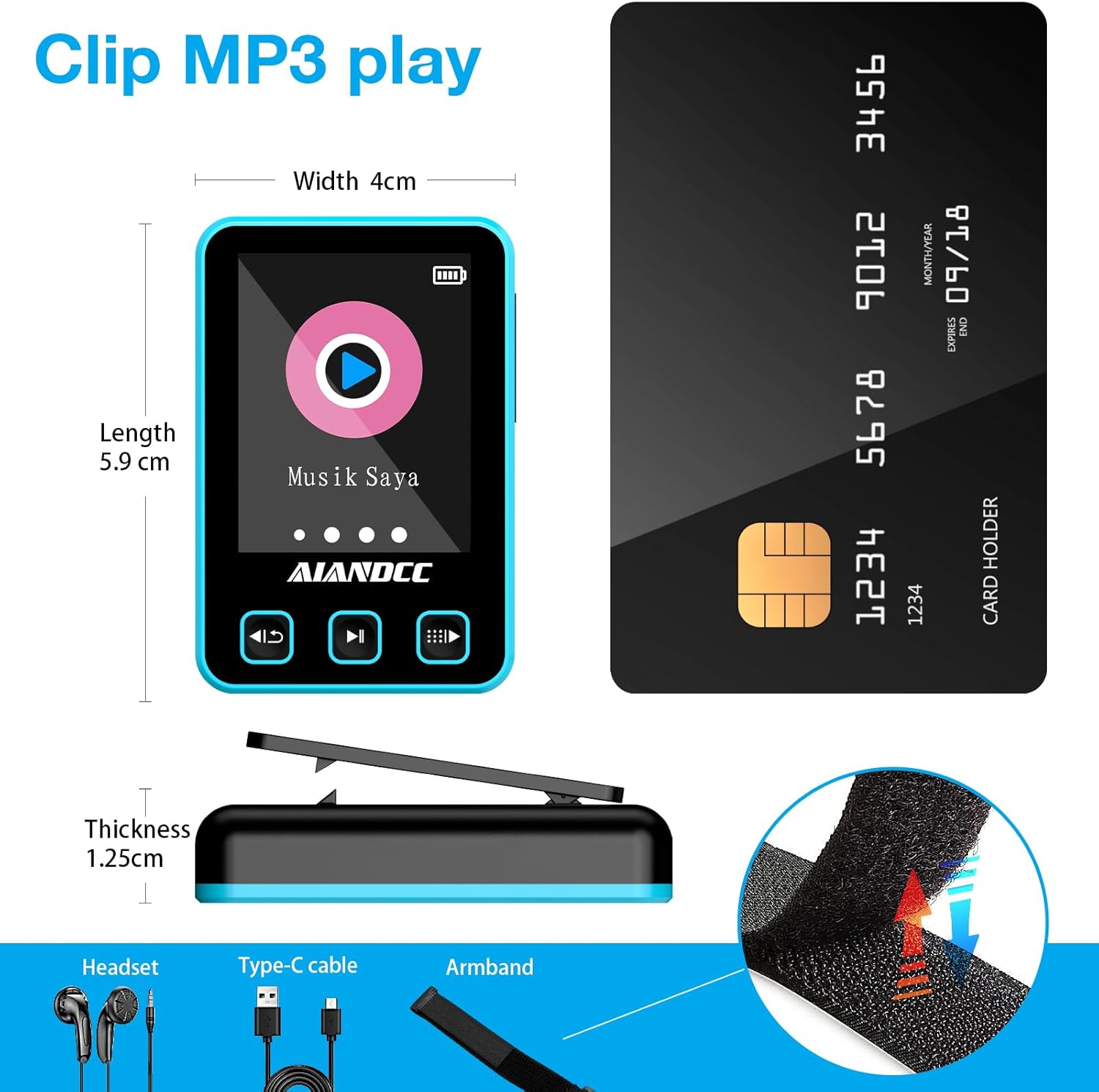
Сүрөт: Diagram showing the dimensions of the Aiandcc M8 MP3 Player (Length 5.9cm, Width 4cm, Thickness 1.25cm) and included accessories: Headset, Type-C cable, and Armband with a clip mechanism.
2.3 Кол скотчту тагынуу
The included armband allows for convenient, hands-free use during activities like sports or running.
- Attach the MP3 player to the clip on the armband.
- Secure the armband around your arm, ensuring a comfortable fit that is not too tight.
- Adjust the position for easy access to controls.

Сүрөт: A person wearing the Aiandcc M8 MP3 Player on an armband during a workout, demonstrating its portability and suitability for active lifestyles with Bluetooth connectivity.
3. Орнотуу
3.1 Аппаратты заряддоо
Before first use, fully charge the MP3 player. A full charge takes approximately 2.5 hours.
- Берилген USB Type-C кабелин түзмөктөгү кубаттоо портуна туташтырыңыз.
- Кабелдин экинчи учун USB кубат адаптерине (кошумча эмес) же компьютердин USB портуна туташтырыңыз.
- Экрандагы батареянын сөлөкөтү заряддоо абалын көрсөтөт.
- Толук заряддалгандан кийин, кабелди ажыратыңыз.

Сүрөт: Illustration of the Aiandcc M8 MP3 Player connected to a Type-C charging cable, showing the charging port and estimated playback times (31 hours with wired headphones, 11 hours with Bluetooth).
3.2 Күйгүзүү/өчүрүү
- Күйгүзүү үчүн: Long press the Power On/Off button located on the side of the device until the screen lights up.
- Өчүрүү үчүн: Long press the Power On/Off button until the screen turns off.
3.3 Inserting a TF Card (MicroSD Card)
The device has 32GB of internal storage and supports external TF cards up to 128GB for additional music storage.
- Locate the TF Card Slot on the side of the device.
- TF картасын ордуна чыкылдаган үн чыкканча акырындык менен уячага салыңыз. Картанын туура багытталганын текшериңиз.
- Алып салуу үчүн, картаны кайра акырын түртүп, ал чыгып кеткенге чейин.

Сүрөт: The Aiandcc M8 MP3 Player showing the TF card slot and indicating support for up to 128GB via TF card, along with support for 28 languages.
4. Негизги операция
4.1 Менюларды башкаруу
- Use the Previous Track and Next Track buttons to scroll through menu options.
- Press the Play/Pause/Confirm button to select an option.
- Press the Submenu button to go back to the previous menu or exit a function.
4.2 Музыка ойнотуу
- From the main menu, navigate to "Music" and press the Play/Pause/Confirm button.
- Browse your music library by Artist, Album, Songs, or Playlists.
- Select a song and press Play/Pause/Confirm to start playback.
- Ойнотуу учурунда:
- Press Play/Pause/Confirm to pause or resume.
- Press Previous Track or Next Track to skip songs.
- Long press Previous Track or Next Track to fast forward or rewind within a song.
- Use Volume - and Volume + buttons to adjust the volume.
The Aiandcc M8 supports various audio formats including MP3, APE, FLAC, ACELP, WMA, and WAV.

Сүрөт: The Aiandcc M8 MP3 Player screen showing supported audio formats (MP3, APE, FLAC, ACELP, WMA, WAV) and equalizer presets (Auto, Normal, Rock, Classic, Jazz, Pop).
5. Bluetooth туташуусу
The Aiandcc M8 features Bluetooth 5.3 for wireless audio streaming to compatible headphones, speakers, or car audio systems. It offers a stable transmission range of up to 10 meters.
- From the main menu, navigate to "Bluetooth" and press the Play/Pause/Confirm button.
- Ensure Bluetooth is enabled on your external device (headphones, speaker, etc.) and it is in pairing mode.
- On the MP3 player, select "Search Device" to scan for available Bluetooth devices.
- Once your device appears in the list, select it and press Play/Pause/Confirm to pair.
- After successful pairing, the Bluetooth icon on the MP3 player's screen will indicate a connected status.

Сүрөт: The Aiandcc M8 MP3 Player screen showing the Bluetooth connection interface, surrounded by various Bluetooth headphones and speakers, illustrating its compatibility and stable connection features.
6. File Башкаруу
Музыка өткөрүү үчүн files to your Aiandcc M8 MP3 Player:
- Connect the MP3 player to your computer using the provided USB Type-C cable.
- Түзмөк компьютериңизде алынуучу диск катары көрсөтүлөт.
- Open the device's storage folder.
- Музыкаңызды сүйрөп барып таштаңыз files (MP3, FLAC, etc.) into the appropriate folders on the MP3 player (e.g., "Music" folder).
- Бир жолу files are transferred, safely eject the device from your computer before disconnecting the cable.
7. Техникалык шарттар
| Өзгөчөлүк | Спецификация |
|---|---|
| Бренд | Aiandcc |
| Модель номери | M8 |
| Ички сактоо сыйымдуулугу | 32 ГБ |
| Кеңейтүүчү сактагыч | Up to 128 GB via TF Card (MicroSD) |
| Screen Size | 1.77 дюйм |
| Bluetooth версиясы | 5.3 |
| Колдоого алынган аудио форматтары | MP3, APE, FLAC, ACELP, WMA, WAV |
| Элемент Салмагы | 31 грамм |
| Өндүрүүчү | shenzhen ChenFec technology co., LTD |
8. Кыйынчылыктарды
8.1 Түзмөк күйбөйт
- Түзмөктүн толук заряддалганын текшериңиз. Аны кубат булагына туташтырып, бир нече мүнөттөн кийин кайра аракет кылыңыз.
- Long press the Power On/Off button for at least 10 seconds to perform a hard reset.
8.2 Үн жок
- Check the volume level and increase it if necessary.
- If using wired headphones, ensure they are fully plugged into the 3.5mm jack. Test with another pair of headphones.
- If using Bluetooth, ensure the device is correctly paired and connected to your audio output. Check the volume on both the MP3 player and the Bluetooth device.
- аудиону камсыз кылуу files бузулган эмес жана колдоого алынган форматта.
8.3 Өткөрүп берүү мүмкүн эмес Files
- Ensure the USB cable is securely connected to both the MP3 player and the computer.
- Компьютериңиздеги башка USB портун же башка USB кабелин колдонуп көрүңүз.
- Restart both the MP3 player and your computer.
- Check if the device appears in "My Computer" or "This PC" as a removable drive.
8.4 Bluetooth туташуу маселелери
- Ensure both devices are within 10 meters of each other.
- Make sure the external Bluetooth device is in pairing mode.
- Delete previous pairings on both the MP3 player and the external device, then attempt to pair again.
- Эки түзмөктү тең өчүрүп күйгүзүңүз.
9. Коопсуздук маалыматы
- Аппаратты экстремалдык температурага, түз күндүн нуруна же жогорку нымдуулукка дуушар кылбаңыз.
- Аппаратты түшүрүүдөн же катуу таасирлерден сактаныңыз.
- Түзмөктү өз алдынча бөлүктөргө бөлүүгө же оңдоого аракет кылбаңыз. Бул кепилдикти жокко чыгарып, зыян келтириши мүмкүн.
- Аппаратты суудан жана башка суюктуктардан алыс кармаңыз.
- Use only the provided or recommended charging cables and accessories.
- Аппаратты жана анын батареясын жергиликтүү эрежелерге ылайык таштаңыз.
10. Кепилдик жана колдоо
The Aiandcc M8 MP3 Player comes with a standard manufacturer's warranty. For specific warranty details, please refer to the warranty card included in your package or contact Aiandcc customer support.
For technical support, troubleshooting assistance, or general inquiries, please visit the official Aiandcc webсайтка же кардарларды тейлөө бөлүмүнө кайрылыңыз. Байланыш маалыматын адатта продукт таңгагынан же бренддин расмий онлайн катышуусунан тапса болот.