
1. Киришүү
This manual provides detailed instructions for the installation, operation, and maintenance of your Hiseeu 4G LTE Cellular Security Camera Solar Powered, Model TDK04U. Please read this manual thoroughly before using the product to ensure proper functionality and safety. This camera is designed for outdoor surveillance in areas without Wi-Fi access, utilizing a 4G cellular network and solar power for continuous operation.
2. Продукт бүтүп калдыview
2.1 Кутуда эмне бар
- Камера
- Заряддоо кабели
- Instruction Manual
- Күн панели
2.2 Негизги өзгөчөлүктөрү
- 4G уюлдук байланышы: Operates exclusively on 4G LTE networks, ideal for remote locations without Wi-Fi. (Data plan required after trial period).
- Күн энергиясы: Equipped with a solar panel to keep the camera battery charged, ensuring uninterrupted surveillance.
- Always-on Video (AOV): Records continuously by capturing frames at intervals, compiling them into a smooth video timeline. Automatically switches to standard recording upon motion detection.
- 2K HD Video & Color Night Vision: Delivers clear 2K full HD video day and night. Four built-in spotlights provide full-color night vision up to 48 ft.
- PIR Motion Detection & AI Analysis: Highly sensitive PIR sensor with AI technology for accurate human motion detection and instant notifications.
- 360° панорамалоо жана 90° эңкейтүү: Кеңири сунуштайт viewing angle with 355° horizontal pan and 90° vertical tilt.
- Эки тараптуу сүйлөшүү: Built-in microphone and speaker for real-time communication via the app.
- Pre-Installed 64GB SD Card: Provides local storage for plug-and-play security. Expandable up to 128GB.
- IP66 аба ырайы: Designed to withstand temperatures from -4°F to 122°F and various weather conditions.
3. Орнотуу колдонмосу
3.1 Физикалык орнотуу
Before installation, ensure the camera is fully charged using the provided USB-C cable or by exposing the solar panel to direct sunlight for several hours. The camera comes with a pre-installed 64GB SD card and a trial 4G data plan.
- Күн панелин орнотуу: Attach the solar panel to its mounting bracket using the provided screws. Choose a location that receives maximum direct sunlight throughout the day.
- Камераны орнотуу: The camera's mounting bracket slides off for easy installation. Secure the bracket to a solid surface (e.g., wooden fence, wall) using the appropriate screws. Ensure the bracket is oriented correctly for the desired camera angle.
- Connecting Solar Panel to Camera: Plug the USB-C cable from the solar panel into the camera's charging port. Ensure the connection is secure and weatherproof.
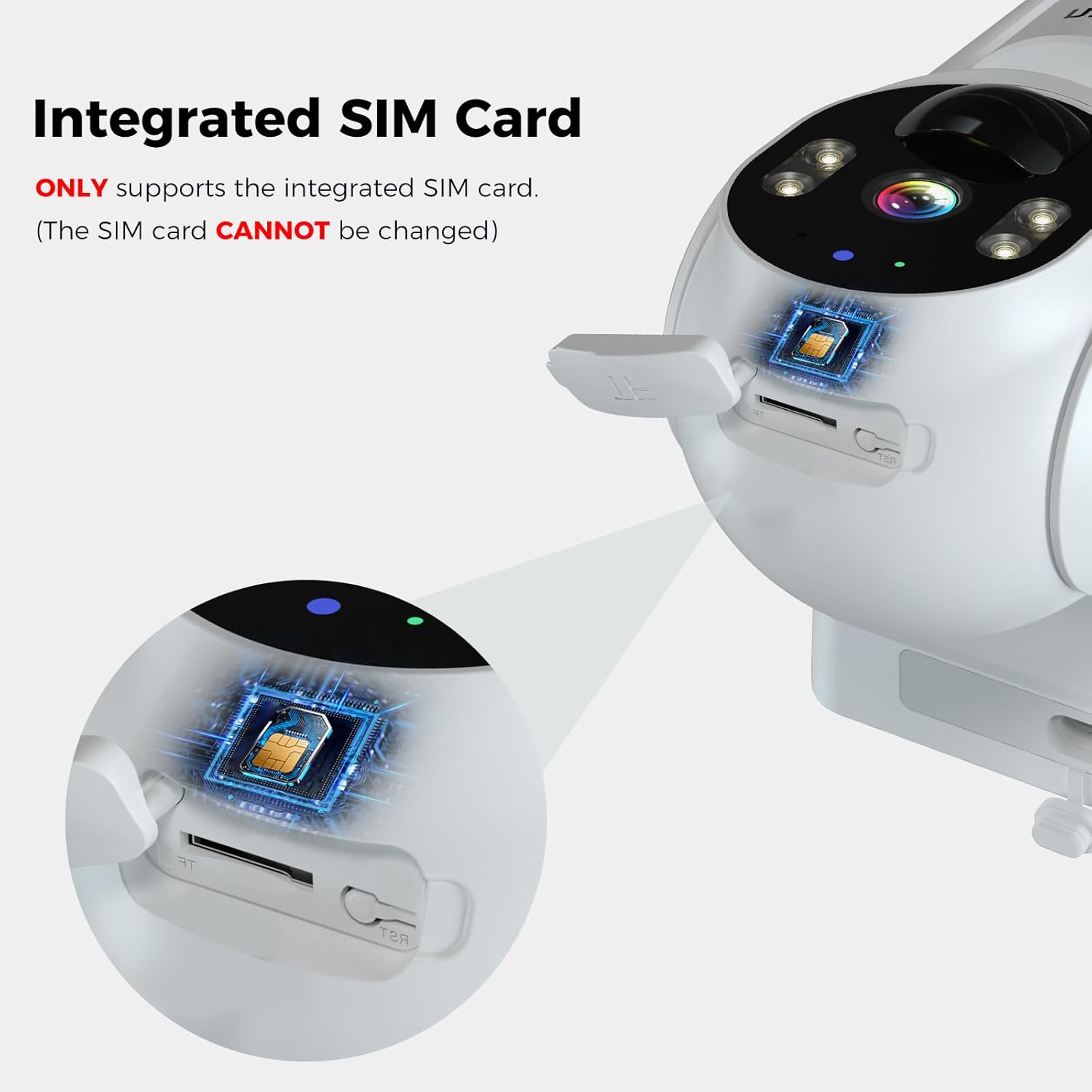
Image: Hiseeu 4G LTE Cellular Security Camera with Solar Panel. The camera is shown mounted with its solar panel, illustrating the connection.

Image: Hiseeu 4G LTE Cellular Security Camera mounted on a tree. This image demonstrates a typical outdoor installation scenario for the camera and its solar panel.
3.2 App Setup and Data Plan Activation
The Hiseeu camera uses the EseeCloud app for remote monitoring and control. Download the app from your device's app store (iOS or Android).
- Колдонмону жүктөп алыңыз: Издөө "EseeCloud" in the App Store (iOS) or Google Play Store (Android) and install it.
- Катталуу/Кирүү: Open the EseeCloud app and follow the on-screen instructions to register a new account or log in if you already have one.
- Камера кошуу: In the app, select the option to add a new device. Scan the QR code located on the camera body or its packaging.
- Activate Data Plan: The camera includes a trial data plan. After the trial, you will need to purchase a cellular data plan directly through the EseeCloud app to keep the camera online. The camera only supports Hiseeu's 4G data plans.

Image: Hiseeu 4G Cellular Data Plan options. This image displays the available data plans for the Hiseeu 4G LTE Cellular Security Camera, including monthly and annual options.

Image: Integrated SIM Card in Hiseeu 4G LTE Cellular Security Camera. This image highlights the integrated SIM card slot, emphasizing that the camera only supports the integrated SIM card and it cannot be changed.
Video: Hiseeu 4G LTE Cellular Security Camera Features. This video demonstrates key features of the Hiseeu 4G LTE cellular security camera, including 2K HD video, night vision, motion detection, two-way audio, solar power, IP66 weather resistance, and 360° pan/tilt functionality.
4. Иштөө нускамалары
4.1 Live View жана Ойнотуу
Access the EseeCloud app to view жаша фооtage from your camera. You can also review recorded events stored on the 64GB SD card or cloud storage (if subscribed).
4.2 Панорама жана жантайтууну башкаруу
Use the directional controls within the EseeCloud app to remotely adjust the camera's viewбурч. Камера толук камтуу үчүн 355° горизонталдык панорамдоону жана 90° вертикалдык эңкейүүнү колдойт.

Image: Hiseeu 4G LTE Cellular Security Camera with 360 degree viewing angle. This image illustrates the camera's 355° pan and 90° tilt capabilities, providing a wide area of coverage.
4.3 Кыймылды аныктоо жана эскертүүлөр
The camera features PIR motion detection with AI analysis to identify human movement. When motion is detected, you will receive instant push notifications on your smartphone. You can adjust sensitivity settings in the app to minimize false alarms.

Image: Hiseeu 4G LTE Cellular Security Camera motion detection and push notifications. This image shows the camera detecting human motion and sending an alert to a smartphone, highlighting the siren and two-way talk features.
4.4 Эки тараптуу сүйлөшүү
Utilize the two-way talk feature in the EseeCloud app to communicate with individuals near the camera. This is useful for deterring intruders or simply interacting with visitors.

Image: Hiseeu 4G LTE Cellular Security Camera with Two-Way Audio. This image shows a user communicating through the camera via a smartphone app, demonstrating the two-way audio feature.
4.5 Түнкү көрүнүш
The camera provides 2K HD video with both full-color night vision (using built-in spotlights) and infrared night vision for clear visibility in low-light conditions.

Image: Hiseeu 4G LTE Cellular Security Camera with Crystal-clear Night Vision. This image demonstrates the camera's ability to provide clear, full-color details at night using its built-in spotlights, as well as infrared night vision.
4.6 Always-on Video (AOV)
The AOV mode ensures continuous recording by capturing frames at regular intervals, creating a comprehensive video timeline. This mode consumes less power than traditional continuous recording. Upon detecting motion, the camera automatically switches to standard recording for detailed capture.

Image: Hiseeu 4G LTE Cellular Security Camera Always-on Video mode. This image illustrates the camera's Always-on Video (AOV) feature, which captures images at intervals to create a continuous video timeline with low power consumption.
5. Техникалык тейлөө
- Таза күн панели: Дайыма күн панелин жумшак менен сүртүп, гamp cloth to remove dust, dirt, or debris that may reduce charging efficiency.
- Байланыштарды текшерүү: Periodically inspect all cable connections, especially the solar panel to camera connection, to ensure they are secure and free from damage.
- Батареянын ден соолугу: Monitor battery levels via the app. Ensure the solar panel receives adequate sunlight to maintain optimal battery performance.
- Программалык камсыздоо жаңыртуулары: Keep the EseeCloud app and camera firmware updated to benefit from the latest features and security enhancements.
6. Кыйынчылыктарды
- Камера оффлайн: Check 4G signal strength in the app. Ensure the data plan is active and not expired. Verify the camera is powered on and the solar panel is charging effectively.
- Кыймыл эскертүүлөрү жок: Confirm motion detection is enabled in the app settings. Adjust PIR sensitivity. Ensure the camera's view тоскоол болбойт.
- Видеонун сапаты начар: Check the camera lens for dirt or condensation. Ensure adequate lighting for night vision. Verify network signal strength.
- Колдонмо маселелери: Restart the app or your smartphone. Ensure the app is updated to the latest version. If issues persist, try reinstalling the app.
- Камераны баштапкы абалга келтирүү: If experiencing persistent issues, long-press the "Reset" button on the camera (located under the rubber tab) to restore factory settings. Re-add the camera to the app after resetting.
7. Техникалык шарттар
| Өзгөчөлүк | Спецификация |
|---|---|
| Бренд | Hiseeu |
| Модель аты | Solar Security Cameras Wireless Outdoor (TDK04U) |
| Байланыш технологиясы | 4G LTE уюлдук байланыш (зымсыз) |
| Сунушталган Колдонуулар | Outdoor Security, Surveillance (360 Degree Coverage) |
| Өзгөчөлүктөр | HD Resolution, Motion Sensor, Night Vision (Night Color), PT Technology (Pan/Tilt), Weather Proof |
| Ички/тышкы колдонуу | Сыртта |
| Шайкеш түзмөктөр | Компьютер, ноутбук, смартфон, планшет |
| Controller Type | Amazon Alexa, SmartThings |
| Тоо түрү | Дубалга орнотуу |
| Түс | Ак |
| Форма фактору | Купол |
| Сууга туруктуулук деңгээли | IP66 (Сууга туруктуу) |
| Жарык булагы | Infrared+LED |
| Видеону коддоо | H.265 |
| Видео тартуу форматы | MPEG-4 |
| Flash эстутум орнотулган өлчөмү | 64 ГБ (Micro SD) |
| Флэш эс тутумдун максималдуу өлчөмү | 128 ГБ |
| Power Source | Күн энергиясы |
| Видео тартуунун резолюциясы | 3K |
| Viewбурч | 100 градус |
| Элементтин өлчөмдөрү | 6.89 x 4 x 6.69 дюйм |
8. Кепилдик жана колдоо
Hiseeu offers a 30-day free return policy and a product warranty. For any technical assistance, lifetime tech support is available. You can also find support by scanning the QR code below:
