
Introduction
This manual provides essential information for setting up, operating, maintaining, and troubleshooting your Razer BlackWidow V4 Low Profile TKL HyperSpeed Wireless Gaming Keyboard. Please read thoroughly to ensure optimal performance and longevity of your device.
Кутуда эмне бар
- Razer BlackWidow V4 Low-profile Tenkeyless HyperSpeed Keyboard
- HyperSpeed Wireless Dongle + USB Dongle Adapter
- USB Type A - USB Type C кабели
- Колдонуучунун колдонмосу (бул документ)
Жайгашуу
1. Баштапкы заряддоо
Before first use, it is recommended to fully charge your keyboard using the provided USB Type A to USB Type C cable. Connect the USB-C end to the keyboard and the USB-A end to a powered USB port on your computer or a wall adapter.
2. Байланыш параметрлери
Your Razer BlackWidow V4 Low Profile TKL keyboard offers three connectivity modes:
- HyperSpeed Wireless (2.4GHz): For a lag-free gaming experience with a 1000Hz polling rate. Use the included HyperSpeed Wireless Dongle.
- Bluetooth: Connect up to three Bluetooth-enabled devices simultaneously for multi-tasking efficiency.
- Зымдуу (USB-C): Connect directly to your PC using the USB Type A to USB Type C cable for a stable, wired connection and simultaneous charging.

Сүрөт: Арткы view of the keyboard, highlighting the USB-C port and the wired/wireless switch.
3. Software Installation (Razer Synapse 4 & Chroma App)
For full customization of lighting, macros, and other features, download and install Razer Synapse 4 and the Chroma App from the official Razer website. These applications allow you to:
- Remap keys and create macro layers.
- Customize RGB lighting effects (Chroma effects).
- Link profiles to specific applications or games.
- Manage onboard memory for settings.
Баскычтопту иштетүү
Негизги өзгөчөлүктөр жана башкаруу элементтери

Image: Close-up of three keyboards displaying the different low-profile mechanical switch types.
- Төмөн Проfile Orange Mechanical Switches: Experience quick, quiet actuation with a tactile bump. These switches have a 1.6 mm actuation point and require 45g of force.
- Ultra-Low 18.5mm Front Height: Designed for ergonomic comfort, reducing wrist strain during extended use. The keyboard features a solid 5052 aluminum alloy top case for durability.

Сүрөт: Side profile of the keyboard demonstrating its ultra-low 18.5mm front height.
- Textured Doubleshot PBT Keycaps: Durable and fade-resistant keycaps with optimized legends for enhanced backlight illumination.
- Optimized Typing Experience: Features lubricated stabilizers and dual sound-dampening foams for clean keystrokes and improved acoustics.
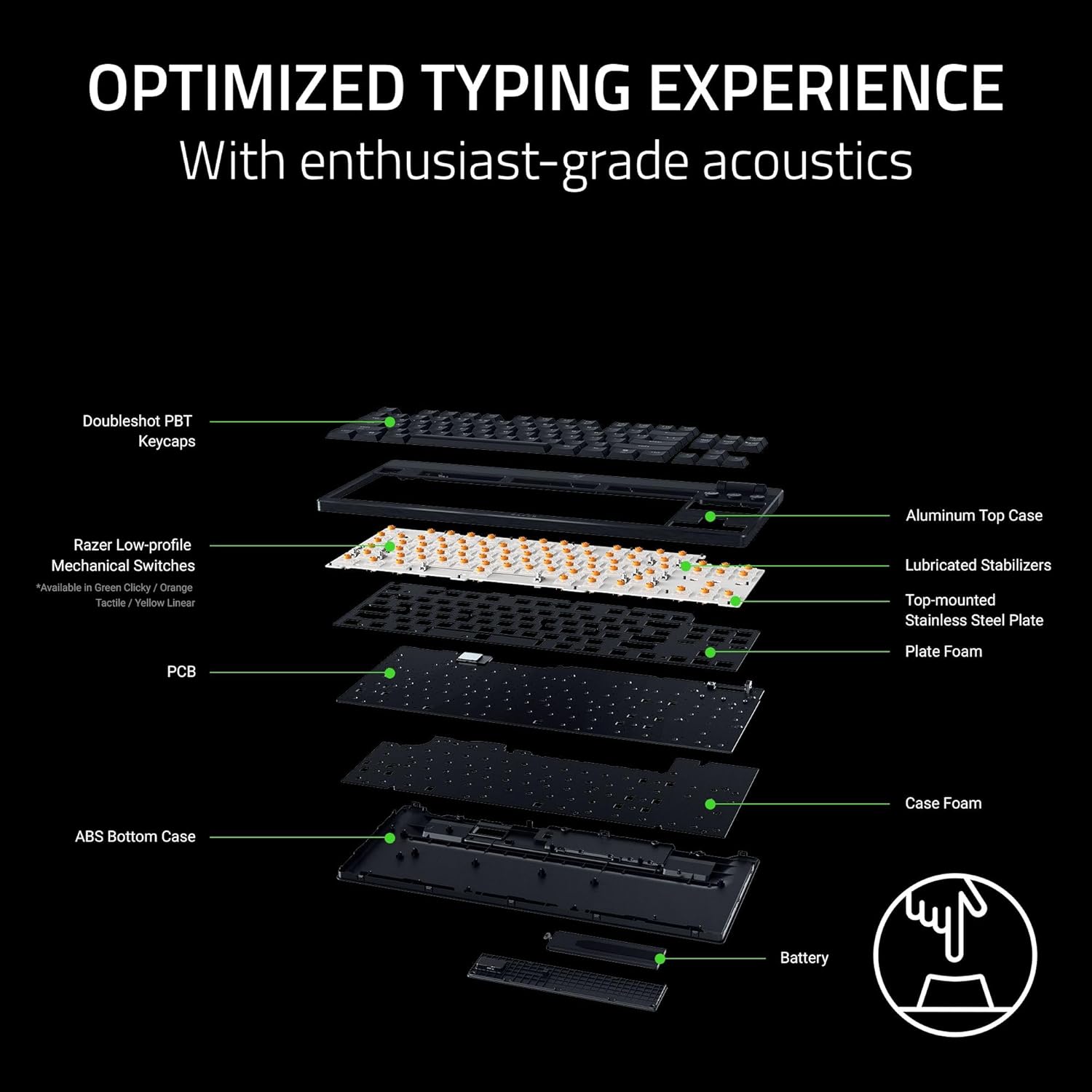
Сүрөт: жарылды view of the keyboard's internal construction, showing layers for optimized typing.
Атайын башкаруу элементтери

Image: Detail of the multi-function roller and dedicated control buttons.
- Көп функциялуу ролик: Adjust volume or remap to other functions via Razer Synapse.
- Медиа башкаруу баскычтары: Dedicated buttons for play/pause, next track, and previous track.
- Connectivity Buttons: Toggle between 2.4GHz HyperSpeed Wireless and Bluetooth modes.
- AI Prompt Button: Launch the AI Prompt Master via Synapse for quick AI interactions.
- Батареянын абалы баскычы: Press to display the current battery level on the number row.
Энергияны үнөмдөө режими
To conserve battery life, press and hold the Battery Status button for 3 seconds to activate Power Saving Mode. In this mode, the keyboard:
- Pauses communication with Synapse.
- Shuts down RGB lighting.
- Reduces the polling rate to 250Hz.
This mode extends battery life significantly, up to 980 hours in idle state when fully charged.

Image: Keyboard highlighting its ultra-long battery life capability.
Техникалык тейлөө
Тазалоо
Regular cleaning helps maintain the keyboard's appearance and functionality:
- Бир аз жумшак, түксүз кездемени колдонуңуз dampened with water to wipe down the keycaps and chassis.
- For stubborn dirt, a small amount of isopropyl alcohol can be used on the cloth.
- Тазалоочу каражаттарды түздөн-түз клавиатурага чачуудан алыс болуңуз.
- Use compressed air to remove debris from between keycaps.
Баскыч капкагына кам көрүү
The Doubleshot PBT keycaps are designed for durability. If removal is necessary for deep cleaning or replacement, use a keycap puller to avoid damage. Apply gentle, even pressure when removing and reattaching keycaps.
Проблемаларды чечүү
Байланыш маселелери
- Wireless (2.4GHz/Bluetooth): Ensure the keyboard is charged and within range of the receiver/device. Check that the correct connectivity mode is selected on the keyboard. Re-pair the device if necessary.
- текст: Verify the USB-C cable is securely connected to both the keyboard and the PC. Try a different USB port or cable.
Жарыктын бузулушу
- Ensure Razer Synapse and Chroma App are running and updated.
- Check lighting settings within the Chroma App for any disabled effects or low brightness.
- If specific keys are not lighting up, check for physical damage or software conflicts.
Батареянын иштөө мөөнөтү
- Activate Power Saving Mode when not actively gaming or requiring full RGB lighting.
- Ensure the keyboard is fully charged. Battery life can vary based on usage, lighting intensity, and polling rate.
Программалык камсыздоо маселелери
- Ensure Razer Synapse and Chroma App are updated to the latest version.
- Restart the applications or your computer.
- If issues persist, consider reinstalling the Razer software.
Техникалык шарттар
| Өзгөчөлүк | Деталь |
|---|---|
| Бренд | Razer |
| Модель аты | BlackWidow V4 Low Profile TKL HyperSpeed Wireless Gaming Keyboard |
| Модель номери | RZ03-05450800-R3U1 |
| Байланыш технологиясы | 2.4 ГГц зымсыз, Bluetooth, USB-C зымдуу |
| Keyboard Description | Төмөн Проfile Механикалык оюн баскычтобу |
| Которуу түрү | Razer Low Profile Orange Mechanical Switches (Tactile & Quiet) |
| Ишке ашыруучу күч | 45г |
| Иш-аракет пункту | 1.2мм |
| Total Travel | 2.8мм |
| Клавиатура материалы | Textured Doubleshot PBT |
| Front Height | 18.5мм |
| Жогорку корпус материалы | 5052 алюминий эритмеси |
| Батареянын иштөө мөөнөтү | Up to 980 hours (in Power Saving Mode) |
| Добуш берүү көрсөткүчү | 1000Hz (Wireless), 250Hz (Power Saving Mode) |
| Ачкычтардын саны | 87 (Tenkeyless) |
| Баскычтоптун жайгашуусу | QWERTY |
| Баскычтоптун арткы жарыгы | RGB |
| Продукциянын өлчөмдөрү (L x W x Y) | 5.48" x 14.07" x 1.12" |
| Элемент Салмагы | 3.1 фунт |
| Шайкеш түзмөктөр | PC |
Кепилдик маалымат
The Razer BlackWidow V4 Low Profile TKL HyperSpeed Wireless Gaming Keyboard comes with a 2 жылдык Өндүрүүчүнүн Кепилдиги. Please retain your proof of purchase for warranty claims. For detailed terms and conditions, refer to the official Razer warranty policy on their webсайт.
Колдоо
For further assistance, technical support, or to access additional resources, please visit the official Razer Support webсайт:
You can also find FAQs, driver downloads, and community forums on the support portal.