
1. Киришүү
Thank you for choosing the GMKtec EVO-T1 Mini PC. This manual provides essential information for setting up, operating, maintaining, and troubleshooting your new mini computer. Please read this manual thoroughly before use to ensure optimal performance and longevity of your device.

Figure 1.1: GMKtec EVO-T1 Mini PC, showcasing анын компакттуу конструкциясы жана ар турдуу порттору.
2. Коопсуздук маалыматы
Always observe the following safety precautions to prevent damage to the device or injury to yourself:
- Аппаратты сууга, нымдуулукка же экстремалдык температурага тийгизбеңиз.
- Аппаратты жылуулук булактарынын жанына же тике күн нуруна коюудан алыс болуңуз.
- Use only the provided power supply and cables.
- Аппаратты өзүңүз ачууга же оңдоого аракет кылбаңыз. Квалификациялуу тейлөө кызматкерлерине кайрылыңыз.
- Иштеп жаткан учурда аппараттын айланасында туура желдетүүнү камсыз кылыңыз.
3. Пакеттин мазмуну
Бардык элементтер кутучада бар экенин текшериңиз:
- GMKtec EVO-T1 AI Mini PC Ultra 9 285H Mini PC Computer
- Power Supply & Cable
- HDMI кабели
- User Manual
- VESA Mount and Screws (for mounting behind a monitor)

Figure 3.1: Contents included in the GMKtec EVO-T1 retail packaging.
4. Орнотуу колдонмосу
4.1 Identifying Ports and Components
Familiarize yourself with the various input/output ports on your EVO-T1 Mini PC:

Figure 4.1: Front and rear port layout of the EVO-T1 Mini PC.
- Алдыңкы порттор: Power Button, 3x USB3.2 (10Gbps), 1x USB4.0 (PD/DP/Data), 1x 3.5mm Audio Jack, Clear CMOS button.
- Арткы порттор: DC In (power), 1x 3.5mm Audio Jack, 1x HDMI 2.1 (8K@60Hz), 1x DisplayPort 1.4 (8K@120Hz), 1x Oculink PCIe Gen4 x4, 2x USB2.0, 2x Giga LAN (RJ45 2.5G).
4.2 Баштапкы орнотуу кадамдары
- Дисплейди туташтыруу: Connect your monitor(s) to the HDMI 2.1, DisplayPort 1.4, or USB4.0 (Type-C) ports using appropriate cables. The EVO-T1 supports up to four screens with 8K resolution.
- Перифериялык түзүлүштөрдү туташтыруу: Plug in your keyboard, mouse, and other USB devices into the available USB ports.
- Тармакка туташуу: For wired internet, connect an Ethernet cable to one of the 2.5GbE LAN ports. For wireless, ensure your Wi-Fi network is available.
- Туташуу кубаты: Plug the power adapter into the DC In port on the back of the Mini PC, then plug the power cable into a wall outlet.
- Күйгүзүү: Press the power button on the front of the device. The system will boot up.
5. Иштөө нускамалары
5.1 Күйгүзүү/өчүрүү
- Күйгүзүү үчүн: Mini PCтин алдыңкы бетиндеги кубат баскычын басыңыз.
- Өчүрүү үчүн: From the operating system, select 'Shut Down'. Alternatively, press and hold the power button for 5 seconds to force a shutdown (use only when necessary).
5.2 Key Features and Usage
The GMKtec EVO-T1 is designed for high performance across various applications:
- Intel Core Ultra 9 285H Processor: Equipped with 16 cores and 22 threads, offering a turbo frequency of up to 5.4GHz for demanding tasks.
- Intel Arc 140T GPU: Integrated graphics with 8 Xe cores, supporting DirectX 12, OpenGL 4.5, and OpenCL 3, suitable for gaming and creative applications.
- AI NPU: Features an Intel AI Boost NPU with up to 13 TOPS for accelerating AI tasks and optimizing AI-enhanced creativity.

Figure 5.1: The Intel AI Boost NPU enhances performance for AI-driven applications.
- 64GB DDR5 RAM: Dual 32GB SO-DIMM DDR5 5600MHz memory for high-speed multitasking and data processing.
- 2TB PCIe 4.0 SSD: Fast storage with three M.2 2280 expansion slots, each supporting up to 8TB for a maximum of 24TB storage.
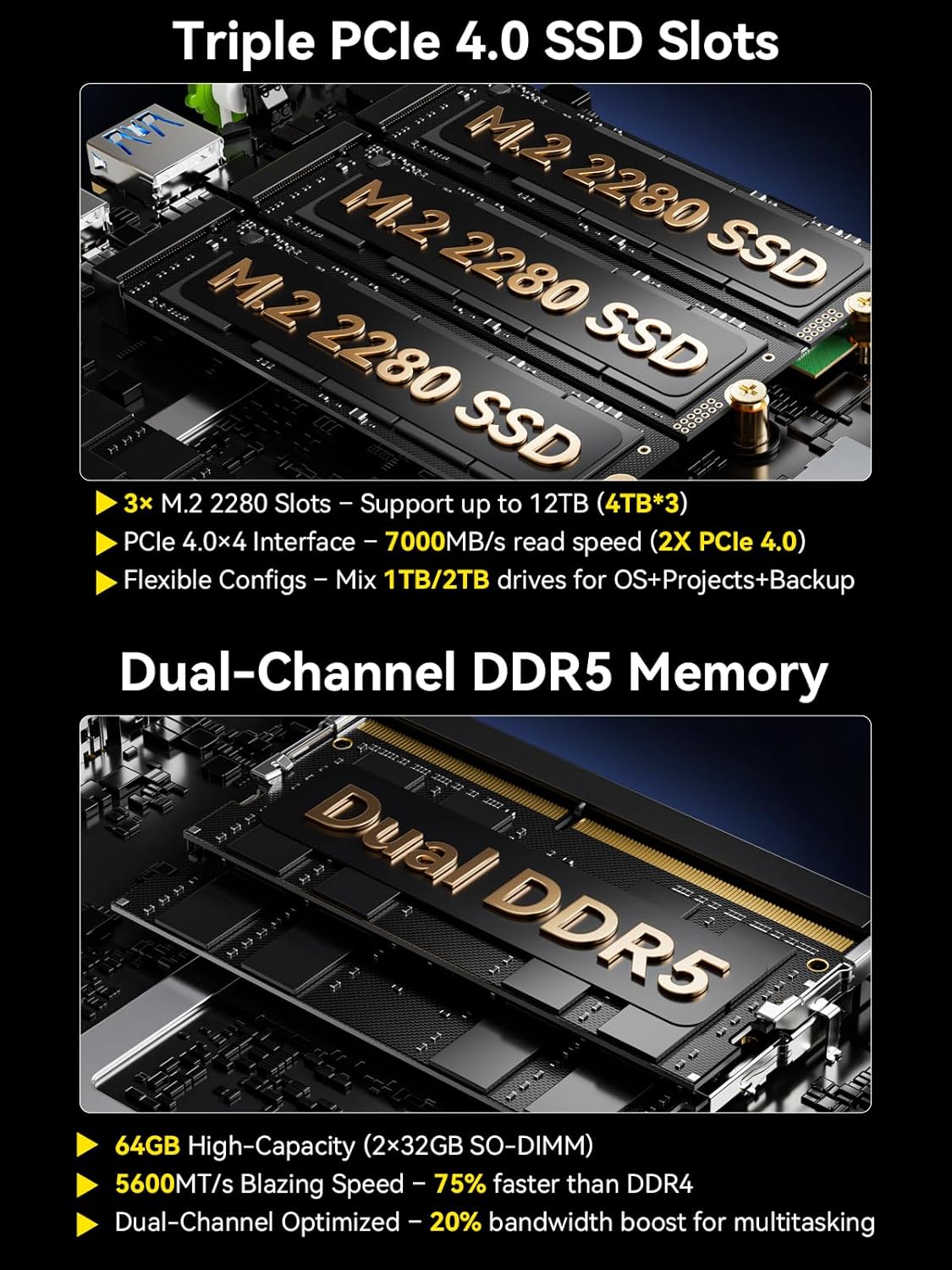
Figure 5.2: ашыкview of the triple M.2 SSD slots and dual-channel DDR5 memory architecture.
- Quad Screen 8K Display Support: Connect up to four displays via HDMI 2.1 (8K@60Hz), DisplayPort 1.4 (8K@120Hz), and USB Type-C (PD3.0/DP1.4/DATA) for expansive visual workspaces.
- Oculink Port: Provides higher bandwidth (64Gbps) for external GPU (eGPU) setups, offering better frame rates and lower lag compared to Thunderbolt. Эскертүү: Oculink does not support hot-plugging. Always power off before connecting/disconnecting devices.

Figure 5.3: OCuLink port capabilities for external graphics performance.
- Тез байланыш: Features 2.5GbE LAN for high-speed wired networking, Wi-Fi 6 for faster and more stable wireless connections, and Bluetooth 5.2 for connecting wireless peripherals.
6. Техникалык тейлөө
6.1 Муздатуу системасы
The EVO-T1 features an advanced dual-fan cooling system with VC heatpipes and 360° airflow to maintain optimal temperatures, even under heavy loads. It operates quietly, with noise levels as low as 35dB in Quiet Mode.

6.1-сүрөт: Ички view of the advanced dual-fan cooling system.
6.2 Жаңыртуу мүмкүнчүлүгү
The EVO-T1 allows for easy upgrades of both RAM and storage. The 3x M.2 2280 expansion slots support up to 8TB each, and the DDR5 SO-DIMM slots can be upgraded for increased memory capacity.
6.3 Тазалоо
To clean the exterior of the Mini PC, use a soft, dry cloth. For dust accumulation in vents, use compressed air. Ensure the device is powered off and unplugged before cleaning.
7. Кыйынчылыктарды
If you encounter issues with your GMKtec EVO-T1, please refer to the following common solutions:
| Көйгөй | Мүмкүн себеп | Чечим |
|---|---|---|
| Күч жок | Power cable loose; Power adapter faulty; Power outlet issue. | Check all power connections. Try a different power outlet. Ensure the power adapter is functioning. |
| Дисплей жок | Display cable loose; Incorrect input selected on monitor; Monitor faulty. | Ensure display cables are securely connected. Select the correct input source on your monitor. Test with a different monitor or cable. |
| System Freezes/Crashes | Overheating; Software conflict; Driver issue. | Ensure proper ventilation. Update drivers. Check for conflicting software. Perform a system restart. |
| Жай аткаруу | Too many applications running; Low storage space; Malware. | Close unnecessary applications. Free up disk space. Run antivirus/malware scan. |
If the problem persists, please contact GMKtec customer support for further assistance.
8. Техникалык шарттар
| Өзгөчөлүк | Деталь |
|---|---|
| Процессор | Intel Core Ultra 9 285H (5.4 ГГц чейин) |
| RAM | 64GB DDR5 5600MHz (Dual 32GB SO-DIMM) |
| Сактагыч | 2TB PCIe 4.0 M.2 2280 SSD (3x M.2 Expansion Slots, Max. 24TB) |
| Графикалык сопроцессор | Intel Arc 140T GPU 2.35GHz |
| Max Screen Resolution | 7680x4320 пиксел (8K) |
| Display Outputs | HDMI 2.1 (8K@60Hz), DisplayPort 1.4 (8K@120Hz), USB Type-C (PD3.0/DP1.4/DATA) |
| Networking | 2.5GbE LAN, Wi-Fi 6, Bluetooth 5.2 |
| USB порттору | 3x USB3.2 (10Gbps), 1x USB4.0, 2x USB2.0 |
| Special Ports | Oculink PCIe Gen4 x4 |
| Операция системасы | OS Pro (Compatible with Windows 11 Pro/Linux) |
| Элемент Салмагы | 4.95 фунт |
| Өлчөмдөр | 14.09 x 8.07 x 3.7 дюйм |
9. Кепилдик жана колдоо
GMKtec offers a 1-year limited warranty for the EVO-T1 Mini PC, starting from the date of purchase. This warranty covers defects due to design and workmanship.
9.1 Колдоо кызматы менен байланышуу
For technical assistance or warranty claims, please use the following methods:
- Amazon аркылуу: Log in to your Amazon account, go to 'Your Orders', and select 'Ask Product Question' for the EVO-T1.
- Электрондук почта: Send an email to the After-Sales Team at support@gmktec.com.
- Кардарларды колдоо: GMKtec provides 24/7 customer support.

Figure 9.1: GMKtec Warranty and Support details.