
1. Киришүү
Сатып алганыңыз үчүн рахматasing the WLIVE Modern TV Stand. This entertainment center is designed to accommodate TVs up to 65 inches and features adjustable open shelves and integrated LED lighting. This manual provides detailed instructions for assembly, operation, maintenance, and troubleshooting to ensure safe and optimal use of your product.

Image 1.1: The WLIVE Modern TV Stand, showcasing анын дизайн жана сактоо мүмкүнчүлүктөрү.
2. Коопсуздук маалыматы
- Ар дайым монтаждоо көрсөтмөлөрүн кылдаттык менен аткарыңыз.
- Колдонуудан мурун бардык жабдыктар бекем бекемделгенин текшериңиз.
- Do not exceed the maximum weight capacity of 110 pounds (50 kg) for the top surface.
- Телевизордун стендин оодарылып кетпеши үчүн тегиз жана туруктуу жерге коюңуз.
- Keep small parts and hardware away from children to prevent choking hazards.
- Utilize the widened anti-tip base feature for enhanced stability.
3. Пакеттин мазмуну
Чогултууну баштоодон мурун, бардык компоненттердин бар экенин жана бузулбаганын текшериңиз. Пакетке төмөнкүлөр кирет:
- All necessary engineered wood panels.
- Hardware kit (screws, dowels, cam locks, etc.).
- LED light strip and remote control.
- Жөнгө салынуучу айнек текчелер.
- Assembly tools (e.g., Allen wrench).
Refer to the included parts list in your physical manual for specific component identification and quantities.
4. Монтаждоо боюнча нускамалар
Assembly of the WLIVE Modern TV Stand requires two people and typically takes 2-3 hours. All parts are labeled, and necessary tools are included. Follow the step-by-step diagrams provided in your physical assembly guide.
- Пакеттен чыгаруу жана аныктоо: Бардык компоненттерди этияттык менен таңгактан чыгарып, жайгаштырыңыз. Ар бир бөлүктү чогултуу боюнча колдонмодогу тиешелүү этикеткага дал келтириңиз.
- Рамканы чогултуу: Begin by connecting the main frame pieces according to the diagrams. Ensure all connections are snug but do not overtighten until instructed.
- Текчелерди орнотуу: Insert the fixed and adjustable shelves into their designated positions. The adjustable shelves offer three height levels for flexible storage.
- Арткы панелдерди тиркөө: Secure any back panels as indicated in the instructions.
- LED жарыктарды орнотуу: Carefully attach the LED light strip to the designated area, typically within the central compartment. Ensure the wiring is neatly routed.
- Акыркы бекемдөө: Once all components are in place, systematically tighten all hardware to ensure structural integrity.
- Позициялоо: Move the assembled TV stand to its desired location.

Image 4.1: Illustration of the 3-level adjustable shelves for customized storage.
5. Иштөө нускамалары
5.1. LED чырактарын иштетүү
The integrated RGB LED lights are controlled by the included RF wireless remote. Ensure the LED strip is properly connected to a power source.
- Күйгүзүү/өчүрүү: Алыстан башкаруу пультунун кубат баскычын басыңыз.
- Түс тандоо: Choose from 7 static hues (e.g., warm white, cool blue, red, green, blue, yellow, purple) using the dedicated color buttons.
- Динамикалык режимдер: Select from 22 dynamic modes (e.g., fade, flash, jump) using the 'MODE' buttons.
- Ылдамдыкты жөндөө: Adjust the speed of dynamic modes using the 'SPEED +' and 'SPEED -' buttons (10 speed levels).
- Жарыктыкты жөндөө: Adjust the brightness of static colors and dynamic modes using the 'BRIGHT +' and 'BRIGHT -' buttons (5 brightness levels).
- DEMO режими: Press 'DEMO' to cycle through various light effects.

Image 5.1: Remote control and features of the multifunctional RGB LED lights.
5.2. Жөнгө салынуучу текчелер
The TV stand features six adjustable shelves, allowing you to customize storage space for various media devices, books, or decorative items. To adjust a shelf:
- Текчедеги бардык буюмдарды алып салыңыз.
- Текчени кылдаттык менен көтөрүп, текче төөнөгүчтөрүн учурдагы тешиктеринен алып салыңыз.
- Текче төөнөгүчтөрүн каалаган жаңы тешиктерге кайра киргизип, алардын тегиз болушун камсыз кылыңыз.
- Текчени кайра төөнөгүчтөргө коюңуз.
Видео 5.1: Бүттүview of the WLIVE TV Stand, demonstrating its features including adjustable shelves and LED lights.
6. Техникалык тейлөө жана кам көрүү
- Тазалоо: The TV stand is made from waterproof wood, making it easy to clean. Wipe surfaces with a soft, damp кездеме. Катуу химиялык заттардан же абразивдүү тазалагычтардан алыс болуңуз.
- Төгүлүүлөр: Promptly wipe up any spills to prevent damage to the finish.
- Текшерүү: Бардык жабдыктардын туташууларын мезгил-мезгили менен текшерип, туруктуулукту сактоо үчүн зарыл болсо, бекемдеңиз.
- Жайгашкан жери: Avoid placing the TV stand in direct sunlight or near heat sources to prevent material degradation.

Image 6.1: Key features of the TV stand, including its easy-to-clean surface.
7. Кыйынчылыктарды
- Чогултуудагы кыйынчылыктар: If you encounter issues during assembly, double-check the instruction diagrams and ensure all parts are correctly oriented. Verify that all hardware is present.
- Тербелүүчү стенд: Ensure the TV stand is placed on a level surface. Check that all screws and fasteners are fully tightened.
- LED жарыктары иштебейт: Verify that the LED strip is securely connected to the power adapter and that the adapter is plugged into a working outlet. Check the remote control battery.
- Алыстан башкаруу жооп бербейт: Ensure there are no obstructions between the remote and the LED receiver. Replace the remote control battery if necessary.
8. Техникалык шарттар
| Өзгөчөлүк | Деталь |
|---|---|
| Бренд | WLIVE |
| Модель номери | B0FHKC2S46 |
| Түс | Ак |
| Продукциянын өлчөмдөрү (L x W x Y) | 58.3'' x 15.4'' x 24.8'' (148cm x 39cm x 63cm) |
| Колдоого алынган телевизордун максималдуу өлчөмү | 65 дюймга чейин |
| Салмак чеги (үстүнкү бет) | 110.01 фунт (50 кг) |
| Материал | Инженердик жыгач |
| Өзгөчөлүктөр | RGB LED lights, Adjustable Open Shelves |
| Текчелердин саны | 9 (6 жөнгө салынуучуну кошо алганда) |
| Ассамблея талап кылынат | Ооба |
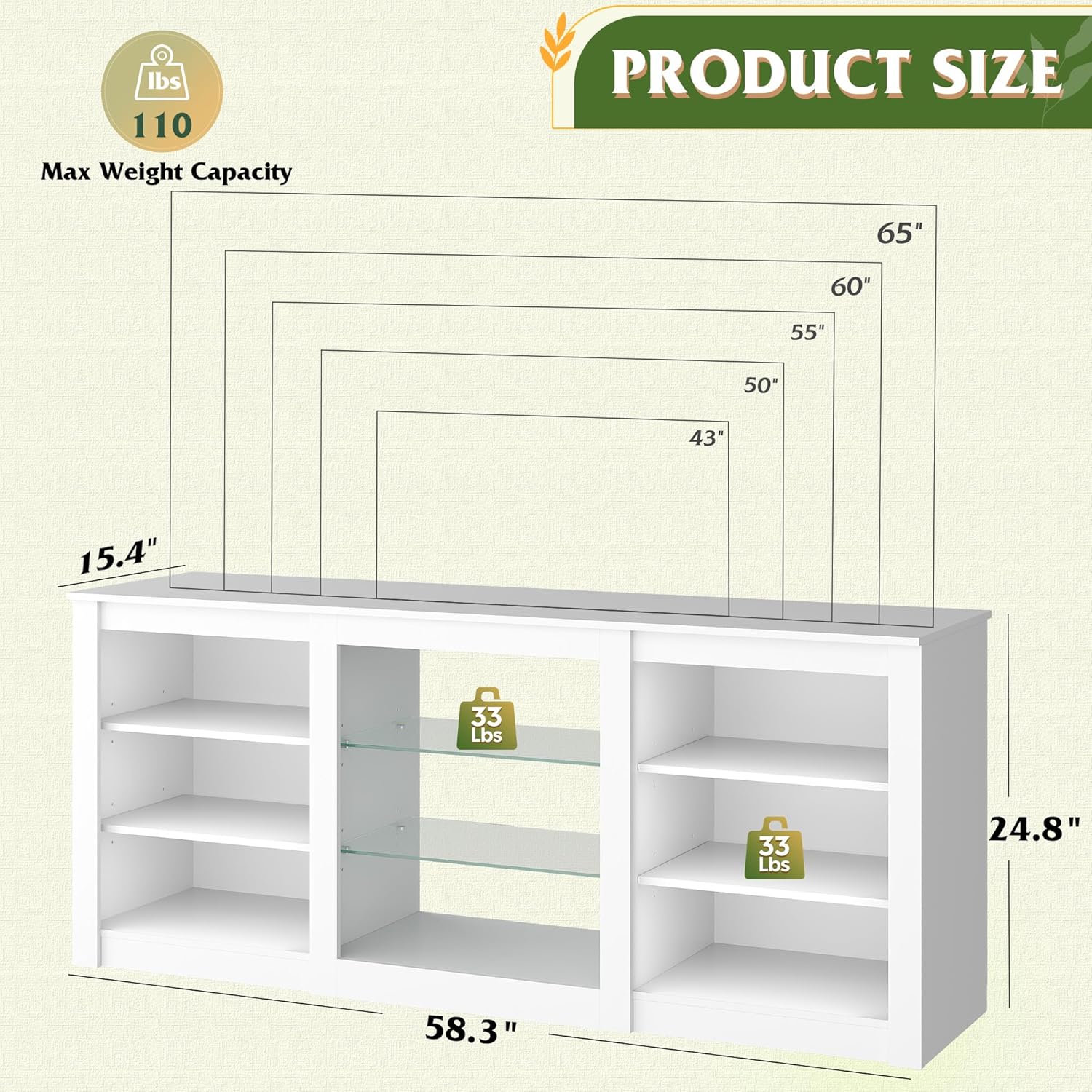
Image 8.1: Product dimensions and maximum weight capacity.
9. Кепилдик жана колдоо
For any questions, concerns, or assistance with your WLIVE Modern TV Stand, please contact our customer support team. We are committed to providing support and ensuring your satisfaction.
Please refer to your purchase documentation or the seller's contact information for specific warranty details and support channels.