
Продукт бүттүview
The Bewinner 1080P Action Camera is a versatile camcorder designed for outdoor photography and vlogging. It features 1080P HD video recording, a multi-axis stabilizer, and a 1.53-inch HD screen for convenient operation and playback. Its unique lens design allows for 270-degree and 180-degree rotation, offering flexible shooting angles.
- 1080P HD видео жаздыруу: Captures high-definition videos with clear details, supported by supplementary light for improved nighttime recording.
- 1.53 дюймдук HD экран: Allows for immediate viewing of recorded content and easy control of camera functions.
- Smart Stabilization: Minimizes shakes during high-speed motion for smoother, more stable footage.
- Versatile Rotating Lens: Features a wide-angle lens with 270-degree and 180-degree rotation for diverse photographic perspectives.
- Бир нече орнотуу параметрлери: Can be clipped to clothing or mounted on tripods using a 1/4 inch screw hole.
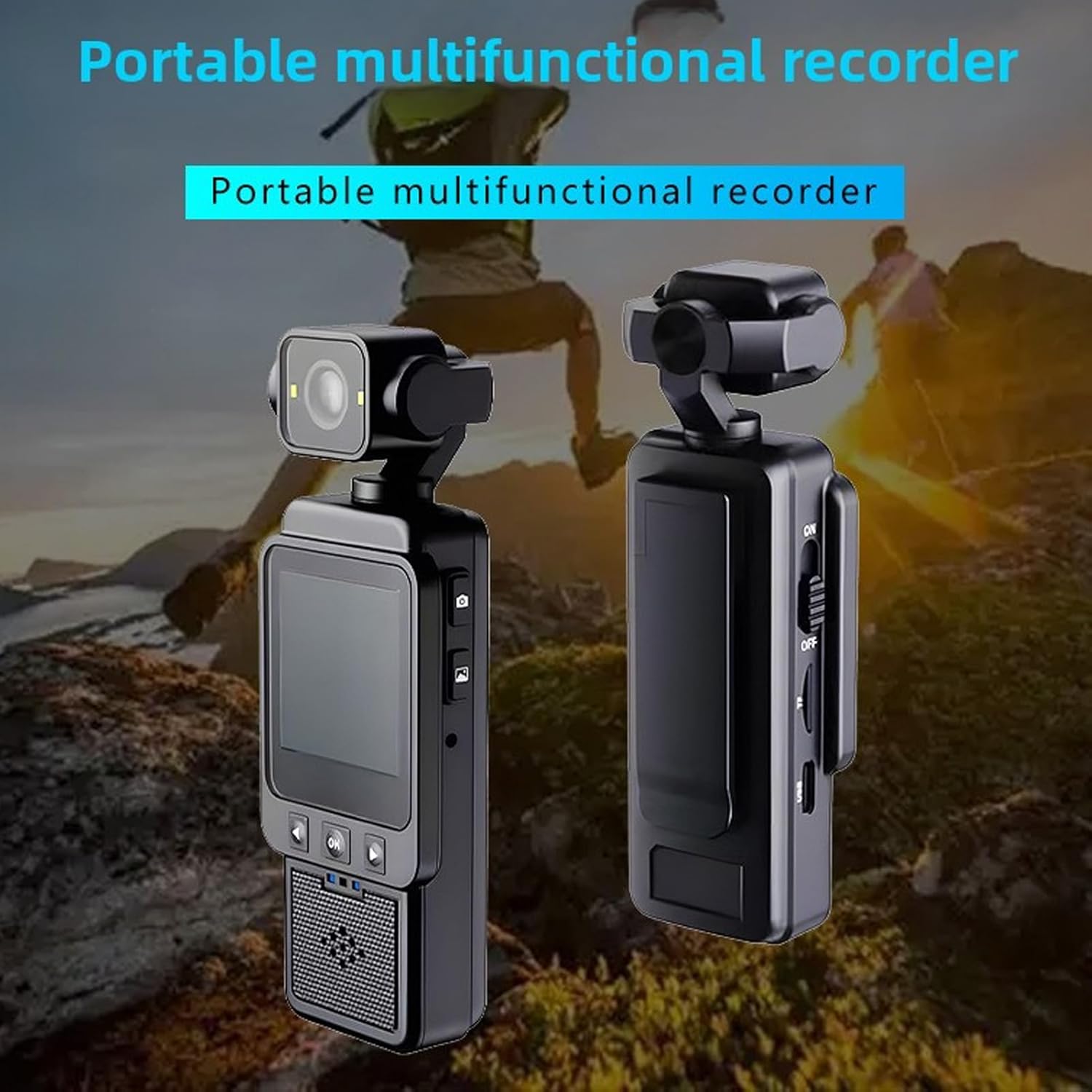
Сүрөт: алдыңкы жана арткы view of the Bewinner 1080P Action Camera, highlighting its compact design and screen.
Пакеттин мазмуну
Пакетте бардык буюмдар бар экенин текшериңиз:
- 1 x Bewinner 1080P Camera
- 1 х Инструкция (бул документ)
- 1 x заряддоо кабели (Type-C)

Image: The Bewinner 1080P Action Camera displayed alongside its USB charging cable.
Жайгашуу
1. Камераны заряддоо
Before first use, fully charge the camera's built-in high-capacity lithium polymer battery. Connect the provided Type-C charging cable to the camera's Type-C port and a suitable USB power source.

Сүрөт: каптал view of the camera, indicating the Type-C charging port and the power switch.
2. Эстутум картасын салуу
The camera supports up to a 256GB memory card (not included). Locate the memory card slot on the side of the camera and insert the card with the contacts facing the correct direction until it clicks into place.

Image: Close-up of the camera's side, showing the memory card slot for storage expansion.
3. Күйгүзүү / Өчүрүү
To power on the camera, slide the ON/OFF switch to the "ON" position. The HD screen will illuminate. To power off, slide the switch to the "OFF" position.
4. Монтаждоо параметрлери
The camera offers flexible mounting:
- Клип: Use the integrated clip to attach the camera to clothing, such as a shirt pocket or backpack strap.
- Tripod орнотуу: Utilize the 1/4 inch screw hole at the bottom of the camera to attach it to tripods, monopods, or other compatible accessories.

Image: The camera's rear view, showing the integrated clip for attachment to clothing or gear.
Иштөө нускамалары
1. Видеолорду жаздыруу жана сүрөткө тартуу
The camera features dedicated buttons for recording and photography:
- басыңыз Видео жаздыруу баскычы (often marked with a camera icon) once to start recording. Press again to stop.
- басыңыз Сүрөт тартуу баскычы (often marked with a camera icon) once to take a still photograph.
Сүрөт: каптал view of the camera, highlighting the distinct buttons for video recording and photo capture.
2. Using the HD Display Screen
The 1.53-inch HD screen allows you to:
- View Тирүү жем: See what the camera is capturing in real-time.
- Ойнотуу жазуулары: Review your videos and photos directly on the device.
- Менюларды багыттоо: Use the navigation buttons (Up, Down, OK) below the screen to access settings and playback options.

Image: The camera's HD screen displaying real-time images, demonstrating its utility for monitoring and playback.
3. Smart Stabilization
The camera incorporates intelligent stabilization technology to reduce blur and shakiness, especially during dynamic activities. This feature is automatically active to ensure smoother video capture.
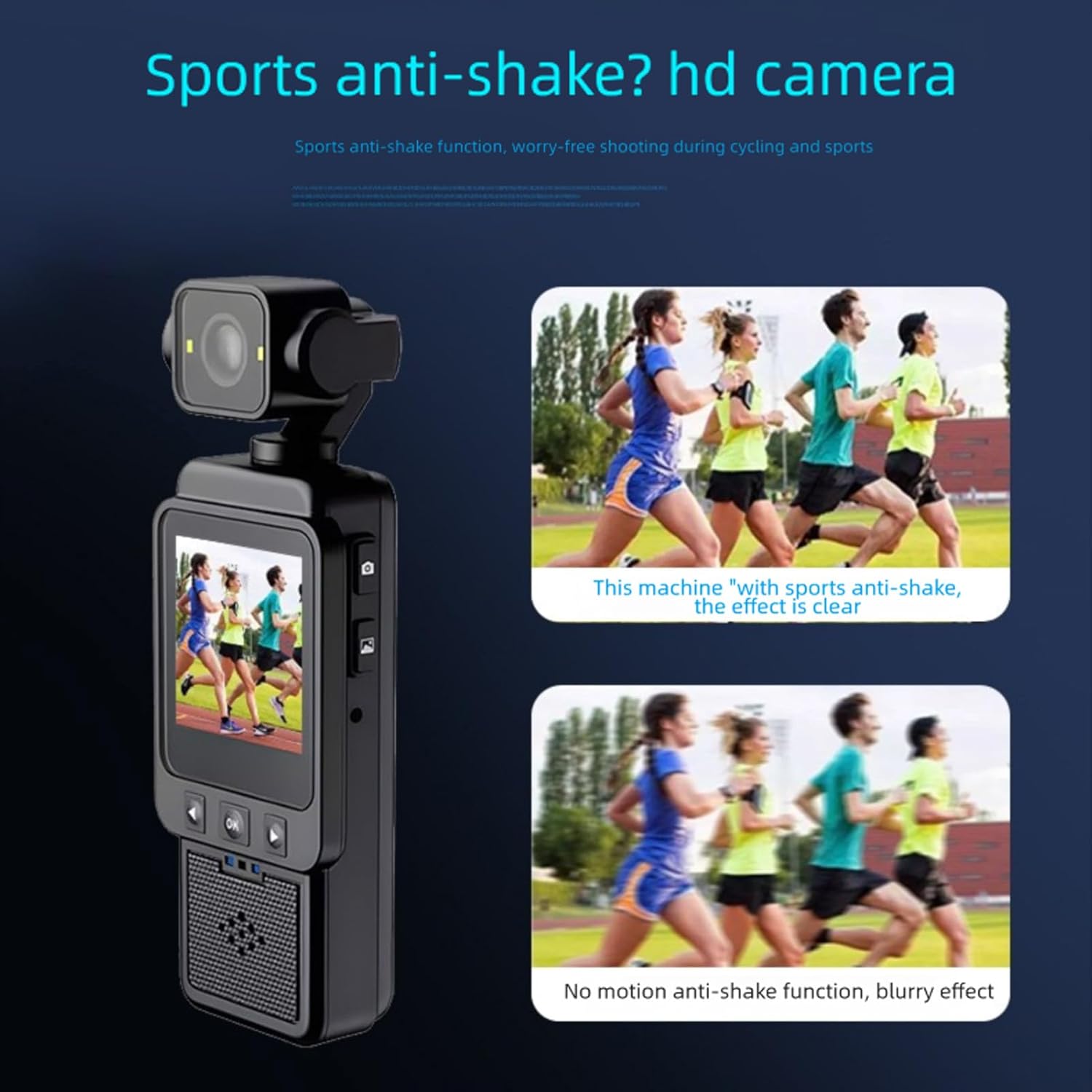
Image: A visual comparison showing the improved clarity of footage when smart anti-shake stabilization is active versus when it is not.
4. Adjusting the Rotating Lens
The camera's lens can be manually rotated 270 degrees and 180 degrees. Gently adjust the lens module to achieve desired shooting angles, such as forward-facing, backward-facing, or upward/downward perspectives.
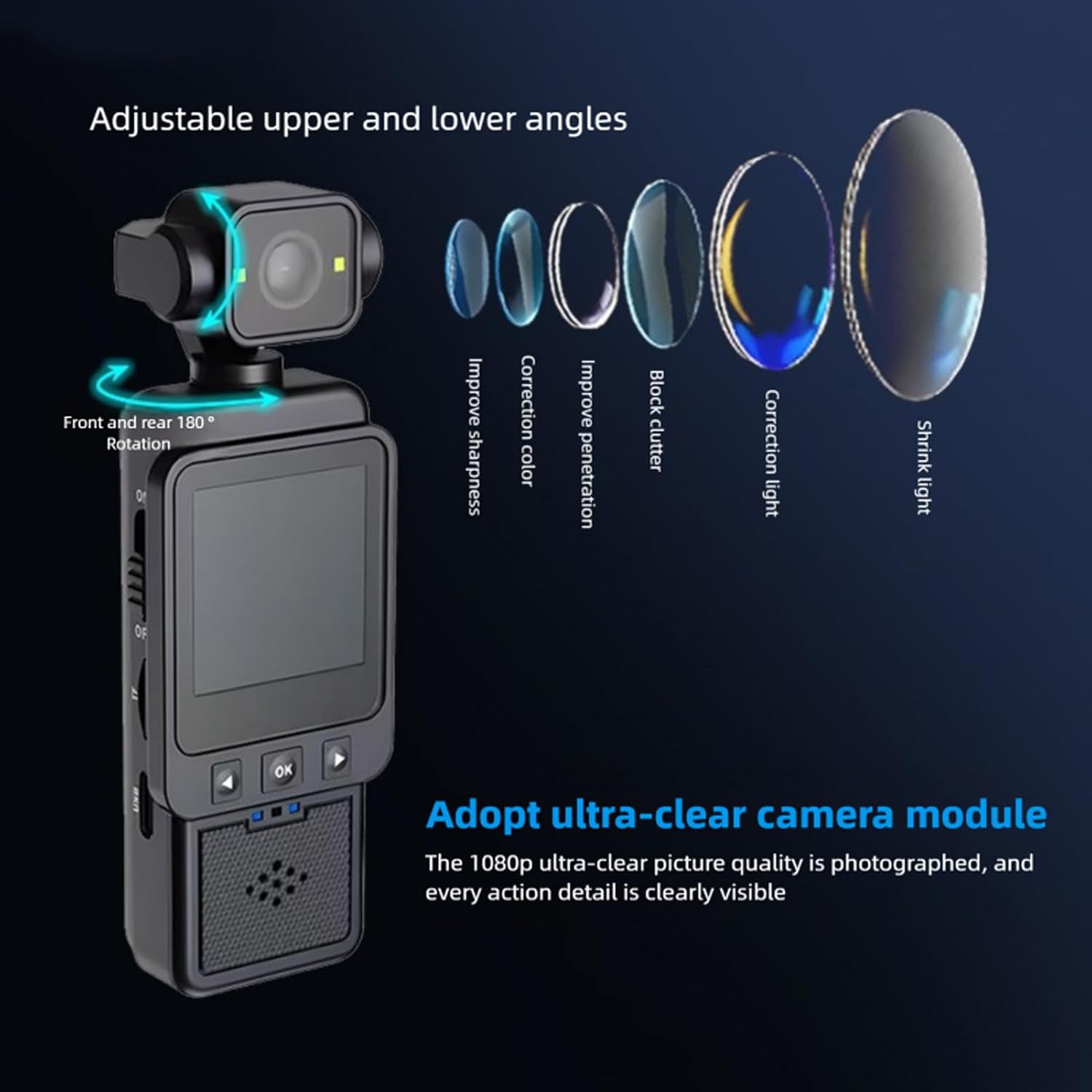
Image: The camera demonstrating its adjustable lens, capable of 180-degree front and rear rotation for varied shooting angles.
5. Using the Built-in Supplementary Light
For low-light conditions, activate the built-in supplementary light to enhance video and photo quality. Refer to the on-screen menu or dedicated button (if available) for activation.

Image: A visual comparison showing the improvement in image brightness and clarity when the built-in supplementary light is used in low-light environments.
6. Wi-Fi Mobile Phone Connection
Connect the camera to your mobile phone via Wi-Fi for remote control, live view, жана file transfer. Download the "Viidure" application on your smartphone (available for Android, iOS, and Linux systems). Follow the app's instructions to pair with the camera.
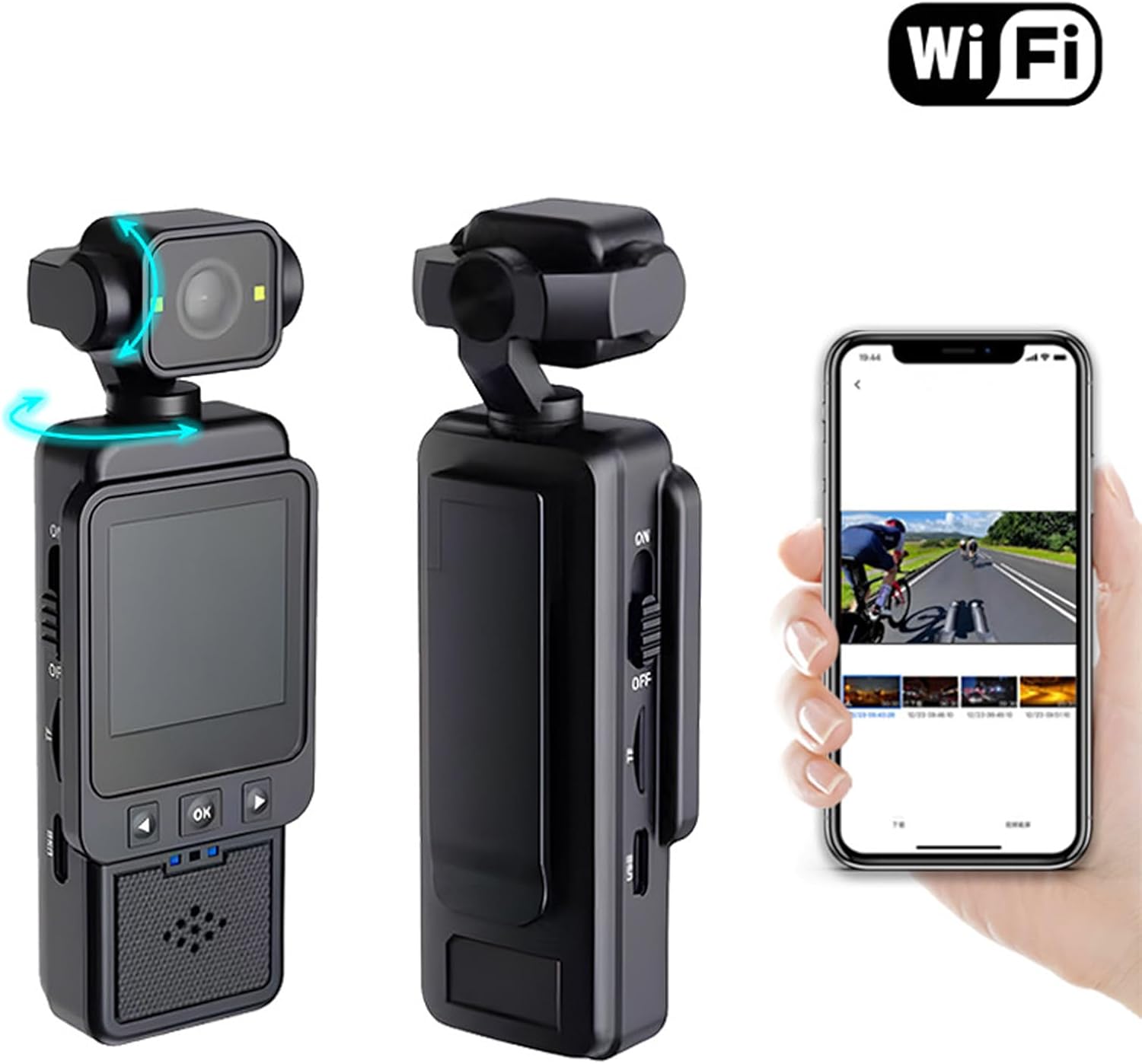
Image: The camera shown wirelessly connected to a smartphone, demonstrating the Wi-Fi connectivity feature for remote operation and data transfer.
Техникалык тейлөө
- Тазалоо: Камера корпусун тазалоо үчүн жумшак, кургак чүпүрөктү колдонуңуз. Линза үчүн атайын линза тазалоочу чүпүрөктү жана эритмени колдонуңуз. Абразивдүү материалдардан же катуу химиялык заттардан алыс болуңуз.
- Сактагыч: Камераны салкын, кургак жерде, күндүн түз тийген нурунан жана өтө жогорку температурадан алыс сактаңыз. Узак убакытка сактасаңыз, эстутум картасын алып салыңыз.
- Батареяга кам көрүү: Батареянын иштөө мөөнөтүн узартуу үчүн, батареяны тез-тез толук зарядсыздандырбаңыз. Колдонулбаса дагы, аны үзгүлтүксүз кубаттап туруңуз.
Проблемаларды чечүү
- Камера күйбөй жатат:
- Ensure the battery is charged. Connect the camera to a power source using the Type-C cable.
- Verify the ON/OFF switch is fully in the "ON" position.
- Видео жаздыруу/сүрөткө тартуу мүмкүн эмес:
- Check if a memory card is inserted correctly.
- Ensure the memory card has sufficient free space.
- The memory card might be full or corrupted. Try formatting the card (this will erase all data) or using a different card.
- Footage is blurry/shaky:
- Линзанын таза экенин текшериңиз.
- Confirm that the smart stabilization feature is active (it is usually automatic).
- Hold the camera as steadily as possible during recording.
- Wi-Fi туташуу көйгөйлөрү:
- Wi-Fi камераңызда да, смартфонуңузда да күйгүзүлгөнүн текшериңиз.
- Confirm you have the correct "Viidure" app installed.
- Try restarting both the camera and your smartphone.
Техникалык шарттар
| Элемент түрү | 1080P камера |
| Материал | ABS |
| Video Resolution | 1080P (Maximum) |
| Объектив | Large Wide Angle 6 Glass Lens |
| Stabilization Type | Electronic Stabilization |
| Screen Size | 1.53 дюйм |
| Аспект катышы | 16:9 |
| Батарея түрү | Built-in High Capacity Lithium Polymer Battery |
| Батарея сыйымдуулугу | 1960mAh |
| Колдоого алынган сактагыч | Up to 256GB Memory Card (Not Included) |
| Interface Type | Type-C |
| Колдоого алынган системалар | Android, OS X, Linux |
| Playback APP | Viidure |
| Кеңейүү интерфейси | 1/4 Inch Screw Port |
Кепилдик жана колдоо
This Bewinner product comes with a manufacturer warranty for 90 days from the date of purchase. Please retain your proof of purchase for warranty claims.
For further assistance or technical support, please refer to the official Bewinner webсайтына кириңиз же продукт сатып алынган чекене сатуучу аркылуу алардын кардарларды тейлөө кызматына кайрылыңыз.