
1. Киришүү
Thank you for choosing the Schneider 43A1 4K UHD LED TV. This television combines advanced display technology with smart features to provide an immersive viewing experience. Featuring a 4K Ultra High Definition display, QLED-LCD technology with Direct LED backlighting, and the VIDAA Smart TV platform, your new TV offers vibrant colors, deep blacks, and access to a wide range of entertainment.
This manual provides essential information for the safe and efficient use of your television. Please read it thoroughly before operating the device and retain it for future reference.
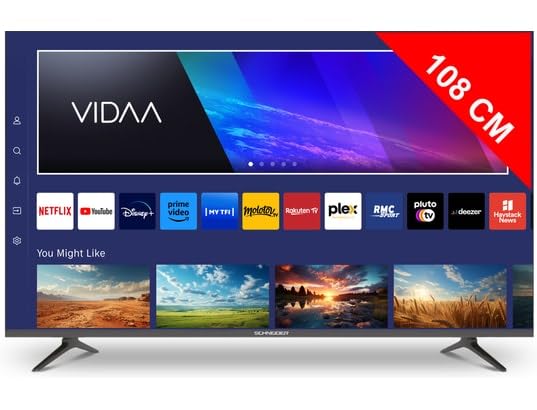
Сүрөт 1.1: Алдыңкы view of the Schneider 43A1 TV with VIDAA interface.
2. Коопсуздук маалыматы
Коопсуз эксплуатацияны камсыз кылуу жана зыян келтирбөө үчүн төмөнкү коопсуздук чараларын сактаңыз:
- Жайгашкан жери: Position the TV on a stable, level surface. Avoid placing it in direct sunlight, near heat sources, or in environments with high humidity or dust.
- Вентиляция: Ensure adequate ventilation around the TV. Do not block ventilation openings. Maintain a minimum distance of 10 cm from walls or other objects.
- Электр камсыздоо: Белгиленген электр менен жабдууну гана колдонуңузtage. Ensure the power cord is not pinched or walked on. Disconnect the power plug during lightning storms or when unused for extended periods.
- Тазалоо: Тазалоодон мурун сыналгыдан ажыратыңыз. Жумшак, кургак чүпүрөктү колдонуңуз. Суюктук же аэрозолдук тазалоочу каражаттарды колдонбоңуз.
- Суюктуктар: Do not expose the TV to dripping or splashing liquids. Do not place objects filled with liquids, such as vases, on the TV.
- Балдар: Supervise children to ensure they do not climb on the TV or furniture.
- Дубалга орнотуу: If wall-mounting, use a VESA compatible bracket (200 x 200 mm) and ensure proper installation by qualified personnel to prevent injury.
3. Пакеттин мазмуну
Сураныч, бардык буюмдар бар экенин жана жакшы абалда экендигин текшериңиз:
- Schneider 43A1 4K UHD LED TV
- Алыстан башкаруу
- Электр кабели
- Телевизор (2 даана)
- Телевизордук стенд үчүн бурамалар
- Колдонуучунун Колдонмосу (бул документ)
4. Орнотуу
4.1 Пакеттен чыгаруу
Carefully remove the TV from its packaging. It is recommended to keep the original packaging for potential future transport or service needs.
4.2 Стендди орнотуу
If you are not wall-mounting the TV, attach the included stand pieces to the bottom of the TV using the provided screws. Ensure the stand is securely fastened before placing the TV upright.
4.3 Дубалга орнотуу (кошумча)
The Schneider 43A1 is compatible with VESA 200 x 200 mm wall mounts. For safe installation, it is highly recommended to use a professional installer. Refer to your wall mount's instructions for specific details.
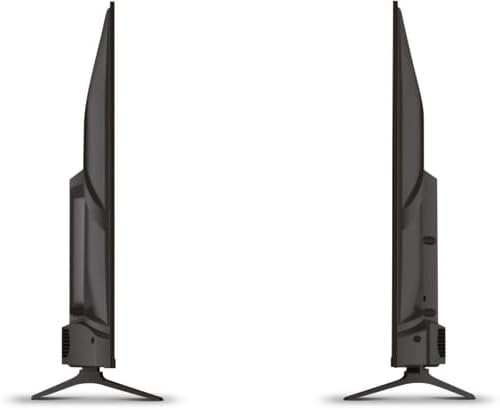
Сүрөт 4.1: Каптал view of the Schneider 43A1 TV, illustrating its profile for placement or wall mounting.
4.4 Тышкы түзмөктөрдү туташтыруу
Сиздин сыналгыңыз ар кандай туташуу опцияларын сунуштайт:
- HDMI: Connect up to three HDMI 2.0 devices (e.g., Blu-ray player, game console, set-top box) to the HDMI ports.
- USB: Two USB ports are available for connecting USB storage devices to play media.
- AV/Audio Input: For older devices requiring composite video and stereo audio.
- Коаксиалдуу чыгаруу: Тышкы аудио системасына туташуу үчүн.
- Антенна/кабель киргизүү: DVB-T/T2/C/S2 кабыл алуу үчүн антеннаңызды же кабелдик телевидение сигналыңызды туташтырыңыз.
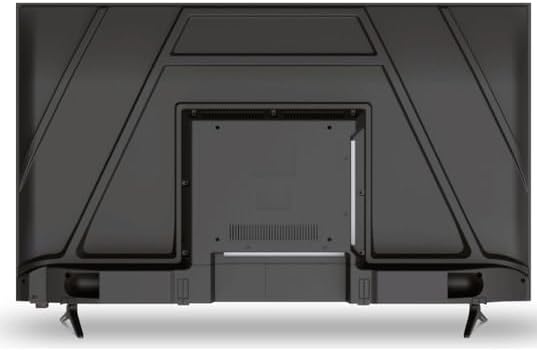
Сүрөт 4.2: Арткы view of the Schneider 43A1 TV, highlighting connection ports.
4.5 Кубатты туташтыруу
Plug the power cable into the TV's power input, then into a suitable wall outlet.
4.6 Баштапкы орнотуу устасы
Upon first power-on, the TV will guide you through an initial setup process. This includes selecting your language, connecting to a Wi-Fi network, and scanning for available channels (DVB-T/T2/C/S2).
5. Иштөө
5.1 Алыстан башкаруу функциялары
The remote control allows you to navigate the TV's features:
- Кубат баскычы: Телевизорду күйгүзөт же өчүрөт.
- Үнүн жогорулатуу/төмөндөтүү: Үн деңгээлин тууралайт.
- Канал өйдө/төмөн: Телеканалдарды өзгөртөт.
- Киргизүү/Булак: Selects the input source (HDMI, USB, TV Tuner).
- Чабыттоо баскычтары: Меню багыттоо үчүн.
- Акылдуу телевизордун баскычтары: Direct access to popular apps like Netflix, Prime Video, YouTube.
5.2 Smart TV (VIDAA)
The integrated VIDAA Smart TV platform provides access to a variety of applications and streaming services. Connect your TV to the internet via Wi-Fi to enjoy features like Netflix, Prime Video, and YouTube. Bluetooth connectivity allows for wireless connection to compatible audio devices.

5.1-сүрөт: Бурчтуу алдыңкы бет view of the Schneider 43A1 TV, displaying the VIDAA Smart TV interface.
5.3 Киргизүүнү тандоо
Press the 'Input' or 'Source' button on your remote control to switch between connected devices (HDMI 1, HDMI 2, HDMI 3, USB, AV, TV Tuner).
5.4 Сүрөт жана үн орнотуулары
Access the TV's menu to adjust picture and sound settings. The 4K UHD resolution, QLED-LCD technology, and Direct LED backlighting ensure a high-quality visual experience. The TV also features upscaling to enhance lower-resolution content. Audio is delivered via 2 x 8 W RMS stereo speakers with Dolby Audio support.
5.5 PC Monitor Mode
The TV can be used as a PC monitor by connecting your computer via an HDMI cable. This mode optimizes the display for computer use.
6. Техникалык тейлөө
6.1 Телевизорду тазалоо
Before cleaning, ensure the TV is unplugged from the power outlet.
- Экран: Экранды жумшак, түксүз чүпүрөк менен акырын сүртүңүз. өжөр белгилери үчүн, жеңил гampчүпүрөккө суу же атайын экран тазалагыч (экранга түздөн-түз чачпаңыз).
- Сырткы: Телевизорду сүртүү үчүн жумшак, кургак чүпүрөктү колдонуңуз casinг. Абразивдүү тазалагычтардан же эриткичтерден качыңыз.
6.2 Программалык камсыздоо жаңыртуулары
Сыналгыңыз иштөөнү жакшыртуу жана жаңы функцияларды кошуу үчүн программалык камсыздоонун жаңыртууларын алышы мүмкүн. Бул жаңыртууларды автоматтык түрдө алуу үчүн сыналгыңыз интернетке туташкандыгын текшериңиз же аларды жөндөөлөр менюсу аркылуу кол менен текшериңиз.
7. Кыйынчылыктарды
Телевизоруңузда көйгөйлөргө туш болсоңуз, төмөнкү жалпы көйгөйлөрдү жана аларды чечүү жолдорун караңыз:
- Кубат жок:
- Электр кабели сыналгыга жана розеткага бекем сайылганын текшериңиз.
- Дубал розеткасынын иштеп жатканын текшериңиз (башка аспап менен текшериңиз).
- Пульттагы же сыналгынын өзүндөгү кубат баскычын басыңыз.
- Сүрөт/үн жок:
- Туура киргизүү булагы тандалганын текшериңиз (мисалы, HDMI 1, сыналгы).
- Сыналгы менен тышкы түзмөктөрдүн ортосундагы бардык кабелдик байланыштарды текшериңиз.
- Үндүн үнү өчүп же минималдуу деп коюлбагандыгын текшериңиз.
- If using an antenna, check the antenna connection and perform a channel scan.
- Алыстан башкаруу иштебейт:
- Пульттагы батарейкаларды алмаштырыңыз.
- Пульт менен сыналгынын IR сенсорунун ортосунда эч кандай тоскоолдуктар жок экенин текшериңиз.
- Smart TV/Network Issues:
- Wi-Fi роутериңизди жана интернет байланышыңызды текшериңиз.
- Go to the TV's network settings to re-connect to your Wi-Fi network.
- Телевизорду жана роутерди өчүрүп-күйгүзүңүз.
Бул чечимдерди колдонуп көргөндөн кийин көйгөй чечилбесе, кардарларды колдоо менен байланышыңыз.
8. Техникалык шарттар
| Өзгөчөлүк | Спецификация |
|---|---|
| Модел | Schneider 43A1 |
| Дисплей өлчөмү | 109 см (43 дюйм) |
| Резолюция | 4K Ultra HD (3840 x 2160 пиксел) |
| Дисплей технологиясы | QLED-LCD with Direct LED Backlight |
| Контраст катышы | 1100:1 |
| Жарыктык | 200 кд/м² |
| Аудио чыгаруу | 2 x 8 W RMS Stereo |
| Аудио технологиясы | Dolby Audio |
| HDMI порттору | 3 2.0 (HDMI XNUMX) |
| USB порттору | 2 |
| Башка кириштер | AV/Audio Input |
| Чыгуулар | Коаксиалдык чыгаруу |
| тюнер | DVB-T/T2/C/S2 |
| Smart TV платформасы | VIDAA (Netflix, Prime Video, YouTube) |
| Зымсыз байланыш | Wi-Fi, Bluetooth |
| VESA шайкештиги | 200 x 200 мм |
| Салмагы | 7.5 килограмм |