
1. Орнотуу жана орнотуу
The Camcamp SC50 system is designed for quick and easy installation, featuring a 100% cable-free setup. The cameras and monitor are pre-paired for immediate use.
1.1 Пакеттин мазмуну
- 1x 10-Channel NVR Monitor with 500GB Hard Drive
- 4x Solar Security Cameras
- 4x Монтаж кронштейндери
- 4x USB-C заряддоо кабелдери
- Expansion Screws and Positioning Stickers
- 1x Instruction Manual
- 1x чычкан
- 1x HDMI кабели
1.2 Баштапкы орнотуу
- Заряддоочу камералар: Ensure all solar cameras are fully charged before installation. Each camera includes a built-in 8000mAh battery and an upgraded solar panel for continuous power.
- Мониторду күйгүзүү: Connect the 10-inch NVR monitor to a power source. The system is plug-and-play, with cameras already paired to the monitor.
- Байланышты текшерүү: Upon powering on, the monitor will display live feeds from the connected cameras.
1.3 Камераны орнотуу
Cameras can be installed in minutes without professional assistance. Choose locations that receive adequate sunlight for optimal solar charging.

Image: A person easily installing a Camcamp solar camera on an exterior wall, demonstrating the simple screw-in installation process.
- Жайгашкан жерди тандоо: Identify outdoor areas requiring surveillance. Ensure the camera's solar panel has direct exposure to sunlight.
- Монтаждоо: Use the provided mounting brackets, expansion screws, and positioning stickers to securely attach each camera to a wall or desired surface.
- Бурчту тууралоо: Position the camera to cover the desired surveillance area. The cameras are fixed-position once mounted, so careful placement is important.

Сүрөт: An overview of the Camcamp SC50 system, showing four solar-powered cameras, the 10-inch NVR monitor, and the included 500GB hard drive.
1.4 Тармакка туташуу (кошумча)
For remote access and advanced features, connect the NVR monitor to your router via Ethernet cable or WiFi.
- Ethernet: Connect an Ethernet cable from the NVR monitor to your router.
- WiFi: Navigate to the network settings on the NVR monitor to connect to your 2.4GHz or 5GHz WiFi network.
Video: An official product video demonstrating the setup process and features of the Camcamp SC50 Solar Security Camera System with Monitor.
2. Иштөө нускамалары
The Camcamp SC50 system offers various features for comprehensive home security and monitoring.
2.1 Live View жана Жаздыруу
- Монитор Viewing: View live feeds directly on the 10-inch NVR monitor.
- Алыстан кирүү: Connect the monitor to WiFi and use the CloudEye 365 app (available for Android and iOS) on your smartphone to view алыстан түз эфирдеги видео.
- HDMI чыгышы: Connect the NVR monitor to a larger display (e.g., TV) via the HDMI cable for a bigger view of your surveillance feeds.

Image: A smartphone screen showing simultaneous live views from multiple Camcamp cameras, highlighting the app's multi-channel monitoring capability.
2.2 Кыймылды аныктоо жана эскертүүлөр
The system utilizes advanced PIR sensors for smart motion detection, minimizing false alarms.
- Ыкчам эскертүүлөр: Receive real-time alerts on your phone via the CloudEye 365 app when motion is detected.
- Үн жана жарык сигнализациясы: Cameras are equipped with spotlights and can trigger a sound alarm upon detection to deter intruders.

Image: A visual representation of the smart PIR detection feature, showing a delivery person and a phone notification for human body detection.
2.3 Эки тараптуу сүйлөшүү
Each camera features a built-in microphone and speaker, enabling two-way audio communication.
- Байланыш: Speak to visitors or warn off unwanted individuals directly through the mobile app.
2.4 Түнкү көрүнүш
Experience clear surveillance even in low-light conditions.
- Түнкү көрүнүш: 4MP resolution and spotlights provide full-color footage up to 30ft away at night.
- Инфракызыл түнкү көрүнүш: Standard infrared mode offers clear black and white video in complete darkness up to 65 feet.
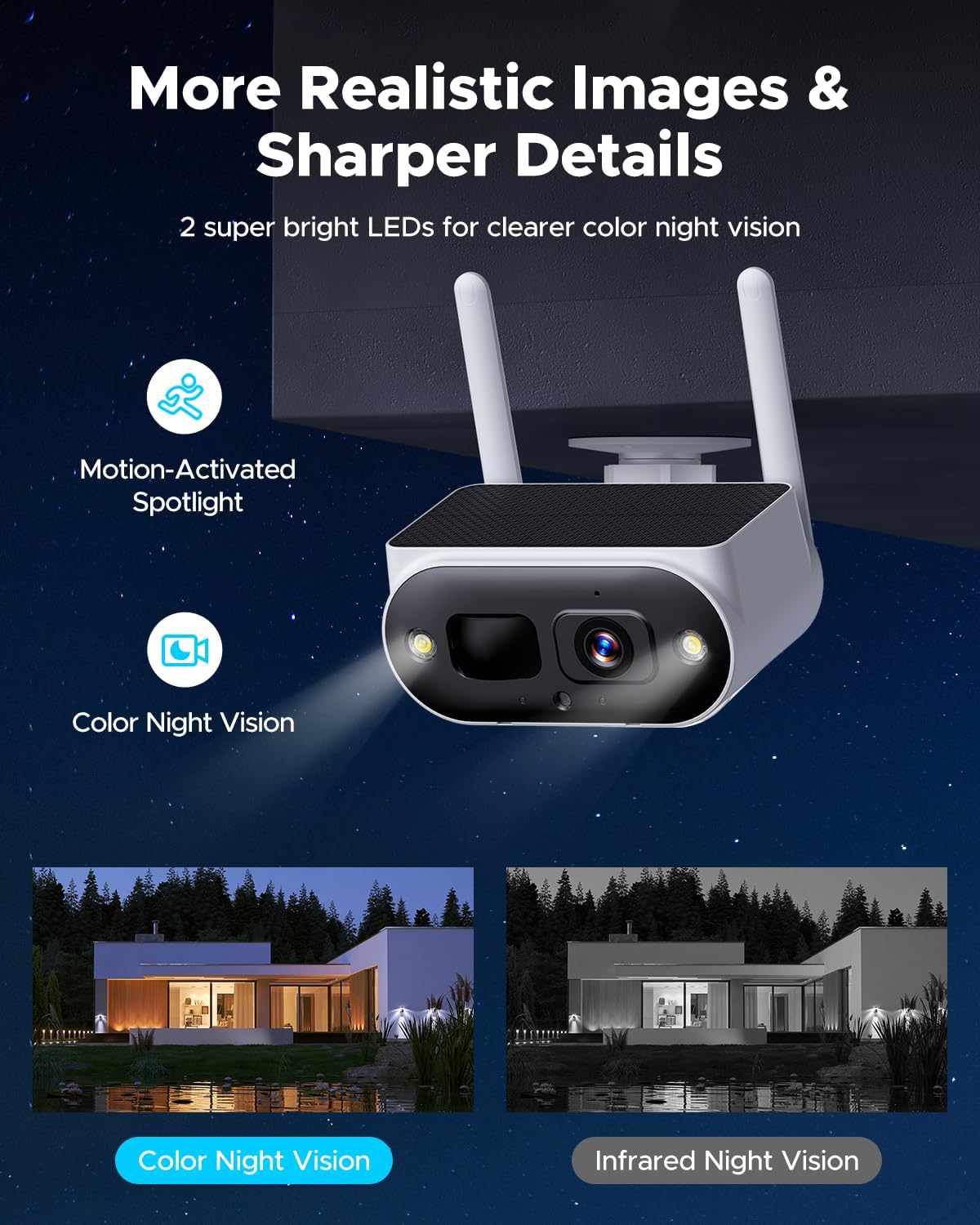
Image: A split image illustrating the difference between color night vision and traditional infrared night vision, both captured by the camera.
2.5 Сактоо жана ойнотуу
The system offers local storage without monthly fees.
- Жергиликтүү сактагыч: The NVR monitor includes a pre-installed 500GB hard drive, expandable up to 6TB.
- Жаздыруу режимдери: Supports motion-activated recording and 24/7 continuous recording.
- Ойнотуу: Жазылган footage directly from the NVR monitor or remotely via the CloudEye 365 app.

Image: The Camcamp monitor interface showing storage options (HDD, TF Card, Cloud) and recommended recording modes (Motion Record, 24/7 Record).
Видео: Продукциянын расмий көргөзмөсүasing various features of the Camcamp Solar Security Camera Wireless Outdoor system, including its ease of use and monitoring capabilities.
3. Техникалык тейлөө
Proper maintenance ensures the longevity and optimal performance of your Camcamp коопсуздук системасы.
3.1 Күн энергиясы менен заряддоо
The integrated solar panels keep your cameras powered without external wiring.
- Оптималдуу жайгаштыруу: Ensure cameras are placed in locations with maximum direct sunlight exposure for efficient charging.
- Батареянын иштөө мөөнөтү: The 8000mAh built-in battery provides continuous operation, supplemented by solar charging.

Image: A close-up of a Camcamp solar camera, emphasizing its solar charging capability and wire-free design for continuous operation.
3.2 Аба ырайына туруктуулук
The cameras are built to withstand various environmental conditions.
- IP66 рейтинги: Cameras are IP66-rated, making them waterproof and suitable for outdoor use in rain, snow, and extreme temperatures.
- Тазалоо: Periodically clean the camera lenses and solar panels to ensure clear vision and efficient charging.
3.3 Сактагычты башкаруу
Manage your recorded footage effectively.
- Катуу диск: The 500GB HDD provides ample local storage. Consider upgrading to a larger 2.5" HDD (up to 6TB) if more storage is required.
- Маалыматтын камдык көчүрмөсү: Маанилүү азык-түлүктөрдүн камдык көчүрмөсүн үзгүлтүксүз сактап туруңузtage to an external device or cloud service (optional, paid).
4. Кыйынчылыктарды
This section addresses common issues you might encounter with your Camcamp SC50 system.
4.1 No Camera Feed on Monitor
- Күчтү текшерүү: Ensure both the NVR monitor and cameras are powered on.
- Камеранын батареясы: Verify that camera batteries are sufficiently charged. Relocate cameras to sunnier spots if needed.
- Сигнал күчү: Check the wireless signal strength between cameras and the monitor. Reduce distance or obstacles if the signal is weak.
- Кайра жупташтыруу: If cameras lose connection, refer to the full instruction manual for re-pairing procedures.
4.2 Алыстан кирүү көйгөйлөрү
- Тармак туташуусу: Confirm the NVR monitor is connected to your home WiFi or Ethernet.
- Колдонмонун абалы: Ensure the CloudEye 365 app is updated to the latest version and your phone has a stable internet connection.
- Маршрутизатор орнотуулары: Check your router's firewall or security settings if they are blocking the app's access.
4.3 Жалган кыймыл жөнүндө эскертүүлөр
- PIR сезгичтиги: Adjust the PIR sensor sensitivity settings in the NVR menu or CloudEye 365 app to reduce triggers from small animals or environmental factors.
- Камераны жайгаштыруу: Avoid pointing cameras directly at busy roads or areas with frequent, non-threatening movement.
4.4 Сактагыч толук
- Review Footage: Delete unnecessary recordings from the NVR.
- Upgrade Storage: Install a larger 2.5" hard drive (up to 6TB) in the NVR monitor.
- Булуттагы сактагыч: Consider subscribing to a cloud storage plan for additional backup and extended retention.
5. Техникалык шарттар
| Өзгөчөлүк | Деталь |
|---|---|
| Модель аты | SC50 Solar Security Camera Wireless Outdoor with Monitor |
| Ички/тышкы колдонуу | Сыртта |
| Power Source | Күн энергиясы, батарея менен иштейт |
| Connectivity Protocol | Wi-Fi (2.4 & 5GHz) |
| Controller Type | Amazon Alexa, Android, iOS |
| Монтаж түрү | Дубалга бекиткич (бурама менен бекитүү) |
| Видео тартуунун резолюциясы | 1440p (4MP эффективдүү резолюция) |
| Элементтердин саны | 4 Камералар |
| Каналдардын саны | 10 (Кеңейтилүүчү) |
| Түнкү көрүү диапазону | 65 Фут |
| Элементтин өлчөмдөрү (L x W x Y) | 13 x 7 x 7 дюйм |
| Сууга туруктуулук деңгээли | IP66 (Суу өткөрбөйт) |
| Flash эстутум орнотулган өлчөмү | 500 GB (NVR) |
| Флэш эс тутумдун максималдуу өлчөмү | 6 TB (NVR) |
| Оптикалык масштаб | 5x |
| Видеону коддоо | H.265 |
| Төмөн жарык технологиясы | Түнкү түс |
| Эскертүү түрү | Кыймыл гана |
| Видео тартуу форматы | MP4 |
| Фото сенсор технологиясы | CMOS |
| Элемент Салмагы | 7.28 фунт |
| Өндүрүүчү | Camcamp |
6. Кепилдик жана колдоо
Camcamp is committed to providing reliable products and excellent customer service.
6.1 Продукциянын кепилдиги
- 12 айлык алмаштыруу: The product is covered by a 12-month replacement warranty for manufacturing defects. Repair services are not offered; eligible products will be replaced.
- 30 күндүк акчаны кайтарып берүү кепилдиги: Эгерде сиз сатып алган товарыңызга канааттанбасаңыз, аны 30 күндүн ичинде кайтарып берип, толук акчаңызды кайтарып алсаңыз болот.
6.2 Техникалык колдоо
- Өмүр бою колдоо: Camcamp offers lifetime professional technical support for all its products.
- Байланыш: For assistance, please visit the official Camcamp store or contact customer service through your purchase platform.