
1. Киришүү
Welcome to the instruction manual for your Jectse WiFi 6 4G/5G CPE LTE Router. This document provides essential information on how to set up, operate, maintain, and troubleshoot your device. Please read this manual carefully before using the product to ensure optimal performance and longevity.
The Jectse WiFi 6 Router is designed to provide high-speed internet connectivity by converting a 4G LTE signal into a Wi-Fi hotspot, supporting multiple devices simultaneously. Its robust design with four antennas ensures stable and wide coverage.
2. Продукт бүтүп калдыview
2.1 Негизги өзгөчөлүктөрү
- 4G LTE Support: Compatible with multiple 4G LTE bands, including FDD B1, B3, B5, B7, B8, B20, TDD B38, B40, B41, and WCDMA B1, B5, B8. This ensures versatile connectivity across various networks.
- Тез ылдамдыктар: Experience 4G download speeds up to 150 Mbps and upload speeds up to 50 Mbps. Wireless transfer rates reach up to 300 Mbps for smooth streaming, gaming, and browsing.
- Оңой орнотуу: Simply insert a standard SIM card to transform the 4G LTE signal into a Wi-Fi hotspot. Enjoy immediate internet access with minimal configuration.
- Түзмөктүн жогорку кубаттуулугу: Connect up to 32 devices simultaneously, including smartphones, tablets, and PCs, within a maximum coverage area of 300 square meters.
- 4-Antenna Design: Equipped with four antennas for enhanced signal coverage, faster network speeds, and stable connectivity throughout your space.
2.2 Пакеттин мазмуну
Сураныч, төмөнкү нерселер үчүн кутучаны белгилеңиз:
- 1 x Jectse WiFi 6 4G/5G CPE LTE Router
- 1 х кубат адаптери
- 1 х Ethernet кабели
- 1 x USB кабели
- 1 х Колдонуучунун колдонмосу (бул документ)

Image: Jectse WiFi 6 Router with its power adapter, Ethernet cable, and USB cable.
3. Орнотуу нускамалары
Follow these steps to set up your Jectse WiFi 6 Router:
- Маршрутизаторду таңгактан чыгаруу: Роутерди жана бардык аксессуарларды таңгактан этияттык менен алып салыңыз.
- SIM картаны салыңыз: Locate the SIM card slot on the side of the router. Insert a standard-sized 4G LTE SIM card into the slot until it clicks into place. Ensure the SIM card is correctly oriented as indicated by the diagram near the slot.

Сүрөт: каптал view of the router highlighting the SIM card slot and USB/WAN/LAN ports.
- Туташуу кубаты: Connect the power adapter to the router's power input port and then plug the adapter into a wall outlet. The router will power on automatically.
- Күйгүзүү: Wait for the router's indicator lights to stabilize. The Wi-Fi and network status lights should indicate a successful connection.
- Optional: Wired Connection: If you prefer a wired connection, connect one end of the Ethernet cable to the WAN/LAN port on the router and the other end to your computer or another network device.
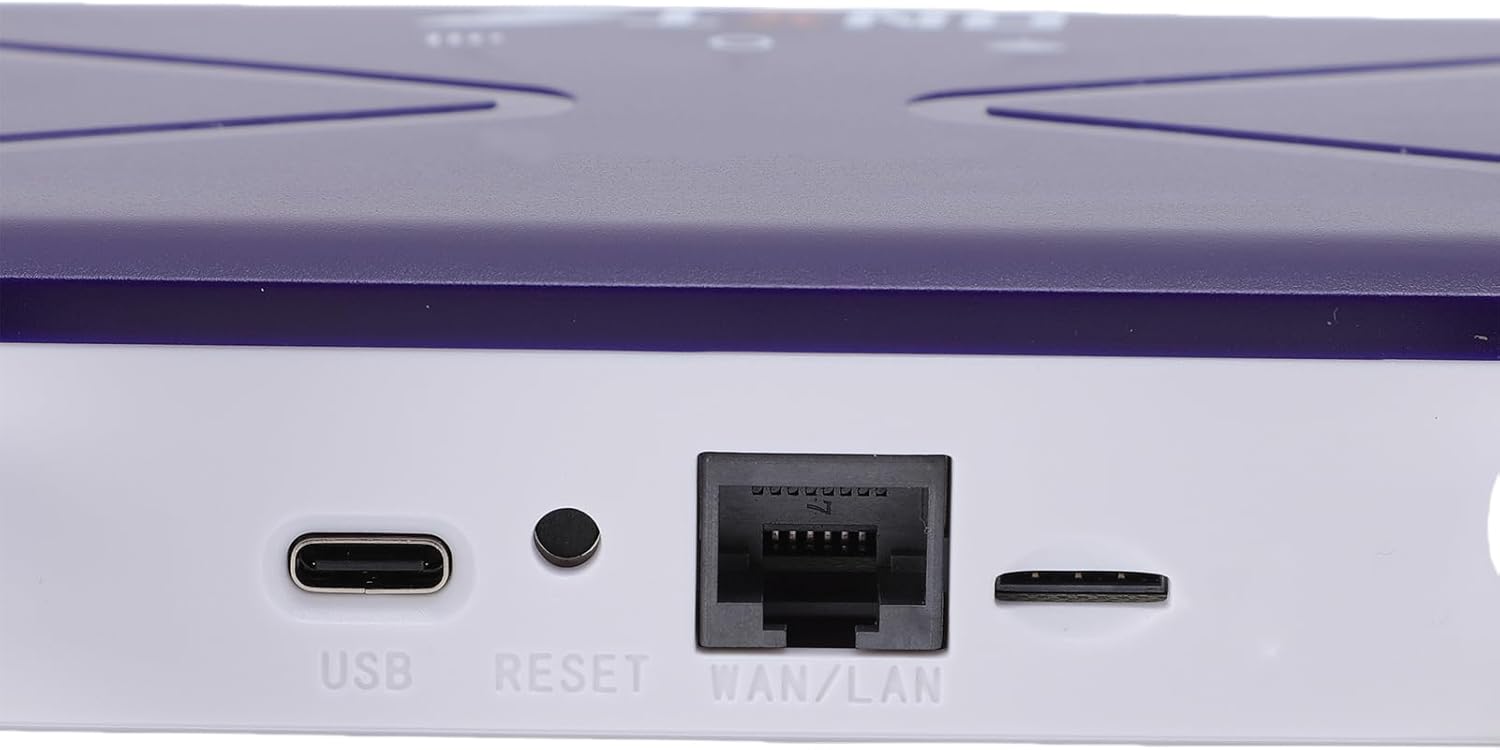
Image: Close-up of the router's rear panel showing the USB port, Reset button, and WAN/LAN port.
4. Иштөө нускамалары
4.1 Wi-Fiга туташуу
Түзмөктөрүңүздү роутердин Wi-Fi тармагына туташтыруу үчүн:
- Түзмөгүңүздө (смартфон, планшет, ноутбук) Wi-Fi жөндөөлөрүн ачыңыз.
- Издөө available Wi-Fi networks. The router's default Wi-Fi network name (SSID) and password (Wi-Fi Key) are typically printed on a label on the bottom of the router.
- Select the router's SSID from the list.
- Enter the Wi-Fi Key when prompted. The default Wi-Fi Key is usually 1234567890.
- Once connected, your device should have internet access.

Image: Bottom label of the router displaying default Wi-Fi Key and Web IP дареги.
4.2 Маршрутизатордун жөндөөлөрүнө кирүү
To manage your router settings, such as changing the Wi-Fi name or password, or configuring advanced network options:
- Connect your device to the router's Wi-Fi network or via an Ethernet cable.
- ачуу а web браузер (мисалы, Chrome, Firefox, Edge).
- In the address bar, type the default Web IP дареги: 192.168.100.1 жана Enter басыңыз.
- You will be prompted for a username and password. Refer to the label on the bottom of your router for default login credentials.
- Once logged in, you can customize your network settings.
4.3 Тармактын камтылышы
The router provides Wi-Fi wireless coverage and supports network port wired output for various environments.

Image: Diagram showing the router's Wi-Fi coverage and wired output capabilities.
5. Техникалык тейлөө
To ensure the optimal performance and longevity of your router, consider the following maintenance tips:
- Жайгашкан жери: Роутерди борбордук жерге, тоскоолдуктардан, чоң металл буюмдардан жана тоскоолдук жаратышы мүмкүн болгон башка электрондук түзүлүштөрдөн алыс коюңуз.
- Вентиляция: Ensure the router has adequate ventilation. Do not cover the ventilation holes or place it in an enclosed space.
- Тазалоо: Gently clean the router's exterior with a soft, dry cloth. Avoid using liquid cleaners or aerosols.
- Программалык камсыздоонун жаңыртуулары: Мезгил-мезгили менен өндүрүүчүнүн текшерүү webмикропрограммалык камсыздоону жаңыртуу сайты. Роутериңиздин микропрограммасын жаңыртып туруу иштин натыйжалуулугун, коопсуздугун жакшыртып, жаңы функцияларды кошо алат.
- Power Cycle: If you experience minor network issues, try power cycling the router by unplugging it from the power outlet for 10-15 seconds and then plugging it back in.
6. Кыйынчылыктарды
Эгер роутериңизде көйгөйлөргө туш болсоңуз, төмөнкү жалпы көйгөйлөрдү жана чечимдерди караңыз:
- Интернет байланышы жок:
- SIM карта туура салынганын жана иштетилгенин текшериңиз.
- Verify that the router's network indicator lights are stable and show a connection.
- Ensure your SIM card has an active data plan.
- Try power cycling the router.
- Жай Wi-Fi ылдамдыгы:
- Сигналдын күчүн жакшыртуу үчүн роутерге жакыныраак жылыңыз.
- Reduce the number of connected devices if many are actively using bandwidth.
- Башка электрондук шаймандардын кийлигишүүсүн текшериңиз.
- Роутерди кайра иштетиңиз.
- Wi-Fi'га туташуу мүмкүн эмес:
- Ensure you are entering the correct Wi-Fi password (Wi-Fi Key).
- Check if the Wi-Fi function on the router is enabled (refer to router settings via web интерфейс).
- Маршрутизаторду да, туташтыргыч түзмөгүңүздү да өчүрүп күйгүзүңүз.
- Роутер жооп бербей жатат:
- Perform a hard reset by pressing and holding the 'RESET' button (located near the WAN/LAN port) with a pin for about 10 seconds until the lights flash. This will restore the router to factory default settings, including the default Wi-Fi name and password.
7. Техникалык шарттар
| Өзгөчөлүк | Спецификация |
|---|---|
| Модель номери | Jectseak28xtdzqf |
| Wi-Fi стандарты | 802.11b/g/n |
| Зымсыз жыштык | 2.4 ГГц |
| 4G LTE Bands (FDD) | B1, B3, B5, B7, B8, B20 |
| 4G LTE Bands (TDD) | B38, B40, B41 |
| WCDMA тилкелери | B1, B5, B8 |
| Макс жүктөө ылдамдыгы | 150 Мбит/сек |
| Максималдуу жүктөө ылдамдыгы | 50 Мбит/сек |
| Wireless Transfer Rate | 300 Мбит/сек |
| SIM карта уячасы | Стандарттык SIM |
| Антенналар | 4 |
| Камтылган Firewall | Ооба |
| Максималдуу туташкан түзмөктөр | 32 |
| Камтуу аймагы | 300 м² чейин |
| Өндүрүүчү | Jectse |
| Келип чыккан өлкө | Кытай |
8. Кепилдик жана колдоо
8.1 Кепилдик маалыматы
This Jectse WiFi 6 4G/5G CPE LTE Router comes with a 2 жылдык өндүрүүчүнүн кепилдиги сатып алынган күндөн тартып. Бул кепилдик нормалдуу колдонуудагы материалдардагы жана жасалгадагы кемчиликтерди камтыйт. Кепилдик дооматтары үчүн сатып алганыңыздын далилин сактап коюңуз.
The warranty does not cover damage caused by misuse, accidents, unauthorized modifications, or external factors such as power surges.
8.2 Кардарларды колдоо
For technical assistance, troubleshooting beyond this manual, or warranty inquiries, please contact your retailer or the Jectse customer support team. Refer to the contact information provided with your purchase or visit the official Jectse webколдоо булактары үчүн сайт.