
1. Киришүү
This manual provides detailed instructions for the installation, operation, and maintenance of your COUGAR OmnyX Mid Tower PC Case. Please read this manual thoroughly before beginning assembly to ensure correct setup and optimal performance. Keep this manual for future reference.
2. Коопсуздук маалыматы
- Компьютердин корпусунун ичиндеги кандайдыр бир компоненттерди орнотуудан же тейлөөдөн мурун, ар дайым кубат булагын розеткадан сууруп коюңуз.
- Статикалык электр тогунун зыянын алдын алуу үчүн бардык компоненттерди этияттык менен кармаңыз. Антистатикалык билек боону колдонууну карап көрүңүз.
- Avoid placing the PC case in direct sunlight, near heat sources, or in areas with high humidity.
- Ашыкча ысып кетүүнүн алдын алуу үчүн корпустун айланасында туура желдетүүнү камсыз кылыңыз.
- Майда тетиктерди жана шаймандарды балдардан алыс кармаңыз.
3. Пакеттин мазмуну
Пакетиңизде бардык буюмдар бар экенин текшериңиз:
- COUGAR OmnyX Mid Tower PC Case
- Кошумча кутуча (бурамаларды, тирөөчтөрдү, кабель байлагычтарды ж.б. камтыйт)
- Колдонуучунун Колдонмосу (бул документ)
- Pre-installed 160mm fans (quantity as specified in product details)
4. Продукт бүтүп калдыview
The COUGAR OmnyX case is designed for high expandability and efficient cooling, suitable for various computing needs. Its symmetrical design allows for flexible placement, showcasing internal components from multiple angles. Key features include:
- Симметриялык дизайн: Allows for versatile orientation on your desk.
- Omnidirectional Dynamic Flow System (ODF): Optimized airflow for superior cooling performance.
- Quad 160mm Fans: Equipped with four large 160mm fans for powerful cooling.
- Ambidextrous I/O Module: Features 4x USB 3.0 Type-A and 2x USB 3.2 Gen 2 Type-C ports for convenient connectivity.
- Ыкчам чыгаруу механизми: Tool-less panel removal for easy access and installation.
- Streamlined Cable Management: Dedicated channels and tie-down points for a clean build.
- Bracketless Vertical GPU Mount: Supports vertical GPU installation without additional brackets.
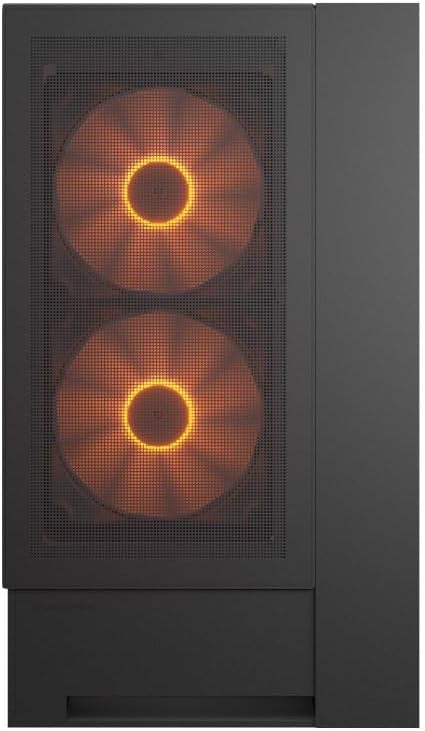
Фронт view of the COUGAR OmnyX PC case, highlighting the pre-installed 160mm fans.

Illustration of the symmetrical design, allowing flexible case orientation.

Close-up of the large 160mm fans providing powerful cooling.
Расмий продукт видео showcasing the COUGAR OmnyX PC case features, including its symmetrical design, quad 160mm fans, ambidextrous I/O module, cable management, and quick release mechanism for easy installation.
5. Орнотуу жана орнотуу
5.1. Даярдоо
Баштоодон мурун, сизде таза, жакшы жарыктандырылган иш мейкиндигине жана Phillips баштуу бурагычты камтыган керектүү шаймандарга ээ болуңуз.
5.2. Панелди алып салуу
The OmnyX case features a quick-release mechanism for easy panel removal. Gently pull the panels to detach them from the chassis. Refer to the exploded view компонентти идентификациялоо үчүн.

Бөлүнгөн view of the COUGAR OmnyX case, showing removable panels and components.
5.3. Motherboard орнотуу
The OmnyX supports Mini ITX, Micro ATX, and ATX motherboards. Install the necessary standoffs for your motherboard size, then carefully place the motherboard and secure it with screws.

Ички view showing the motherboard tray and mounting points.
5.4. Графикалык картаны (GPU) орнотуу
Install your graphics card into the appropriate PCIe slot. The case supports GPUs up to 380mm in length. For vertical GPU mounting, utilize the integrated bracketless vertical GPU mount.

Illustration of the bracketless vertical GPU mounting option.
5.5. Дискти орнотуу
The case provides bays for 2x 3.5-inch drives and 2x 2.5-inch drives. Secure your storage devices in the designated locations using the provided screws.
5.6. Электр менен камсыздоо блогун (PSU) орнотуу
Install your power supply unit in the rear-mount location. The case accommodates PSUs up to 200mm in length.
5.7. Кабелдик башкаруу
Utilize the dedicated cable management channels and tie-down points behind the motherboard tray to route and secure cables. This ensures optimal airflow and a clean internal appearance.

View illustrating the efficient cable management system within the case.
5.8. Front I/O Connections
Connect the front panel I/O cables (USB 3.0, USB 3.2 Gen 2 Type-C, audio, power, reset) to their corresponding headers on your motherboard. The ambidextrous I/O module offers flexible placement.

Close-up of the front I/O panel with USB ports and controls.
6. Иштөө нускамалары
6.1. Күйгүзүү/өчүрүү
After all components are installed and cables connected, plug the power supply into a wall outlet. Press the power button on the front I/O panel to turn on your PC.
6.2. RGB жарыкты башкаруу
The pre-installed fans feature RGB lighting. Control of the RGB effects and fan speed is typically managed through your motherboard's software or a dedicated controller if included. Refer to your motherboard manual for specific instructions on RGB synchronization.

Illustration depicting RGB LED and fan speed control capabilities.
7. Техникалык тейлөө
Regular maintenance helps ensure the longevity and performance of your PC case:
- Чаңды тазалоо: Чаң чыпкаларын жана ички компоненттерин мезгил-мезгили менен кысылган аба же жумшак щетка менен тазалап туруңуз. Чаңдын топтолушу абанын агымына тоскоол болуп, ысып кетишине алып келиши мүмкүн.
- Тышкы тазалоо: Сырткы беттерин жумшак менен сүртүңүз, гamp кездеме. Абразивдүү тазалагычтардан алыс болуңуз.
- Кабель текшерүү: Ensure all internal cables remain securely connected and neatly routed.
8. Кыйынчылыктарды
Көйгөйгө туш болсоңуз, төмөнкү жалпы көйгөйлөрдү чечүү кадамдарын караңыз:
- Кубат жок: Check if the power supply is properly connected to the wall outlet and the motherboard. Ensure the power button cable is correctly connected to the motherboard header.
- Айланбаган күйөрмандар: Verify that the fan cables are securely connected to the motherboard fan headers or a fan controller. Check BIOS settings for fan speed control.
- RGB иштебей жатат: Confirm RGB cables are connected to the correct motherboard headers or controller. Check your motherboard's RGB software for settings.
- Ашыкча ысып кетүү: Ensure all fans are functioning correctly and oriented for optimal airflow. Clean any dust buildup from filters and components. Verify CPU cooler and GPU cooler installations.
For more complex issues, consult your component manuals or contact COUGAR support.
9. Техникалык шарттар
| Өзгөчөлүк | Спецификация |
|---|---|
| Модель аты | OmnyX |
| Модель номери | CGR-2WA3B-RGB |
| Иштин түрү | Ара Tower |
| Motherboard Support | Mini ITX / Micro ATX / ATX |
| Өлчөмдөр (D x W x H) | 300 x 470 x 520 мм |
| 3.5" Айдоочу булуңдар | 2 |
| 2.5" Айдоочу булуңдар | 2 |
| CPU муздаткычтын бийиктигинин чеги | 170мм |
| GPU Length Limit | 380мм |
| Электр камсыздоосунун узундугунун чеги | 200мм |
| Алдын ала орнотулган күйөрмандар | 4 x 160 мм |
| Алдыңкы I / O порттору | 4x USB 3.0 Type-A, 2x USB 3.2 Gen 2 Type-C |
| Салмагы | 12.6 кг |
10. Кепилдик жана колдоо
The COUGAR OmnyX PC Case comes with a 1 жылдык кепилдик from the date of purchase. This warranty covers manufacturing defects and faulty components under normal use. It does not cover damage caused by misuse, accidents, unauthorized modifications, or improper installation.
For technical support, warranty claims, or further assistance, please visit the official COUGAR webсайтына кириңиз же жергиликтүү сатуучуңузга кайрылыңыз.
COUGAR расмий өкүлү Webсайт: www.cougar-gaming.com