
1. Киришүү
This manual provides essential instructions for the safe and efficient operation, maintenance, and troubleshooting of your CAARLA Push Sweeper MS50W. Please read this manual thoroughly before operating the machine and retain it for future reference.
The CAARLA MS50W is a hand-propelled mini street and road sweeper designed for effective cleaning of various surfaces. It features a water system for dust suppression and an integrated dust filter for enhanced cleaning performance.
2. Коопсуздук нускамалары
Кандайдыр бир техниканы иштетүүдө ар дайым коопсуздукту биринчи орунга коюңуз. Төмөнкү көрсөтмөлөрдү аткарыңыз:
- Колдонуудан мурун бардык нускамаларды окуп, түшүнүңүз.
- Ensure the sweeper is on a stable, level surface before performing any adjustments or maintenance.
- Колдорду, буттарды жана бош кийимдерди кыймылдуу бөлүктөрдөн алыс кармаңыз.
- Do not operate the sweeper in wet conditions unless specifically designed for it, and exercise extreme caution.
- Store the sweeper in a dry, secure location, out of reach of children.
- Wear appropriate personal protective equipment (PPE) such as gloves and safety glasses if necessary.
- Disconnect power (if applicable for electric components) before cleaning or maintenance.
3. Продукт бүтүп калдыview
The CAARLA MS50W sweeper is designed for efficient debris collection. Key components include the main sweeping brushes, side brushes, debris hopper, water tank, and dust filter system.

3.1-сүрөт: Жалпысынан view of the CAARLA Push Sweeper MS50W. This image displays the sweeper from a front-side angle, showing the main body, handle, and both the main and side brushes.

3.2-сүрөт: Жогорудан төмөн view of the sweeper's main body. This image highlights the central cover, likely for the debris hopper or water system, and the robust wheel design.
4. Орнотуу жана чогултуу
The CAARLA MS50W sweeper is designed for minimal assembly. According to product specifications, assembly is not required. However, ensure the following before first use:
- Тутканы тууралоо: Adjust the handle to a comfortable height for operation. The handle is designed to collapse for storage.
- Суу куюлган бактын толтурулушу: Locate the water tank (capacity 5L) and fill it with clean water if using the water spray system for dust suppression.
- Dust Filter Check: Ensure the dust filter is correctly installed.

4.1-сүрөт: Components of the dust filter system. This image shows the filter housing, the pleated filter element, and a foam pre-filter, indicating a multi-stage фильтрация системасы.
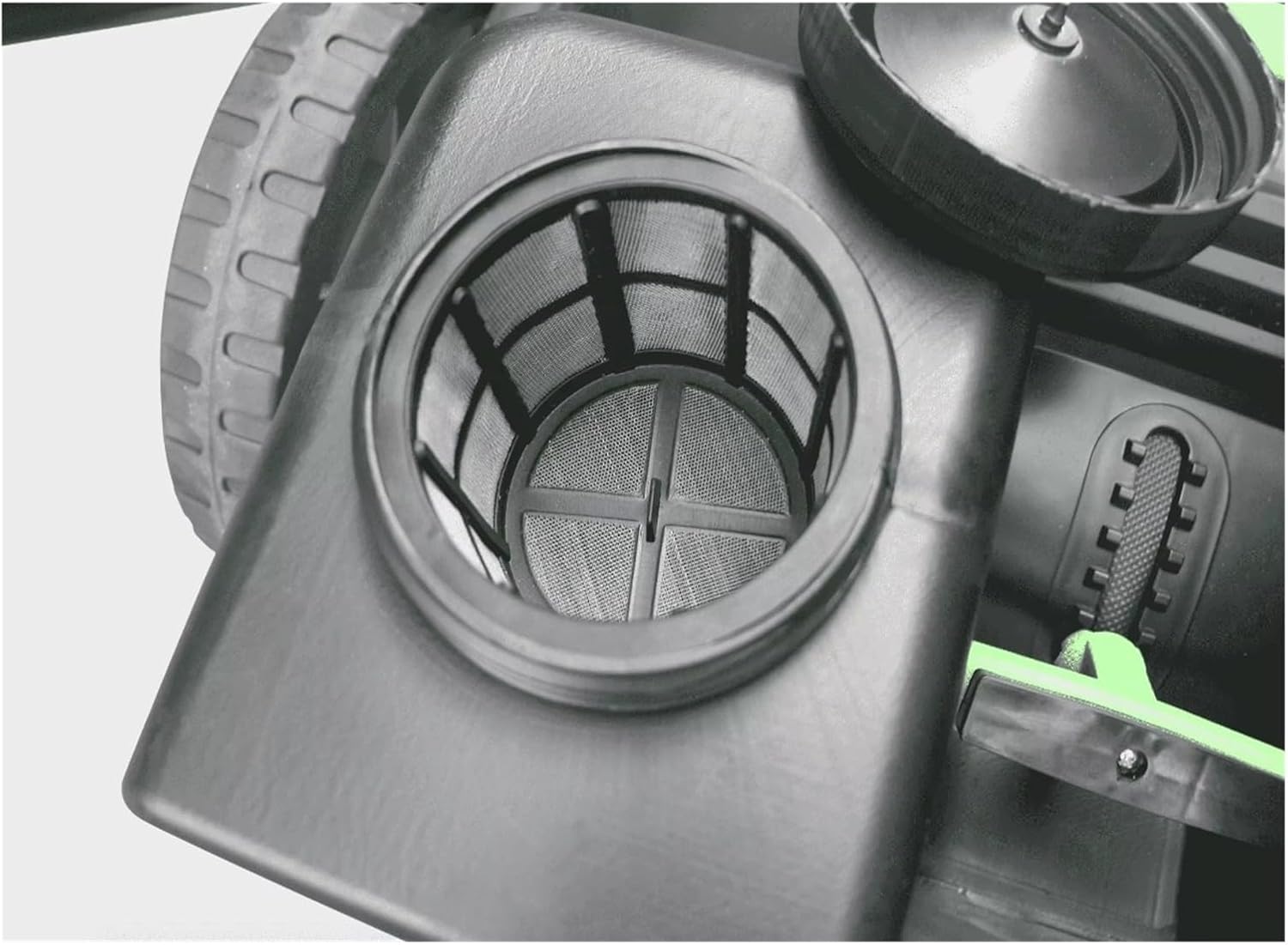
4.2-сүрөт: Ички view of the water tank inlet with a mesh filter. This filter prevents larger particles from entering the water system, protecting the spray nozzles.
5. Иштөө нускамалары
- Даярдоо: Ensure the debris hopper is empty and the water tank (if used) is filled.
- Ишти баштоо: Push the sweeper forward at a steady, comfortable pace. The main and side brushes will rotate, collecting debris into the hopper.
- Water System (if applicable): If your model includes an electric water spray system, ensure it is charged and activated to suppress dust during sweeping.
- Тазалоо техникасы: Overlap sweeping paths slightly to ensure complete coverage. For corners and edges, utilize the side brushes effectively.
- Бункерди бошотуу: Periodically check the debris hopper. When full, disengage it from the sweeper and empty its contents into a waste receptacle.

5.1-сүрөт: Charging port and battery voltage indicator. This panel shows the power input for charging the electric components (e.g., water pump) and a visual gauge for battery status.
6. Техникалык тейлөө
Regular maintenance ensures optimal performance and extends the lifespan of your sweeper.
- Ар бир колдонуудан кийин:
- Empty the debris hopper.
- Clean the brushes of any tangled debris (strings, hair, etc.).
- Wipe down the exterior of the sweeper with a damp кездеме.
- Мезгил-мезгили менен:
- Dust Filter Cleaning/Replacement: Remove and clean the dust filter (refer to Figure 4.1). Tap out loose dust or wash if washable. Replace if damaged or excessively clogged.
- Water Tank Filter Cleaning: Clean the mesh filter in the water tank inlet (refer to Figure 4.2) to prevent blockages.
- Щетканы текшерүү: Check brushes for wear and tear. Replace worn brushes to maintain sweeping efficiency.
- Battery Charging (if electric): Ensure the battery for the water system (if present) is charged as needed.
- Сактагыч: Store the sweeper in a dry, protected area. Collapse the handle for compact storage.
7. Кыйынчылыктарды
| Көйгөй | Мүмкүн себеп | Чечим |
|---|---|---|
| Начар шыпыруу аткаруу | Worn brushes; Hopper full; Debris tangled in brushes; Sweeping too fast. | Replace brushes; Empty hopper; Clean brushes; Reduce sweeping speed. |
| Water spray not working | Empty water tank; Clogged water filter; Discharged battery (if electric pump). | Refill tank; Clean water filter; Charge battery. |
| Difficulty pushing | Overfilled hopper; Obstruction in wheels/brushes. | Empty hopper; Remove obstruction. |
8. Техникалык шарттар
| Өзгөчөлүк | Деталь |
|---|---|
| Модел | MS50W |
| Sweeping Path | 980 мм |
| Hopper Volume | 70 Л |
| Суу резервуарынын сыйымдуулугу | 5 Л |
| Салмагы (Машина) | 24 кг (52.9 фунт) |
| Өлчөмдөрү (L*W*H) | 1300 x 980 x 1035 мм |
| Power Source | Manual (with electric components for water system) |
| Ассамблея талап кылынат | Жок |
9. Кепилдик жана колдоо
Specific warranty information is not provided in this manual. For details regarding warranty coverage, technical support, or replacement parts, please contact your retailer or the manufacturer, CAARLA, directly. Retain your proof of purchase for warranty claims.
For further assistance, please refer to the contact information provided at the point of purchase or on the official CAARLA webсайт.