
Hikity A7878A4294H6MI2-63EU
Hikity 4+128GB Android 15 Car Radio Instruction Manual
Model: A7878A4294H6MI2-63EU
1. Продукт бүтүп калдыview
This manual provides detailed instructions for the installation, operation, and maintenance of your Hikity 4+128GB Android 15 Car Radio. Designed for Citroen Berlingo B9 (2008-2017) and Peugeot Partner (2008-2019) vehicles, this car radio features a 9-inch In-Cell touchscreen, wireless CarPlay and Android Auto, Bluetooth 5.0, integrated GPS, Wi-Fi, FM/RDS tuner, and steering wheel control compatibility.
The unit offers 4GB RAM and 128GB internal storage for smooth performance and ample space for applications. It is equipped with a high-definition display for clear visuals and an intuitive user interface.
2. Пакеттин мазмуну
Төмөндө тизмеленген нерселердин баары пакетиңизге камтылганын текшериңиз:
- 1 x Радио корпусу
- 1 x Original USB кабели
- 1 x Радио антенна
- 1 x Canbus декодери
- 1 x Орнотуу куралы
- 1 x Унаа радиосу
- 2 х Power Cables
- 1 x GPS антеннасы
- 1 x Арткы камера
- 1 x Арткы камеранын киргизүү кабели
- 1 x RCA кабели
- 2 х USB кабелдери
- 2 х Монтаждык кашаа
- 1 x Микрофон
- 1 x User Manual
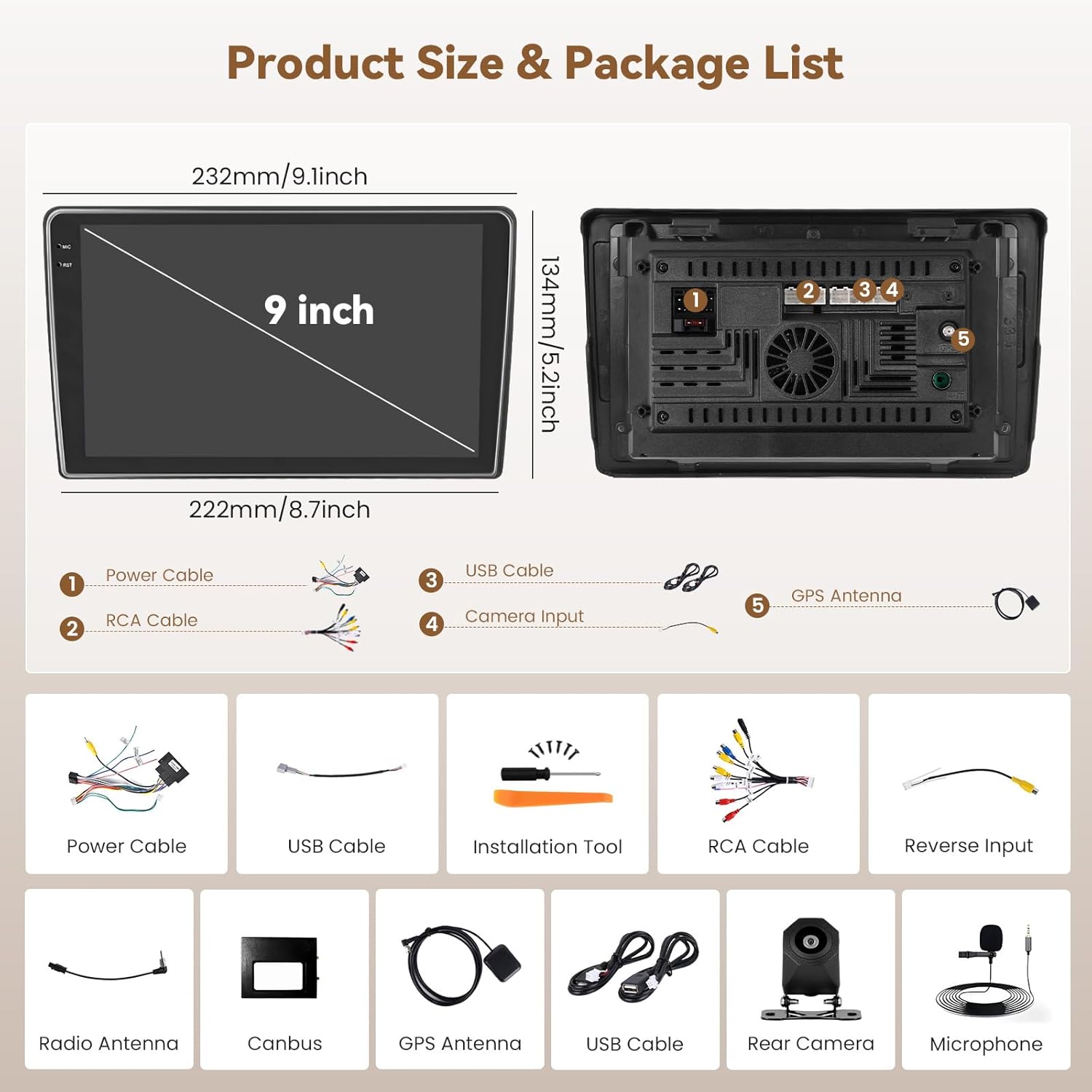
2.1-сүрөт: Продукциянын өлчөмдөрү жана ага кошулган аксессуарлар.
3. Орнотуу боюнча колдонмо
3.1 Унаа шайкештиги
This car radio is specifically designed for Citroen Berlingo B9 (2008-2017) and Peugeot Partner (2008-2019) models. Please confirm that your vehicle's center console matches the compatible models shown in the image below before proceeding with installation. If your console differs, contact customer service for guidance.

Figure 3.1: Compatible vehicle center console types.
3.2 Орнотууга чейинки кадамдар
- Электр зымдарынын кыска төшөлүшүнө жол бербөө үчүн унаанын аккумуляторун ажыратыңыз.
- Carefully remove the original car radio and trim panels using the provided installation tool.
- Identify the wiring harnesses from your vehicle.
3.3 Зымдарды туташтыруу
Connect the provided cables to the corresponding ports on the Hikity car radio and your vehicle's wiring harness. Refer to the wiring diagram in the included user manual for specific connections. Key connections include:
- Электр кабелдери: Унаанын электр кубатына туташтырыңыз.
- RCA кабели: Аудио/видео киргизүү/чыгаруу үчүн.
- USB кабелдери: Тышкы USB түзмөктөрү жана маалыматтарды өткөрүп берүү үчүн.
- Камеранын киргизүү кабели: For connecting the rear camera.
- GPS антеннасы: Тунук жерге орнотуңуз view асмандын.
- Радио антенна: Connect for FM/RDS reception.
- Canbus декодери: Connect for steering wheel control and vehicle data integration.
- Микрофон: Колсуз чалуу үчүн тышкы микрофонду туташтырыңыз.

Figure 3.2: Visual comparison of the dashboard before and after installing the Hikity car radio.
3.4 Агрегатты монтаждоо
- Secure the car radio into the dashboard opening using the provided mounting brackets.
- Кесүү панелдерин кайра орнотуңуз.
- Унаанын аккумуляторун кайра туташтырыңыз.
4. Иштөө нускамалары
4.1 Күйгүзүү/өчүрүү жана негизги навигация
- Күйгүзүү: Turn the vehicle ignition to ACC or ON. The unit will power on automatically.
- Өчүрүү: Turn the vehicle ignition to OFF. The unit will power off.
- Сенсордук экран: Navigate the interface by tapping, swiping, and pinching on the 9-inch In-Cell touchscreen.
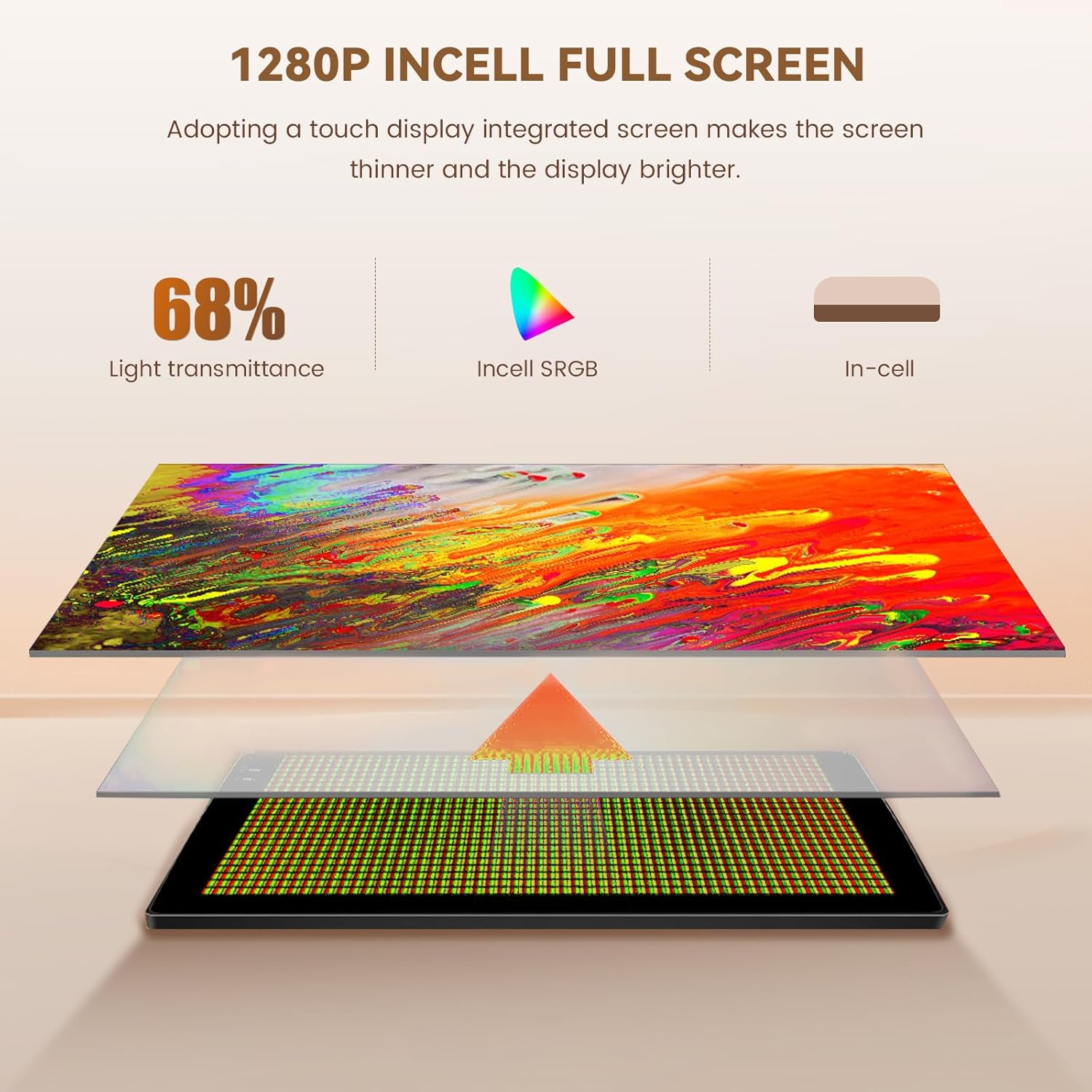
Figure 4.1: In-Cell touchscreen technology benefits.
4.2 Wireless CarPlay жана Android Auto
The unit supports wireless CarPlay for iOS devices and wireless Android Auto for Android devices, allowing seamless integration of your smartphone's features onto the car radio display.
- Смартфонуңузда Bluetooth жана Wi-Fi иштетилгенин текшериңиз.
- Унаа радиосунан "CarPlay" же "Android Auto" тиркемесин ачыңыз.
- Телефонуңузду Bluetooth аркылуу жупташтыруу үчүн экрандагы көрсөтмөлөрдү аткарыңыз. Жупташтырылгандан кийин система зымсыз CarPlay/Android Auto үчүн Wi-Fi туташуусун автоматтык түрдө орнотот.
- You can now access navigation, music, calls, and messages directly from the car radio screen.

Figure 4.2: Wireless CarPlay, Android Auto, and Mirror Link interfaces.
4.3 Bluetooth Hands-Free чалуу жана музыка
Connect your smartphone via Bluetooth 5.0 for hands-free calls and audio streaming.
- Унаа радиосундагы Bluetooth жөндөөлөрүнө өтүңүз.
- Смартфонуңузда Bluetooth'ду иштетип, жеткиликтүү түзмөктөрдү издеңиз.
- Select "Hikity Car Radio" (or similar name) from your phone's list and pair.
- Туташкандан кийин, сиз унаанын динамиктери аркылуу чалууларды жасай/кабыл ала жана музыка ойной аласыз.

Figure 4.3: Bluetooth, Wi-Fi, GPS, and Equalizer features.
4.4 GPS навигациясы
The integrated GPS module provides reliable navigation. You can use pre-installed maps or download online maps via Wi-Fi.
- Open the Navigation application from the main menu.
- Enter your destination. The system will calculate the route and provide turn-by-turn directions.
- Online maps support real-time traffic updates when connected to Wi-Fi.
4.5 FM/RDS радиосу
Access FM radio stations with RDS (Radio Data System) for station information.
- Select the "Radio" application.
- Жеткиликтүү станцияларды табуу же жыштыкка кол менен күүлдөө үчүн сканерлөө функциясын колдонуңуз.
- RDS provides information such as station name and program type.
4.6 Рулду башкаруу (SWC)
The unit supports your vehicle's original steering wheel controls for convenient operation.
- Система менюсундагы "Рулду башкаруу" жөндөөлөрүнө кириңиз.
- Follow the on-screen instructions to program each button on your steering wheel to its corresponding function (e.g., volume up/down, next/previous track, answer/end call).
- Save the settings once configuration is complete.

Figure 4.4: Steering Wheel Control configuration interface.
4.7 Камера
Унаа артка берүүчү ылдамдыкка өткөндө, дисплей автоматтык түрдө арткы камерага которулат view, унаа токтотууга жана маневр жасоого жардам берүү.

Figure 4.5: Backup camera, radio, and other advanced features.
4.8 Бөлүнгөн экран функциясы
Бөлүнгөн экран функциясы дисплейде бир эле учурда эки тиркемени, мисалы, навигацияны жана музыканы ойнотууну иштетүүгө мүмкүндүк берет.
- While an application is open, long-press the recent apps button or drag from the side (depending on the Android version) to activate split-screen mode.
- Биринчи тиркеменин жанында көрсөтүлүүчү экинчи тиркемени тандаңыз.
5. Техникалык тейлөө
Hikity автоунаа радиоңуздун узак мөөнөттүү иштешин жана оптималдуу иштешин камсыз кылуу үчүн, төмөнкү техникалык тейлөө көрсөтмөлөрүн аткарыңыз:
- Экранды тазалоо: Use a soft, lint-free cloth to gently wipe the touchscreen. Avoid abrasive cleaners or solvents that could damage the display.
- Программалык камсыздоо жаңыртуулары: Periodically check for available software updates through the system settings to ensure you have the latest features and performance improvements.
- Экологиялык шарттар: Аппаратты экстремалдык температурага, түз күн нуруна узак убакытка же ашыкча нымдуулукка дуушар кылуудан алыс болуңуз.
6. Кыйынчылыктарды
Эгерде сиз унааңыздын радиосу менен көйгөйлөргө туш болсоңуз, төмөнкү жалпы көйгөйлөрдү чечүү кадамдарын караңыз:
| Көйгөй | Мүмкүн себеп | Чечим |
|---|---|---|
| Түзмөк күйбөйт. | Бошоң электр туташуу, күйгөн сактагыч, унаанын аккумуляторунун көйгөйү. | Электр кабелдеринин туташууларын текшериңиз. Унаанын сактагычтарын текшериңиз. Унаанын аккумулятору заряддалганын текшериңиз. |
| Үн жок. | Үн өтө төмөн, аудио булагы туура эмес, динамиктин зымдарында көйгөй бар. | Үнүн жогорулатуу. Туура аудио булагын тандаңыз. Динамик байланыштарын текшериңиз. |
| Зымсыз CarPlay/Android Auto туташпай жатат. | Bluetooth/Wi-Fi off on phone, incorrect pairing, software glitch. | Ensure phone's Bluetooth and Wi-Fi are on. Re-pair the device. Restart both phone and car radio. |
| Камдык камера көрсөтүлбөй жатат. | Loose camera connection, faulty camera, incorrect wiring. | Check the camera input cable connection. Verify camera functionality. Ensure reverse trigger wire is correctly connected. |
| Рулдун башкаруулары иштебейт. | Canbus not connected, incorrect programming. | Ensure Canbus decoder is correctly installed. Re-program the steering wheel controls in settings. |
Эгерде бул чечимдерди колдонуп көргөндөн кийин да көйгөй чечилбесе, кошумча жардам алуу үчүн Hikity кардарларды колдоо кызматына кайрылыңыз.
7. Техникалык шарттар
| Өзгөчөлүк | Деталь |
|---|---|
| Модель номери | A7878A4294H6MI2-63EU |
| Операция системасы | Android 15 |
| RAM | 4 ГБ |
| Ички сактагыч (ROM) | 128 ГБ |
| Экран түрү | 9-inch In-Cell Touchscreen |
| Байланыш | Bluetooth 5.0, USB, Wi-Fi (5G compatible) |
| Атайын функциялар | GPS Navigation, RDS, FM Tuner, Wireless CarPlay, Wireless Android Auto |
| Аудио чыгаруу режими | Стерео |
| Айланадагы үн каналдары | 4.0 |
| Чыгуу күчү | 45 Watts (per channel, total 180 Watts) |
| Видеону коддоо | H.264, H.265/HEVC, MPEG-4, ж.б. |
| Шайкеш түзмөктөр | Смартфон |
| Продукциянын өлчөмдөрү (DxWxH) | 23.5 x 13.5 x 4.5 см |
| Салмагы | 1.29 кг |
| Origin | Кытай |
8. Кепилдик жана колдоо
Your Hikity car radio comes with a 24 айлык кепилдик. For any technical assistance, product inquiries, or warranty claims, please contact Hikity customer support. Online assistance is available, with responses typically provided within 24 hours.
For the most up-to-date support information, please visit the official Hikity store on Amazon or refer to the contact details provided in your warranty card.
Интернет дүкөн: Hikity Amazon Store
Ask a question about this manual
Ask about setup, troubleshooting, compatibility, parts, safety, or missing instructions. Manuals+ will review the question and use this page’s manual context to help answer it.