
1. Киришүү
The NZXT H2 Flow (CI-H21FB-01) is a compact vertical Mini-ITX PC case designed to maximize airflow and save space while accommodating high-performance components. It features smart cable management, tool-less access, and includes dual top fans and a premium PCIe 5.0 riser cable for a streamlined building experience.
Негизги өзгөчөлүктөрү:
- Hybrid Glass-and-Mesh Side Panel: Showcases your build while supporting up to a 280 mm radiator for efficient cooling.
- Компакт дизайн: A 20.7 L volume fits most GPUs up to 331 mm, offering high-end power in a small footprint.
- High Airflow Panels: Ultra-fine mesh panels on multiple sides maximize fresh air intake and filter dust, keeping components cooler and cleaner.
- Effortless Building: Tool-less panels, integrated cable routing Velcro straps, and intuitive wire management channels simplify installation.
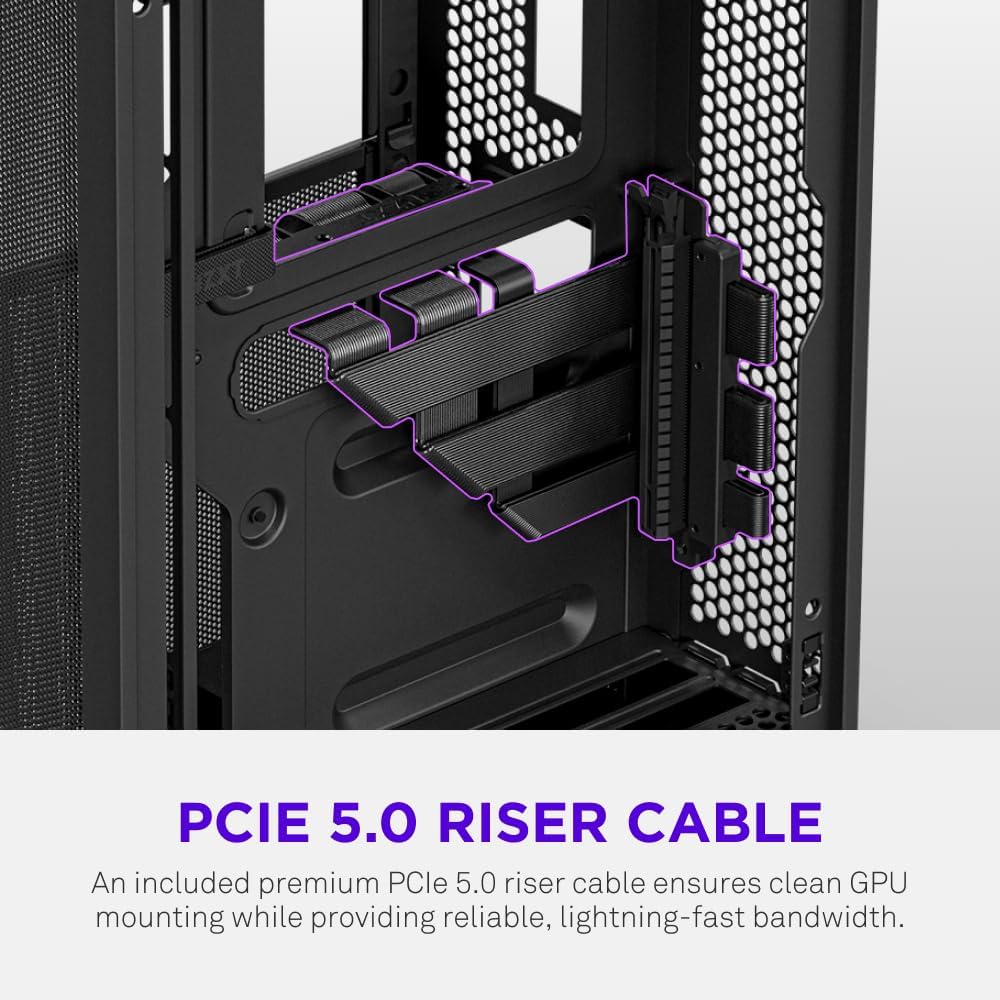
- Pre-Installed Performance: Includes a premium PCIe 5.0 riser cable for vertical GPU mounting and dual F120Q CV fans for immediate exhaust cooling.
2. Коопсуздук маалыматы
WARNING: Always disconnect power from your PC before performing any installation, maintenance, or troubleshooting. Failure to do so may result in personal injury or damage to components.
- Орнотуудан мурун бардык нускамаларды кылдат окуп чыгыңыз.
- Компоненттерге электростатикалык разряддын (ESD) зыянын болтурбоо үчүн антистатикалык билек боону тагыңыз же жерге туташтырылган металл нерсеге тез-тез тийип туруңуз.
- Handle components with care. Avoid touching pins or exposed circuitry.
- Майда тетиктерди жана таңгактоочу материалдарды балдардан алыс кармаңыз.
- Ашыкча ысып кетүүнүн алдын алуу үчүн PC корпусунун айланасында туура желдетүүнү камсыз кылыңыз.
3. Пакеттин мазмуну
Verify that all items are present in your NZXT H2 Flow package:
- NZXT H2 Flow Mini-ITX PC Case
- 2 x 120mm F120Q CV Top Fans (pre-installed)
- Premium PCIe 5.0 Riser Cable (pre-installed)
- Аксессуар кутусу (бурамалар, кабелдик байланыштар жана башка майда бөлүктөрү бар)
4. Компоненттин шайкештиги
The NZXT H2 Flow case is designed to accommodate specific component sizes for optimal performance and fit:
- Motherboard: Mini ITX
- Графикалык карта (GPU): Up to 331 mm in length
- Радиатор: Up to 280 mm (for liquid cooling solutions)
- Кубат менен камсыздоо (PSU): SFX/SFXL form factor is recommended for best compatibility and cable management.
- Күйөрмандар: Includes 2 x 120mm top fans. Additional fan mounting options may be available depending on other component choices.
5. Орнотуу жана орнотуу
Follow these steps to assemble your PC within the NZXT H2 Flow case. Refer to your individual component manuals for specific installation details.
5.1. Case Overview жана Өлчөмдөр
The NZXT H2 Flow is a compact vertical Mini-ITX case. Understanding its dimensions is crucial for planning your build.

5.2. Accessing the Case Interior
The H2 Flow features tool-less panels for easy access to the interior.

5.3. Motherboard and CPU Installation
Install your Mini-ITX motherboard and CPU (with cooler) before placing it into the chassis.
5.4. Электр менен камсыздоо блогун (PSU) орнотуу
The case supports SFX/SFXL power supplies. Mount the PSU in its designated area, typically at the bottom of the case.

5.5. Кабелдик башкаруу
Utilize the integrated cable routing channels and Velcro straps for a clean and organized interior.
5.6. Графикалык картаны (GPU) орнотуу
The H2 Flow supports GPUs up to 331 mm in length and includes a premium PCIe 5.0 riser cable for vertical mounting.

5.7. Муздатуу системасы
The case comes with two pre-installed 120mm F120Q CV fans at the top for exhaust. It also supports up to a 280mm radiator for liquid cooling.


5.8. Продукт бүтүп калдыview Video
Көрүү үчүн бул расмий видеону көрүңүзview of the NZXT H2 Flow Mini-ITX PC Gaming Case.
6. Иштөө нускамалары
6.1. Күйгүзүү/өчүрүү
Press the power button located on the front I/O panel to turn your PC on or off.
6.2. Алдыңкы киргизүү/чыгаруу порттору
The front I/O panel provides convenient access to:
- USB 3.0 порттору
- USB-C порту
- Audio Jack (if applicable)
Connect your peripherals such as keyboards, mice, and headsets to these ports.
7. Техникалык тейлөө
7.1. Чаң чыпкаларын тазалоо
The NZXT H2 Flow features ultra-fine mesh panels that act as dust filters. Regularly clean these panels to maintain optimal airflow and prevent dust buildup inside your PC.
- Gently remove the mesh panels from the case.
- Use compressed air or a soft brush to remove accumulated dust.
- Панелдерди кайра бекем бекитиңиз.
7.2. Жалпы тазалоо
жумшак колдонуу, damp корпустун сыртын аарчый турган чүпүрөк. Абразивдүү тазалагычтардан же эриткичтерден качыңыз.
8. Кыйынчылыктарды
Эгерде сиз компьютериңизди түзүүдө көйгөйлөргө туш болсоңуз, төмөнкү жалпы көйгөйлөрдү чечүү кадамдарын карап көрүңүз:
- Кубат жок: Ensure all power cables (PSU to wall, PSU to motherboard, CPU, GPU) are securely connected. Check the power switch on the PSU.
- Дисплей жок: Verify that your monitor is connected to the graphics card (not the motherboard I/O unless using integrated graphics) and that the GPU has proper power connections. Reseat the GPU and RAM.
- Ашыкча ысып кетүү: Check fan connections and orientation. Ensure mesh panels are clean and not obstructed. Verify CPU cooler installation and thermal paste application.
- Компонент аныкталган жок: Reseat the component (GPU, RAM, storage drives). Check power and data connections.
For more complex issues, consult your individual component manuals or NZXT customer support.
9. Техникалык шарттар
| Өзгөчөлүк | Деталь |
|---|---|
| Бренд | NZXT |
| Модель аты | NZXT H2 Flow |
| Иштин түрү | Мини-Мунара |
| Motherboard шайкештиги | Mini ITX |
| GPU узундугун колдоо | 331 мм чейин |
| Радиатор колдоо | 280 мм чейин |
| Камтылган күйөрмандар | 2 x 120mm F120Q CV Top Fans |
| Included Riser Cable | Premium PCIe 5.0 |
| Кубат менен камсыздоону орнотуу түрү | Bottom Mount (SFX/SFXL recommended) |
| Муздатуу ыкмасы | Air, Liquid |
| Түс | Кара |
| Материал | Айнек, металл |
| Элемент Салмагы | 4.55 килограмм |
| Total USB 3.0 Ports | 1 |
| Other Special Features | Tool-less Installation, Integrated Cable Management |
10. Кепилдик жана колдоо
10.1. Кепилдик маалыматы
The NZXT H2 Flow Mini-ITX PC Case comes with a 2 жылдык Өндүрүүчүнүн Кепилдиги. Кепилдик дооматтары үчүн сатып алганыңыздын далилин сактап коюңуз.
10.2. Кардарларды колдоо кызматы
For technical assistance, troubleshooting, or warranty inquiries, please visit the official NZXT support webсайтка же кардарларды тейлөө тобуна кайрылыңыз.
NZXT Store: Visit the NZXT Store on Amazon