
1. Продукт бүтүп калдыview
The PAPIFEED Automatic Pet Feeder and Water Fountain combo provides a convenient and organized solution for daily pet care. This set ensures your pet has access to fresh food and clean water, ideal for busy households or short trips. The feeder features smart APP control via 2.4GHz WiFi for precise feeding schedules, while the water fountain offers triple filtration for clean, fresh water.

Image: The PAPIFEED Automatic Pet Feeder and Water Fountain set, showing the feeder dispensing kibble into a stainless steel bowl, the water fountain with flowing water, and a smartphone displaying the control app interface.
2. Коопсуздук нускамалары
- Ensure the device is placed on a stable, level surface to prevent tipping.
- Use only the provided power adapters for both the feeder and water fountain.
- Keep the feeder base dry. Do not wash the feeder base with water.
- Regularly clean all detachable parts of both devices to maintain hygiene.
- Keep out of reach of children and pets that may chew on cords.
- Only use dry pet food with the automatic feeder. Do not use canned, wet, or moist food.
- Recommended kibble size is 0.2–0.39 inches (5–10mm) to prevent clogging.
3. Пакеттин мазмуну
Пакетте бардык буюмдар бар экенин текшериңиз:
- 3L Automatic Pet Feeder with APP control
- 3L Үй жаныбарлары үчүн суу фонтаны
- Дат баспас болоттон жасалган тамактандыруучу идиш
- USB Power Cable (for feeder)
- USB Power Cable with Pump (for water fountain)
- Water Fountain Filter (pre-installed)
- Тазалоочу щетка
- User Manuals (for feeder and fountain)

Image: A cat eating from the PAPIFEED Automatic Pet Feeder, with the water fountain visible next to it. This image illustrates the complete set in use.
4. Орнотуу нускамалары
4.1. Automatic Pet Feeder Setup
- Компоненттерди таңгактан чыгаруу: Turn the food container counterclockwise to remove the cover. Remove all internal accessories.
- Азыктандыргычты чогултуу: Align the food container with the base and rotate clockwise to secure it.
- Add Desiccant: Open the desiccant compartment on the lid and insert the desiccant packet to keep food fresh. Close the compartment securely.
- Fill Food Container: Add dry pet food (0.2–0.39 inch / 5–10mm kibble recommended) into the transparent container.
- Коопсуз капкак: Rotate and close the lid securely to maintain food freshness.
- Чөйчөктү жайгаштыруу: Position the stainless steel feeding bowl in front of the dispenser opening.
- Күйгүзүү: Plug the DC 5V power adapter into the feeder and a wall outlet. For battery backup, install 4x D-cell batteries (not included) in the bottom compartment.

Image: A six-step visual guide demonstrating the assembly of the automatic pet feeder, from unpacking to plugging in the power.
4.2. Water Fountain Setup
- Насосту орнотуу: Place the water pump into the water tank, ensuring the USB power cord is routed through the designated groove.
- Сууну толтуруу: Fill the water tank with clean water up to the MAX fill line.
- Фильтрди киргизүү: Remove the cartridge frame, insert the filter cartridge, and place the frame back into the water tank. (Pre-soak and rinse the filter before first use).
- Душ башын тиркөө: Install the water storage tray and attach the showerhead/spout onto the pump.
- Күйгүзүү: Place the assembled water fountain on a level surface and connect the DC 5V power adapter to a wall outlet.

Image: A five-step visual guide showing how to install the pump, fill the water tank, insert the filter, attach the showerhead, and power on the water fountain.
5. Иштөө нускамалары
5.1. Smart APP Control (2.4GHz WiFi)
The PAPIFEED feeder can be controlled remotely via the 'Smartlyn' APP. Ensure your device is connected to a 2.4GHz WiFi network (5G networks are not supported).
- Колдонмону жүктөп алуу: Scan the QR code in the user manual or search for 'Smartlyn' in your app store (http://www.chuangzhile.com/smartlyn/downloadApp.php).
- Enable Bluetooth & WLAN: On your mobile phone, turn on Bluetooth and WLAN. Keep your phone within 1 meter of the feeder.
- Жупташтыруу режимине кирүү: After powering on the feeder, long-press the '+' button for 10 seconds until the blue indicator light flashes.
- Түзмөк кошуу: Open the 'Smartlyn' APP, tap the '+' icon in the upper right corner to add the device. Follow the on-screen prompts to complete the connection.
- Set Feeding Plan: Once connected, you can create up to 12 meals per day, each offering 1–10 portions (approx. 0.35 oz per portion). Adjust schedules, monitor feeding records, and enable slow feeding mode.

Image: A visual guide illustrating the steps to connect the pet feeder to the 'Smartlyn' mobile application via Bluetooth and Wi-Fi.
5.2. Кол менен тамактандыруу
To manually dispense food, short-press the '+' button on the back of the feeder. Each short press will dispense one portion of food.
5.3. Расмий продукт Videos
Video: This video provides a detailed guide on how to use the PAPIFEED Automatic Pet Feeder and Water Fountain, covering assembly, app connection, and basic operation.
Video: A demonstration and setup guide for the PAPIFEED Automatic Pet Feeder, including app configuration and assembly steps, highlighting its ease of use.
6. Техникалык тейлөө
6.1. Азыктандыргычты тазалоо
- The stainless steel bowl, food container, and rotor are detachable and washable.
- Дат баспас болоттон жасалган идиш идиш жуугучта жууй албайт.
- Тамак берүүчү бөлүктүн негизин жуубаңыз. Аны кургак чүпүрөк менен сүртүңүз.
- Replace the desiccant packet in the lid regularly (e.g., monthly) to ensure food freshness.
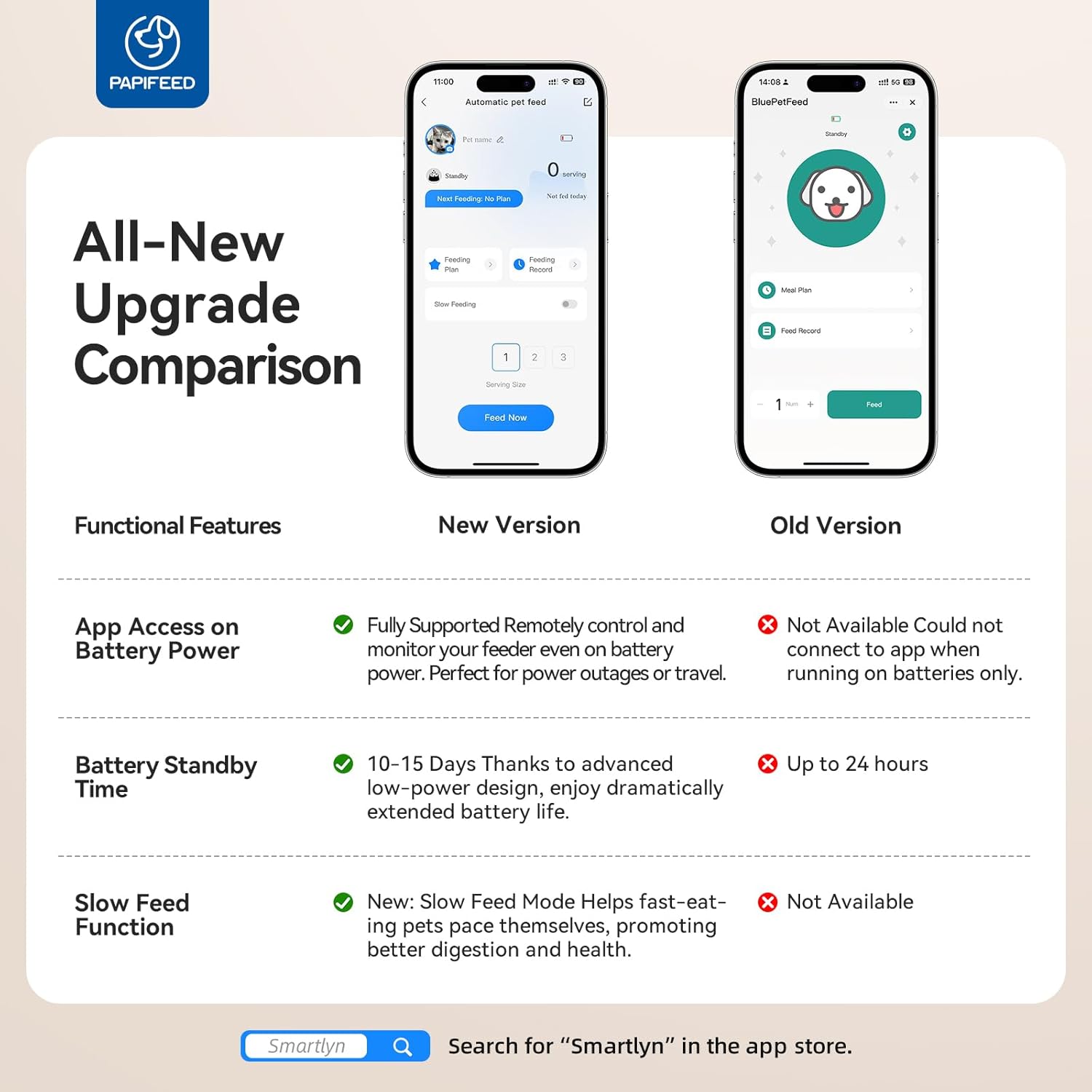
Image: Various detachable components of the pet feeder and water fountain are shown, emphasizing their easy-to-clean design. A note indicates that the main base is not washable.
6.2. Cleaning the Water Fountain
- Disassemble the water fountain by removing the showerhead, water storage tray, filter, and pump.
- Wash all detachable parts (water tank, tray, showerhead) with mild soap and water.
- Насосту тазалоо: Remove the pump cover and outer cover. Use tweezers to take out the impeller. Clean all parts with the provided brush. Reassemble the pump.
- Rinse the filter thoroughly before reinserting.
- It is recommended to clean the pump every 1 to 2 weeks to prevent mineral buildup and ensure proper water flow.

Image: A three-step visual guide demonstrating how to disassemble and clean the water pump, including removing the cover, taking out the impeller, and cleaning with a brush.
6.3. Фильтрди алмаштыруу
- The water fountain filter should be replaced every 2-4 weeks, depending on usage and water quality.
- Always pre-soak new filters in clean water for 5-10 minutes before use.
7. Кыйынчылыктарды
| Көйгөй | Мүмкүн себеп | Чечим |
|---|---|---|
| Азыктандыруучу тамак бербейт. | Food container empty; kibble size too large; dispenser clogged; power issue. | Refill food; check kibble size (0.2-0.39 inch); clear any clogs; check power connection/batteries. |
| Water fountain not flowing. | Water level too low; pump clogged; power issue. | Refill water; clean pump and filter; check power connection. |
| Колдонмо фидерге туташпай жатат. | Incorrect WiFi (5G); feeder not in pairing mode; weak signal. | Ensure 2.4GHz WiFi; long-press '+' button to enter pairing mode (flashing blue light); move closer to router. |
| Тамак-аш жаңы эмес. | Desiccant expired; lid not sealed. | Replace desiccant; ensure lid is rotated and securely closed. |
8. Техникалык шарттар
| Өзгөчөлүк | Деталь |
|---|---|
| Бренд | PAPIFEED |
| Модель номери | B0FJKP8WBN |
| Фидер кубаттуулугу | 3L / 12 Cups |
| Water Fountain Capacity | 3L |
| Байланыш | 2.4G WiFi (Not support 5G) |
| Азыктандыруу графиги | Up to 12 meals/day, 1-10 portions/meal |
| Порциянын өлчөмү | Approx. 0.35 oz per portion |
| Электр камсыздоо | DC 5V adapter, 4x D-cell batteries (backup, not included) |
| Материал | Polyester (Feeder), Stainless Steel (Bowl) |
| Түс | Кара |
| Элемент Салмагы | 4.44 фунт |
| Продукциянын өлчөмдөрү | 6 x 11 x 6 дюйм |
| Care Instructions | Dishwasher Safe (Bowl) |
9. Кепилдик жана колдоо
The PAPIFEED Automatic Pet Feeder and Water Fountain comes with a 2 жылдык Өндүрүүчүнүн Кепилдиги. For any product inquiries, technical support, or warranty claims, please contact PAPIFEED customer service through the retailer where the product was purchased.