
DAYBETTER FCZ004
DAYBETTER акылдуу сайгычы (FCZ004 модели) колдонуучунун колдонмосу
Model: FCZ004 | Brand: DAYBETTER
Introduction
This manual provides detailed instructions for the setup, operation, and maintenance of your DAYBETTER Smart Plug (Model FCZ004). This smart plug allows you to control your electronic devices remotely, set schedules, and use voice commands through compatible smart home assistants. Please read this manual thoroughly before use to ensure proper functionality and safety.
Продукт өзгөчөлүктөрү
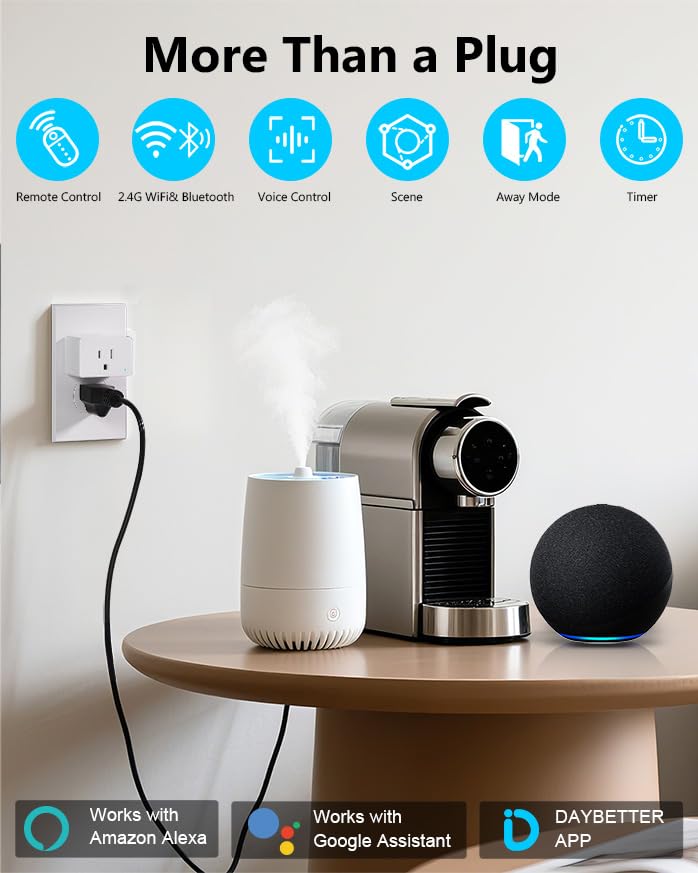
- Үн менен башкаруу: Handsfree иштөө үчүн Amazon Alexa жана Google Assistant менен шайкеш келет.
- Алыстан башкаруу: Manage connected devices from anywhere using the DAYBETTER mobile application.
- График түзүү жана таймер функциялары: Program devices to turn on/off automatically with custom schedules, countdowns, and recurring tasks.
- Оңой орнотуу: Quick setup process with 2.4GHz WiFi and Bluetooth connectivity.
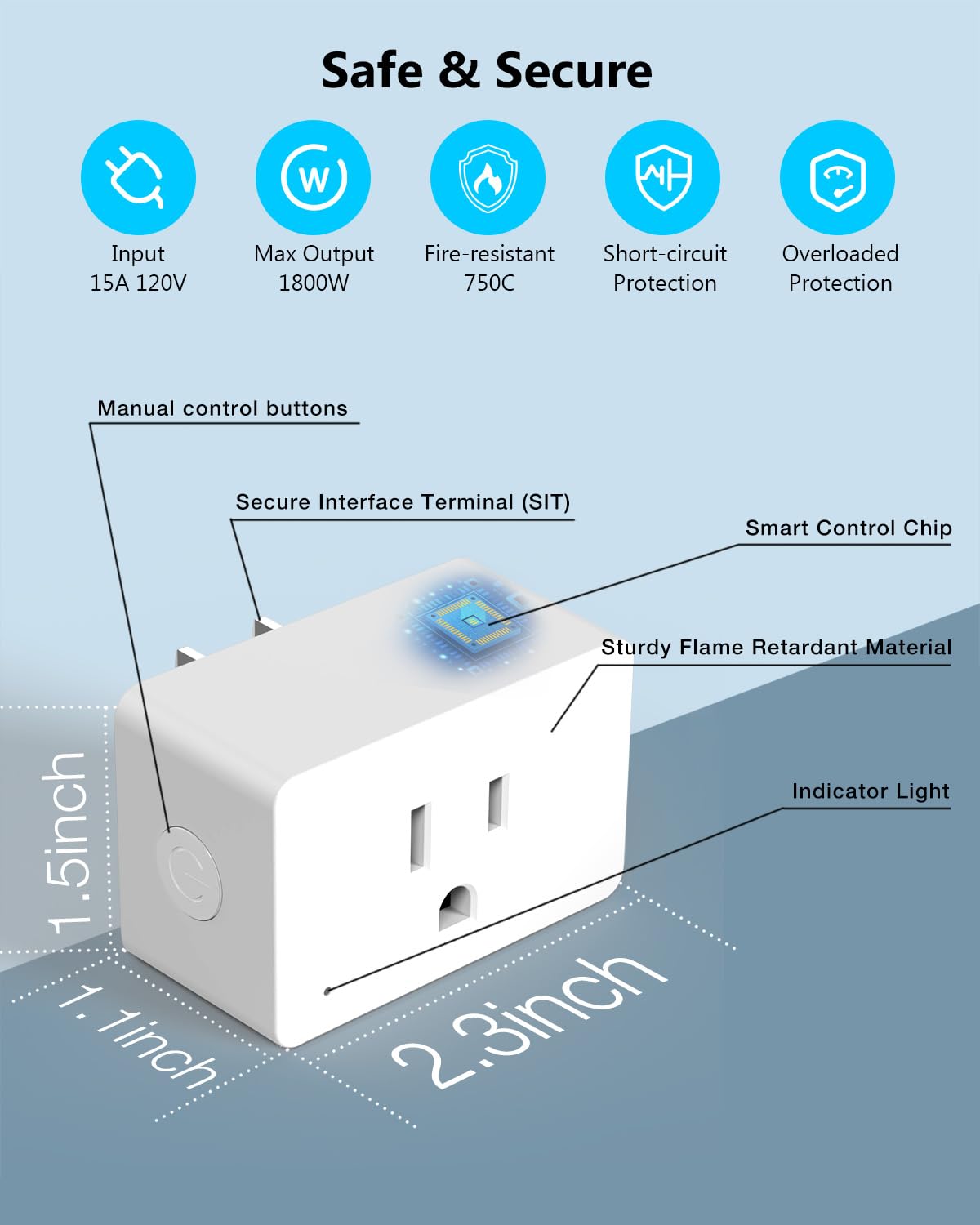
- Компакт дизайн: Small form factor (approximately 2.32 x 1.97 x 1.5 inches) designed to avoid blocking adjacent outlets.
- Коопсуздук сертификаттары: ETL and FCC certified for reliable and safe operation.
- Кубат рейтинги: Supports up to 15A / 1800W.
Пакеттин мазмуну
- DAYBETTER Smart Plug (4 units)
- User Manual

Орнотуу жана орнотуу
1. Тармак талаптары
- The DAYBETTER Smart Plug requires a 2.4GHz Wi-Fi network for connectivity. It does not support 5GHz Wi-Fi networks.
- Ensure your Wi-Fi router is broadcasting a 2.4GHz signal.
2. Физикалык орнотуу
- Plug the DAYBETTER Smart Plug into a standard 120V wall outlet.
- Ensure the indicator light on the smart plug begins blinking. If it does not blink, press and hold the manual control button on the side of the plug for 5 seconds until it starts blinking.
- Connect your appliance to the smart plug.
Колдонмону орнотуу жана жупташтыруу
- Download the DAYBETTER App: Издөө "DAYBETTER" in the Apple App Store (for iOS devices) or Google Play Store (for Android devices). Ensure you download the official DAYBETTER App.
- Enable Wi-Fi and Bluetooth: On your smartphone, ensure both Wi-Fi and Bluetooth are enabled.
- Колдонмону ачып, түзмөктү кошуңуз: Open the DAYBETTER App. The app should automatically detect the smart plug if its indicator light is blinking. Follow the on-screen prompts to add the device.
- Wi-Fi'га туташуу: 2.4 ГГц Wi-Fi тармагыңызды тандап, суралганда сырсөздү киргизиңиз.
- Pairing Completion: The smart plug will successfully pair in less than 2 minutes. Once paired, the indicator light will stop blinking and remain solid.

Иштөө нускамалары
1. Кол менен башкаруу
Press the manual control button on the side of the smart plug to manually turn the connected appliance on or off.
2. APP алыстан башкаруу пульту
Once paired, open the DAYBETTER App on your smartphone. You can remotely turn your connected appliances on or off from anywhere with an internet connection.
3. Үн менен башкаруу (Alexa жана Google Home)
Integrate your DAYBETTER Smart Plug with Amazon Alexa or Google Assistant for voice-activated control.
- Ensure your Alexa or Google Home device is set up and connected to the same 2.4GHz Wi-Fi network as your smart plug.
- Alexa же Google Home колдонмосун ачыңыз.
- Издөө and enable the "DAYBETTER" skill/service.
- Follow the app instructions to discover new devices. Your smart plug should appear.
- Assign a name to your smart plug (e.g., "Living Room Lamp," "Fan").
- Үн буйруктарын колдонуңуз, мисалы:
- "Alexa, [түзмөктүн аталышын] күйгүзүңүз."
- "Окей Google, [түзмөктүн аталышын] өчүрүңүз."
4. График түзүү жана таймер функциялары
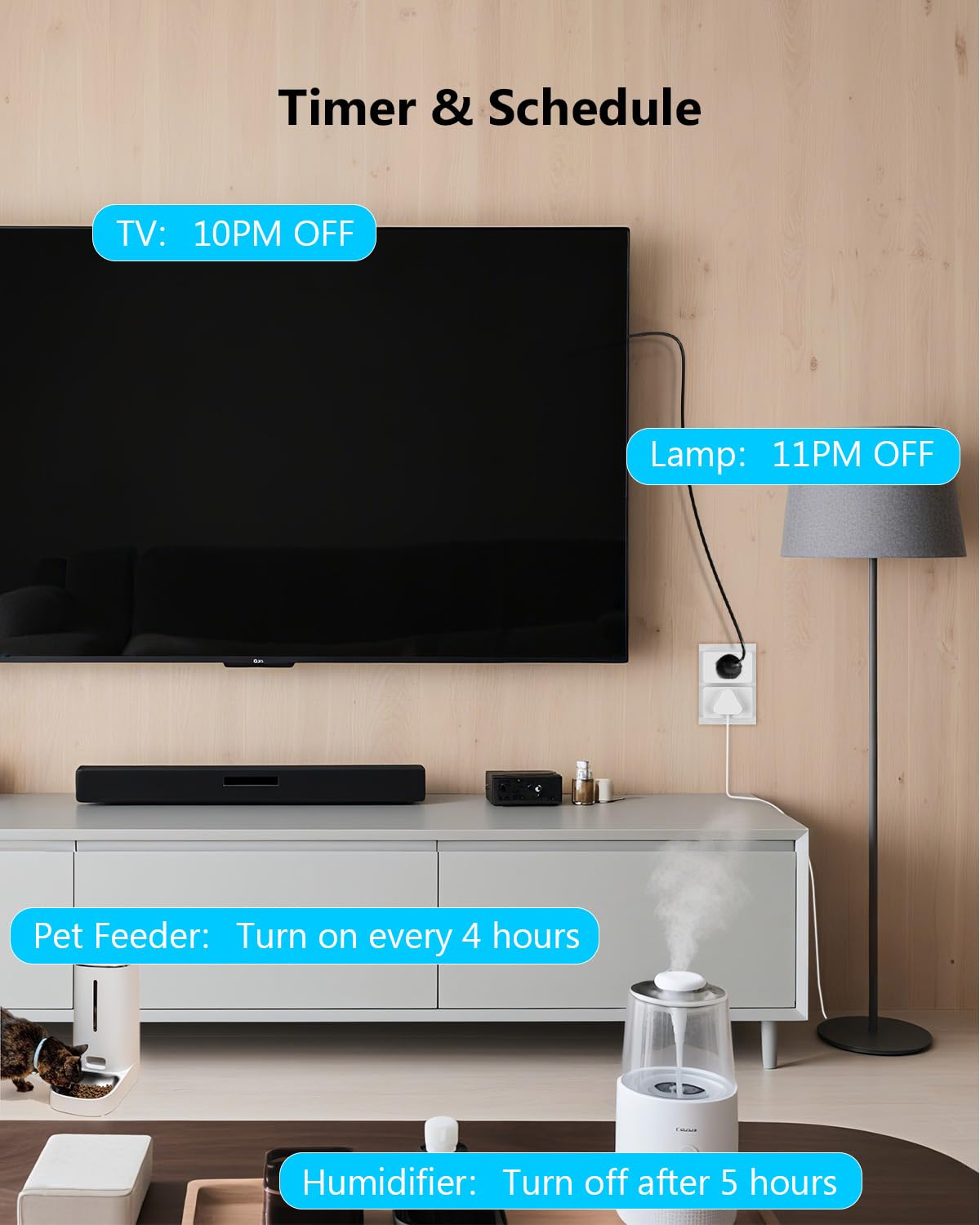
The DAYBETTER App allows you to create various automated tasks for your smart plug.
- Пландаштырылган тапшырмалар: Set specific times for your devices to turn on or off daily or on selected days of the week. For example, turn on lights at 8 AM.
- Countdown Tasks: Set a timer for a device to turn off after a specified duration. For example, turn off a humidifier after 5 hours.
- Recurring Tasks (Cyclic Timer): Program devices to cycle on and off at regular intervals. For example, a pet water feeder dispensing water for 10 minutes every 5 hours.


Коопсуздук маалыматы
The DAYBETTER Smart Plug is designed with multiple safety features. Please adhere to the following guidelines:
- Киргизүү көлөмүtage: 15A, 120V. Do not exceed these ratings.
- Максималдуу чыгаруу: 1800W. Ensure connected appliances do not exceed this wattage.
- Отко туруктуу: Constructed with fire-resistant materials (up to 750°C).
- Коргоо өзгөчөлүктөрү: Includes short-circuit protection and overloaded protection to prevent damage to the plug and connected devices.
- Do not disassemble or modify the smart plug.
- Avoid using in wet environments or near water.
- Балдар жетпеген жерде сактаңыз.
Техникалык шарттар
| Өзгөчөлүк | Спецификация |
|---|---|
| Продукциянын өлчөмдөрү | Окутуу үчүн. 2.32 х 1.97 х 1.5 дюйм |
| Элемент Салмагы | 9.59 унция (4 пакет үчүн) |
| Модель номери | FCZ004 |
| Өндүрүүчү | DAYBETTER |
| Иштөө режими | КҮЙГҮЗҮҮ ӨЧҮРҮҮ |
| Учурдагы рейтинг | 15 Amps |
| Operating Voltage | 120 вольт |
| Max Output | 1800 Ватт |
| Байланыш түрү | Адатта жабык |
| Туташтыргыч түрү | Плагин |
| Терминал | Through Hole |
| Circuit Type | 2-жол |
| Байланыш материалы | Металл |
| Зымсыз байланыш | 2.4 ГГц Wi-Fi, Bluetooth |
| Шайкештик | Amazon Alexa, Google Home |
Проблемаларды чечүү
- Smart Plug not connecting to Wi-Fi:
- Wi-Fi тармагыңыз 2.4 ГГц экенин текшериңиз. Акылдуу сайгыч 5 ГГц Wi-Fi'ды колдобойт.
- Wi-Fi сырсөзүңүздүн туура экенин текшериңиз.
- Make sure the smart plug's indicator light is blinking during pairing. If not, press and hold the manual button for 5 seconds to reset.
- Сигналдын күчүн жогорулатуу үчүн акылдуу сайгычты Wi-Fi роутериңизге жакындатыңыз.
- Wi-Fi роутериңизди өчүрүп-күйгүзүп, кайра жупташтырып көрүңүз.
- Voice control not working with Alexa/Google Home:
- Confirm the smart plug is successfully paired with the DAYBETTER App and is online.
- Ensure the "DAYBETTER" skill/service is enabled in your Alexa or Google Home app.
- Check that your voice assistant device (e.g., Echo Dot, Google Home speaker) is connected to the same 2.4GHz Wi-Fi network.
- Try rediscovering devices in the Alexa or Google Home app.
- Verify the name you are using for the smart plug in your voice command matches the name set in the Alexa/Google Home app.
- Smart Plug frequently loses connection:
- This can occur if the Wi-Fi signal is weak. Try relocating the smart plug closer to your router or consider a Wi-Fi extender.
- Ensure there are no physical obstructions or interference sources (e.g., thick walls, other wireless devices) between the plug and the router.
- Check for any firmware updates for the smart plug within the DAYBETTER App.
- Incompatibility with other smart home platforms:
- The DAYBETTER Smart Plug is not compatible with Tuya, Smartlife, Magic Home, or Home Assistant. Please use the official DAYBETTER App for control.
Техникалык тейлөө
- Keep the smart plug clean and dry. Wipe with a soft, dry cloth if necessary.
- Катуу химиялык заттарды же абразивдүү тазалоочу каражаттарды колдонбоңуз.
- Ensure the plug is unplugged from the wall outlet before cleaning.
- Regularly check for firmware updates in the DAYBETTER App to ensure optimal performance and security.
Кепилдик жана колдоо
For warranty information or technical support, please refer to the official DAYBETTER website or contact their customer service directly. Contact details are typically found on the product packaging or the official brand webсайт.
Өндүрүүчү: DAYBETTER
Ask a question about this manual
Ask about setup, troubleshooting, compatibility, parts, safety, or missing instructions. Manuals+ will review the question and use this page’s manual context to help answer it.