
1. Киришүү
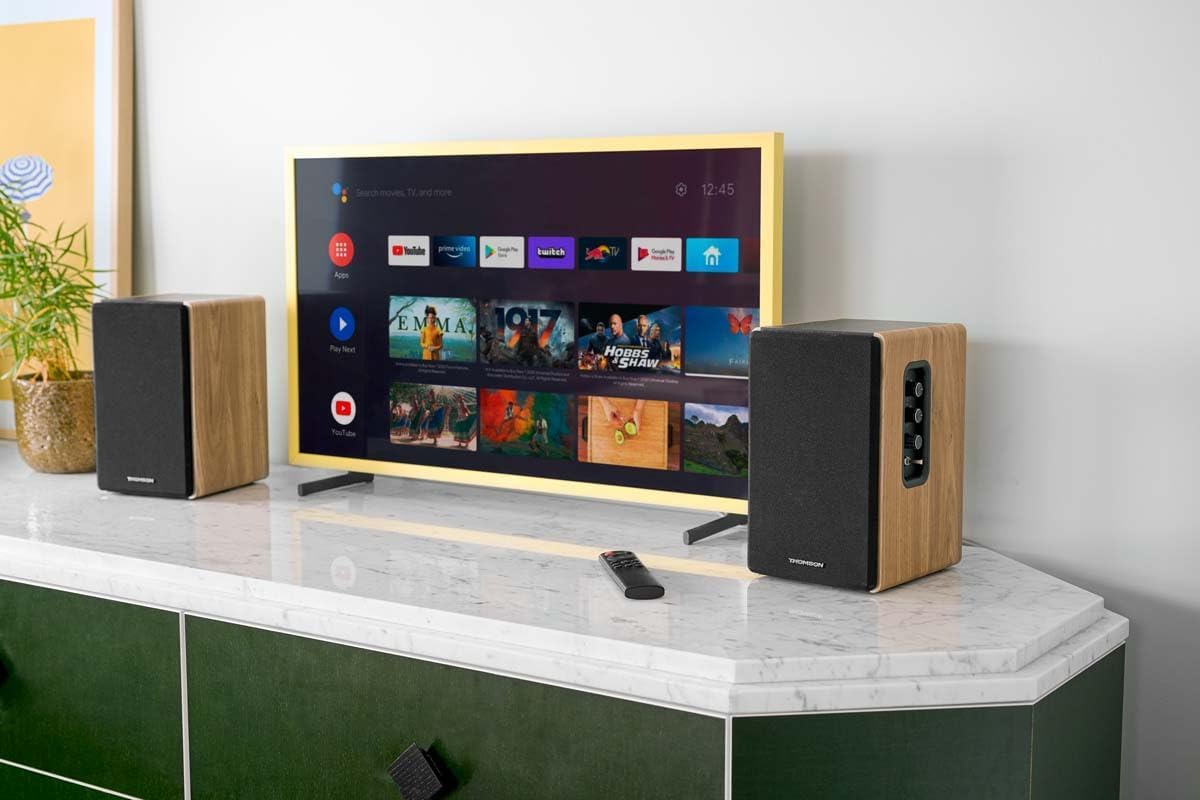
Thank you for choosing the THOMSON WS902DUO Cosy Bookshelf Speakers. These active stereo speakers deliver a powerful 150W audio experience with deep bass from two 10 cm woofers. They offer versatile connectivity options including Bluetooth 5.3, Optical, HDMI (ARC), RCA, and USB playback. The included remote control and side panel adjustments provide precise control over your audio. Please read this manual carefully before use to ensure proper operation and to maximize your listening experience.

Image 1.1: THOMSON WS902DUO Bookshelf Speakers in a living space, showcasing their elegant wood finish.
2. Маанилүү коопсуздук нускамалары
- Продукцияны колдонуудан мурун бул көрсөтмөлөрдү кылдат окуп чыгыңыз.
- Бул нускамаларды келечектеги маалымат үчүн сактаңыз.
- Буюмдагы жана колдонуу нускамасындагы бардык эскертүүлөргө кулак салыңыз.
- Бардык нускамаларды аткарыңыз.
- Бул аппаратты суунун жанында колдонбоңуз.
- Кургак чүпүрөк менен гана тазалаңыз.
- Эч кандай желдетүүчү тешиктерди жаап албаңыз. Өндүрүүчүнүн көрсөтмөлөрүнө ылайык орнотуу.
- Радиаторлор, жылуулук регистрлери, мештер же башка аппараттар (анын ичинде) сыяктуу жылуулук булактарынын жанына орнотпоңуз ampкөтөргүчтөр) жылуулукту пайда кылуучу.
- Поляризацияланган же жерге туташтыруучу сайгычтын коопсуздук максатын жокко чыгарбаңыз. Поляризацияланган сайгычтын эки бычагы бар, бири экинчисинен кенен. Жерге туташтыруучу түрдөгү сайгычтын эки бычак жана үчүнчү жерге туташтыруучу тиштери бар. Кең бычак же үчүнчү тиш сиздин коопсуздугуңуз үчүн берилген. Эгерде берилген сайгыч розеткага туура келбесе, эскирген розеткаңызды алмаштыруу үчүн электрикке кайрылыңыз.
- Электр шнурунун басылып кетүүсүнөн же кысып калуудан сактаңыз, өзгөчө сайгычтарда, розеткаларда жана алар аппараттан чыга турган жеринде.
- Өндүрүүчү тарабынан көрсөтүлгөн тиркемелерди/аксессуарларды гана колдонуңуз.
- Өндүрүүчү белгилеген же аппарат менен бирге сатылган араба, стенд, штатив, кронштейн же үстөл менен гана колдонуңуз. Араба колдонулганда, оодарылып кетүүдөн жаракат албаш үчүн арабаны/аппаратты айкалыштырууда этият болуңуз.
- Бул аппаратты чагылгандуу бороондордо же узак убакыт бою колдонбогондо электр розеткасынан ажыратыңыз.
- Бардык тейлөөлөрдү квалификациялуу тейлөө кызматкерлерине тапшырыңыз. Аппарат кандайдыр бир зыянга учураганда, мисалы, кубат берүүчү шнур же сайгыч бузулганда, суюктук төгүлгөндө же аппараттын ичине нерселер түшкөндө, аппарат жамгырга же нымдуулукка дуушар болгондо, нормалдуу иштебей калганда тейлөө талап кылынат. , же түшүрүлгөн.
3. Пакеттин мазмуну
Төмөндө тизмеленген нерселердин баары пакетиңизге камтылганын текшериңиз:
- THOMSON WS902DUO Bookshelf Speakers (2 units)
- Алыстан башкаруу
- Электр кабели
- Динамикти туташтыруу кабели
- 3.5mm Jack to RCA Adapter Cable
- Колдонуучунун Колдонмосу (бул документ)

Image 3.1: Packaging of the THOMSON WS902DUO Bookshelf Speakers.
4. Продукт бүтүп калдыview
4.1. Side Control Panel (Active Speaker)
The active speaker features a side control panel for easy access to essential functions.

Image 4.1: Side control panel.
- Басс башкаруу: Төмөн жыштык чыгарууну тууралайт.
- Үч ыргак башкаруу: Жогорку жыштык чыгарууну тууралайт.
- Үндү көзөмөлдөө: Үндүн жалпы көлөмүн тууралайт.
- Кубат которгучу: Динамиктерди күйгүзөт же өчүрөт.
- LED көрсөткүчү: Shows the current status or selected input.
4.2. Арткы панель (активдүү динамик)
The rear panel of the active speaker provides all necessary input and output connections.
4.2-сүрөт: Арткы панелдин туташуулары.
- Оптикалык киргизүү: For connecting digital audio sources like TVs, game consoles, or Blu-ray players.
- Aux In (RCA): For connecting analog audio sources such as turntables, CD players, or PCs. A 3.5mm jack adapter is provided.
- TV Audio (HDMI ARC): For connecting to a TV's HDMI ARC port, allowing TV remote control of the speaker volume.
- USB ойнотуу: MP3 ойнотуу үчүн fileтүздөн-түз USB флэш-дискинен.
- Sub Out: For connecting an external active subwoofer for enhanced bass.
- Динамиктин чыгышы: Пассивдүү динамикке туташат.
- Кубат киргизүү: Connects to the main power supply.
4.3. Алыстан башкаруу
The remote control provides convenient access to all speaker functions from a distance.

Image 4.3: Remote control.
- Кубат баскычы: Динамиктерди күйгүзөт/өчүрөт.
- Үнсүз баскычы: Үндү өчүрөт/ачат.
- Көлөм +/-: Үн деңгээлин тууралайт.
- Ойнотууну башкаруу элементтери (Ойнотуу/Тындыруу, Өткөрүп жиберүү): USB ойнотуу үчүн.
- Source Selection Buttons (OPT, BT, ARC, USB, LINE): Аудио киргизүү булагын тандайт.
- EQ Mode Buttons (MOVIE, MUSIC, DIALOG): Selects preset equalization modes.
5. Орнотуу
5.1. Спикердин жайгашуусу
Place the speakers on a stable, flat surface such as a bookshelf, desk, or speaker stands. For optimal stereo imaging, position the speakers equidistant from your listening position and at ear level. Ensure there is adequate space around the speakers for ventilation.
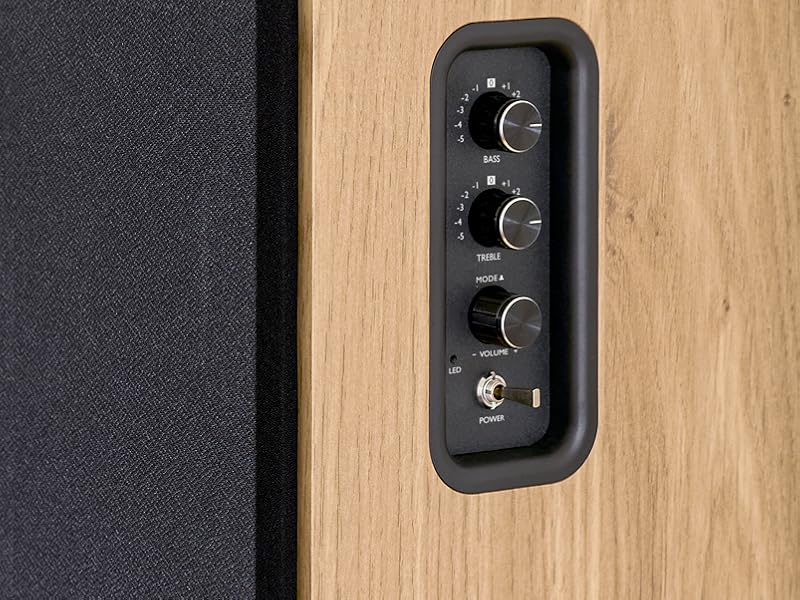
Image 5.1: Recommended speaker placement on a desk.
5.2. Спикерлерди туташтыруу
- Identify the active speaker (with controls and inputs) and the passive speaker.
- Connect the included speaker cable from the speaker output terminals on the active speaker to the input terminals on the passive speaker. Ensure correct polarity (+ to + and - to -).
5.3. Аудио булактарын туташтыруу
Connect your desired audio sources to the active speaker using the appropriate cables.
- Оптикалык киргизүү: Use an optical cable to connect your TV, game console, or Blu-ray player to the OPTICAL IN port.
- HDMI (ARC) Input: Use an HDMI cable to connect your TV's HDMI ARC port to the TV AUDIO (HDMI) port on the speaker. This allows your TV remote to control the speaker volume.
- RCA (AUX) Input: Use an RCA cable (or the provided 3.5mm jack to RCA adapter) to connect devices like a turntable, CD player, or PC to the AUX IN (RCA) ports.
- USB киргизүү: MP3 камтыган USB флэш-дискти салыңыз files into the USB PLAY port.

Image 5.2: Speakers connected to a television via HDMI ARC.
5.4. Bluetooth Жупташтыруу
- Динамиктердин күйгүзүлгөнүн текшериңиз.
- Press the 'BT' button on the remote control or the side panel to select Bluetooth input. The LED indicator will flash, indicating pairing mode.
- Смартфонуңузда, планшетиңизде же компьютериңизде Bluetooth'ду күйгүзүп, жеткиликтүү түзмөктөрдү издеңиз.
- Select "THOMSON WS902DUO" from the list of devices.
- Жупташтырылгандан кийин, LED индикатору күйүп-өчүүнү токтотуп, туруктуу бойдон калат. Эми аудиону зымсыз агылта аласыз.
5.5. Сабвуферди туташтыруу (милдеттүү эмес)
If you wish to enhance bass further, connect an active subwoofer to the 'Sub Out' port on the rear panel of the active speaker using an RCA cable.
6. Иштөө нускамалары
6.1. Күйгүзүү/өчүрүү
Use the power switch on the side control panel or the power button on the remote control to turn the speakers on or off.
6.2. Булак тандоо
Press the corresponding source button on the remote control (OPT, BT, ARC, USB, LINE) to switch between connected audio inputs. The LED indicator will change to reflect the selected source.
6.3. Үндү башкаруу
Adjust the volume using the 'Volume' knob on the side control panel or the 'VOL+/-' buttons on the remote control.
6.4. Аудио жөндөөлөрү
Fine-tune the sound to your preference:
- Бас/жогорку: Use the 'Bass' and 'Treble' knobs on the side control panel to adjust the low and high frequencies.
- EQ режимдери: Press the 'MOVIE', 'MUSIC', or 'DIALOG' buttons on the remote control to select preset equalization settings optimized for different content types.
6.5. USB ойнотуу
When a USB flash drive with MP3 files is inserted and USB source is selected, the speakers will automatically begin playing. Use the playback control buttons on the remote control (Play/Pause, Skip) to manage your music.
6.6. Bluetooth операциясы
After successful pairing (see Section 5.4), you can stream audio from your Bluetooth device. Use your device's controls or the speaker's remote control for playback and volume adjustments.
7. Техникалык тейлөө
Тийиштүү техникалык тейлөө сиздин динамиктериңиздин узак мөөнөттүү иштешин жана жакшы иштешин камсыз кылат.
- Тазалоо: Wipe the speaker surfaces with a soft, dry cloth. Do not use liquid cleaners or abrasive materials.
- Вентиляция: Ашыкча ысып кетүүнүн алдын алуу үчүн желдетүү тешиктери жабылбагандыгын текшериңиз.
- Сактагыч: If storing the speakers for an extended period, unplug them from the power outlet and store them in a cool, dry place.
- Нымдуулуктан качыңыз: Keep the speakers away from water and high humidity.
8. Кыйынчылыктарды
Эгер кандайдыр бир көйгөйгө туш болсоңуз, төмөнкү көйгөйлөрдү чечүү боюнча колдонмону караңыз:
| Көйгөй | Мүмкүн себеп | Чечим |
|---|---|---|
| Күч жок | Power cable not connected; Power switch off; Wall outlet not working. | Ensure power cable is securely connected. Turn on the power switch. Test the wall outlet with another device. |
| Үн жок | Incorrect input source selected; Volume too low; Mute function active; Audio cable not connected properly. | Select the correct input source. Increase volume. Press Mute button on remote. Check all audio cable connections. |
| Bluetooth жупташтыруу ишке ашпай калды | Speakers not in pairing mode; Device too far; Bluetooth disabled on source device. | Ensure speakers are in Bluetooth pairing mode (flashing LED). Move device closer to speakers. Enable Bluetooth on your source device. |
| USB ойнотуу иштебей жатат | USB drive not formatted correctly; Files not MP3; USB drive not inserted properly. | Ensure USB drive is FAT32 formatted. Verify files are in MP3 format. Re-insert USB drive firmly. |
| Үн бурмалоо | Volume too high; Source audio quality poor; Bass/Treble settings too extreme. | Lower the volume. Test with a different audio source. Adjust Bass and Treble controls. |
9. Техникалык шарттар
| Өзгөчөлүк | Спецификация |
|---|---|
| Бренд | ТОМСОН |
| Модель номери | WS902DUO |
| Спикердин максималдуу чыгаруу күчү | 150 Ватт |
| Frequency Response | 60 Гц |
| Байланыш технологиясы | Bluetooth, HDMI (ARC), Optical, RCA, USB |
| Bluetooth версиясы | 5.3 |
| Аудио чыгаруу режими | Стерео (2.0 канал) |
| Киргизүү көлөмүtage | 230 вольт (AC) |
| Монтаж түрү | Shelf Mount |
| Динамик түрү | Multimedia Bookshelf |
| Өзгөчөлүктөр | Stereo Pairing, USB Port, Sub-Out, Remote Control, EQ Modes |
| Сунушталган Колдонуулар | Smartphone, Tablet, PC, TV, Game Console, DVD Player, Turntable |
| Түс | Табигый жыгач бүтүрүү |
| Башкаруу ыкмасы | Remote Control, Side Panel Knobs |
| Вуфердин өлчөмү | 10 сантиметр |
| Өлчөмдөрү (H x W x D) | 28 см x 24 см x 47 см (болжолдуу түрдө, ар бир динамик үчүн) |
| Салмагы | 5048 Grams (total for pair) |
| Элементтердин саны | 2 |
| Келип чыккан өлкө | Кытай |
10. Кепилдик маалыматы
This THOMSON WS902DUO product comes with a 1 жылдык чектелген кепилдик сатып алынган күндөн тартып. Бул кепилдик кадимки колдонуудагы өндүрүштүк кемчиликтерди жана чеберчиликти камтыйт. Туура эмес колдонуудан, кырсыктардан, уруксатсыз өзгөртүүлөрдөн же кадимки эскирүүдөн келип чыккан зыянды камтыбайт. Кепилдик дооматтары үчүн сатып алганыңызды тастыктаган документти сактап коюңуз.
11. Кардарларды колдоо кызматы
For technical assistance, warranty claims, or any questions regarding your THOMSON WS902DUO speakers, please contact your retailer or visit the official THOMSON support website. Please have your model number (WS902DUO) and proof of purchase ready when contacting support.
Онлайн колдоо: www.thomsonconsumer.com (Аймактык колдоо байланыштарын текшериңиз)