
KTC H25Y7
KTC H25Y7 24.5 дюймдук 300Гц FHD оюн мониторунун колдонуу боюнча колдонмосу
Model: H25Y7 | Brand: KTC
Introduction
This manual provides essential information for setting up, operating, and maintaining your KTC H25Y7 24.5-inch 300Hz Full HD Gaming Monitor. Please read this guide thoroughly before using the product to ensure optimal performance and safety.

Сүрөт: алдыңкы view of the KTC H25Y7 24.5-inch 300Hz FHD Gaming Monitor.
Кутуда эмне бар
Төмөнкү нерселердин баары пакетиңизге камтылганын текшериңиз:
- 24.5" FHD 300Hz Monitor (x1)
- Монитор стенди (x1)
- Quick Setup Guide (QSG) (x1)
- DisplayPort (DP) кабели (x1)
- Кубат адаптери (x1)
Жайгашуу
Монитор стендинин жыйыны
Монитордун стендин чогултуу жана аны дисплей панелине бекитүү үчүн бул кадамдарды аткарыңыз:
- Бардык компоненттерди таңгактан кылдаттык менен алып салыңыз.
- Attach the stand base to the stand column using the provided screws. Ensure it is securely fastened.
- Align the stand's mounting plate with the VESA mounting holes on the back of the monitor panel.
- Secure the monitor panel to the stand using the appropriate screws.

Сүрөт: Арткы view of the KTC H25Y7 monitor showing dimensions and stand attachment points.
Түзмөккө туташуу
Connect your monitor to a computer or other video source using the appropriate cables:
- DisplayPort (DP): For 300Hz refresh rate at 1920x1080 resolution, use the included DisplayPort 1.4 cable.
- HDMI: For up to 240Hz refresh rate at 1920x1080 resolution, use an HDMI 2.0 cable. Two HDMI 2.0 ports are available.
- Күч: Кубат адаптерин монитордун туруктуу ток киргизүүсүнө, андан кийин розеткага туташтырыңыз.

Image: Close-up of the KTC H25Y7 monitor's rear panel, highlighting the DC power input, two HDMI 2.0 ports, one DisplayPort 1.4, and one USB 2.0 port.
Иштөө нускамалары
Күйгүзүү/өчүрүү
Мониторду күйгүзүү же өчүрүү үчүн арткы жагында жайгашкан кубат баскычын басыңыз.
Экрандык меню навигациясы
The On-Screen Display (OSD) menu allows you to adjust various monitor settings. Use the joystick control located on the back of the monitor to navigate the menu:
- Push the joystick in to select an option.
- Move the joystick up/down/left/right to navigate through menu options and adjust values.
Дисплей өзгөчөлүктөрү
- High Refresh Rate & Fast Response Time: Experience smooth visuals with a 300Hz refresh rate (via DP 1.4) and 1ms response time, reducing motion blur and ghosting.
- Adaptive Sync технологиясы: This monitor supports Adaptive Sync to eliminate screen tearing and stuttering, providing a fluid gaming experience.
- Fast IPS Panel & Wide Color Gamut: The Fast IPS panel delivers realistic colors and clear details with 119% sRGB color gamut coverage. HDR support enhances immersion with improved contrast and color.
- Көзгө кам көрүүнүн өзгөчөлүктөрү: The monitor includes Low Blue Light, Flicker-free, and Anti-glare technologies to reduce eye strain during extended use.

Image: Visual representation of 300Hz refresh rate compared to lower refresh rates, showing reduced motion blur.

Image: Split screen comparison demonstrating the effect of Adaptive Sync, showing a tear-free image on one side and a torn image on the other.

Image: Display showcasing vibrant colors and details, with icons indicating 99% sRGB, 16.7M colors, 350cd/m² brightness, and 1000:1 contrast.

Image: Visuals illustrating the benefits of Low Blue Light, Flicker-free, and Anti-glare features for eye comfort during gaming.
Эргономикалык тууралоо
The monitor stand offers multiple adjustment options for comfortable viewing:
- Россия: Adjust the screen angle from -5° to 20° (±3°).
- Пивот: Rotate the screen ±90° for portrait or landscape orientation.
- Бийиктиги: Экрандын бийиктигин 110 мм (±5 мм) га тууралаңыз.
- VESA тоосу: Supports 100x100mm VESA mounting for wall or arm installation.
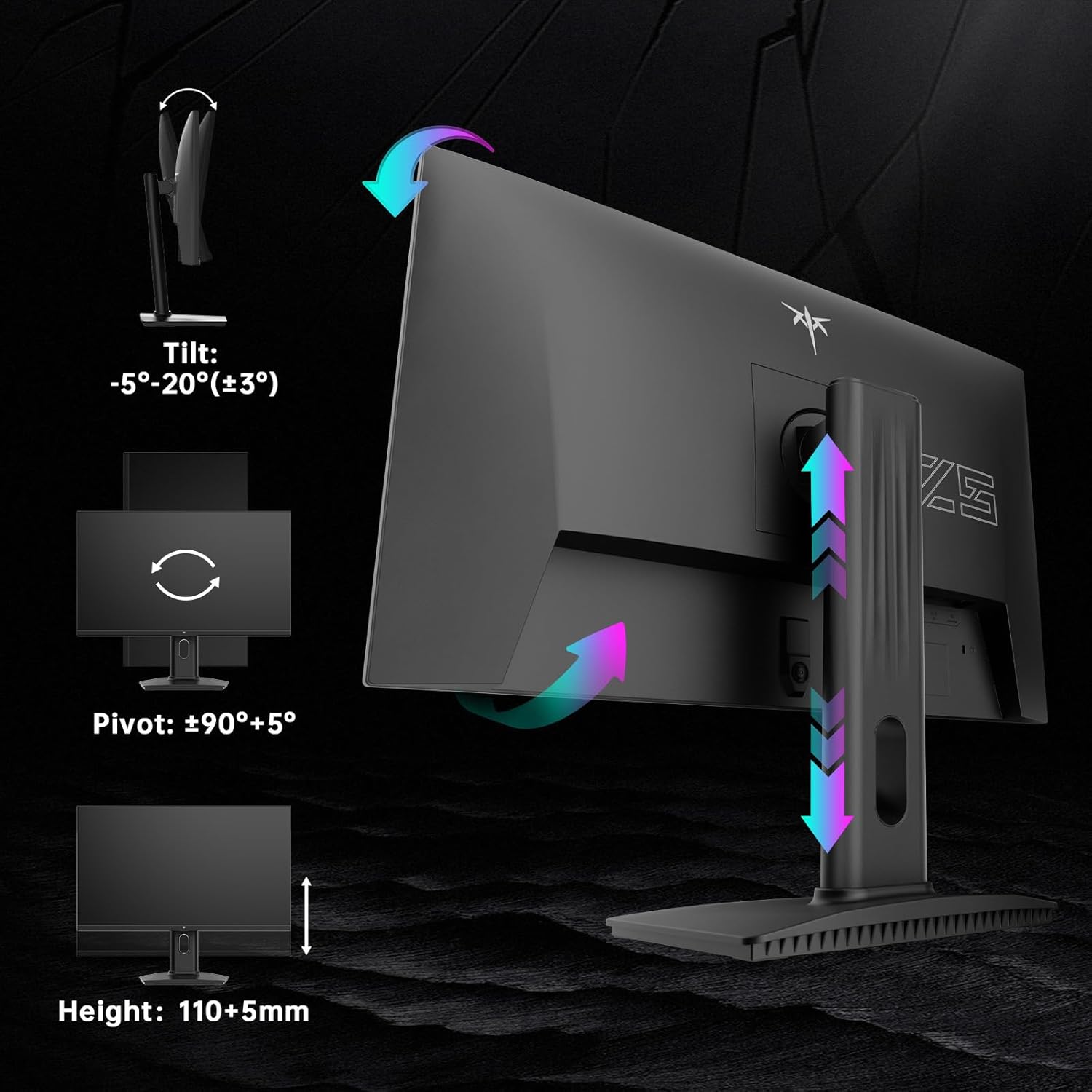
Image: Diagrams illustrating the tilt, pivot, and height adjustment capabilities of the KTC H25Y7 monitor stand.
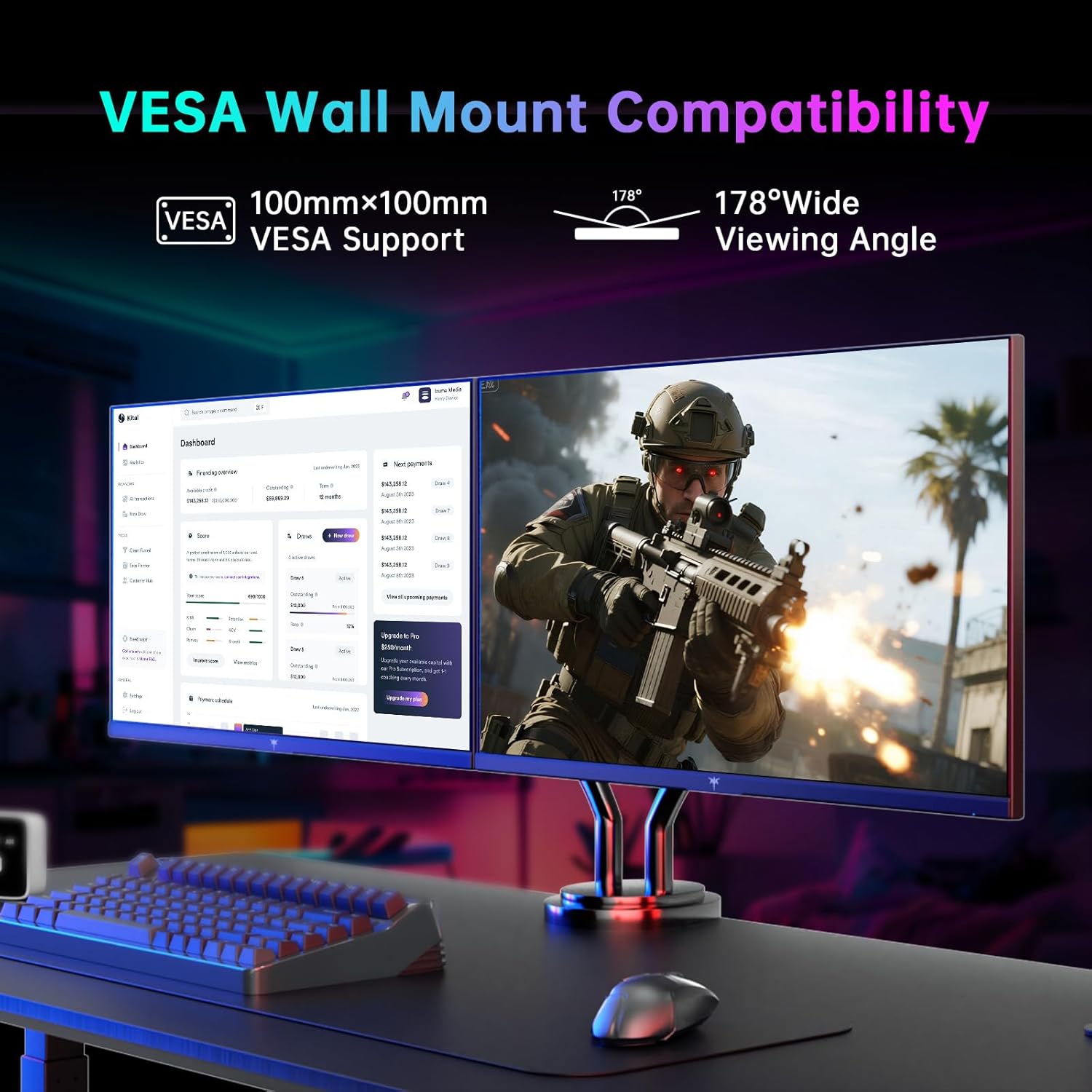
Image: Monitor mounted on a VESA-compatible arm, demonstrating VESA wall mount compatibility and wide viewбурчтар.
Техникалык тейлөө
Мониторуңуздун узак иштөөсүн жана оптималдуу иштешин камсыз кылуу үчүн төмөнкү тейлөө көрсөтмөлөрүн аткарыңыз:
- Экранды тазалоо: Экранды жумшак, түксүз чүпүрөк менен акырын сүртүңүз. өжөр белгилери үчүн, жеңил гampчүпүрөккө суу же экранды тазалоо эритмеси. Катуу химиялык заттардан алыс болуңуз.
- Тазалоо Casing: Мониторду тазалоо үчүн жумшак, кургак чүпүрөктү колдонуңуз casing.
- Колдонуу: Avoid pressing directly on the screen or placing heavy objects on the monitor.
- Вентиляция: Ашыкча ысып кетүүнүн алдын алуу үчүн монитордун айланасында жакшы желдетүүнү камсыз кылыңыз. Желдетүүчү тешиктерди жаппаңыз.
Проблемаларды чечүү
If you encounter any issues with your monitor, refer to the following common solutions:
- Кубат жок: Ensure the power adapter is securely connected to both the monitor and a working power outlet. Check if the power indicator light is on.
- Сигнал жок: Verify that the video cable (DP or HDMI) is correctly connected to both the monitor and your computer/device. Ensure the correct input source is selected in the OSD menu.
- Жаркылдоо/Кекелөө: Check your graphics card drivers are up to date. Ensure Adaptive Sync is enabled in both the monitor's OSD and your graphics card settings.
- Image Distortion/Incorrect Colors: Reset the monitor to factory settings via the OSD menu. Check the video cable for damage.
- Баскычтар жооп бербейт: Power cycle the monitor. If the issue persists, contact customer support.
Техникалык шарттар
| Өзгөчөлүк | Спецификация |
|---|---|
| Бренд | KTC |
| Модель номери | H25Y7 |
| Screen Size | 24.5 дюйм |
| Резолюция | 1920 x 1080 пиксел (FHD 1080p) |
| Жаңыртуу ылдамдыгы | 300Hz (via DisplayPort 1.4), 240Hz (via HDMI 2.0) |
| Жооп убактысы | 1ms |
| Панел түрү | Ыкчам IPS |
| Аспект катышы | 16:9 |
| Түс гаммасы | 119% sRGB |
| Сүрөттүн жарыктыгы | 350 Кандела |
| Байланыш | 1x DisplayPort 1.4, 2x HDMI 2.0, 1x USB 2.0 |
| Эргономика | Tilt (-5° to 20°), Pivot (±90°), Height (110+5mm) |
| VESA колдоосу | 100x100мм |
| Продукциянын өлчөмдөрү | 7.6 x 21.97 x 18.22 дюйм |
| Элемент Салмагы | 2.2 фунт |
Кепилдик жана колдоо
For warranty information or technical support, please refer to the contact details provided in the Quick Setup Guide included with your monitor or visit the official KTC webсайт. Сатып алуу квитанциясын кепилдик дооматтары үчүн сатып алуунун далили катары сактаңыз.
Ask a question about this manual
Ask about setup, troubleshooting, compatibility, parts, safety, or missing instructions. Manuals+ will review the question and use this page’s manual context to help answer it.