
1. Продукт бүтүп калдыview
The JZAQ A50 is an ultra-thin wireless Bluetooth headset designed for motorcycle helmets, offering high-definition audio, DSP noise reduction, and intelligent features for communication and entertainment during riding, skiing, and other sports. It features a long-lasting 1000mAh battery and IP67 waterproof rating.
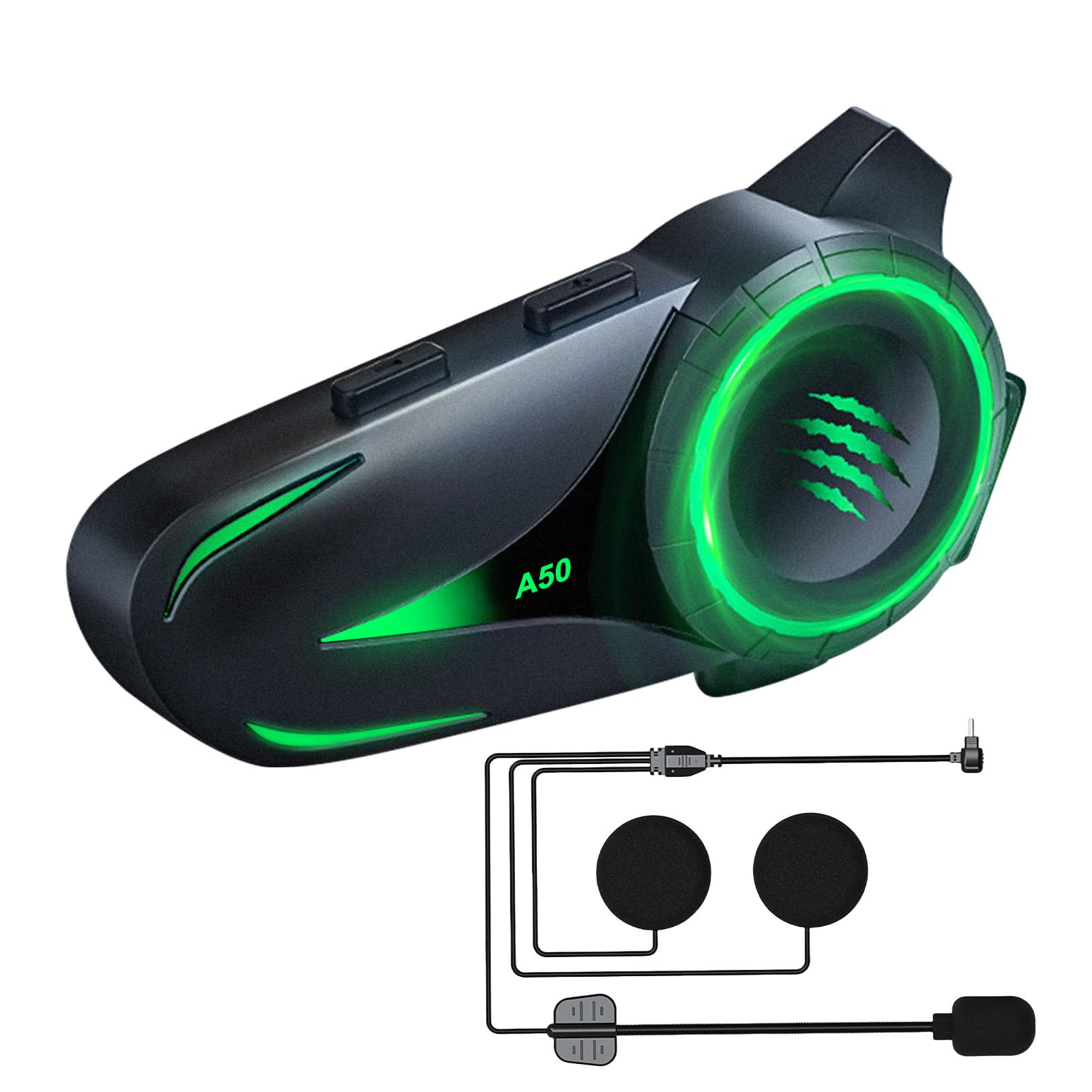
Image: The JZAQ A50 Motorcycle Helmet Bluetooth Headset, showcasing анын кооз дизайны.
2. Кутуда эмне бар
Пакетте бардык компоненттер бар экенин текшериңиз:
- Bluetooth Host (Main Unit)
- Speaker Microphone Set (with soft and hard microphones)
- Клип базасы
- 3M Glue Base
- Заряддоо кабели (USB Type-C)
- Velcro Pads (4 pieces)
- Noise-Reducing Windproof Cotton (2 pieces)
- Колдонуучунун Колдонмосу (бул документ)

Image: All components included in the JZAQ A50 package, laid out for easy identification.
3. Орнотуу жана орнотуу
Follow these steps to install your JZAQ A50 headset into your helmet.
3.1 Гарнитураны заряддоо
Before first use, fully charge the headset. Connect the provided USB Type-C charging cable to the headset's charging port and a suitable USB power source. A full charge takes approximately 2 hours.

Image: The JZAQ A50 headset highlighting its 1000mAh battery capacity and charging port.
3.2 Негизги блокту орнотуу
The JZAQ A50 is designed for easy installation in various helmet types. You can choose between the clip base or the 3M glue base.
- Монтаждоо ордун тандаңыз: Туулгаңыздын сол тарабында, ылдыйкы четине жакын тегиз жерди тандаңыз.
- Базаны тиркөө:
- Clip Base: Slide the clip base between the helmet shell and the inner padding. Ensure it is securely fastened.
- 3M Glue Base: Clean the chosen area on the helmet. Peel off the protective film from the 3M glue base and firmly press it onto the helmet for at least 30 seconds. Allow 24 hours for the adhesive to fully cure before attaching the main unit.
- Mount the main unit: Slide the JZAQ A50 main unit onto the installed base until it clicks securely into place.

Image: The JZAQ A50 headset shown compatible with various helmet styles, demonstrating its versatile installation.
3.3 Динамиктерди жана микрофонду орнотуу
The ultra-thin speakers (0.38 inches) are designed to fit comfortably without squeezing your ears.
- Attach Velcro pads: Place the provided Velcro pads inside the helmet's ear pockets.
- Position speakers: Attach the speakers to the Velcro pads, ensuring they are centered over your ears for optimal audio.
- Position microphone: Choose either the soft or hard microphone based on your helmet type and preference. Position the microphone near your mouth for clear voice transmission.
- Connect to main unit: Plug the speaker and microphone cable into the designated port on the main unit.
Video: A demonstration of the JZAQ A50 headset's features, including installation steps for the main unit, speakers, and microphone, as well as showcasing the various lighting effects.
4. Иштөө нускамалары
Learn how to use your JZAQ A50 headset for calls, music, and voice assistance.
4.1 Power On/Off and Bluetooth Pairing
- Күйгүзүү: Press and hold the Power button for approximately 3 seconds until the indicator light flashes and you hear a power-on tone.
- Bluetooth жупташууда:
- When powered on for the first time, the headset will automatically enter pairing mode (indicator light flashes rapidly).
- On your mobile device, enable Bluetooth and search for "JZAQ A50".
- Select "JZAQ A50" to connect. Once paired, the indicator light will slow down or turn solid, and you will hear a confirmation tone.
- For subsequent uses, the headset will automatically connect to the last paired device when powered on.
- Өчүрүү: Press and hold the Power button for approximately 5 seconds until the indicator light turns off and you hear a power-off tone.

Image: Visual representation of Bluetooth 5.4 technology, indicating stable connection, reduced energy consumption, and improved transmission efficiency.
4.2 Музыканы ойнотуу
- Ойнотуу/тындыруу: Көп функциялуу баскычты бир жолу басыңыз.
- Кийинки трек: Үндү жогорулатуу (+) баскычын басып, кармап туруңуз.
- Мурунку трек: Үндү азайтуу (-) баскычын басып, кармап туруңуз.
- Үндү тууралоо: Үндү тууралоо үчүн Үндү катуулатуу (+) же Үндү азайтуу (-) баскычтарын басыңыз.
The headset provides loud, 3D sound quality with high/low pitch effects, ensuring clear music playback even while riding.

Image: A motorcyclist enjoying music with loud, clear sound, illustrating the DSP noise reduction technology of the JZAQ A50 headset.
4.3 Телефон чалуулар
- Чакырууга жооп берүү: The headset will automatically answer incoming calls after a few rings. Alternatively, press the Multi-function button once to answer.
- Чакырууну аяктоо: Чалуу учурунда Көп функциялуу баскычты бир жолу басыңыз.
- Чакырууну четке кагуу: Чалуу келгенде Көп функциялуу баскычты 2 секунд басып туруңуз.
- Акыркы номерди кайра терүү: Көп функциялуу баскычты эки жолу басыңыз.
The DSP noise reduction ensures clear call quality, allowing you to communicate effectively while riding.
4.4 Үн жардамчысы
Activate your smartphone's intelligent voice assistant (e.g., Siri, Google Assistant) directly from the headset.
- Үн Жардамчысын жандыруу: Double-click the Volume Down (-) button.

Image: A motorcyclist interacting with the intelligent voice assistant feature of the JZAQ A50 headset, indicated by a glowing microphone icon.
4.5 Жарык эффекттери
The JZAQ A50 features 4 dazzling lighting effects that can be switched to personalize your headset's appearance.
- Жарыктандыруу эффектиси: Refer to the specific button combination in the quick start guide or experiment with the main unit buttons to cycle through the lighting modes.

Image: Four JZAQ A50 headsets displaying different intelligent lighting effects in red, blue, pink, and green.
5. Техникалык тейлөө
Proper maintenance ensures the longevity and optimal performance of your JZAQ A50 headset.
- Тазалоо: Use a soft, dry cloth to wipe the main unit. For speakers, gently clean with a slightly damp cloth if necessary. Avoid harsh chemicals or abrasive materials.
- Гидроизоляция: The headset has an IP67 waterproof rating, meaning it is protected from dust and can withstand immersion in water up to 1 meter for 30 minutes. This allows for confident use on rainy days. Ensure the charging port cover is securely closed when not charging to maintain waterproofing.
- Батареяга кам көрүү:
- Батареяны бат-баттан толук кубаттап калуудан алыс болуңуз.
- Charge the headset regularly, even if not in use for extended periods, to maintain battery health.
- Store the headset in a cool, dry place.

Image: The JZAQ A50 headset demonstrating its IP67 deep waterproof capability, suitable for riding in wet conditions.
6. Кыйынчылыктарды
If you encounter issues with your JZAQ A50 headset, refer to the following common problems and solutions:
| Көйгөй | Мүмкүн себеп | Чечим |
|---|---|---|
| Гарнитура күйбөйт. | Батарея аз. | Гарнитураны кеминде 2 саат кубаттаңыз. |
| Телефон менен жупташтыруу мүмкүн эмес. | Bluetooth not enabled on phone; headset not in pairing mode; too many paired devices. | Ensure phone Bluetooth is on. Power off/on headset to re-enter pairing mode. Forget previous devices on phone and try again. |
| Үн жок же аз үн. | Volume too low; speakers incorrectly positioned; loose connection. | Increase headset and phone volume. Adjust speaker position. Ensure speaker/mic cable is fully plugged into the main unit. |
| Чалуу сапаты начар. | Microphone not positioned correctly; excessive wind noise. | Adjust microphone closer to your mouth. Ensure noise-reducing windproof cotton is installed on the microphone. |
| Bluetooth байланышы туруксуз. | Interference; device too far from headset. | Ensure no major obstructions between phone and headset. Keep devices within optimal Bluetooth range. |
7. Техникалык шарттар
| Өзгөчөлүк | Деталь |
|---|---|
| Модел | A50 |
| Bluetooth версиясы | 5.4 |
| Батарея сыйымдуулугу | 1000mAh |
| Заряддоо убактысы | Болжол менен 2 саат |
| Музыканы ойнотуу убактысы | 160 саатка чейин |
| Күтүү убактысы | 600 саатка чейин |
| Суу каршылык | IP67 суу өткөрбөйт |
| Noise Control | DSP Noise Reduction, Adaptive Noise Cancellation |
| Динамиктин калыңдыгы | 0.38 дюйм (өтө жука) |
| Заряддоо интерфейси | USB Type-C |
| Салмагы | 0.16 килограмм (болжол менен 5.6 унция) |
| Сертификаттар | CE, FCC, Bluetooth Association |
8. Кепилдик жана колдоо
JZAQ is committed to providing quality products and customer satisfaction.
8.1 Кардарларды колдоо
If you encounter any issues with your JZAQ A50 helmet headset, please contact us through the Amazon Buyer Center. Our support team aims to respond within 12 hours to assist you with troubleshooting or product-related inquiries.
Кошумча жардам алуу үчүн, сураныч, баш багыңыз JZAQ Store on Amazon.
8.2 Кепилдик маалыматы
Specific warranty details are typically provided with your purchase documentation. Please retain your proof of purchase for any warranty claims. The product is designed and manufactured to high standards, holding CE and FCC certifications.