
1. Продукт бүтүп калдыview
The GAMDIAS ATHENA M4M WOOD is a compact micro-ATX gaming case designed for high-performance builds. It features a real walnut-finish mesh front panel and a tempered glass side panel, offering both aesthetic appeal and component visibility. This case supports micro-ATX and mini-ITX motherboards and is optimized for efficient cooling and smart cable management.
Негизги өзгөчөлүктөрү:
- Премиум дизайн: Real walnut-finish mesh front panel and tempered glass side panel.
- High-Airflow Cooling: Includes three pre-installed 120mm NOTUS M1 fans (two front intake, one rear exhaust). Supports up to nine fans and dual 360mm radiators (top and bottom).
- Compact Compatibility: Accommodates micro-ATX and mini-ITX motherboards, graphics cards up to 395mm, and CPU coolers up to 175mm.
- Smart Layout: Front-mounted PSU with downward-facing connectors for improved cable management. Supports connector-hidden (BTF) motherboards.
- Заманбап байланыш: Front I/O includes one USB 3.2 Gen2 Type-C port, two USB 3.0 ports, and audio connectivity.
- Чаңга каршылык: Equipped with dust filters on the top, front, bottom, and side.
- Ийкемдүү сактагыч: Supports one 3.5" drive and multiple 2.5" bays.

Figure 1: GAMDIAS ATHENA M4M WOOD Micro-Tower Gaming Case, front-side view.
2. Орнотуу жана орнотуу
This section provides general guidelines for installing components into your ATHENA M4M WOOD case. For detailed, step-by-step visual instructions, please refer to the official online manual by scanning the QR code provided with your product packaging.
2.1 Ишти даярдоо
- Каптал панелдерин алып салуу: Locate the thumb screws on the tempered glass side panel and the solid side panel. Unscrew them and carefully remove both panels.
- Аксессуарлар топтому: Бурамалар, кабель байлагычтар жана башка бекитүүчү жабдыктар камтылган кутучанын ичиндеги аксессуарлар кутучасын табыңыз.
2.2 Motherboard орнотуу
- Ensure the correct standoffs are installed for your micro-ATX or mini-ITX motherboard.
- Carefully place the motherboard into the case, aligning it with the standoffs and the I/O shield opening.
- Берилген бурамалар менен энелик тактаны бекитиңиз.
2.3 Электр менен камсыздоо блогун (PSU) орнотуу
The ATHENA M4M WOOD features a front-mounted PSU design. The PSU is installed vertically at the front of the case, with its connectors oriented downwards for easier cable management.
- Mount the PSU to the designated bracket at the front of the case.
- Secure the PSU with screws. Ensure all cables are routed through the cable management cutouts.
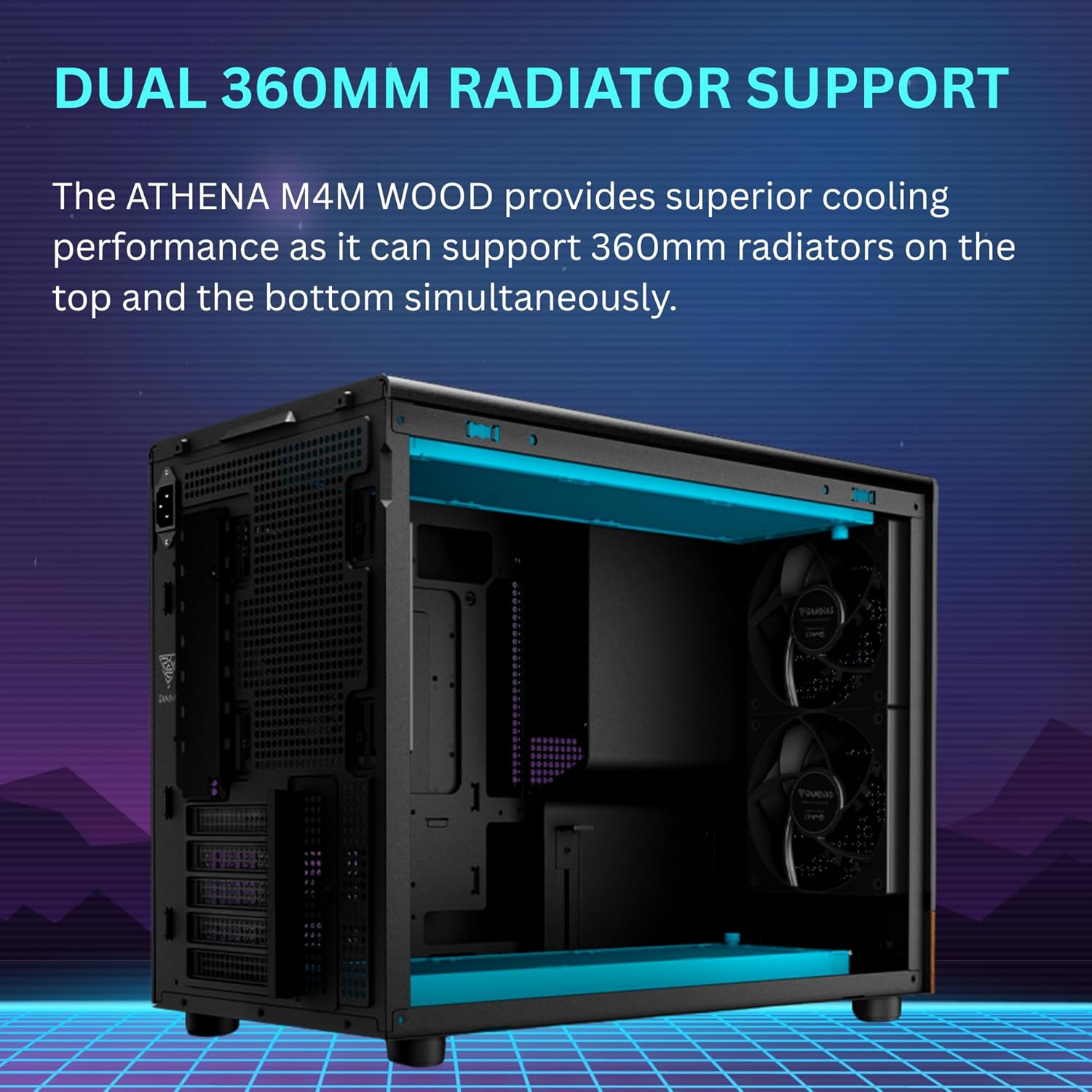
Figure 2: Illustration of the front-mounted PSU design with downward-facing connectors.
2.4 Graphics Card (VGA) Installation
- Керектүү PCIe уячасынын капкактарын корпустун арткы бөлүгүнөн алып салыңыз.
- Insert the graphics card into the appropriate PCIe slot on the motherboard.
- Secure the graphics card with screws. The case includes a built-in support bracket for longer GPUs.
2.5 Муздатуу системасын орнотуу (вентиляторлор жана радиаторлор)
The case comes with three pre-installed 120mm NOTUS M1 fans. Additional fans and radiators can be installed as follows:
- Алдыңкы: Supports up to two 120mm fans (two pre-installed).
- Арткы: Бир 120 мм желдеткичти колдойт (бири алдын ала орнотулган).
- Жогорку: Supports up to three 120mm fans or one 360mm radiator.
- Төмөнкү: Supports up to three 120mm fans or one 360mm radiator.
- тарап: 120 мм эки күйөрманга чейин колдойт.
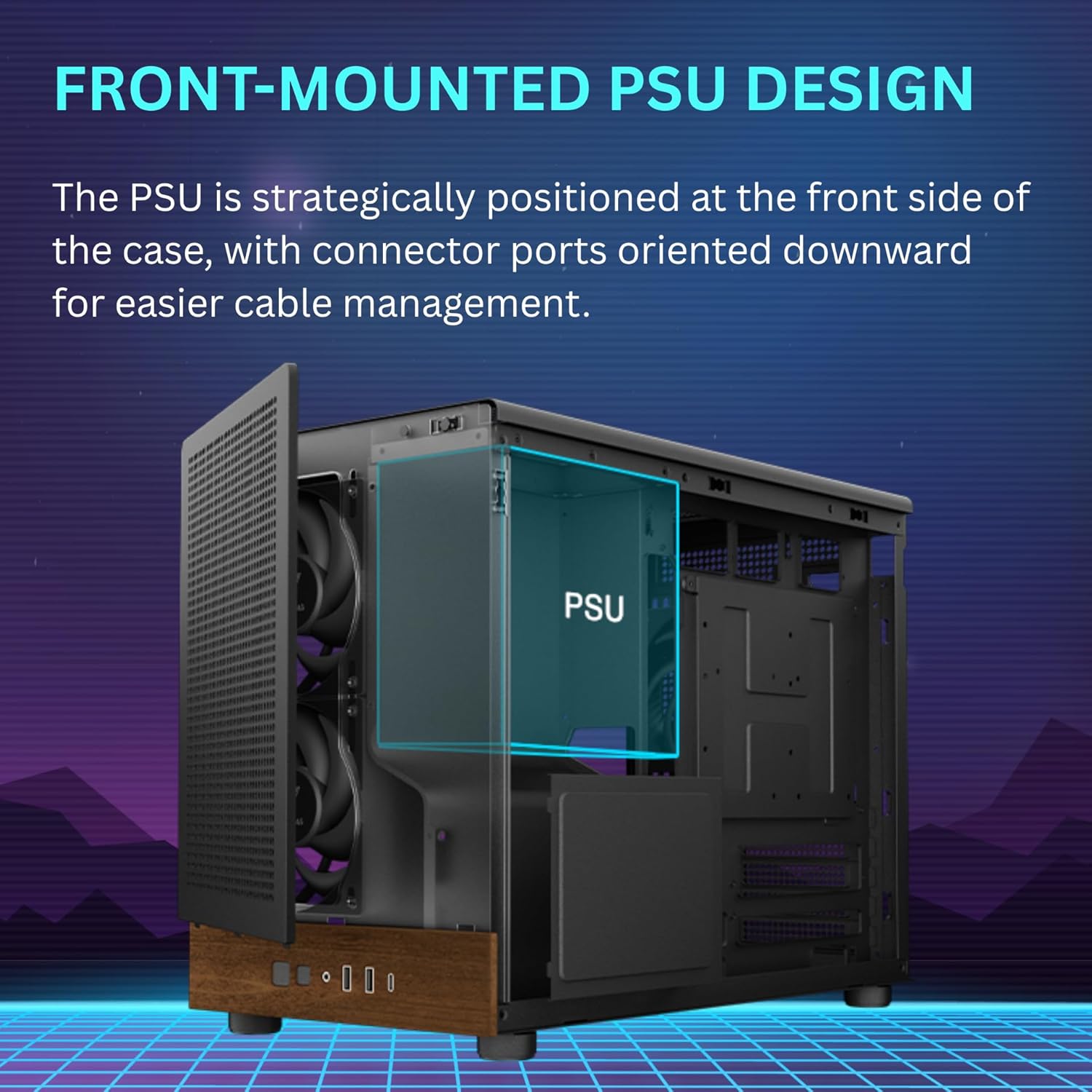
Figure 3: Extensive airflow configuration with three built-in PWM fans.
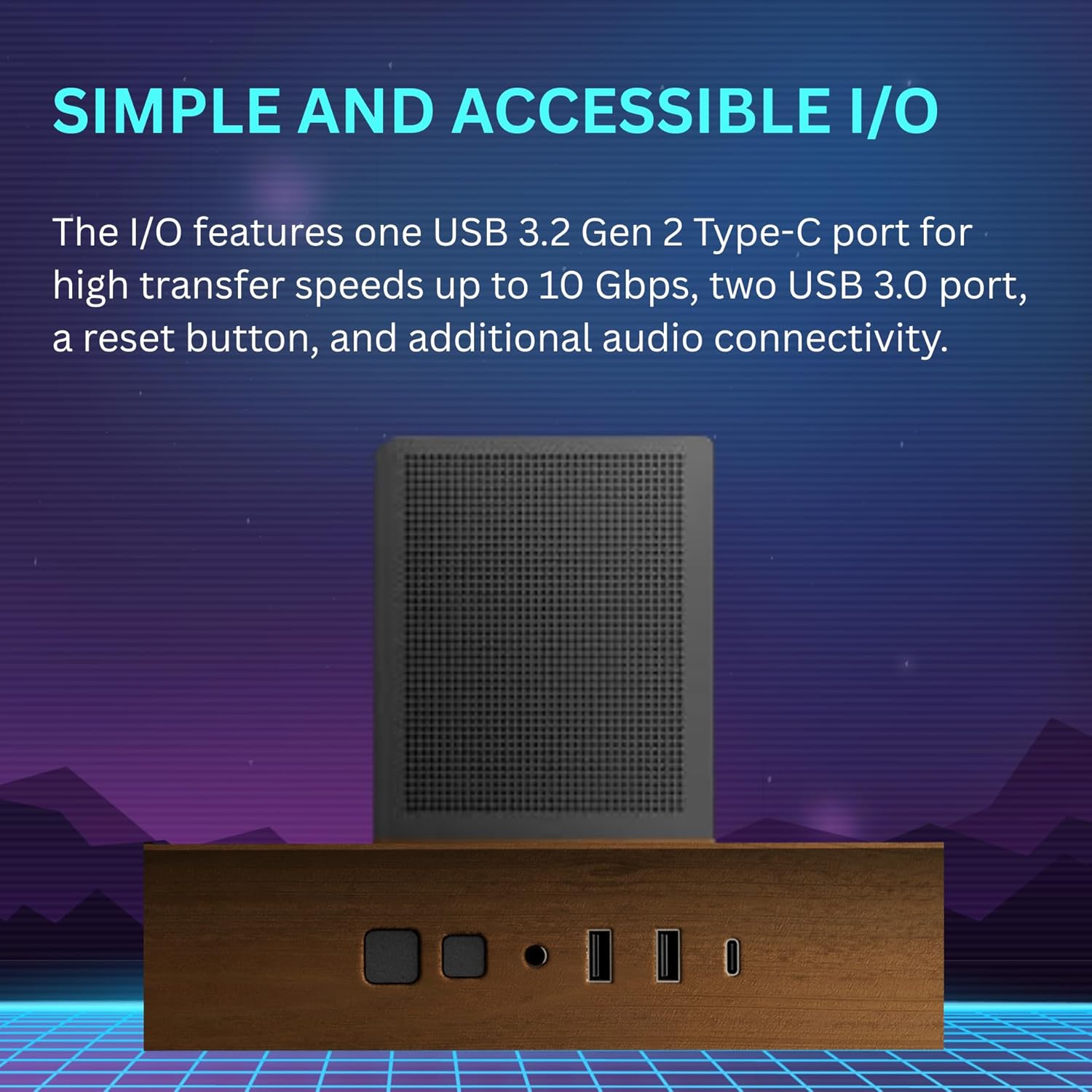
Figure 4: Dual 360mm radiator support for top and bottom mounting.

Figure 5: Cooling compatibility diagram showing fan and radiator placements.
2.6 Сактоочу дискти орнотуу
The case provides flexible storage options:
- One 3.5" HDD bay.
- Multiple 2.5" SSD bays.
Mount your drives to the designated brackets using the provided screws.

Figure 6: Flexible storage options for HDDs and SSDs, also showing dust filters.
2.7 Кабелди башкаруу
Utilize the cable routing cutouts and tie-down points behind the motherboard tray to organize cables. The front-mounted PSU with downward-facing connectors simplifies cable routing. For BTF (Back-To-the-Future) motherboards, the case is designed to accommodate hidden connectors for an ultra-clean build.
3. Иштөө нускамалары
3.1 Алдыңкы I/O панели
Алдыңкы I/O панели маанилүү портторго жана башкаруу элементтерине ыңгайлуу мүмкүнчүлүк берет:
- Кубат баскычы: Системаны күйгүзүү же өчүрүү үчүн.
- Калыбына келтирүү баскычы: Системаны кайра иштетүү үчүн.
- USB 3.2 Gen2 Type-C порту: For high-speed data transfer (up to 10 Gbps).
- USB 3.0 порттору (x2): Стандарттык USB туташуу үчүн.
- Аудио уячалары: For headphone and microphone connections.

Figure 7: Front I/O panel with USB-C, USB 3.0, and audio ports.
3.2 Fan Control
The case includes a fan/connection hub at the back, allowing you to connect more fans than your motherboard might natively support. Note that this hub may not include individual fan sensors, meaning manual speed control for each fan might be limited. Fan speeds are typically controlled via your motherboard's BIOS/UEFI settings or dedicated software.
4. Техникалык тейлөө
4.1 Чаң чыпкасын тазалоо
The ATHENA M4M WOOD is equipped with dust filters on the top, front, bottom, and side panels to prevent dust accumulation. Regular cleaning of these filters is crucial for maintaining optimal airflow and cooling performance.
- Carefully remove the dust filters from their respective locations.
- Clean the filters using compressed air, a soft brush, or by rinsing them with water (ensure they are completely dry before reinstallation).
- Reinstall the dust filters securely.
8-сүрөт: жарылган view showing dust filters on top and side panels.
4.2 Жалпы тазалоо
Use a soft, dry cloth to wipe down the exterior surfaces of the case. Avoid abrasive cleaners or solvents that could damage the finish, especially the walnut front panel and tempered glass.
5. Кыйынчылыктарды
- Difficulty connecting front USB 3.0/3.2 cables: The front USB 3.0/3.2 Gen2 Type-C connectors can be challenging to connect due to cable length and angle. Consider using a 90-degree adapter if you encounter difficulty.
- PSU Fitment Issues: Some larger PSUs (e.g., over 150mm in length) or specific models might have tight fitment due to the front-mounted design. Verify PSU dimensions before installation. If issues persist, ensure the PSU shroud is not obstructing.
- Top Plate Not Sitting Flush: If the top plate does not sit flush, gently check for any obstructions or misalignments. Avoid forcing it, as this may damage the metal.
- Fan Control Limitations: The included fan hub may not allow individual fan speed control via software. Fan speeds might be regulated by the motherboard's BIOS/UEFI settings based on temperature curves.
- SSD Placement and SATA Power Cables: Ensure that standard SATA power cables can reach and connect properly to SSDs, especially if using daisy-chained cables, as placement might be tight.
For further assistance, please consult the GAMDIAS support webсайтка же кардарларды тейлөөгө кайрылыңыз.
6. Техникалык шарттар
| Өзгөчөлүк | Деталь |
|---|---|
| Модель аты | ATHENA M4M WOOD |
| Иштин түрү | Micro-Tower |
| Motherboard шайкештиги | Micro ATX, Mini ITX |
| Материал | Metal, Stainless Steel, Tempered Glass, Walnut Wood |
| Түс | Black (with Walnut front panel) |
| Өлчөмдөрү (L x W x Y) | 17.56 x 9.25 x 13.66 дюйм (446 x 235 x 347 мм) |
| Элемент Салмагы | 12.36 фунт (5.62 кг) |
| PSU монтаждоо түрү | Front Mount |
| CPU муздаткычтын бийиктигинин чеги | 175 мм чейин |
| VGA Card Length Limit | 395 мм чейин |
| Күйөрмандардын колдоосу |
|
| Радиатор колдоо |
|
| Drive Bays | 1 x 3.5", Multiple 2.5" |
| Алдыңкы I / O порттору | 1 x USB 3.2 Gen2 Type-C, 2 x USB 3.0, Audio (Headphone/Mic), Power, Reset |

Figure 9: Interior accommodation showing CPU cooler and VGA card clearance.
7. Кепилдик маалыматы
GAMDIAS products are covered by a limited warranty. The specific terms and duration of the warranty may vary by region and product. Please retain your proof of purchase for warranty claims.
For detailed warranty information, including coverage, limitations, and the claims process, please visit the official GAMDIAS webсайтына кириңиз же жергиликтүү сатуучуңузга кайрылыңыз.
8. Кардарларды колдоо кызматы
If you encounter any issues or have questions regarding your GAMDIAS ATHENA M4M WOOD gaming case, please refer to the following resources:
- Онлайн колдонмо: Scan the QR code provided in your product packaging for the most up-to-date and detailed installation guide.
- GAMDIAS расмий Webсайт: Visit www.gamdias.com for product information, FAQs, and support contact options.
- Техникалык колдоо: Contact GAMDIAS technical support directly through their webжекелештирилген жардам үчүн сайт.