
1. Киришүү
Thank you for choosing the Tacens AEROSLIM500 MicroATX PC Case. This slim mini-tower is designed for efficient and compact PC builds, supporting MicroATX and Mini-ITX motherboards. It features optimized airflow, an integrated 500W TFX power supply, and modern connectivity. This manual provides essential information for safe installation, operation, and maintenance of your new PC case.
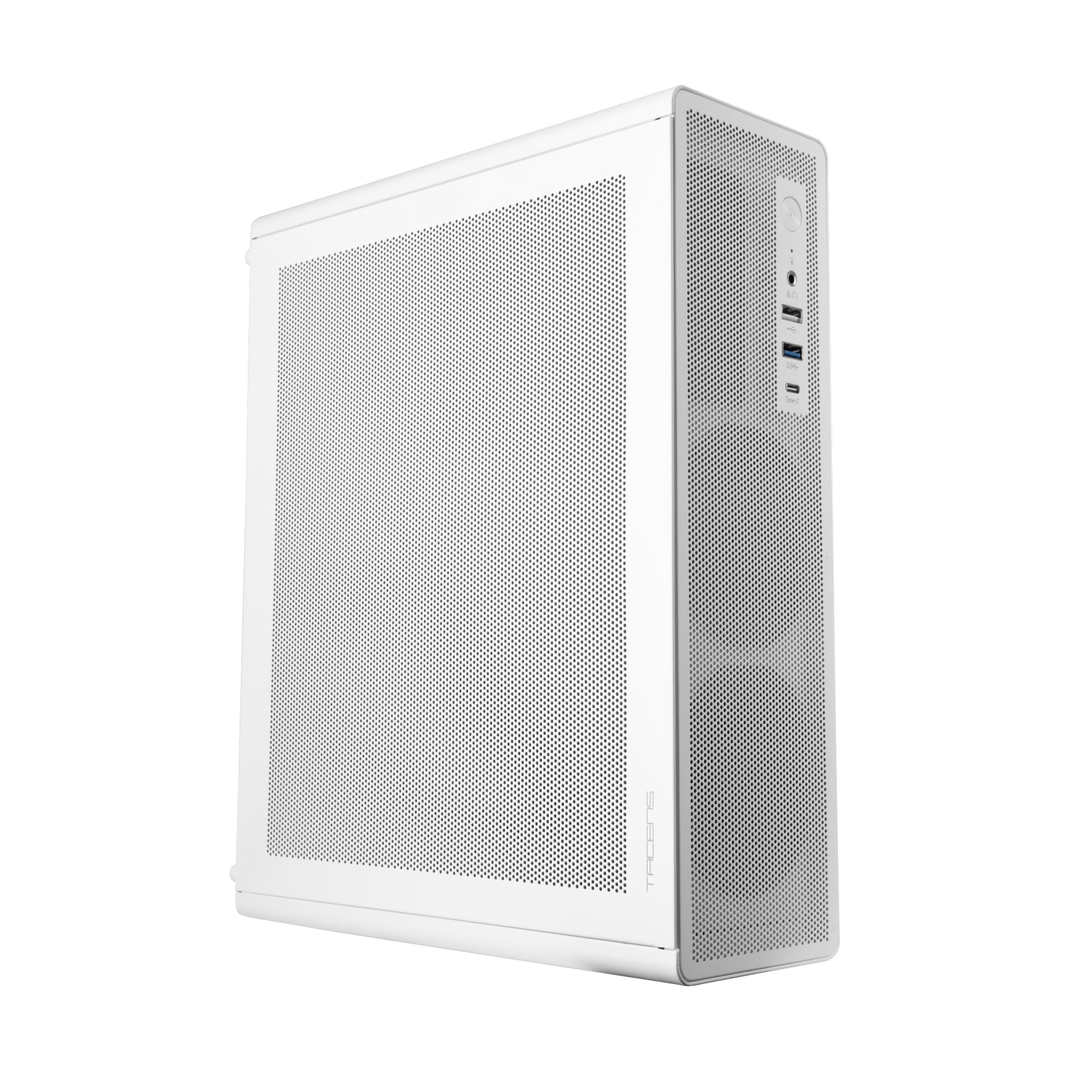
Figure 1: Tacens AEROSLIM500 MicroATX PC Case (Overall View)
2. Коопсуздук маалыматы
Please read and follow these safety guidelines to prevent damage to the product or injury to yourself.
- Электр энергиясын өчүрүү: Always disconnect the power cable from the wall outlet before opening the case or performing any installation/maintenance.
- Статикалык электр: Discharge static electricity from your body before handling internal components. Use an anti-static wrist strap if available.
- Курч жээктер: Орнотуу учурунда корпустун ичиндеги курч бурчтардан сак болуңуз.
- Вентиляция: Ensure proper ventilation around the case. Do not block air vents.
- Суюктук жана нымдуулук: Keep the case away from liquids and excessive moisture.
- Кесиптик орнотуу: Эгерде сиз орнотуунун кандайдыр бир кадамдары боюнча күмөн санасаңыз, квалификациялуу техниктен жардам сураңыз.
3. Пакеттин мазмуну
Таңгагыңызда бардык буюмдар бар экенин текшериңиз. Эгерде кандайдыр бир буюмдар жок болсо же бузулуп калса, сатуучуга кайрылыңыз.
- Tacens AEROSLIM500 MicroATX PC Case with integrated 500W TFX Power Supply
- Pre-installed 90mm FDB Front Fan
- Кошумча жабдуулар топтому (бурамалар, бекиткичтер, кабелдик байлагычтар)
- Колдонуучунун Колдонмосу (бул документ)
4. Продукциянын өзгөчөлүктөрү
The Tacens AEROSLIM500 PC case offers a range of features for a compact and efficient build:
- Integrated TFX 500W Power Supply: Ensures stable and efficient power delivery for your components.
- Өркүндөтүлгөн муздатуу: Front and side ultra-fine mesh panels provide constant airflow and act as a dust barrier.
- Pre-installed Front Fan: Includes a 90mm FDB (Fluid Dynamic Bearing) fan for optimal cooling. Supports up to two 90mm front fans.
- Optimized Internal Space: Compatible with MicroATX (up to 210mm wide) and Mini-ITX motherboards.
- GPU колдоосу: Accommodates low-profile GPUs up to 220mm long and 63mm wide.
- Сактоо параметрлери: Features 5 x 2.5" SSD drive bays.
- Кеңейтүү уячалары: Provides 3 expansion slots for MicroATX or 1-2 for Mini-ITX configurations.
- Толук туташуу: Front panel includes USB-C, USB 3.0, USB 2.0 ports, and HD audio/microphone jacks.
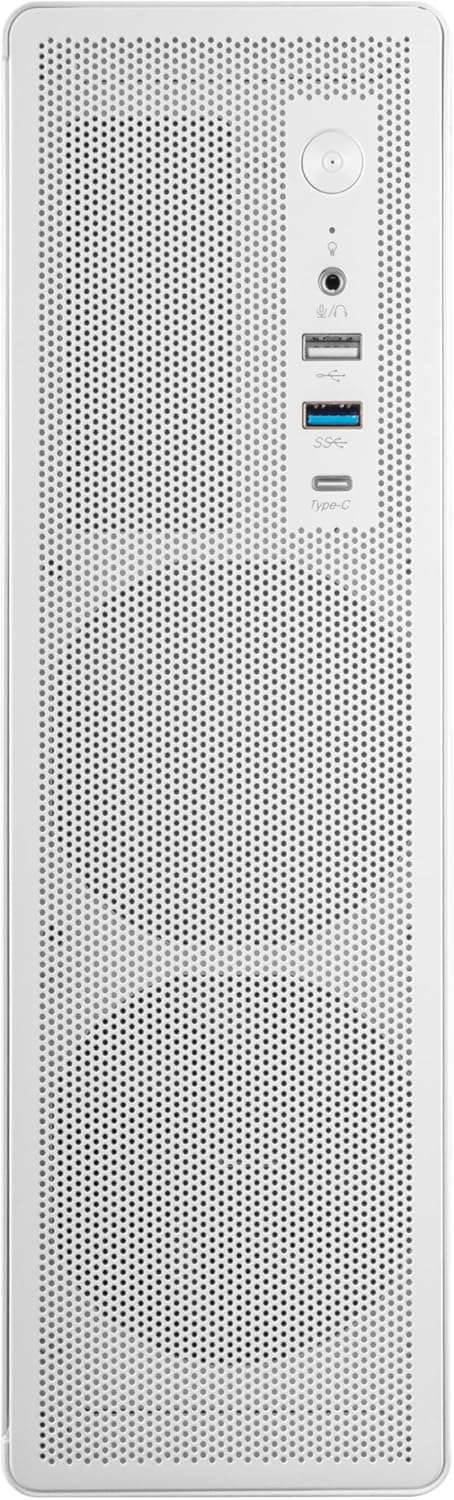
Figure 2: Front Panel Connectivity

3-сүрөт: Детальдуу View of Front I/O Ports
5. Орнотуу жана орнотуу
Follow these steps to install your components into the Tacens AEROSLIM500 PC case. Ensure the system is powered off and unplugged before beginning.
5.1. Ишти ачуу
- Корпусту тегиз, туруктуу бетке коюңуз.
- Locate the thumbscrews or standard screws on the rear panel securing the side panel(s).
- Remove the screws and carefully slide the side panel(s) backward, then lift them off.

Figure 4: Case Interior View with Pre-installed Fan
5.2. Motherboard орнотуу
- Install the CPU, CPU cooler (ensure it fits within the 73mm height limit), and RAM onto your MicroATX or Mini-ITX motherboard before placing it in the case.
- Align the motherboard with the pre-installed standoffs inside the case.
- Кошумча жабдуулар топтомундагы тиешелүү бурамалар менен энелик платаны бекитиңиз.

Figure 5: Motherboard Mounting Area
5.3. Storage Device Installation (2.5" SSD/HDD)
- Locate the 2.5" drive bays/mounting points. The case supports up to 5 x 2.5" drives.
- Secure your 2.5" SSDs or HDDs using the provided screws.
- Connect SATA data and power cables to the drives.

Figure 6: Power Supply and Drive Bay Area
5.4. Кеңейтүү картасын (GPU) орнотуу
- Корпустун артындагы керектүү кеңейтүү уячасынын капкактарын алып салыңыз.
- Carefully insert your low-profile GPU (max 220mm length, 63mm width) into the PCIe slot on the motherboard.
- Secure the expansion card with a screw.
5.5. Алдыңкы панелдин кабелдерин туташтыруу
Connect the front panel cables (USB-C, USB 3.0, USB 2.0, HD Audio, Power Switch, Reset Switch, Power LED, HDD LED) to their corresponding headers on your motherboard. Refer to your motherboard manual for exact header locations.
5.6. Кабелдик башкаруу
Route cables neatly to improve airflow and aesthetics. Use the provided cable ties to secure bundles of cables.
5.7. Ишти жабуу
- Once all components are installed and cables are managed, reattach the side panel(s).
- Secure the side panel(s) with the thumbscrews or standard screws.
6. Иштөө нускамалары
After successful assembly, connect your peripherals (monitor, keyboard, mouse) and the power cable to the integrated TFX 500W power supply.
- Күйгүзүү: Компьютериңизди күйгүзүү үчүн алдыңкы панелде жайгашкан кубат баскычын басыңыз.
- USB порттору: Use the front USB-C, USB 3.0, and USB 2.0 ports for connecting external devices.
- Аудио уячалары: Connect headphones or a microphone to the front audio jacks.
- Өчүрүү: Shut down your computer through the operating system. For a hard shutdown, press and hold the power button for several seconds.
7. Техникалык тейлөө
Үзгүлтүксүз тейлөө сиздин PC компоненттеринин оптималдуу иштешин жана узак иштөөсүн камсыз кылууга жардам берет.
- Чаңды тазалоо: The mesh panels act as dust filters. Periodically clean the front and side mesh panels using compressed air or a soft brush to remove accumulated dust.
- Ички тазалоо: Every 6-12 months, open the case (after disconnecting power) and use compressed air to clean dust from internal components, especially CPU coolers and GPU fans.
- Кабель башкаруу текшерүү: Кабелдердин тыкан жайгашканын жана абанын агымына тоскоол болбогонун текшериңиз.
8. Кыйынчылыктарды
Эгерде сиз көйгөйлөргө туш болсоңуз, төмөнкү жалпы көйгөйлөрдү чечүү кадамдарын караңыз.
- Кубат жок:
- Ensure the power cable is securely connected to both the wall outlet and the PC's power supply.
- Verify that the power supply switch (if present) is in the 'ON' position.
- Check all internal power connections (24-pin ATX, 8-pin CPU, GPU power) to the motherboard and components.
- Алдыңкы панелдеги кубат баскычынын кабели энелик платага туура туташтырылганын текшериңиз.
- Дисплей жок:
- Confirm your monitor is powered on and connected to the correct video output on your GPU or motherboard.
- Reseat your GPU and RAM modules.
- Ашыкча ызы-чуу:
- Check if any cables are obstructing fan blades.
- Clean dust from fans (CPU, GPU, case fans, PSU fan).
- Ensure all screws are tightened to prevent vibrations.
- Алдыңкы панелдин порттору иштебейт:
- Verify that the USB and audio cables from the front panel are correctly connected to the motherboard headers.
9. Техникалык шарттар
| Бренд | Tacens |
| Модель аты | AEROSLIM500 |
| Motherboard шайкештиги | Micro ATX, Mini ITX |
| Иштин түрү | Compact Desktop / Mini-Tower |
| Түс | Ак |
| Материал | Металл |
| Электр камсыздоо | Integrated TFX 500W |
| Муздатуу ыкмасы | Air (Pre-installed 90mm FDB front fan) |
| CPU муздаткычтын бийиктигинин чеги | 73 мм чейин |
| GPU Length Limit | Up to 220mm (low-profile гана) |
| GPU Width Limit | 63 мм чейин |
| Drive Bays | 5 x 2.5" SSD/HDD |
| Кеңейтүү уячалары | 3 (MicroATX), 1-2 (Mini-ITX) |
| Алдыңкы I / O порттору | 1x USB-C, 1x USB 3.0, 2x USB 2.0, HD Audio (Headphone/Microphone) |
| Элемент Салмагы | 2.25 килограмм |
10. Кепилдик жана колдоо
Tacens products are manufactured to the highest quality standards. For information regarding warranty coverage, terms, and conditions, please refer to the warranty card included with your product or visit the official Tacens webсайт.
For technical support, troubleshooting assistance beyond this manual, or to inquire about replacement parts, please contact Tacens customer service through their official webсайт же продукт документациясында көрсөтүлгөн байланыш маалыматы.
Official Tacens Webсайт: www.tacens.com (Эскертүү: Бул толтургуч URL. Please refer to your product packaging for the correct official webсайт.)