
INNOCN GA32V1M
INNOCN MiniLED 4K Gaming Monitor GA32V1M User Manual
Model: GA32V1M
1. Киришүү
This manual provides essential information for the safe and efficient operation of your INNOCN MiniLED 4K Gaming Monitor GA32V1M. Please read this manual thoroughly before using the product and retain it for future reference. This 32-inch monitor features advanced MiniLED technology, offering a versatile display experience with switchable resolutions and refresh rates, including 4K at 160Hz and Full HD at 320Hz.
2. Коопсуздук маалыматы
Observe the following safety precautions to prevent damage to the monitor and ensure your personal safety:
- Өрт же электр тогуна урунуу коркунучун болтурбоо үчүн мониторду жамгыр же нымдуулукка дуушар кылбаңыз.
- Мониторду ачпаңыз casinг. Ичинде колдонуучу тейлей турган бөлүктөр жок. Бардык тейлөөлөрдү квалификациялуу кызматкерлерге тапшырыңыз.
- Монитор кулап калбаш үчүн аны туруктуу, тегиз бетке коюңуз.
- Монитордун айланасында туура желдетүүнү камсыз кылыңыз. Вентиляция тешиктерин жаап албаңыз.
- Монитор менен кошо берилген кубат адаптерин жана кабелдерди гана колдонуңуз.
- Монитор узак убакыт бою колдонулбай турган болсо, электр сайгычын розеткадан ажыратыңыз.
- Электр шнуруна же башка кабелдерге оор нерселерди коюудан алыс болуңуз.
- If any abnormal operation occurs, immediately unplug the monitor and contact customer support.
3. Пакеттин мазмуну
Пакетиңизде бардык буюмдар бар экенин текшериңиз:
- INNOCN GA32V1M Monitor Unit
- Стенд базасы
- Stand Arm
- HDMI кабели (x1)
- DisplayPort (DP) кабели (x1)
- USB-C кабели (x1)
- USB-B Cable (x1)
- Электр кабели
- Кубаттуу адаптер
- Instruction Manual / Quick Start Guide

Image: The monitor unit, stand components, and various cables (HDMI, DP, USB-C, USB-B, power) along with the power adapter and documentation are shown. Dimensions of the monitor are also indicated.
4. Орнотуу
4.1 Стендди чогултуу
- Монитордун таңгагынан кылдаттык менен чыгарып, чийилбеши үчүн, аны жумшак, таза бетке ылдый каратып коюңуз.
- Attach the stand arm to the back of the monitor using the provided screws.
- Connect the stand base to the stand arm and secure it with the designated screw.
- Бардык байланыштар бекем жана туруктуу экенин текшериңиз.
The monitor also supports VESA mounting (100x100mm) for alternative installation options. When VESA mounting, ensure proper support for the monitor's weight.
4.2 Туташтыруучу кабельдер
Refer to the port diagram for correct connections:

Сүрөт: Арткы view of the monitor showing various input/output ports labeled A through G. These include USB-A 3.0, USB-B 3.0, HDMI 2.1, USB-C 90W, DisplayPort 1.4, Audio Out, and DC Power In.
- Кубат туташуу: Connect the power adapter to the DC Power In port (G) on the monitor and then plug the power cable into a wall outlet.
- Video Input:
- HDMI: Connect an HDMI cable to one of the HDMI 2.1 ports (C) and to your computer or gaming console.
- DisplayPort (DP): Connect a DisplayPort cable to one of the DP 1.4 ports (E) and to your computer.
- USB-C: For compatible devices, connect a USB-C cable to the USB-C 90W port (D). This port supports video, data, and power delivery (up to 90W).
- USB хабы: Connect the USB-B 3.0 upstream cable (B) from your computer to the monitor to enable the USB-A 3.0 downstream ports (A) for connecting peripherals.
- Аудио чыгаруу: Connect external speakers or headphones to the Audio Out port (F) if desired.
5. Иштөө нускамалары
5.1 Күйгүзүү/өчүрүү
Press the power button, typically located near the joystick control on the back of the monitor, to turn the monitor on or off.
5.2 Экрандагы дисплей (OSD) менюсунун навигациясы
The monitor features a joystick control for navigating the OSD menu. Push the joystick in to open the menu, then move it up, down, left, or right to select and adjust settings.
- Сүрөт жөндөөлөрү: Жарыктыгын, контрастын, курчтугун жана түс температурасын тууралаңыз.
- Түс мейкиндиги: Select from various color profiles such as sRGB, DCI-P3, and Adobe RGB.
- Киргизүү булагы: Manually select the input source (HDMI, DP, USB-C).
- Системанын жөндөөлөрү: Access language, OSD timeout, and other general monitor settings.
5.3 Dual Mode Resolution and Refresh Rate Switching
The monitor supports a unique dual mode feature, allowing you to switch between high resolution and high refresh rate settings based on your needs:
- 4K (3840x2160) @ 160Hz: Ideal for detailed visuals in 3A games, video editing, and general productivity where high resolution is prioritized.
- Full HD (1920x1080) @ 320Hz: Optimized for competitive gaming (FPS, racing) where response speed and ultra-high refresh rates are critical.
This mode can typically be switched via a dedicated button or through the OSD menu. Refer to the on-screen prompts for specific instructions.

Image: Illustrates the monitor's ability to switch between 4K resolution at 160Hz and Full HD resolution at 320Hz, catering to different usage scenarios like high-fidelity graphics or competitive gaming.
5.4 MPCS Technology (Motion Picture Clarity System)
The monitor incorporates INNOCN's proprietary MPCS technology to reduce motion blur and ghosting, enhancing clarity in fast-moving scenes. Two modes are available:
- MPCS/ULL (Ultra Low Latency): Optimized for games requiring quick reflexes, such as FPS titles. This mode minimizes input lag, ensuring immediate on-screen reflection of player actions.
- MPCS/LD (Local Dimming): Best suited for games like MOBA or 3A titles that emphasize graphics and immersion. This mode enhances detail in dark areas and highlights bright effects, increasing immersion.

Image: A comparison showing the visual difference with MPCS technology enabled versus a conventional display, demonstrating reduced motion blur and improved clarity in a gaming scene.
5.5 HDR1000 and MiniLED Backlight
The monitor features a 2304-zone MiniLED backlight and HDR1000 support, delivering exceptional contrast and brightness. This technology allows for precise control of light, achieving deep blacks and vibrant highlights up to 1200 nits peak brightness. This results in a highly immersive visual experience for HDR content.

Image: An astronaut in space, illustrating the deep blacks and bright highlights achieved with HDR1000 and MiniLED technology, showcasing a contrast ratio of 2,500,000:1 and 1200 nits peak brightness.
5.6 Color Accuracy and Quantum Dot Technology
Utilizing Quantum Dot technology, the monitor achieves a wide color gamut, covering 99% of DCI-P3, Adobe RGB, and sRGB color spaces. Each unit is factory-calibrated to ensure accurate color reproduction with a Delta E (ΔE) less than 2, providing vivid and true-to-life colors.
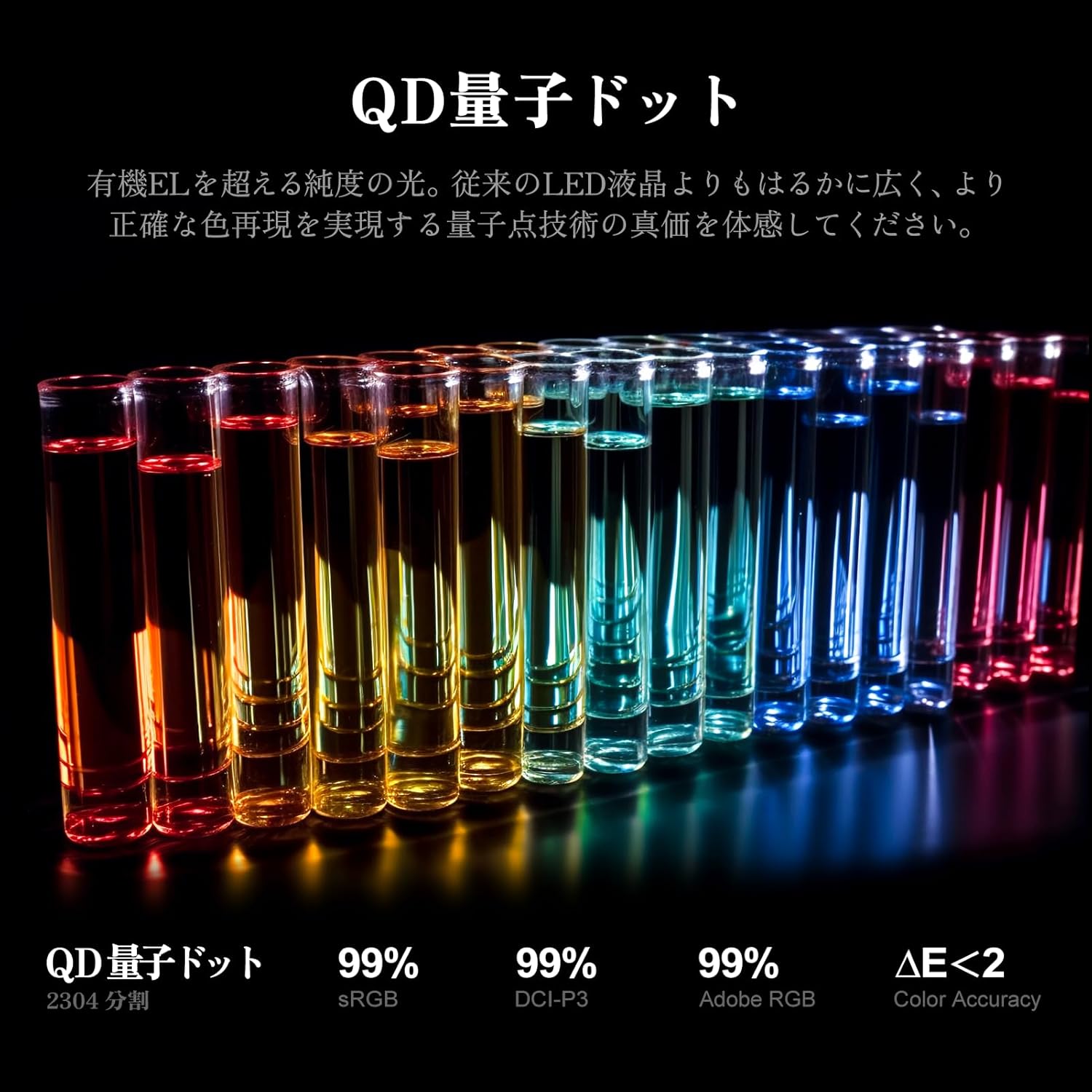
Image: A visual representation of vibrant colors in test tubes, indicating the monitor's wide color gamut coverage (99% sRGB, DCI-P3, Adobe RGB) and high color accuracy (ΔE<2) due to Quantum Dot technology.
5.7 Flicker-Free and Low Blue Light
The monitor incorporates flicker-free technology and a low blue light mode to reduce eye strain during extended use, enhancing viewсооронуч.

Image: A split screen showing the difference between flicker-free ON and OFF, demonstrating how the technology reduces screen flickering for eye comfort.
5.8 KVM которуштуруу функциясы
The monitor includes a KVM switch function, allowing you to control multiple computers with a single keyboard and mouse connected to the monitor's USB hub. This feature is particularly useful for users with multiple systems, simplifying cable management and workspace setup.
6. Техникалык тейлөө
6.1 Мониторду тазалоо
- Тазалоодон мурун ар дайым мониторду сууруп коюңуз.
- Бир аз жумшак, түксүз кездемени колдонуңуз dampсуу же жумшак, абразивдүү эмес экран тазалагыч менен иштетиңиз.
- Тазалоочу каражатты түз экранга чачпаңыз. Алгач аны кездемеге сүйкөңүз.
- Avoid using benzene, thinner, or any volatile solvents, as they may damage the monitor's surface.
6.2 Жалпы кам көрүү
- Мониторду түз күн нурунан, ашыкча ысыктан же сууктан алыс кармаңыз.
- Avoid placing the monitor in dusty environments.
- Монитор же анын кабелдерине оор нерселерди койбоңуз.
7. Кыйынчылыктарды
Мониторуңузда көйгөйлөргө туш болсоңуз, төмөнкү жалпы чечимдерди караңыз:
| Көйгөй | Мүмкүн чечим |
|---|---|
| Экранда сүрөт жок |
|
| Сүрөт бүдөмүк же бурмаланган |
|
| Динамиктерден/наушниктерден үн чыкпайт |
|
| USB порттору иштебейт |
|
Бул чечимдерди колдонуп көргөндөн кийин көйгөй чечилбесе, кардарларды колдоо менен байланышыңыз.
8. Техникалык шарттар
| Өзгөчөлүк | Деталь |
|---|---|
| Модель номери | GA32V1M |
| Screen Size | 32 дюйм |
| Дисплей түрү | MiniLED LCD |
| Резолюция | 3840x2160 (4K UHD) |
| Жаңыртуу ылдамдыгы | 160 Hz (4K), 320 Hz (FHD) |
| Жооп убактысы | 0.5 мс |
| Аспект катышы | 16:9 |
| Viewбурч | 178 градус |
| HDR колдоо | HDR1000 |
| Түс гаммасы | 99% DCI-P3, 99% Adobe RGB, 99% sRGB |
| Байланыш | 2x HDMI 2.1, 2x DisplayPort 1.4, 1x USB-C (90W PD), USB Hub (USB-B upstream, USB-A downstream), Audio Out |
| Өзгөчөлүктөрү | Adaptive Sync, Height Adjustment, MPCS Technology, Flicker-Free, Low Blue Light, Built-in Speakers, KVM Switch |
| VESA шайкештиги | Ооба (100x100мм) |
| Өнүмдүн Өлчөмдөрү (Ж x Y x D) | 71.4 см х 55.9 см х 24 см |
| Продукт Салмагы | 4.5 кг |
9. Кепилдик жана колдоо
INNOCN products are designed and manufactured to the highest quality standards. This product is covered by a limited warranty from the date of purchase. Please refer to the warranty card included in your package or visit the official INNOCN webдеталдуу кепилдик шарттары жана шарттары үчүн сайт.
For technical support, troubleshooting assistance, or warranty claims, please contact INNOCN customer service. Contact information can typically be found on the official webсайтында же продуктуңуз менен бирге берилген документтерде.
Zero Bright Dot Warranty: This monitor includes a zero bright dot warranty, ensuring a premium display experience free from bright pixel defects.
Тектеш документтер - GA32V1M
 |
INNOCN PF15-PRO Portable Monitor Ыкчам баштоо куралы Бул колдонмо INNOCN PF15-PRO көчмө мониторду орнотуу жана колдонуу үчүн коопсуздук чараларын, өнүмдөрдүн спецификацияларын жана бузулууларды аныктоону камтыган маанилүү маалыматты камтыйт. |
 |
INNOCN N2F көчмө мониторун тез баштоо боюнча колдонмо INNOCN N2F көчмө монитору боюнча кеңири колдонмо, анда орнотуулар, функциялар, OSD менюсунун параметрлери, бузулууларды оңдоо, мүнөздөмөлөр жана кепилдик жөнүндө маалымат берилген. |
 |
INNOCN N1F PRO көчмө мониторун тез баштоо боюнча колдонмо INNOCN N1F PRO көчмө монитору үчүн кеңири тез баштоо колдонмосу. Орнотуу, коопсуздук чаралары, негизги функциялар, OSD менюсунун навигациясы, мүчүлүштүктөрдү оңдоо, техникалык мүнөздөмөлөр жана кепилдик жөнүндө маалымат алыңыз. |
 |
INOCN PU15-PRE портативдик монитордун тез баштоо колдонмосу Бул колдонмо INOCN PU15-PRE портативдик мониторунун тез баштоосун камсыздайт, ал орнотууларды, функцияларды жана көйгөйлөрдү оңдоону камтыйт. |
 |
INNOCN GA32V1M (3260V PRO) 32-inch 4K Fast IPS Mini LED Monitor Specifications Detailed specifications for the INNOCN GA32V1M (3260V PRO) 32-inch monitor, featuring a Fast IPS panel, Mini LED backlight with 2304 zones, 4K resolution (3840x2160), HDR1000 support, and a high refresh rate up to 160Hz. Includes color gamut coverage, connectivity options, and mechanical details. |
 |
INNOCN GA27V1M (2760V PRO) 27-inch 4K Mini LED Monitor Specifications Detailed technical specifications for the INNOCN GA27V1M (2760V PRO) 27-inch 4K Mini LED monitor, featuring HDR1000, 160Hz refresh rate, and extensive color gamut coverage. |
Ask a question about this manual
Ask about setup, troubleshooting, compatibility, parts, safety, or missing instructions. Manuals+ will review the question and use this page’s manual context to help answer it.