
1. Introduction and Overview
The domyfan N2 16.1-inch Portable Monitor is designed to extend your laptop's display, offering a Full HD 1200P IPS screen with a 16:10 aspect ratio. It features a 360-degree rotating detachable stand and VESA mount support for versatile positioning. This monitor is compatible with various operating systems and devices, providing a plug-and-play solution for enhanced productivity and entertainment.

Image 1.1: The domyfan N2 portable monitor in use, extending a laptop display.

Image 1.2: Visual comparison highlighting the 16.1-inch screen size and display features like 120% sRGB, 16:10 aspect ratio, 360-degree rotation, 60Hz refresh rate, IPS panel, and 178-degree viewбурч.
2. Пакеттин мазмуну
Пакетте бардык буюмдар бар экенин текшериңиз:
- 1x domyfan N2 Portable Monitor
- 1x Колдонуучунун колдонмосу
- 1x USB-C - USB-C кабели
- 1x HDMI to Mini HDMI Cable
- 1x USB-A - USB-C кабели
- 1x Portable Stand (pre-attached or separate)

Image 2.1: All components included in the domyfan N2 portable monitor package.
3. Орнотуу нускамалары
Follow these steps to set up your domyfan N2 portable monitor:
- Detach Screen: Hold the circular base and slide forward to remove the screen from the stand.
- Extend Stand: Open the stand behind the frame and extend it to a 90-degree maximum angle.
- Экранды тиркөө: Align the holes on the screen with the magnetic mount on the stand and attach securely.
- Экранды айландыруу: Rotate the screen 360 degrees for full laptop compatibility and desired orientation.
- Бийиктигин тууралоо: Freely adjust the screen height with the 9cm vertical sliding range.
- Rotate Stand: Utilize the 360-degree rotatable stand for optimal viewбурчтар.

Image 3.1: Detailed steps for assembling and adjusting the monitor with its stand.
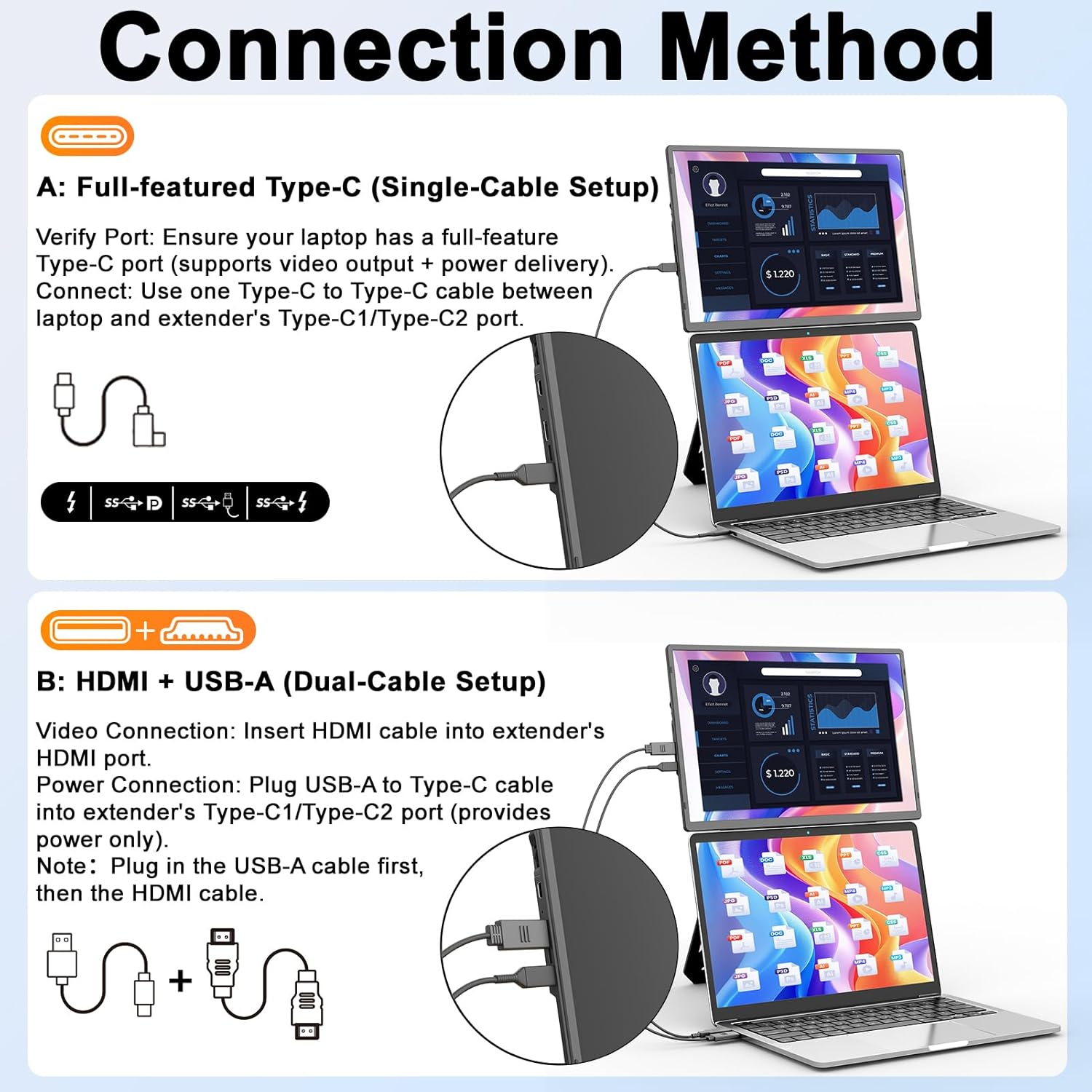
4. Туташуу ыкмалары
The domyfan N2 monitor supports two primary connection methods:
A. Full-featured Type-C (Single-Cable Setup)
This method provides both video signal and power through a single USB-C cable.
- Verify Port: Ensure your laptop has a full-feature Type-C port (supporting Thunderbolt 3.0/4.0, DisplayPort Alternate Mode, and power delivery).
- Туташуу: Use one USB-C to USB-C cable to connect between your laptop's full-feature Type-C port and the extender's Type-C1 or Type-C2 port.
B. HDMI + USB-A (Dual-Cable Setup)
This method is used when your laptop's USB-C port does not support video output or when using an HDMI-only device.
- Видео туташуу: Insert the HDMI to Mini HDMI cable into the extender's Mini HDMI port and your laptop's HDMI port.
- Кубат туташуу: Plug the USB-A to USB-C cable into the extender's Type-C1 or Type-C2 port (for power only) and a USB-A port on your laptop or a power adapter.
- Эскертүү: Plug in the USB-A cable first, then the HDMI cable for proper detection.

Image 4.1: Illustrations of connecting the monitor using a single USB-C cable or a combination of HDMI and USB-A cables.
5. Иштөө режимдери
The domyfan N2 monitor supports various display modes to suit your workflow:
- MirrorMode: Негизги экраныңыздын мазмунун көчмө мониторго кайталайт.
- Узартуу режими: Expands your desktop across both screens, allowing for multitasking.
- Портрет режими: Rotates the display vertically, ideal for reading documents or coding.
- Mobile Casting Mode: Connects to compatible smartphones for a larger display experience.

Сүрөт 5.1: Visual examples of the different display modes available with the monitor.
6. VESA орнотуу
The domyfan N2 monitor is VESA compatible, allowing for flexible mounting options.
- VESA стандарты: Supports 75x75mm VESA mounts.
- Бурамалар: Use M4*4pcs screws for secure attachment.
- Орнотуу: Securely attach the monitor to a compatible desk arm or wall mount for ergonomic positioning.
Сүрөт 6.1: Мисample of the monitor mounted on a VESA-compatible arm for various applications.
7. Шайкештик
The domyfan N2 portable monitor offers broad compatibility with various devices and operating systems:
- Операциялык системалар: macOS, Windows, Android.
- Түзмөктөр: PC, Laptops, PS5, Xbox, Nintendo Switch, and most other devices with compatible video output.

Image 7.1: Visual representation of the monitor's wide compatibility with different platforms.
8. Техникалык шарттар
| Өзгөчөлүк | Спецификация |
|---|---|
| Модель номери | N2 |
| Screen Size | 16.1 дюйм |
| Резолюция | FHD 1920 x 1200 Pixels (1200P) |
| Аспект катышы | 16:10 |
| Панел түрү | IPS |
| Сүрөттүн жарыктыгы | 300 кД/м² (Нит) |
| Продукциянын өлчөмдөрү | 15.67 x 2.26 x 10.83 дюйм |
| Элемент Салмагы | 4.77 фунт |
| VESA колдоосу | 75x75mm (M4*4pcs screws) |
| Байланыш | USB-C (full-feature), Mini HDMI |
| Screen Surface | Жылтырак |
9. Кыйынчылыктарды
If you encounter issues with your domyfan N2 portable monitor, refer to the following common solutions:
- "No Signal" Message with USB-C: If the screen displays "No Signal" when connected via USB-C, it indicates that your laptop's USB-C port may only support power delivery and not video output. In this case, you must use the HDMI to Mini HDMI cable for video signal and a USB-A to USB-C cable for power.
- Дисплей/кубат жок:
- Бардык кабелдер коопсуз туташтырылганын текшериңиз.
- Verify that your laptop's USB-C port supports video output and power delivery if using a single USB-C cable.
- If using HDMI, ensure the USB-A to USB-C power cable is connected to a sufficient power source (laptop USB-A port or wall adapter).
- Try a different USB-C port on your laptop, or a different cable if available.
- Сүрөттүн сапаты маселелери:
- Check your laptop's display settings to ensure the resolution is set to 1920x1200 for the external monitor.
- Adjust brightness and contrast settings on the monitor using its control buttons.
- Үн маселелери:
- Ensure the monitor's volume is not muted or set too low.
- Check your computer's sound output settings to ensure the domyfan N2 monitor is selected as the audio output device.
10. Кепилдик жана колдоо
domyfan is committed to providing reliable products and customer service.
- Сатуудан кийинки колдоо: For any issues regarding screen functionality, missing accessories, compatibility, or connectivity, please refer to the contact information provided in your product packaging.
- We offer 24/7 after-sales support to assist you with any concerns and provide satisfactory solutions.