1. Киришүү
Thank you for choosing the OKP Life L1 Lidar Robot Vacuum Cleaner. This manual provides essential information for the safe operation, maintenance, and troubleshooting of your device. Please read it thoroughly before use and retain it for future reference.
2. Маанилүү коопсуздук нускамалары
To reduce the risk of injury or damage, read these safety instructions carefully and keep them handy when setting up, using, and maintaining your robot.
- Бул шайманды 8 жаштан жогорку балдар жана физикалык, сезүү же акыл-эс жөндөмү начар же тажрыйбасы жана билими жок адамдар колдонсо болот, эгерде алар көзөмөлгө алынган же шайманды коопсуз колдонуу боюнча нускама алган болсо жана келтирилген коркунучтарды түшүнсө. .
- Балдар шайман менен ойнобошу үчүн аларды көзөмөлгө алуу керек.
- Тазалоо жана колдонуучу тейлөөнү балдар көзөмөлсүз жасабашы керек.
- Өндүрүүчү тарабынан берилген оригиналдуу кубат адаптерин гана колдонуңуз.
- Роботту ачык жалын же морт буюмдар бар чөйрөдө колдонбоңуз.
- Ensure the robot is used on dry surfaces only.
- Чачты, кенен кийимдерди, манжаларды жана дененин бардык бөлүктөрүн тешиктерден жана кыймылдуу бөлүктөрдөн алыс кармаңыз.
3. Пакеттин мазмуну
Пакетте бардык компоненттер бар экенин текшериңиз:
- OKP Life L1 Robot Vacuum Cleaner
- Заряддоо док
- Кубаттуу адаптер
- Каптал щеткалары (2 жуп)
- HEPA чыпкасы (1 кошумча)
- Тазалоо куралы
- User Manual
4. Продукт бүтүп калдыview
Familiarize yourself with the components of your OKP Life L1 robot vacuum.

4.1-сүрөт: Жогорку view of the OKP Life L1 Lidar Robot Vacuum Cleaner alongside its mobile application interface. The robot is white with a dark grey Lidar sensor on top and a power button. The app shows cleaning status and control options.
Робот компоненттери:
- Lidar сенсор: Так навигация жана карта үчүн.
- Кубат баскычы: To start/pause cleaning or power on/off.
- контейнери: Таштандыларды чогултат.
- Каптал щеткалар: Негизги щетка жолуна таштандыларды шыпырыңыз.
- Main Brush Roll: Agitates and lifts debris from floors.
- Заряддоо байланыштары: For automatic recharging at the dock.
- Cliff сенсорлору: Роботтун тепкичтен кулап түшүшүнө жол бербеңиз.
- Бампер: Тоскоолдуктарды аныктайт.
5. Орнотуу жана алгачкы колдонуу
5.1 Preparing the Robot
- Роботтон жана кубаттоочу доктон бардык коргоочу пленкаларды жана стикерлерди алып салыңыз.
- Каптал щеткаларды мамыларга чыкылдаган үн чыкканча басып орнотуңуз.
5.2 Кубаттоочу докту орнотуу
Place the charging dock against a wall in an open, uncluttered area. Ensure there is at least 0.5 meters (1.6 feet) of clear space on both sides and 1.5 meters (4.9 feet) in front of the dock. Plug in the power adapter.
5.3 Баштапкы төлөм
Place the robot on the charging dock. The indicator light will show charging status. Fully charge the robot before its first use (approximately 5-6 hours).
5.4 Connecting to the OKP Life App
The OKP Life L1 supports remote control via the OKP Life App. This allows for scheduling, mode customization, and real-time monitoring.
- Download the "OKP Life" app from your mobile device's app store.
- Каттоо эсебин жана кирүү.
- Follow the in-app instructions to add your L1 robot vacuum. Ensure your Wi-Fi network is 2.4GHz.
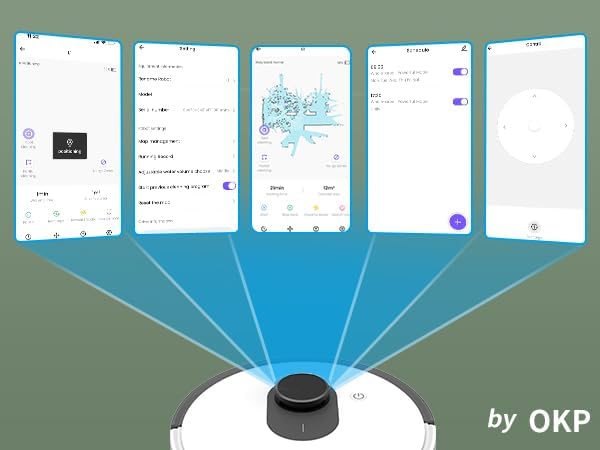
5.1-сүрөт: Various screenshots of the OKP Life mobile application, demonstrating features like device connection, settings, mapping, and remote control options.
5.5 Үн менен башкаруунун интеграциясы
The L1 is compatible with Amazon Alexa and Google Assistant for hands-free operation.
- Ensure your robot is connected to the OKP Life App.
- Alexa же Google Home колдонмосун ачыңыз.
- Издөө the "OKP Life" skill/service and enable it.
- Link your OKP Life account.
- You can now use voice commands such as "Alexa, turn on L1" or "Hey Google, start cleaning with L1."

5.2-сүрөт: The OKP Life L1 robot vacuum on a rug, with an Amazon Echo Dot speaker and a smartphone displaying the control app. This illustrates the voice and app control capabilities.
6. Робот вакуумуңузду иштетүү
6.1 Тазалоо режимдери жана навигация
The L1 utilizes advanced LDS laser radar and SLAM navigation to create accurate real-time maps of your home, optimizing cleaning routes and ensuring comprehensive coverage.

6.1-сүрөт: The OKP Life L1 robot vacuum navigating a living room, with blue lines illustrating its precision LiDAR mapping and navigation path.
Робот колдонмо аркылуу жеткиликтүү ар кандай тазалоо режимдерин сунуш кылат:
- Автоматтык тазалоо: Робот бүт үйүңүздү акылдуу түрдө тазалайт.
- Таза так: Белгилүү бир аймакты топтолгон күч менен тазалайт.
- Таза аймак: Тазалоо үчүн картадагы белгилүү бир бөлмөлөрдү же аймактарды тандаңыз.
- Пландалган тазалоо: Роботту автоматтык түрдө тазалоо үчүн атайын убакыттарды коюңуз.

6.2-сүрөт: The OKP Life L1 robot vacuum next to a smartphone displaying its app, which shows a floor plan map where a user can select a specific zone for vacuuming using the LiDAR sensor data.

6.3-сүрөт: The OKP Life L1 robot vacuum on a rug, with a smartphone displaying the app's features including No-Go Zones, Real-time Mapping, Recharge Resume, Partial Cleaning, and Spot Cleaning.
6.2 Suction Power and Carpet Boost
The L1 features a 4000Pa suction motor for effective cleaning. It automatically increases suction power when detecting carpets for deeper cleaning.

6.4-сүрөт: The OKP Life L1 robot vacuum moving from a hard floor to a carpet, illustrating its ability to boost suction power for effective carpet cleaning.
6.3 No-Go Zones and Invisible Walls
Use the OKP Life App to define "No-Go Zones" or "Invisible Walls" to prevent the robot from entering specific areas or protecting fragile items.

6.5-сүрөт: The OKP Life L1 robot vacuum demonstrating its ability to respect "No-Go Zones" (preventing entry into a pet area) and "Invisible Walls" (blocking access to a specific room entrance).
6.4 Тоскоолдуктарды болтурбоо
Freemove 3.0 obstacle avoidance technology ensures the robot navigates smoothly around furniture, stairs, walls, and pets, minimizing collisions and preventing it from getting stuck.
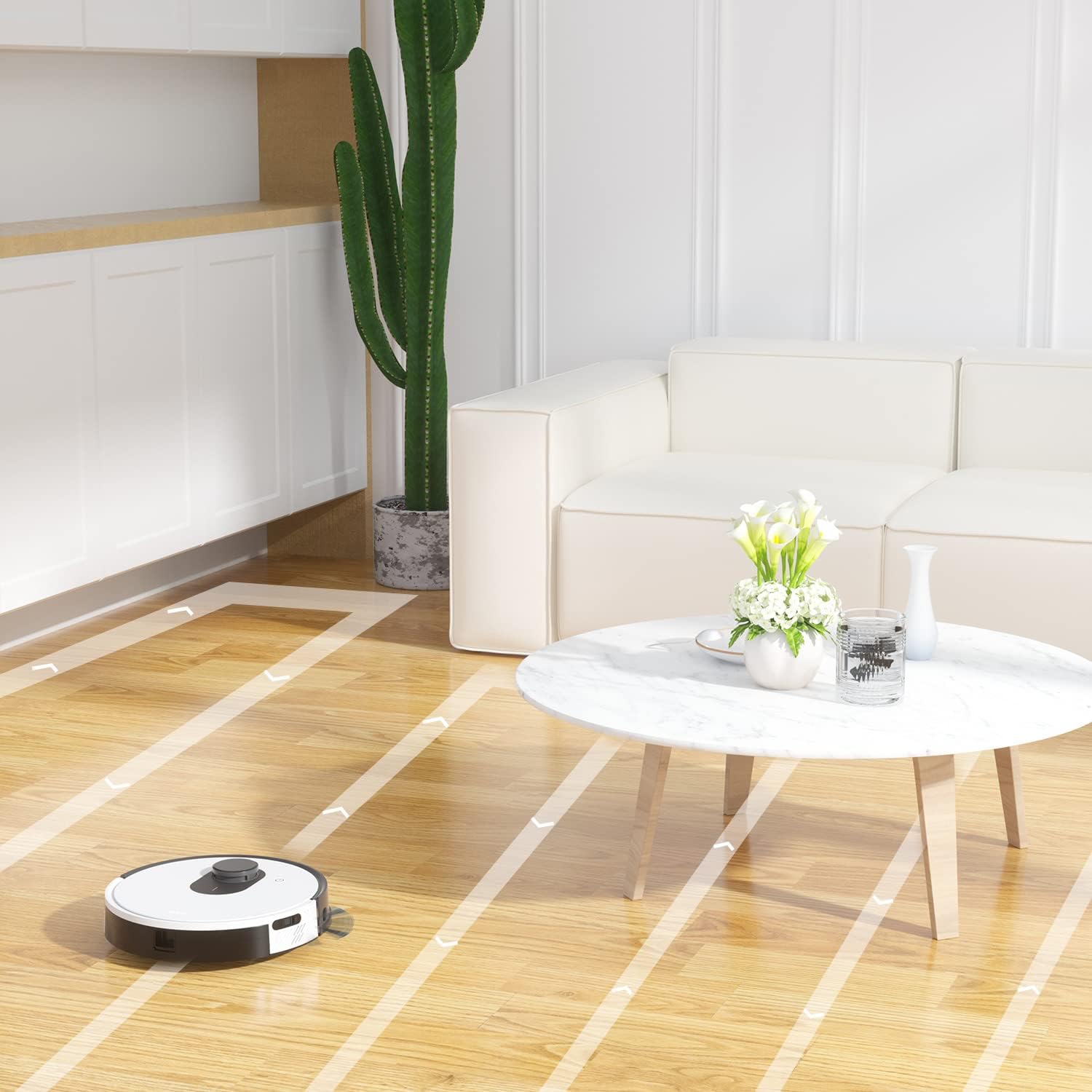
6.6-сүрөт: The OKP Life L1 robot vacuum cleaning a room, illustrating its efficient path planning and obstacle avoidance capabilities.
6.5 Батареяны башкаруу
The robot features a 4000mAh battery, providing up to 200 minutes of continuous cleaning. When the battery is low or cleaning is complete, the robot automatically returns to its charging dock.
7. Техникалык тейлөө
Робот чаң соргучуңуздун оптималдуу иштешин үзгүлтүксүз техникалык тейлөө камсыз кылат.
7.1 Таштанды кутусун бошотуу
Empty the dustbin after each cleaning cycle. Press the dustbin release button, remove the dustbin, and discard collected debris. Clean the filter inside the dustbin.
7.2 Cleaning the Main Brush Roll
The self-cleaning brush roll reduces hair tangles. However, periodically remove the main brush roll and use the provided cleaning tool to remove any tangled hair or debris.
7.3 Каптал щеткаларды тазалоо
Check side brushes regularly for wear or damage. Remove any tangled hair or debris. Replace worn brushes as needed.
7.4 Сенсорлорду жана заряддоо контакттарын тазалоо
Wipe the cliff sensors, bumper sensor, and charging contacts on both the robot and the charging dock with a clean, dry cloth to ensure proper function.
7.5 Фильтрди алмаштыруу
Replace the HEPA filter every 3-6 months, or more frequently depending on usage, to maintain optimal suction performance.
8. Кыйынчылыктарды
Жалпы маселелер жана алардын чечимдери үчүн бул бөлүмдү караңыз.
| Көйгөй | Мүмкүн себеп | Чечим |
|---|---|---|
| Робот күйбөйт. | Батареянын аздыгы; Кубат өчүрүү. | Роботту кубаттаңыз; Кубат которгучу күйүк экенин текшериңиз. |
| Робот заряддоочу жайга кайтып келе албайт. | Charging dock obstructed; Robot too far from dock. | Clear obstacles around the dock; Manually place robot near dock. |
| Соруу күчү начар. | таштанды челек толгон; Фильтр тыгылып калган; Негизги щетка чаташып калган. | бош таштанды челек; Чыпканы тазалоо/алмаштыруу; Таза негизги щетка. |
| Робот бат-баттан тыгылып калат. | Loose cables/rugs; Small obstacles. | Clear floor of obstructions; Use No-Go Zones. |
| Колдонмого туташуу маселелери. | Incorrect Wi-Fi (not 2.4GHz); Router issues. | Ensure 2.4GHz Wi-Fi; Restart router and robot; Re-pair in app. |
9. Техникалык шарттар
| Өзгөчөлүк | Деталь |
|---|---|
| Бренд | OKP Life |
| Модель аты | L1 Lidar Robot Vacuum |
| Өзгөчө өзгөчөлүк | HEPA Filtration, Vacuums |
| Түс | Cloud White |
| Продукциянын өлчөмдөрү | 12"L x 12"W x 3.5"H |
| Камтылган компоненттер | Батарея |
| Батареянын иштөө мөөнөтү | 200 мүнөткө чейин (4000 мАч батарея) |
| Сыйымдуулугу (чаң челек) | 500 миллилитр |
| Батареялар талап кылынат | 1 литий-иондук батарейка (кошулган) |
| Шайкеш түзмөктөр | Amazon Echo, Google Home, Смартфондор |
| Элемент Салмагы | 7 фунт |
| Өндүрүүчү | OKP Life |
| Элемент моделинин номери | L1 |
10. Кепилдик жана колдоо
For warranty information and technical support, please refer to the official OKP Life webсайтка же кардарларды тейлөөгө кайрылыңыз. Сатып алганыңыздын далили катары сатып алуу дүмүрчөгүңүздү сактаңыз.
Онлайн колдоо: Visit the official OKP Life webКөп берилүүчү суроолор, көйгөйлөрдү чечүү боюнча колдонмолор жана байланыш маалыматы үчүн сайт.
Кардарларды тейлөө: Refer to your product packaging or the OKP Life website for specific customer service contact details.