1. Киришүү
The SCULPFUN H1 Auto Heat Press Machine is designed for efficient and precise heat transfer applications on various materials. Featuring an innovative upward pressure mechanism, it ensures uniform heat and pressure distribution for optimal results across different projects, including DTF, HTV, Sublimation, and Vinyl transfers.
This manual provides essential information for setting up, operating, maintaining, and troubleshooting your SCULPFUN H1 machine to ensure safe and effective use.
2. Продукт бүтүп калдыview
The SCULPFUN H1 features a 15x15 inch heating plate, capable of reaching 180°C (356°F) in just 7 minutes. It offers adjustable pressure up to 80kg (176lb) with three preset levels, and an intuitive control panel for precise temperature and time settings.
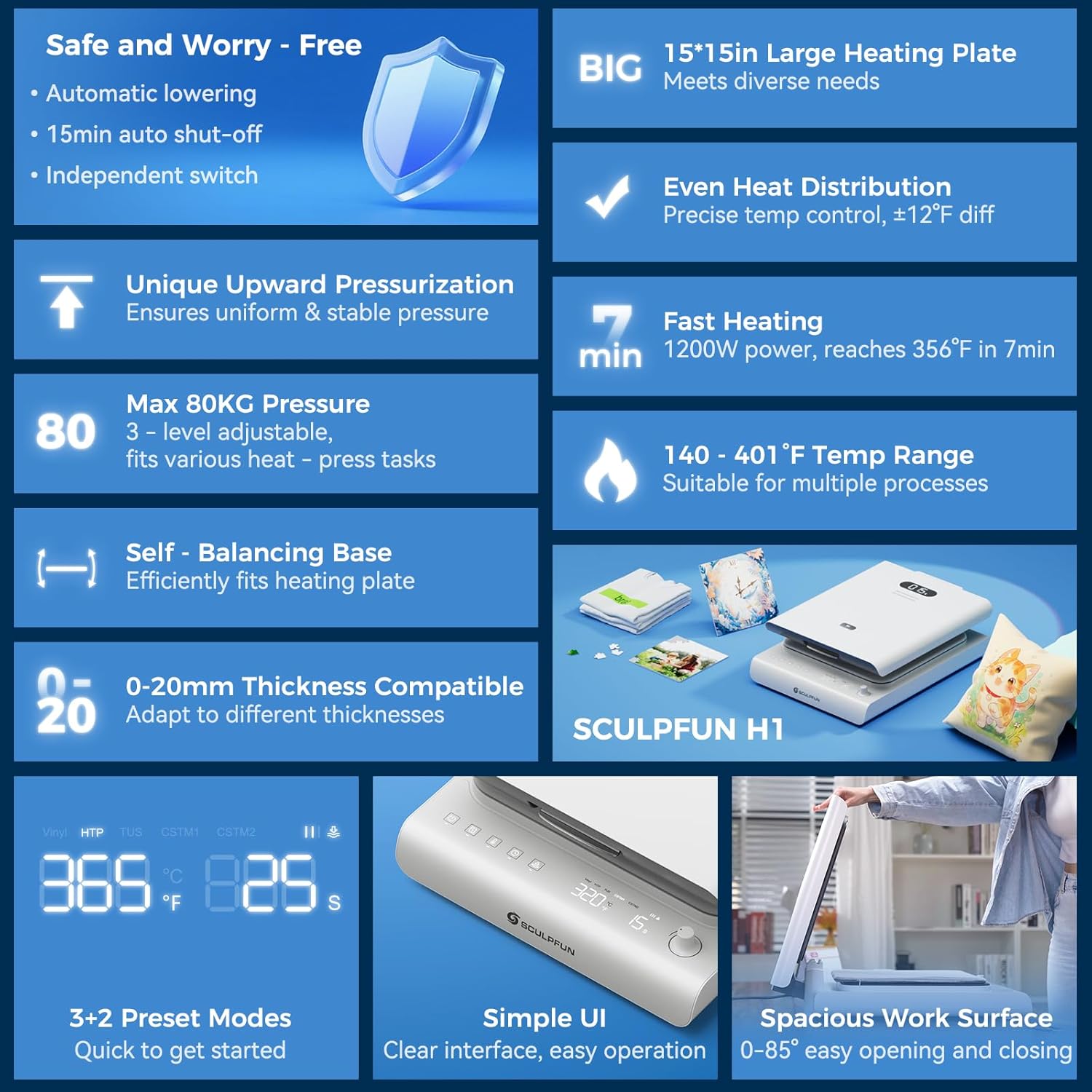
Figure 1: SCULPFUN H1 Auto Heat Press Machine highlighting key features like large heating plate, even heat distribution, fast heating, and smart control.
Негизги өзгөчөлүктөрү:
- World's First Upward Pressure Design: Lifts the plate from below for stable, continuous, and even pressure distribution, ideal for various material thicknesses.
- Жөнгө салынуучу басым: Offers three preset pressure levels (40kg/88lb, 60kg/132lb, 80kg/176lb) to suit different materials and transfer types.
- Тез жана бирдей жылытуу: Dual-tube heating core and precise temperature control sensors allow the 15x15 inch plate to reach 180°C (356°F) in 7 minutes, ensuring uniform heat distribution.
- Температураны так көзөмөлдөө: Real-time digital display provides accurate feedback on temperature, time, and pressure.
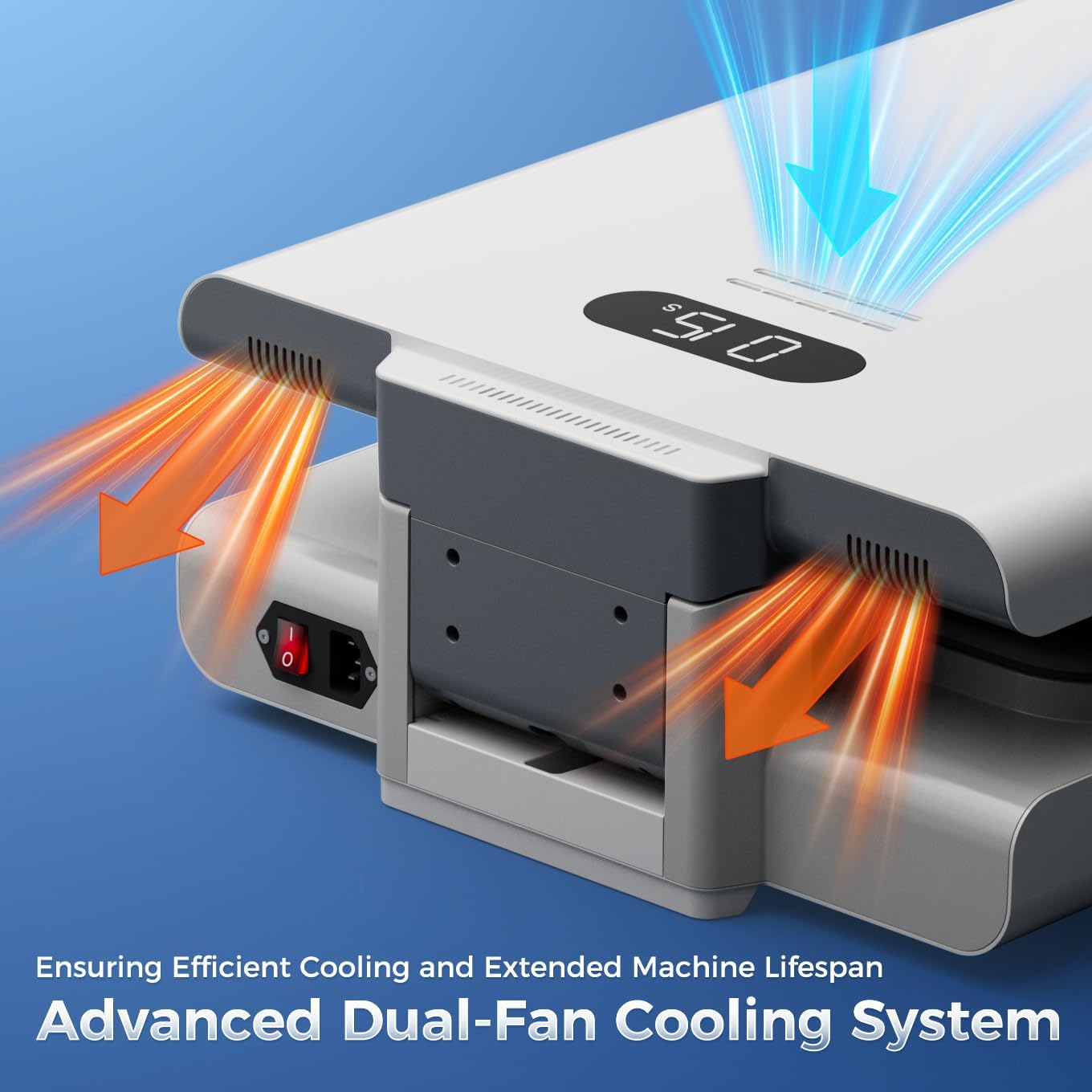
- Автоматтык өчүрүү коопсуздугу: Automatic shut-off after 15 minutes of inactivity prevents overheating and enhances safety.
- Өркүндөтүлгөн муздатуу системасы: Built-in dual cooling fans reduce heat buildup and extend product lifespan.
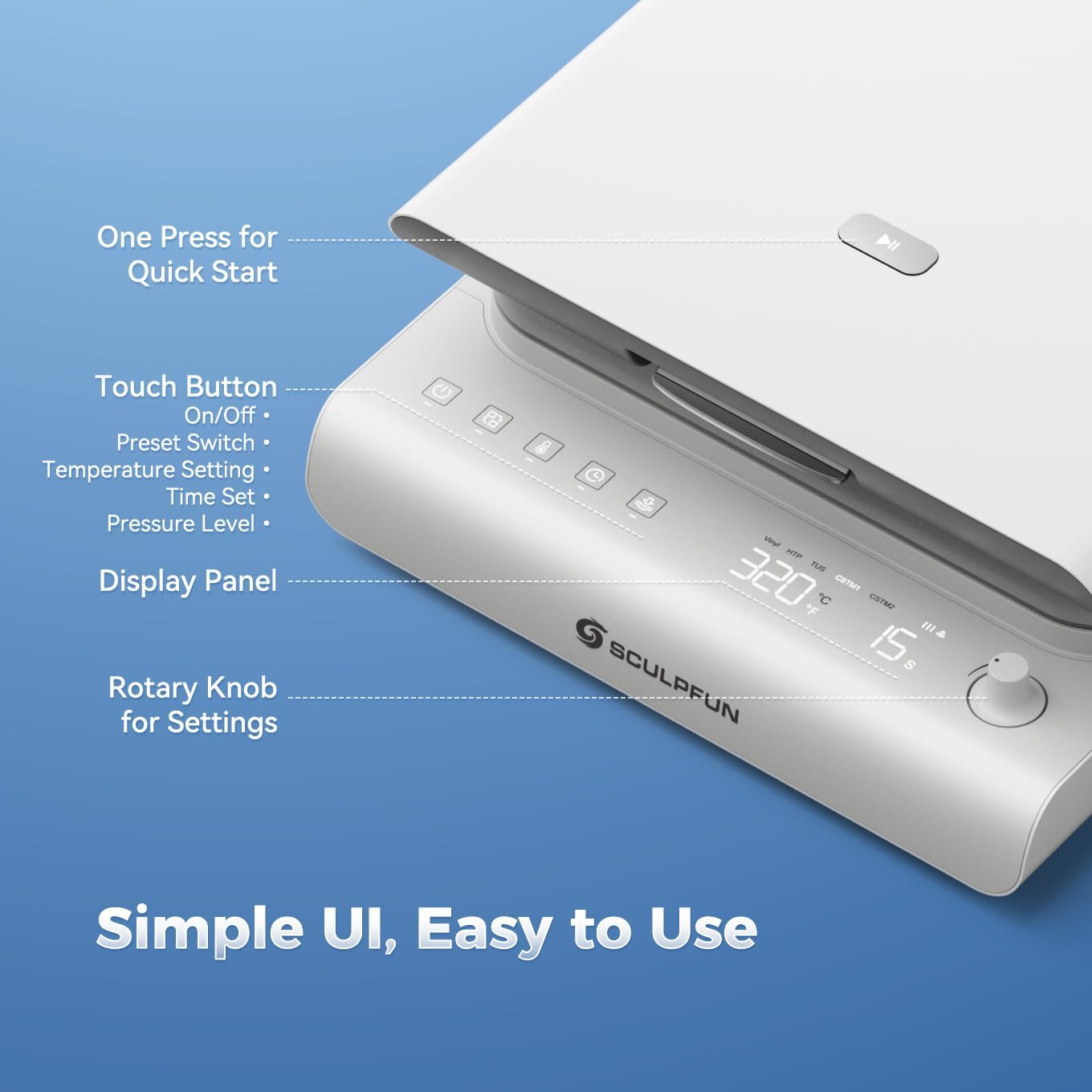
- Интуитивдик интерфейс: Touch panel with preset modes for beginners and a rotary knob for expert customization.
3. Орнотуу
- Кутудан чыгаруу: Carefully remove the heat press machine and all accessories from the packaging. Retain packaging for future storage or transport.
- Жайгашкан жери: Place the machine on a stable, heat-resistant surface. Ensure adequate clearance around the machine for ventilation.
- Кубат туташуу: Connect the power cable to the machine's power inlet located at the rear. Plug the power cable into a grounded electrical outlet.
- Баштапкы күйгүзүү: Locate the main power switch at the rear of the machine and flip it to the 'ON' position. The control panel will illuminate.

Figure 2: Machine components and dimensions for proper setup.
4. Иштөө нускамалары
4.1 Күйгүзүү жана алдын ала ысытуу
- Ensure the main power switch (at the rear) is ON.
- On the front control panel, long-press the power button for 2 seconds to fully activate the machine.
- The digital display will show the current temperature and time.
- The machine will begin to preheat to the last used temperature or a preset mode.
3-сүрөт: Детальдуу view of the intuitive control panel for easy operation.
4.2 Setting Temperature, Time, and Pressure
- Режим тандоо: Press the 'Mode' button to cycle through preset modes (Vinyl, HTP, TUS) or custom modes (CSTM1, CSTM2).
- Температураны жөндөө: Press the 'Temperature' button. The temperature value on the display will flash. Rotate the rotary knob to adjust the temperature (140-401°F / 60-205°C). Press the 'Temperature' button again to confirm.
- Убакытты тууралоо: Press the 'Time' button. The time value on the display will flash. Rotate the rotary knob to adjust the time (1-999 seconds). Press the 'Time' button again to confirm.
- Басымды жөндөө: Press the 'Pressure' button. The pressure level indicator will flash. Rotate the rotary knob to select from three preset pressure levels (40kg/88lb, 60kg/132lb, 80kg/176lb). Press the 'Pressure' button again to confirm.
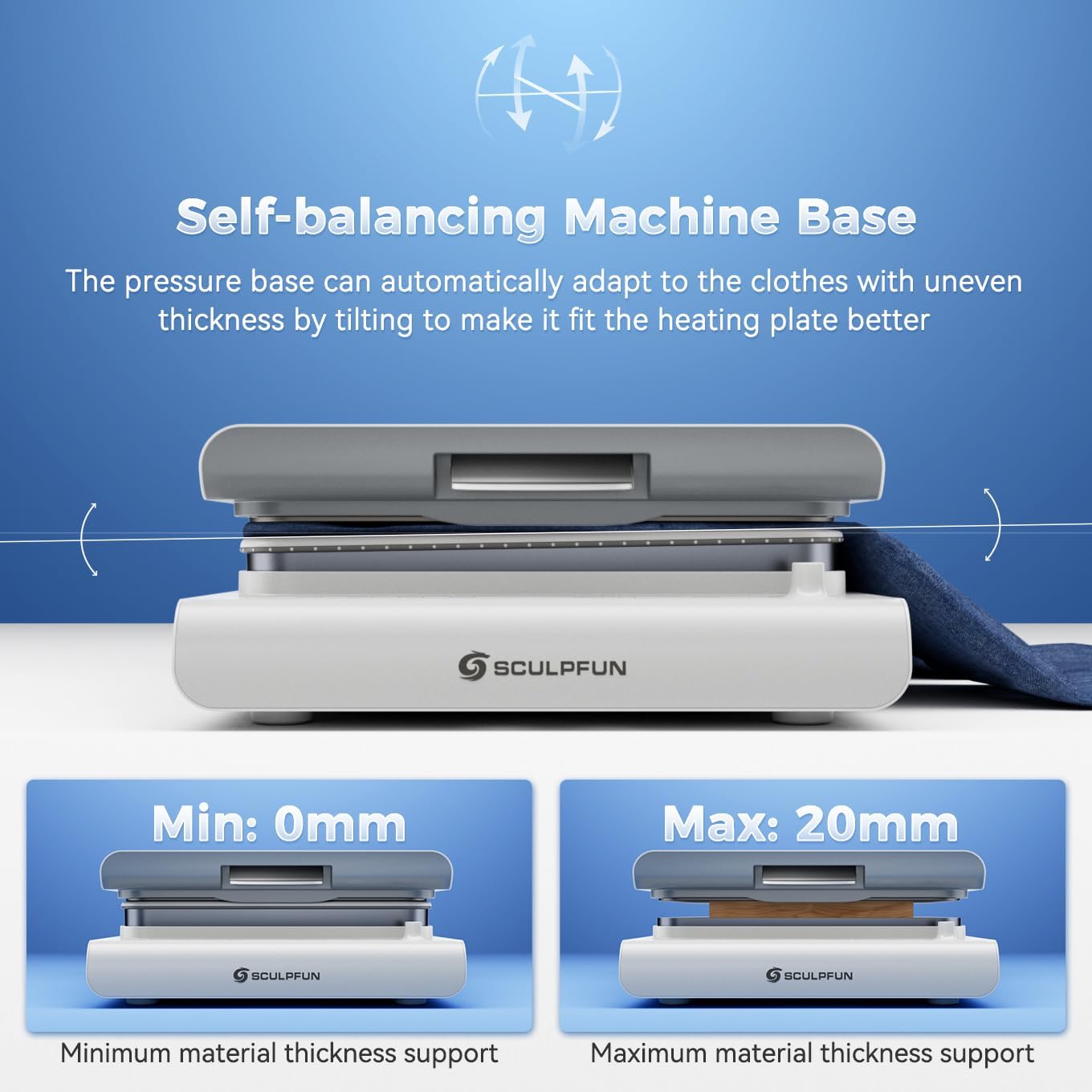
Figure 4: Upward pressure design and adjustable pressure levels for precise transfers.
4.3 Performing a Heat Transfer
- Материалды даярдоо: Place your garment or item flat on the pressure platform. Ensure it is smooth and free of wrinkles.
- Позициянын дизайны: Place your transfer design (DTF, HTV, Sublimation, Vinyl) onto the garment in the desired location.
- Cover with Protective Sheet: Place a PTFE Teflon sheet or parchment paper over your design to protect the heating plate.
- Close and Press: Gently lower the heating plate until it locks into position. The machine will automatically apply pressure and begin the countdown.
- Аяктоо: Once the timer reaches zero, the machine will beep and automatically release the pressure. Carefully lift the heating plate.
- Пил дизайны: Follow the specific peeling instructions for your transfer material (hot peel, warm peel, or cold peel).

5-сүрөт: Мисample of a DTF transfer in progress using the SCULPFUN H1.
Video 1: Demonstration of the SCULPFUN H1 Heat Press Machine in action, showing the process of applying a design to a garment.
5. Техникалык тейлөө
5.1 Коопсуздук өзгөчөлүктөрү
- Автоматтык өчүрүү функциясы: The machine automatically shuts off after 15 minutes of inactivity to prevent overheating and ensure safety.
- Кош муздаткыч желдеткичтер: Integrated fans help dissipate heat during extended use, protecting internal components and prolonging the machine's lifespan.

Figure 6: Illustration of the machine's safety features, including auto-off and dual cooling fans.
5.2 Тазалоо жана сактоо
- Тазалоодон мурун ар дайым электр менен жабдууну ажыратыңыз.
- Wipe the heating plate and exterior surfaces with a soft, damp кездеме. Абразивдүү тазалагычтарды колдонбоңуз.
- Машинаны колдонбогондо кургак, чаңсыз жерде сактаңыз.
6. Кыйынчылыктарды
- Машина иштебей жатат: Ensure the power cable is securely connected and the main power switch is ON. Long-press the front power button for 2 seconds.
- Uneven heat transfer: Verify that the temperature and pressure settings are appropriate for your material. Ensure the material is laid flat and free of wrinkles.
- Machine not closing/opening smoothly: Check for any obstructions on the pressure platform.
- Machine smoking slightly when heating: This is normal when using heat sublimation materials, as high temperatures heat sublimation ink to produce gases.
- Бузер үнү: A buzzing sound is normal when the machine is powered on, turned off, or when parameter setting is completed.
If you encounter any issues not covered here, please contact SCULPFUN customer service for assistance.
7. Техникалык шарттар
| Өзгөчөлүк | Деталь |
|---|---|
| Бренд | SCULPFUN |
| Модел | H1 |
| Материал | Алюминий |
| Түс | Ак |
| Продукциянын өлчөмдөрү | 22.7"L x 16.6"W x 6.6"H |
| Элемент Салмагы | 44 фунт |
| UPC | 860014205323 |
| Жогорку температура рейтинги | 180 градус Цельсий (356°F) |
| Тtage | 120 вольт |
| Ватtage | 1200 ватт |
8. Кепилдик жана колдоо
The SCULPFUN H1 Auto Heat Press Machine comes with a 1 жылдык кепилдик. For warranty claims or technical support, please refer to the contact information provided in your product packaging or visit the official SCULPFUN webсайт.
Сураныч, сатып алуу дүмүрчөгүңүздү кепилдикти текшерүү үчүн сатып алуунун далили катары сактап коюңуз.
9. Additional Media
9.1 Продукциянын сүрөттөрү