
1. Киришүү
Thank you for choosing the COTOE G7 Bluetooth Headset. This manual provides detailed instructions for setting up, operating, and maintaining your headset. Please read this manual carefully before use to ensure optimal performance and longevity of your device.
The COTOE G7 is a wireless Bluetooth headset designed for clear communication and audio playback. It features an LED digital display for battery status, extended standby time, and Active Noise Cancellation (ANC) for an enhanced audio experience.
2. Пакеттин мазмуну
Сураныч, пакетте төмөнкү нерселерди текшериңиз:
- COTOE G7 Bluetooth Headset (Gray)
- Заряддоо кутусу
- USB заряддоо кабели
- Кулак учтары (ар кандай өлчөмдөгү)
- User Manual
3. Продукт бүтүп калдыview
Familiarize yourself with the components of your COTOE G7 Bluetooth Headset.
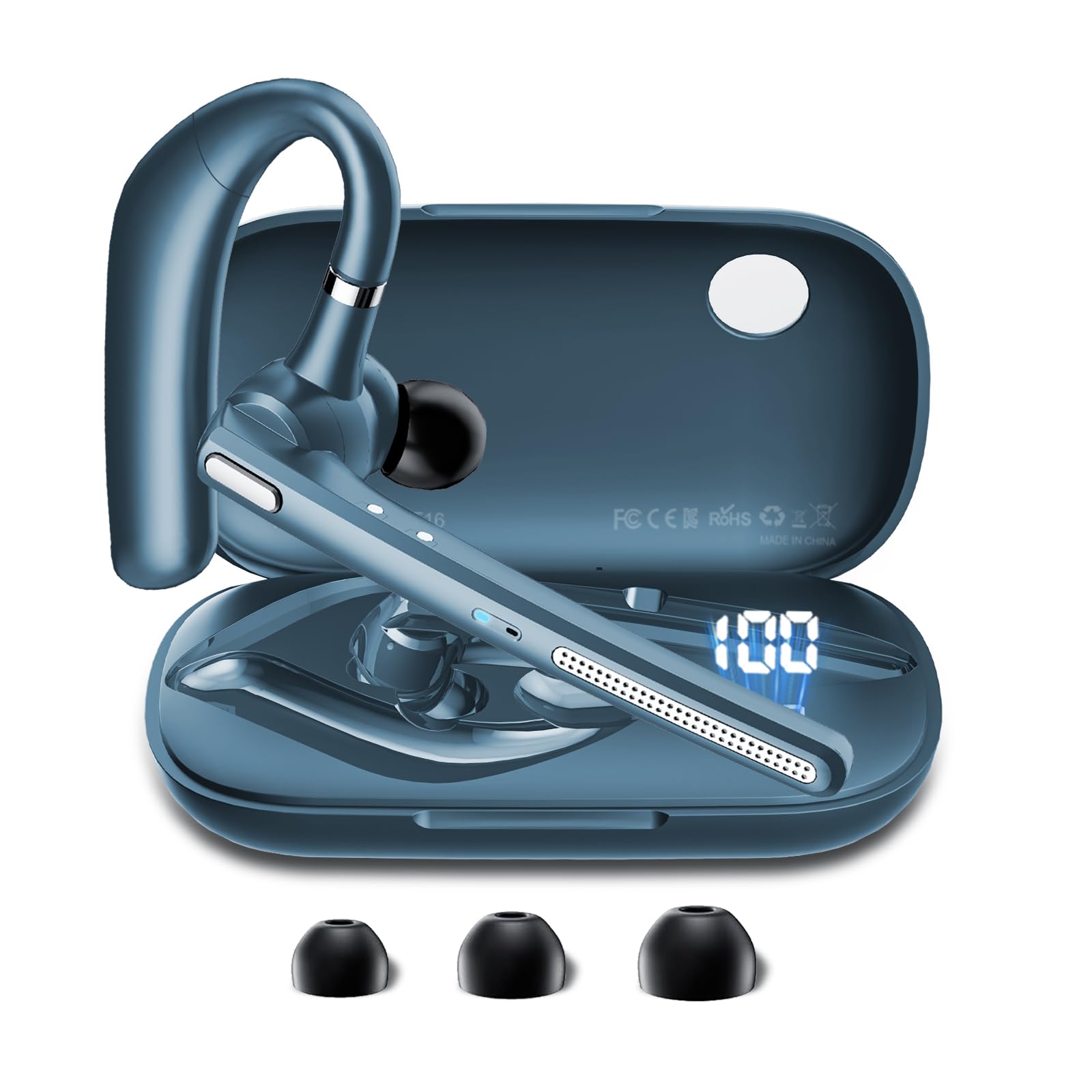
Image: The COTOE G7 Bluetooth Headset (gray) shown with its charging case. The headset features an ergonomic in-ear design, and the charging case is compact.
Негизги компоненттер:
- Кулакчын: The main unit worn in the ear, containing the speaker, microphone, and control buttons.
- Заряддоо кутусу: Used to store and charge the headset. Features an LED digital display.
- LED санарип дисплей: Located on the charging case, indicates the charging status of the headset and the power level of the case.
4. Орнотуу
4.1 Гарнитураны жана кутуну заряддоо
- USB кубаттоочу кабелди корпустагы кубаттоочу портко жана кубат булагына (мисалы, USB дубал адаптери, компьютердин USB порту) туташтырыңыз.
- The LED digital display on the charging case will show the current battery level and charging status.
- Place the headset into the charging case. Ensure proper alignment for charging. The headset's indicator light will show charging status.
- A full charge typically takes approximately 1-2 hours for the headset and 2-3 hours for the charging case.
Эскертүү: The headset offers up to 12 hours of music playback and the charging case provides 120 hours of standby time.
4.2 Bluetooth түзмөгү менен жупташтыруу
- Гарнитура заряддалганын текшериңиз.
- Take the headset out of the charging case. It will automatically enter pairing mode, indicated by a flashing LED light (usually blue and red).
- Уюлдук телефонуңузда же башка Bluetooth иштетилген түзмөгүңүздө Bluetooth жөндөөлөрүнө өтүңүз.
- Издөө available devices. You should see "COTOE G7" in the list.
- Select "COTOE G7" to connect. Once connected, the headset's LED light will stop flashing and may turn solid blue or turn off.
- Эгер сырсөз суралса, "0000" (төрт нөл) киргизиңиз.
- The headset will automatically reconnect to the last paired device when powered on and within range.
5. Иштөө нускамалары
5.1 Күйгүзүү/өчүрүү
- Күйгүзүү: Take the headset out of the charging case, or press and hold the Multi-function Button for approximately 3 seconds.
- Өчүрүү: Place the headset back into the charging case, or press and hold the Multi-function Button for approximately 5 seconds.
5.2 Чалууларды башкаруу
- Чакырууга жооп берүү: Көп функциялуу баскычты бир жолу басыңыз.
- Чакырууну аяктоо: Чалуу учурунда көп функциялуу баскычты бир жолу басыңыз.
- Чакырууну четке кагуу: Көп функциялуу баскычты болжол менен 2 секунд басып туруңуз.
- Акыркы номерди кайра терүү: Көп функциялуу баскычты эки жолу басыңыз.
5.3 Музыканы ойнотуу
- Ойнотуу/тындыруу: Көп функциялуу баскычты бир жолу басыңыз.
- Кийинки трек: Үнүн жогорулатуу баскычын басып, кармап туруңуз.
- Мурунку трек: Үндү азайтуу баскычын басып, кармап туруңуз.
5.4 Үндү башкаруу
- Көлөмүн жогорулатуу: Үнүн жогорулатуу баскычын басыңыз.
- Көлөмдү азайтуу: Үндү азайтуу баскычын басыңыз.
5.5 Активдүү ызы-чууну жокко чыгаруу (ANC)
The COTOE G7 features Active Noise Cancellation to reduce ambient noise. To activate or deactivate ANC, locate the dedicated ANC button (if present) or refer to the specific button combination in your quick start guide. Typically, a long press on a designated button toggles ANC.
6. Техникалык тейлөө
- Тазалоо: Use a soft, dry, lint-free cloth to clean the headset and charging case. Do not use harsh chemicals or abrasive materials.
- Сактагыч: Store the headset in its charging case when not in use to protect it from dust and damage. Avoid extreme temperatures.
- Батареяга кам көрүү: To prolong battery life, avoid fully discharging the headset frequently. Charge it regularly, even if not used for extended periods.
- Суу каршылык: The headset is not waterproof. Avoid exposure to liquids and moisture.
7. Кыйынчылыктарды
| Көйгөй | Чечим |
|---|---|
| Гарнитура күйбөйт. | Ensure the headset is charged. Place it in the charging case to confirm charging. |
| Түзмөк менен жупташтыруу мүмкүн эмес. | Make sure Bluetooth is enabled on your device. Ensure the headset is in pairing mode. Try restarting both the headset and your device. Clear previous Bluetooth connections on your device. |
| Үн жок же үнү төмөн. | Check the volume levels on both the headset and your connected device. Ensure the headset is properly connected. Try playing different audio sources. |
| үзгүлтүктүү байланыш. | Ensure the headset is within the effective range of your Bluetooth device (typically 10 meters/33 feet). Avoid obstacles between the headset and device. |
8. Техникалык шарттар
- Бренд: COTOE
- Модел: G7
- Түсү: Боз
- Кулак жайгаштыруу: Кулакта
- Форма фактору: Кулакта
- Ызы-чууну көзөмөлдөө: Активдүү ызы-чууну жокко чыгаруу
- Күтүү убактысы: 120 саатка чейин (кубаттоочу корпусу менен)
- Музыка ойнотуу убактысы: 12 саатка чейин (кубаттоочу корпусу менен)
9. Кепилдик жана колдоо
The COTOE G7 Bluetooth Headset comes with a standard manufacturer's warranty. Please refer to the warranty card included in your package for specific terms and conditions.
For technical support, troubleshooting assistance, or warranty claims, please contact COTOE customer service through the retailer where you purchased the product or visit the official COTOE webбайланыш маалыматы үчүн сайт.