
Introduction
This manual provides detailed instructions for the setup, operation, maintenance, and troubleshooting of your GMKtec G3 Plus Mini PC. Please read this manual thoroughly before using the device to ensure proper functionality and to maximize your user experience.

Image: The GMKtec G3 Plus Mini PC, displaying its compact design and various connectivity ports on the front and rear panels.
Пакеттин мазмуну
Verify that all items listed below are present in your product packaging. If any items are missing or damaged, please contact GMKtec customer support.
- GMKtec Nucbox G3 Plus Mini PC (16GB RAM, 256GB SSD)
- VESA Mount with Screws
- HDMI кабели
- Кубаттуу адаптер
- Колдонуучунун Колдонмосу (бул документ)

Image: All components included in the retail packaging for the GMKtec G3 Plus Mini PC, including the mini PC, power adapter, HDMI cable, VESA mount, and user manual.
Орнотуу нускамалары
- Дисплейге туташуу: Use the provided HDMI cable to connect the Mini PC to a monitor, TV, or projector. The device supports dual 4K@60Hz displays.
- Перифериялык түзүлүштөрдү туташтыруу: Баскычтопуңузду, чычканыңызды жана башка USB түзмөктөрүңүздү жеткиликтүү USB 3.2 портторуна туташтырыңыз.
- Тармак туташуусу:
- текст: Connect an Ethernet cable to the 2.5GbE RJ45 port for a wired network connection.
- Зымсыз: The Mini PC supports WiFi 6. Once powered on, you can configure the wireless connection through the operating system settings.
- Күйгүзүү: Connect the power adapter to the DC 12V 3A port on the Mini PC, then plug the adapter into a power outlet. Press the power button on the front of the device.
- Баштапкы жүктөө: The system will boot up. Follow the on-screen instructions for the initial setup of the operating system (e.g., OS Pro).

Image: A detailed diagram illustrating the various ports on the GMKtec G3 Plus Mini PC, including USB 3.2, HDMI, Giga LAN (RJ45 2.5G), 3.5mm Audio, DC 12V 3A power input, and security lock slot.
Иштөө нускамалары
Power Management
- Күйгүзүү: Алдыңкы панелдеги кубат баскычын басыңыз.
- Өчүрүү: Use the operating system's shutdown function. Do not unplug the power adapter directly without proper shutdown to prevent data loss.
- Кайра баштоо: Use the operating system's restart function.
- Уйку режими: The device can enter sleep mode via the operating system.
- Wake On LAN (WoL): This feature allows the Mini PC to be powered on remotely over a network. Ensure it is enabled in the BIOS/UEFI settings and configured in your network environment.
- Авто күйгүзүү: The device can be configured to automatically power on when power is supplied. This setting is typically found in the BIOS/UEFI.
Дисплейлерге туташуу
The GMKtec G3 Plus supports dual display output via its two HDMI 2.0 ports. Each port can support up to 4K resolution at 60Hz.
- Connect your primary display to one HDMI port.
- Connect your secondary display to the other HDMI port.
- Configure display settings (extend, duplicate, or primary only) within your operating system.

Image: The GMKtec G3 Plus Mini PC demonstrating its dual 4K@60Hz display capability by being connected to two separate monitors, extending the desktop across both screens.
Тармак жана Bluetooth
- WiFi 6: Provides high-speed wireless connectivity. Access network settings in your OS to connect to available Wi-Fi networks.
- Bluetooth 5.2: Allows connection to various wireless peripherals such as keyboards, mice, and audio devices. Pair devices through the Bluetooth settings in your OS.
- 2.5 Гбит/с Ethernet: For a stable and high-speed wired network connection, plug an Ethernet cable into the RJ45 port.

Image: An illustration emphasizing the GMKtec G3 Plus Mini PC's support for WiFi 6 and Bluetooth 5.2, showing improved speed and connectivity compared to older standards.
Техникалык тейлөө
- Тазалоо: Use a soft, dry cloth to clean the exterior of the Mini PC. Avoid liquid cleaners directly on the device. Use compressed air to clear dust from vents periodically.
- Вентиляция: Ensure the cooling vents are not obstructed to prevent overheating. Maintain adequate space around the device for airflow.
- Программалык камсыздоо жаңыртуулары: Оптималдуу аткарууну жана коопсуздукту камсыз кылуу үчүн операциялык тутумуңузду жана драйверлериңизди үзгүлтүксүз жаңыртыңыз.
- Маалыматтын камдык көчүрмөсү: Маанилүү маалыматтардын камдык көчүрмөсүн мезгил-мезгили менен тышкы дискке же булут сактагычына сактап туруңуз.
- Сактагычты кеңейтүү: The Mini PC supports an additional M.2 2242 SATA SSD (not included) for storage expansion, up to 2TB. Refer to the internal components diagram for location.

Сүрөт: жарылган view diagram of the GMKtec G3 Plus Mini PC, showing its internal components such as the DDR4 RAM, 256GB SSD, M.2 2242 SATA slot, cooling fan, and cooling vents.
Проблемаларды чечүү
- Кубат жок:
- Кубат адаптери Мини компьютерге жана иштеген электр розеткасына бекем туташып турганын текшериңиз.
- Розетканын иштеп жатканын башка түзмөк менен сынап көрүү менен текшериңиз.
- Дисплей жок:
- Check HDMI cable connections at both the Mini PC and the monitor.
- Монитордун күйгүзүлгөнүн жана туура киргизүү булагына коюлганын текшериңиз.
- Башка HDMI кабелин же бар болсо, мониторду колдонуп көрүңүз.
- Интернет байланышы жок:
- For wired connection, ensure the Ethernet cable is properly connected and your router is working.
- For wireless connection, check Wi-Fi settings in the OS, ensure Wi-Fi is enabled, and you are connected to the correct network with the correct password.
- Роутериңизди/модемиңизди өчүрүп күйгүзүңүз.
- Жай аткаруу:
- Фондо иштеп жаткан керексиз тиркемелерди жабыңыз.
- Операциялык системанын жаңыртууларын текшериңиз.
- Термикалык өчүрүүнү болтурбоо үчүн адекваттуу вентиляцияны камсыз кылыңыз.
- Run a disk cleanup or defragmentation tool (if applicable to your OS/storage type).
Бул жерде каралбаган маселелерге туш болсоңуз, кошумча жардам алуу үчүн колдоо бөлүмүнө кайрылыңыз.
Техникалык шарттар
| Өзгөчөлүк | Спецификация |
|---|---|
| Модел | G3 PLUS |
| Процессор | Intel Twin Lake N150 (4 Cores, 4 Threads, 6MB Cache, up to 3.6GHz) |
| RAM | 16 ГБ DDR4 (3200 МГц) |
| Сактагыч | 256GB PCIe 3.0 M.2 2280 NVMe SSD (Expandable with M.2 2242 SATA SSD up to 2TB) |
| Графика | Intel Graphics (max 1000MHz), supports 4K video playback and AV1 decoding |
| Video Output | 2 x HDMI 2.0 (4K@60Hz Dual Display) |
| USB порттору | 4 x USB 3.2 (up to 5Gbps/S) |
| Аудио | 1 x 3.5 мм аудио уячасы |
| Network |
|
| Операция системасы | OS Pro (Compatible with Linux, Proxmox, Ubuntu, ESXI VMware) |
| Өзгөчөлүктөр | Wake On LAN, PXE Boot, RTC Wake, Auto Power On |
| Power Input | DC 12V 3A |
| Өлчөмдөрү (пакет) | 6.42 x 6.18 x 4.09 дюйм |
| Салмагы (пункт) | 1.98 фунт |
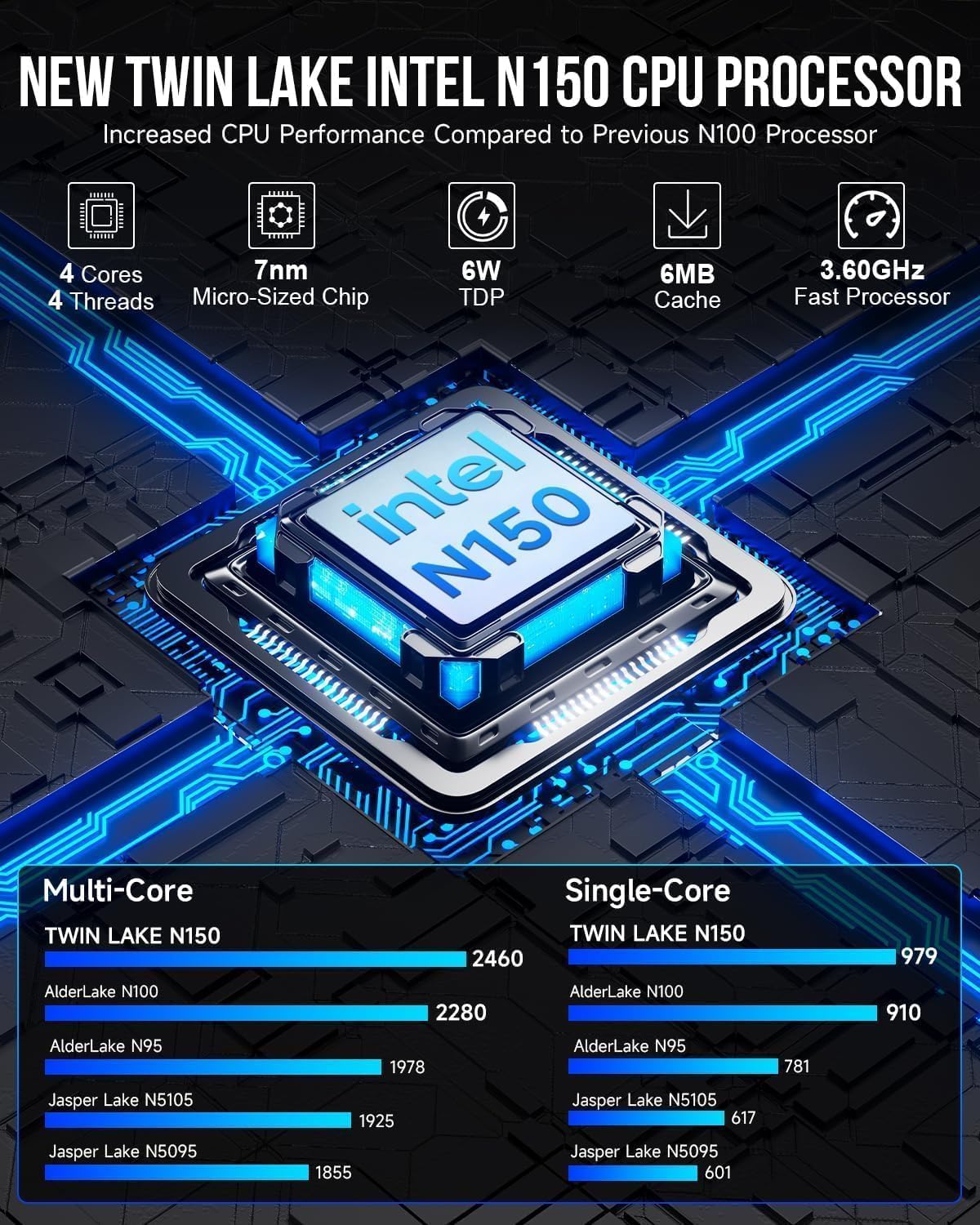
Image: A graphic detailing the specifications and performance improvements of the Intel Twin Lake N150 CPU compared to previous generations like N100 and N95.

Image: A visual representation of the 2.5G High Speed Ethernet performance, showing read-write and transmission speeds compared to 1000Mbps Ethernet.
Кепилдик маалымат
GMKtec provides a 1 жылдык чектелген кепилдик for the G3 Plus Mini PC, effective from the date of purchase. This warranty covers defects in design and workmanship. Please retain your proof of purchase for warranty claims.
Кепилдик төмөндөгүлөр келтирилген зыянды камтыбайт:
- Accident, abuse, misuse, or improper installation.
- Уруксатсыз оңдоолор же өзгөртүүлөр.
- Power surges or electrical issues not related to the device itself.
- Natural disasters or acts of God.
Колдоо
For technical assistance, warranty claims, or any questions regarding your GMKtec G3 Plus Mini PC, please contact our professional after-sales team.
- Электрондук почта колдоо: support@gmktec.com
- Онлайн колдоо: Visit the official GMKtec webКөп берилүүчү суроолор жана кошумча ресурстар үчүн сайт.
When contacting support, please provide your product model (G3 PLUS) and a detailed description of the issue.