
boAt Rockerz Trinity Gen 2
boAt Rockerz Trinity Gen 2 Bluetooth Neckband Earphones User Manual
Model: Rockerz Trinity Gen 2
Introduction
Thank you for choosing the boAt Rockerz Trinity Gen 2 Bluetooth Neckband Earphones. This manual provides essential information for setting up, operating, and maintaining your earphones. Please read it carefully to ensure proper use and to maximize your listening experience. These earphones are designed for extended audio playback, high-resolution sound, and clear communication.
Кутуда эмне бар
- boAt Rockerz Trinity Gen 2 Earphones
- Заряддоо кабели
- User Manual
The package includes the boAt Rockerz Trinity Gen 2 Earphones, a charging cable, and this user manual.
Продукт бүттүview
The boAt Rockerz Trinity Gen 2 features a flexible neckband design with in-ear earbuds. It includes integrated controls for media playback, call management, and voice assistant activation. The neckband houses the battery and main electronics.
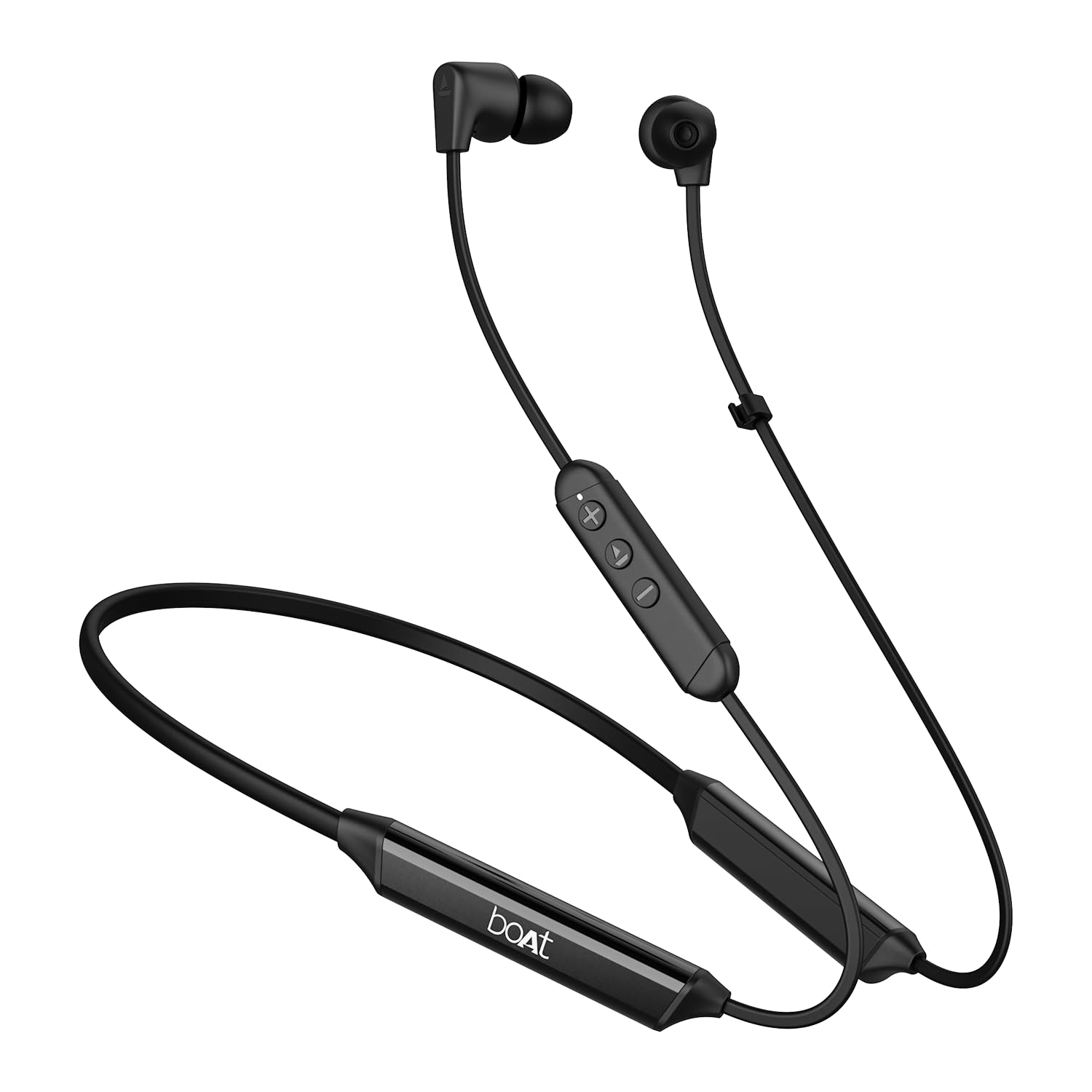
Image: The boAt Rockerz Trinity Gen 2 neckband earphones, highlighting the flexible neckband and in-ear design.

Сүрөт: деталдуу view of the boAt Rockerz Trinity Gen 2 earbuds and the inline control panel, showing buttons for volume and playback.
Жайгашуу
1. Наушниктерди заряддоо
Before first use, fully charge your earphones. Connect the provided charging cable to the charging port on the neckband and to a USB power source. The LED indicator will show charging status. A full charge provides up to 150 hours of playback. With ASAP Charge, 10 minutes of charging provides up to 24 hours of playback.
Image: The boAt Rockerz Trinity Gen 2 neckband, illustrating its long battery life with "150 HOURS PLAYBACK" text.
2. Күйгүзүү / Өчүрүү
- Күйгүзүү үчүн: Press and hold the Multi-function button (usually the center button on the inline control) for approximately 3 seconds until the LED indicator flashes blue and you hear a power-on prompt.
- Өчүрүү үчүн: Көп функциялуу баскычты LED индикатору кызыл болуп күйүп-өчкөнгө чейин жана сиз өчүрүү сигналын укканга чейин болжол менен 5 секунд басып туруңуз.
3. Bluetooth Жупташтыруу
- Наушниктердин өчүрүлгөнүн текшериңиз.
- Көп функциялуу баскычты LED индикатору кезектешип кызыл жана көк түстө күйүп-өчкөнгө чейин 5-7 секунд басып туруңуз, бул жупташтыруу режимин көрсөтөт.
- Түзмөгүңүздө (смартфон, ноутбук) Bluetooth күйгүзүп, жеткиликтүү түзмөктөрдү издеңиз.
- Select "boAt Rockerz Trinity Gen 2" from the list of found devices.
- Once connected, the LED indicator will flash blue slowly, and you will hear a confirmation tone.

Image: The boAt Rockerz Trinity Gen 2 earphones connected to both a smartphone and a tablet, illustrating the dual pairing feature.
4. Dual Pairing (Multipoint)
The Rockerz Trinity Gen 2 supports dual pairing, allowing connection to two devices simultaneously. After pairing with the first device, disable Bluetooth on that device. Put the earphones back into pairing mode and connect to the second device. Once connected to the second device, re-enable Bluetooth on the first device. The earphones will automatically connect to both devices, allowing seamless switching between them for calls and media.
Иштөө нускамалары
Негизги башкаруу элементтери
- Ойнотуу/тындыруу: Көп функциялуу баскычты бир жолу басыңыз.
- Көлөмү: '+' баскычын басыңыз.
- Үнүн азайтуу: '-' баскычын басыңыз.
- Кийинки трек: '+' баскычын басып, кармап туруңуз.
- Мурунку трек: '-' баскычын басып, кармап туруңуз.
- Чалууга жооп берүү/аяктоо: Көп функциялуу баскычты бир жолу басыңыз.
- Чакырууну четке кагуу: Көп функциялуу баскычты 2 секунд басып туруңуз.
- Үн Жардамчысын жандыруу: Көп функциялуу баскычты эки жолу басыңыз.
Hi-Res Audio with LDAC
The Rockerz Trinity Gen 2 supports Hi-Res Audio with LDAC codec, providing superior sound quality. Ensure your connected device also supports LDAC for the best audio experience. This feature allows for high-resolution audio transmission over Bluetooth, preserving more detail from your music.

Image: The boAt Rockerz Trinity Gen 2 earphones displaying the "Hi-Res Audio Wireless" and "LDAC" logos, indicating high-resolution audio support.
Кош EQ режимдери
Switch between different equalizer modes to customize your audio experience. Refer to the product's quick start guide or experiment with button combinations (often a triple-press of the Multi-function button or a combination with volume buttons) to cycle through available EQ presets. This allows you to adjust the sound profile сиздин каалооңуз боюнча.

Image: A close-up of the boAt Rockerz Trinity Gen 2 earbuds, highlighting the availability of dual EQ modes for sound customization.
AI-ENx™ Technology for Clear Calls
The earphones feature AI-ENx™ technology, which enhances call clarity by eliminating background noise. This ensures your voice is heard clearly during calls, even in noisy environments.

Image: A close-up of a boAt Rockerz Trinity Gen 2 earbud, emphasizing the AI-ENx™ technology for clear voice calls.
BEAST™ Mode (Low Latency)
Activate BEAST™ Mode for a low-latency gaming experience (65ms). This mode synchronizes audio with visuals, providing a more immersive gaming session. To activate/deactivate BEAST™ Mode, refer to the specific instructions in your quick start guide, usually involving a dedicated button press or a combination.

Image: The boAt Rockerz Trinity Gen 2 earphones with "BEAST™ MODE 65ms Low Latency" text, depicted alongside gaming characters to illustrate its use for gaming.
Техникалык тейлөө
Тазалоо
- Наушниктерди жумшак, кургак, түксүз чүпүрөк менен сүртүңүз.
- Катуу химиялык заттарды, тазалоочу эриткичтерди же күчтүү жуучу каражаттарды колдонбоңуз.
- Regularly clean the ear tips to prevent wax buildup, which can affect sound quality.
Сууга туруктуулук (IPX5)
The earphones are IPX5 rated, meaning they are resistant to sweat and light splashes of water. They are not designed for submersion in water. Avoid exposing them to heavy rain or direct water jets. Ensure the charging port cover is securely closed when not charging to maintain water resistance.

Image: The boAt Rockerz Trinity Gen 2 earbuds with water droplets on them, illustrating their IPX5 water resistance rating.
Сактагыч
Store the earphones in a cool, dry place away from direct sunlight and extreme temperatures. Avoid storing them with sharp objects that could damage the cables or earbuds.
Проблемаларды чечүү
Күч жок
- Наушниктердин толук заряддалганын текшериңиз.
- Press and hold the Multi-function button for 3-5 seconds to power on.
Түзмөк менен жупташтыруу мүмкүн эмес
- Ensure the earphones are in pairing mode (LED flashing red and blue alternately).
- Түзмөгүңүздө Bluetooth күйгүзүлгөнүн жана ал аралыкта (адатта 10 метр) экенин текшериңиз.
- Forget "boAt Rockerz Trinity Gen 2" from your device's Bluetooth list and try pairing again.
- Restart both your device and the earphones.
Төмөн же бурмаланган үн
- Adjust the volume on both the earphones and your connected device.
- Ensure the ear tips are clean and properly seated in your ears.
- Жакшыраак жабуу үчүн ар кандай өлчөмдөгү кулактын учтарын байкап көрүңүз.
- Кедерги болбош үчүн туташкан түзмөгүңүзгө жакындаңыз.
Микрофон иштебейт
- Наушниктердин түзмөгүңүзгө туура туташтырылганын текшериңиз.
- Check your device's audio settings to ensure the earphones are selected as the input device.
- Clean the microphone opening if it appears obstructed.
Техникалык шарттар
| Бренд | кайык |
| Модель аты | Rockerz Trinity Gen 2 |
| Кулак жайгаштыруу | Кулакта |
| Форма фактору | Кулакта |
| Noise Control | AI-ENx™ Technology (for calls) |
| Байланыш технологиясы | Bluetooth |
| Батареянын орточо иштөө мөөнөтү | 150 саат |
| Батареяны заряддоо убактысы | 10 Minutes (for 24 hours playback via ASAP Charge) |
| Аудио драйвер түрү | Dynamic Driver (10mm, inferred from description) |
| Жыштык диапазону | 20 Гц - 20 000 Гц |
| Суу каршылык | IPX5 |
| Өзгөчөлүктөр | Hi-Res Audio with LDAC, Dual EQ Modes, AI-ENx™ Technology, Dual Pairing, BEAST™ Mode (65ms Low Latency), ASAP Charge |
| Башкаруу ыкмасы | Үн, Баскыч |
| Элемент Салмагы | 60 грамм |
Кепилдик жана колдоо
Кепилдик маалымат
The boAt Rockerz Trinity Gen 2 earphones come with a 1 жылдык кепилдик from the date of purchase. This warranty covers manufacturing defects. Please retain your purchase receipt for warranty claims. The warranty does not cover damage caused by misuse, accidents, unauthorized modifications, or normal wear and tear.
Кардарларды колдоо
For technical assistance, warranty claims, or any other inquiries, please contact boAt customer support:
- Электрондук почта: info@imaginemarketingindia.com
- Өндүрүүчү: Imagine Marketing Ltd
Сураныч, расмий boAt сайтына кириңиз webэң акыркы колдоо маалыматы жана байланыш маалыматтары үчүн сайт.
Ask a question about this manual
Ask about setup, troubleshooting, compatibility, parts, safety, or missing instructions. Manuals+ will review the question and use this page’s manual context to help answer it.