
1. Продукт бүтүп калдыview
The NARWAL Freo X10 Pro is an advanced robot vacuum and mop combo designed for comprehensive floor cleaning. It features powerful suction, intelligent navigation, and an all-in-one base station for automated maintenance.

Image: The NARWAL Freo X10 Pro robot vacuum and its accompanying base station, shown alongside a smartphone displaying the control app interface and a smartwatch with the Narwal logo.
2. Орнотуу колдонмосу
2.1 Пакеттен чыгаруу жана компоненттерди текшерүү
Carefully unpack all components and verify against the following list:
- Robot (Main Robot Body, Anti-tangle Roller Brush, Mop Pads (Pair), Dust Collection Bin & HEPA Filter (with liner))
- Dust Collection Base Station (Base Station Body, Cleaning Module, Clean Water Tank, Dirty Water Tank)
- Accessories: Ramp Extension Pad, Anti-tangle Side Brush (Right), Power Cord, User Manual, Base Station Dust Bag

Image: A visual representation of all components included in the NARWAL Freo X10 Pro packaging, including the robot, base station, and various accessories.
2.2 Initial Installation Steps
- Тармакты жупташтыруу: Scan the QR code located under the robot’s top cover. Follow the in-app instructions to connect the device to your Wi-Fi network. Эскертүү: The Freo X10 Pro supports 2.4GHz Wi-Fi only (5GHz networks are not supported).
- Аксессуарларды орнотуу: Attach the side brush to the robot. Place the dust bag into the designated compartment within the base station.
- Check Cleaning Filter: Ensure the replaceable cleaning filter is correctly installed on the cleaning base.
- Кубат туташуу: Connect the power cord to the base station and plug it into a 100-240V power outlet.
3. Иштөө нускамалары
3.1 Тазалоо режимдери жана өзгөчөлүктөрү
- 11,000Pa Hyper Suction: Provides powerful vacuuming for deep cleaning on various floor types. Features carpet detection with 12mm auto mop lift to protect rugs.
- DualFlow Tangle-Free System: Designed to minimize hair wrap around brushes. A dynamic side brush loosens debris, and the roller brush guides hair into the dustbin.
- MopExtend & EdgeSwing: Enhances edge and corner cleaning by extending the mop and performing dynamic movements to reach tight spaces.
- Dual Spinning Mops: Applies 8N pressure and 180 RPM rotation to effectively scrub stubborn stains. The Reuleaux Triangular Mop design maximizes coverage.
- LiDAR Navigation & 3D Obstacle Avoidance: Utilizes Forward 3D Structured Light and LiDAR scanning for precise object detection, optimal route planning, and multi-level mapping (up to 4 maps).

Image: The robot vacuum operating on a hard floor, illustrating its 11,000Pa suction power by showing debris being pulled into the device.
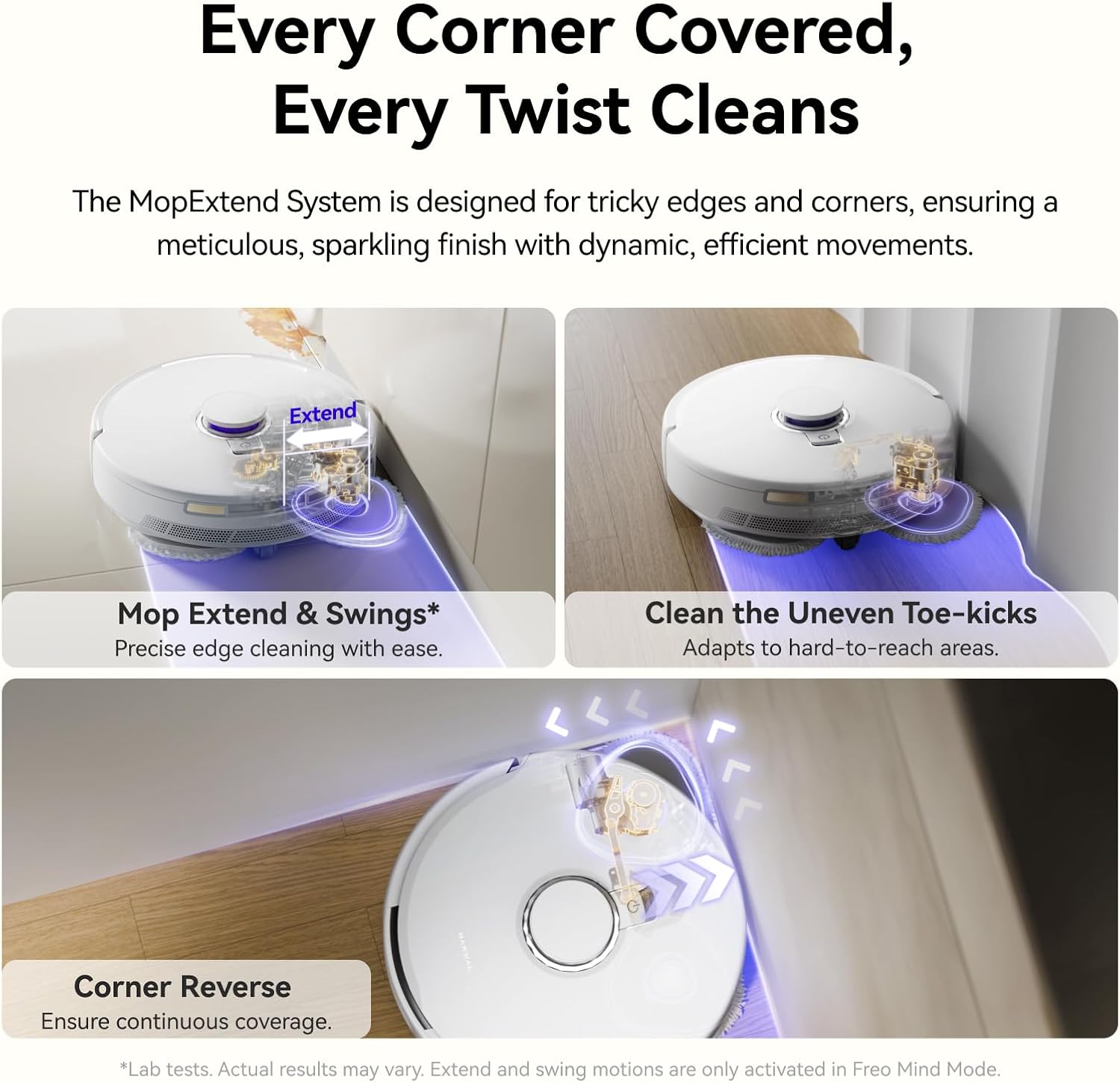
Image: The robot vacuum extending its mop to clean along the edges of a wall, demonstrating the MopExtend feature for thorough corner and edge coverage.

Image: The underside of the robot vacuum showing its dual spinning mops actively scrubbing a stained hard floor, highlighting its mopping capabilities.

Image: The robot vacuum navigating a room, with blue light beams illustrating its LiDAR and 3D Structured Light sensors detecting and avoiding small objects on the floor.
3.2 Акылдуу тиркеме жана үн менен башкаруу
The NARWAL Freo X10 Pro can be controlled via a dedicated smartphone application and voice assistants (Works with Alexa).
- Тазалоо иштерин пландаштырыңыз.
- Set no-go zones.
- Manage multiple floor maps.
- Adjust cleaning parameters and modes.

Image: A person interacting with a smart speaker to issue voice commands to the NARWAL Freo X10 Pro robot vacuum, demonstrating voice control functionality.
3.2.1 Spot Cleaning in App
Video: This video demonstrates how to use the Narwal Freo App to initiate spot cleaning. It shows navigating to the device homepage, tapping 'Zone', adjusting the cleaning area, selecting 'Vacuum and Mop', and starting the cleaning process for a specific zone.
3.2.2 Map Editing - No-Go Zones
Video: This video illustrates how to edit maps and set no-go zones within the Narwal Freo App. It guides users through accessing map editing, defining no-go areas, and saving the changes to prevent the robot from entering specific locations.
3.2.3 Create Quick Tasks in App
Video: This video demonstrates the process of creating quick tasks in the Narwal Freo App. It shows how to add a shortcut, select cleaning areas and modes, adjust cleaning parameters, and rename the shortcut for easy access to customized cleaning routines.
4. Техникалык тейлөө
4.1 All-in-One Base Station Maintenance
The base station is designed for hands-free upkeep, performing automatic mop washing and drying with warm air, and self-emptying the dustbin.
- Өзүн-өзү бошотуу: The extra-large dust bag can store up to 120 days of debris.
- Auto Mop Wash & Dry: Mops are automatically washed and dried with warm air to prevent odors and bacterial growth.

Image: The NARWAL Freo X10 Pro base station highlighting its key features: auto dust compression, 120-day self-empty dock, auto mop washing, 45°C air drying, detachable dock base, and station self-cleaning.
4.2 DualFlow Tangle-Free System Maintenance
To maintain optimal performance and prevent hair tangling:
- Regularly check the roller brush and side brush for frayed bristles, damage, or hair tangling.
- If tangling occurs:
- Remove the side brush and clear any hair from both ends.
- Use scissors to cut and remove tangled hair from the roller brush.
- Inspect the bristles; replace if they are worn or damaged before reinstalling.
4.3 Cleaning Solution Usage
The Freo X10 Pro does not include floor cleaner, allowing you to choose your preferred solution:
- Using a Cleaner: Purchase Narwal cleaning tablets through official channels or contact Narwal Customer Support for details.
- Химиялыксыз тазалоо: Simply use water. The robot still delivers powerful mopping without additives.
Коопсуздук эскертүүсү: Always keep cleaning tablets out of reach of children and pets to prevent accidental ingestion.
4.3.1 Manage Accessories in App
Video: This video demonstrates how to manage accessories and view their usage status within the Narwal Freo App. It shows navigating to 'Manage Accessories' in the settings to check replacement countdowns and access maintenance guides for various components.
4.3.2 Adjust Drying Intensity
Video: This video shows how to adjust the drying intensity settings for the base station within the Narwal Freo App. Users can select between 'Silent Drying', 'Strong Drying', or 'Smart Drying' modes to optimize mop drying based on their preferences.
5. Кыйынчылыктарды
5.1 Robot Disconnects from App
If your robot disconnects from the Narwal Freo App:
- Verify 2.4GHz Network: Ensure your router’s 2.4GHz band is active. The Freo X10 Pro does not support 5GHz Wi-Fi.
- Reconnect the Robot: Open the Narwal Freo App and navigate to the device homepage. Tap the Settings icon (top-right corner), select 'Device' > 'Reset Network', and follow the on-screen prompts to reconnect.
5.2 Cleaning Heavily Soiled Areas
The Freo X10 Pro, powered by Freo Advice 1.0, offers two methods for cleaning heavily soiled areas:
- Increase Cleaning Passes Manually: Go to 'Cleaning Options' > 'Customize' > 'Vacuum & Mop Cycle' and set additional passes per session.
- Set a "Heavily Soiled Room" in the App: Tap the Map icon (right side) > 'Map Editing' > 'Heavily Soiled Room' > Choose the desired room. The robot will automatically adjust its routine to perform extra passes for a thorough clean.
6. Техникалык шарттар
| Бренд | НАРВАЛ |
| Модель аты | Freo X10 Pro |
| Элемент моделинин номери | YJCC027 |
| Түс | Ак |
| Продукциянын өлчөмдөрү | 19"L x 15.2"W x 20.7"H |
| Элемент Салмагы | 39.6 фунт |
| Power Source | Батарея менен иштейт |
| Батареянын иштөө мөөнөтү | 210 мүнөт |
| Чыпка түрү | Губка |
| Тtage | 100-240V |
| Wi-Fi колдоо | 2.4GHz only (not 5GHz) |
7. Кепилдик жана колдоо
7.1 Коргоо пландары
Кошумча коргоо пландары кеңейтилген камтуу үчүн жеткиликтүү:
- 2 жылдык коргоо планы: Сатып алуу үчүн жеткиликтүү.
- 3 жылдык коргоо планы: Сатып алуу үчүн жеткиликтүү.
- Толук коргоо: Жарамдуу өткөн жана келечектеги сатып алууларды камтыган айлык план.
For further assistance or to inquire about cleaning tablets, please reach out to Narwal Customer Service.