
THOMSON 1001W (10.1-inch WiFi)
THOMSON 10.1-inch WiFi Digital Picture Frame User Manual
Модел: 1001 Вт
1. Киришүү
Thank you for choosing the THOMSON 10.1-inch WiFi Digital Picture Frame. This device allows you to easily share and display your cherished photos and videos with family and friends from anywhere in the world. This manual provides detailed instructions to help you set up, operate, and maintain your digital picture frame.
Пакеттин мазмуну:
- THOMSON 10.1-inch WiFi Digital Picture Frame
- Кубаттуу адаптер
- Ажыратылуучу стенд
- User Manual
2. Продукт бүтүп калдыview
Familiarize yourself with the components of your digital picture frame.
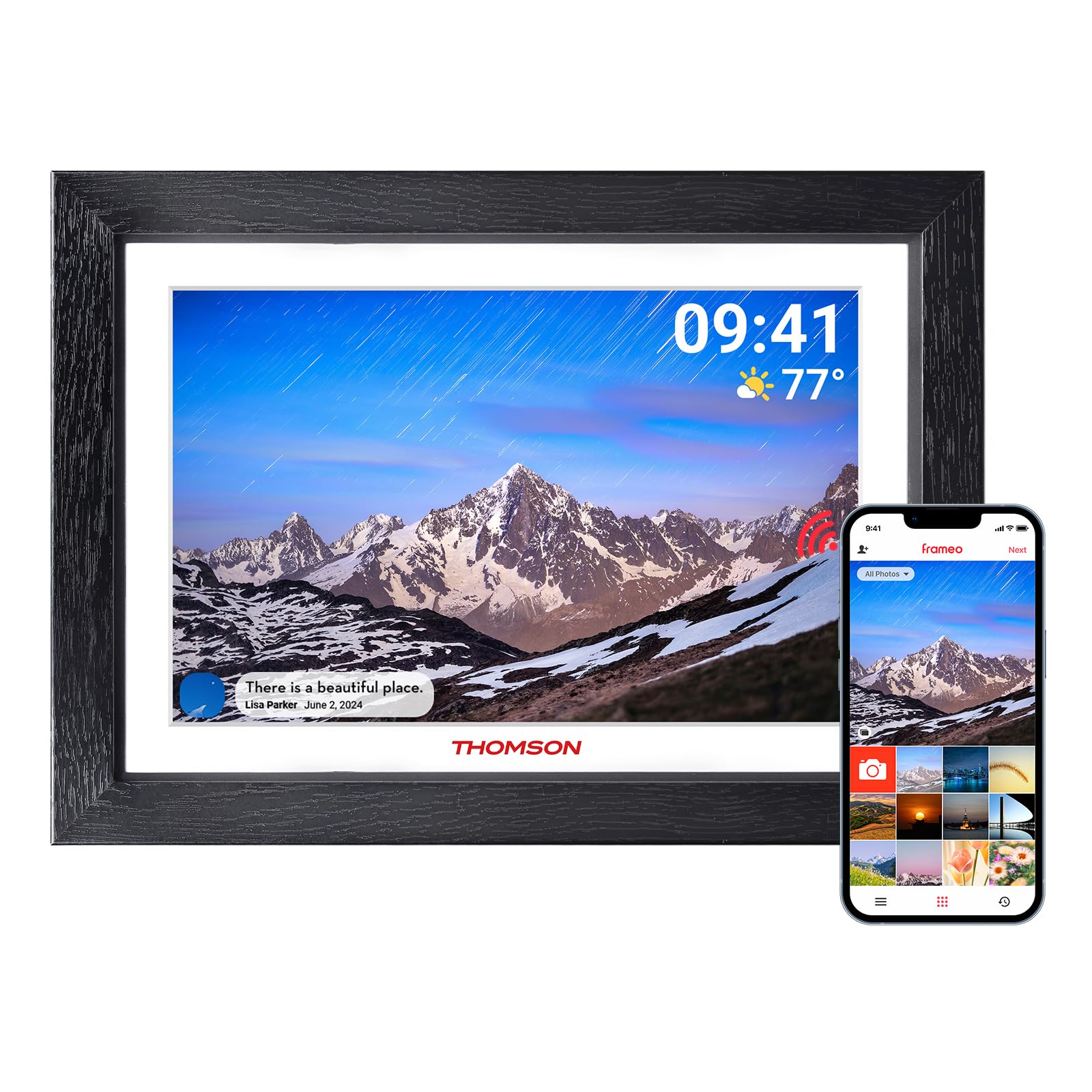
Сүрөт 2.1: Алдыңкы view of the digital picture frame.

2.2-сүрөт: Арткы view with wall mount and stand attachment points.
Негизги компоненттер:
- 10.1 дюймдук HD IPS сенсордук экраны: For clear display and intuitive navigation.
- Электр порту: Кубат адаптерине туташат.
- SD карта уячасы: For expanding storage (supports up to 128GB, SD card not included).
- USB порт: For data transfer (e.g., from a USB flash drive).
- Кубат баскычы: To turn the frame on/off or put it into sleep mode.
- Wall Hanging Hole: Allows for wall mounting in both landscape and portrait orientations.
- Detachable Stand: Үстөл үстүнө жайгаштыруу үчүн.
3. Баштапкы орнотуу
3.1 Күйгүзүү
- Attach the detachable stand to the back of the frame if you intend to place it on a surface.
- Кубат адаптерин рамканын кубат портуна туташтырып, андан кийин аны розеткага сайыңыз.
- The frame will automatically power on. If not, press and hold the power button on the back of the frame.
3.2 Wi-Fiга туташуу
Upon first startup, the frame will guide you through the initial setup wizard.
- Каалаган тилиңизди тандаңыз.
- Убакыт алкагыңызды тандаңыз.
- The frame will scan for available Wi-Fi networks. Select your network from the list.
- Enter your Wi-Fi password and tap "Connect".
- Once connected, the frame will display a unique device code. Make a note of this code.
3.3 Downloading and Pairing the App
To share photos and videos, you need to download the companion app.

Figure 3.1: App download and pairing process.
- Download the "Frameo" app from the App Store (iOS) or Google Play Store (Android) on your smartphone or tablet.
- Frameo тиркемесин ачып, аккаунт түзүңүз.
- In the app, select "Add Frame" and enter the unique device code displayed on your digital picture frame.
- Жупташтырылгандан кийин, сиз сүрөттөрдү жана видеолорду кадрыңызга жөнөтө баштасаңыз болот.
4. Operating Your Digital Picture Frame
4.1 Sending Photos and Videos via App
The Frameo app allows you to send photos and short videos (up to 15 seconds) directly to your frame from anywhere with an internet connection.

Figure 4.1: Sharing photos and videos from a smartphone to the frame.
- Смартфонуңузда Frameo тиркемесин ачыңыз.
- Сиз жөнөткүңүз келген сүрөттөрдү же видеолорду тандаңыз.
- Choose your THOMSON frame as the recipient.
- Add a caption if desired and tap "Send". The content will appear on your frame shortly.
4.2 Using an SD Card or USB Drive
You can also display media directly from an SD card or USB flash drive.
- Insert an SD card (up to 128GB) into the SD card slot or a USB flash drive into the USB port.
- The frame will detect the storage device. You can then import photos/videos to the frame's internal memory or view аларды түздөн-түз.
4.3 Слайдшоунун жөндөөлөрү
Customize how your photos and videos are displayed.
- Тартипти көрсөтүү: Choose between chronological, reverse chronological, or shuffle.
- Сүрөт аралыгы: Ар бир сүрөттүн көрсөтүлүү узактыгын коюңуз.
- Өткөөл таасирлер: Select various visual transitions between photos.
- Көлөмү: Adjust the volume for videos.
- Жарыктык: Экран жарыктыгын тууралаңыз.
4.4 Auto-Rotate Function
The frame automatically detects its orientation (landscape or portrait) and adjusts the display accordingly. This feature works whether the frame is on its stand or wall-mounted.
Figure 4.2: Auto-rotate and wall-mount capabilities.
5. Негизги өзгөчөлүктөрү

Figure 5.1: ашыкview of frame features.
- HD IPS Touch Screen: Enjoy vibrant images and videos with a 1280x800 resolution and a wide 180° viewing angle. The touch interface provides easy navigation.
- Wi-Fi туташуусу: Seamlessly connect to your home Wi-Fi network for instant photo and video sharing.
- Жоомарт сактагыч: The frame comes with 32GB of built-in memory, capable of storing thousands of photos. Expand storage further with an SD card (up to 128GB).
- Frameo App Sharing: Share moments privately and securely with family and friends from anywhere using the dedicated Frameo app.
- Автоматтык айлантуу: Photos and videos automatically adjust to the frame's orientation, whether placed horizontally or vertically.
- Уйку режими: Conserve energy by setting the frame to automatically turn off during specified hours.
- "Реакция" функциясы: Send emoticons back to loved ones in real-time to show your appreciation for the photos they share.
6. Техникалык тейлөө
6.1 Экранды тазалоо
- Always power off the frame and unplug it before cleaning.
- Use a soft, lint-free cloth, such as a microfiber cloth, to gently wipe the screen.
- өжөр тактар үчүн, жеңил гampчүпүрөккө суу же электроника үчүн атайын иштелип чыккан экранды тазалоо эритмеси. Суюктукту экранга түз чачпаңыз.
- Avoid using abrasive cleaners, alcohol, or ammonia-based solutions, as these can damage the screen.
6.2 Программалык камсыздоо жаңыртуулары
The frame may receive periodic software updates to improve performance and add new features. Ensure your frame is connected to Wi-Fi to receive these updates. You will typically be notified on the frame when an update is available.
7. Кыйынчылыктарды
| Көйгөй | Мүмкүн себеп | Чечим |
|---|---|---|
| Frame does not turn on. | Кубат адаптеринде же кубат адаптеринде эч кандай көйгөй жок. | Кубат адаптери рамкага да, иштеп жаткан розеткага да бекем туташтырылганын текшериңиз. Башка розетканы колдонуп көрүңүз. |
| Wi-Fi'га туташпай жатат. | Туура эмес сырсөз, диапазондон тышкары же тармак маселеси. | Double-check the Wi-Fi password. Move the frame closer to the router. Restart your router and the frame. Ensure your Wi-Fi network is 2.4GHz compatible. |
| Сүрөттөр/видеолор кадрда көрүнбөйт. | Frame not connected to internet, app not paired, or incorrect recipient. | Verify the frame is connected to Wi-Fi. Ensure the app is correctly paired with the frame. Confirm you are sending to the correct frame ID in the app. Check if the frame's internal storage or SD card is full. |
| Сенсордук экран жооп бербей жатат. | Убактылуу программалык ката. | Restart the frame by unplugging it and plugging it back in after a few seconds. Ensure the screen is clean and free of debris. |
| Frame is stuck on a logo or screen. | Программалык камсыздоо катасы. | Perform a hard reset by unplugging the power adapter, waiting 10 seconds, and plugging it back in. If the issue persists, contact customer support. |
8. Техникалык шарттар
| Өзгөчөлүк | Деталь |
|---|---|
| Бренд | ТОМСОН |
| Модель номери | 1001 Вт |
| Screen Size | 10.11 дюйм |
| Резолюция | 1280 x 800 (HD IPS) |
| Байланыш технологиясы | Wi-Fi (2.4 ГГц) |
| Эстутум сактоо сыйымдуулугу | 32 ГБ (ички) |
| Тышкы сактагыч | SD Card (max. 128 GB, not included) |
| Башкаруу ыкмасы | Touch Screen, App |
| Power Source | Электр зымдары |
| Аспект катышы | 16:10 |
| Frame Material | Жыгач |
| Элемент Салмагы | 680 грамм |
| Элементтин өлчөмдөрү (L x W) | 16" x 10" |
9. Кепилдик жана колдоо
9.1 Кепилдик маалыматы
The THOMSON 10.1-inch WiFi Digital Picture Frame comes with a 24 айлык кепилдик сатып алынган күндөн тартып. Бул кепилдик өндүрүштүк кемчиликтерди камтыйт жана буюмдун нормалдуу колдонууда белгиленгендей иштешин камсыздайт.
9.2 Техникалык колдоо
THOMSON provides өмүр бою техникалык колдоо for this product. If you encounter any issues or have questions not covered in this manual, please refer to the contact information provided with your product packaging or visit the official THOMSON support webжардам үчүн сайт.
Ask a question about this manual
Ask about setup, troubleshooting, compatibility, parts, safety, or missing instructions. Manuals+ will review the question and use this page’s manual context to help answer it.