
1. Киришүү
Thank you for choosing the iRobot Roomba Max 706 Combo Robot Vacuum Cleaner with AutoWash Dock. This advanced cleaning system is designed to provide comprehensive floor care, combining powerful vacuuming with heated mopping capabilities. The AutoWash Dock automates dirt disposal, mop cleaning, and fluid replenishment, ensuring your floors remain consistently clean with minimal effort.
This manual provides essential information for the safe and efficient operation, maintenance, and troubleshooting of your Roomba Max 706 Combo. Please read it thoroughly before using your robot and retain it for future reference.
2. Коопсуздук боюнча маанилүү маалымат
ЭСКЕРТҮҮ: To reduce the risk of injury or damage, read and follow all safety precautions and instructions before setting up, using, and maintaining your robot.
- Бул шайманды 8 жаштан жогорку балдар жана физикалык, сезүү же акыл-эс жөндөмү начар же тажрыйбасы жана билими жок адамдар колдонсо болот, эгерде алар көзөмөлгө алынган же шайманды коопсуз колдонуу боюнча нускама алган болсо жана келтирилген коркунучтарды түшүнсө. .
- Балдар шайман менен ойнобошу үчүн аларды көзөмөлгө алуу керек.
- Тазалоо жана колдонуучу тейлөөнү балдар көзөмөлсүз жасабашы керек.
- Use only as described in this manual. Any other use not recommended by the manufacturer may cause fire, electric shock, or injury.
- Do not use the robot or dock if they are damaged. Contact customer service for repair information.
- Do not handle the robot or dock with wet hands.
- Чачты, кенен кийимдерди, манжаларды жана дененин бардык бөлүктөрүн тешиктерден жана кыймылдуу бөлүктөрдөн алыс кармаңыз.
- Роботту полдо ачык электр розеткалары бар жерлерде иштетпеңиз.
- Do not use the robot to pick up large debris, broken glass, or anything that is burning or smoking.
- Берилген электр шнурун гана колдонуңуз.
3. Пакеттин мазмуну
Verify that you have received all the following items in your package:
- iRobot Roomba Max 706 Combo Robot Vacuum Cleaner
- AutoWash Dock
- Электр кабели
- 2 additional vacuum cleaner bags
- 1 bottle of cleaning concentrate (300 ml)
- Колдонуучунун Колдонмосу (бул документ)
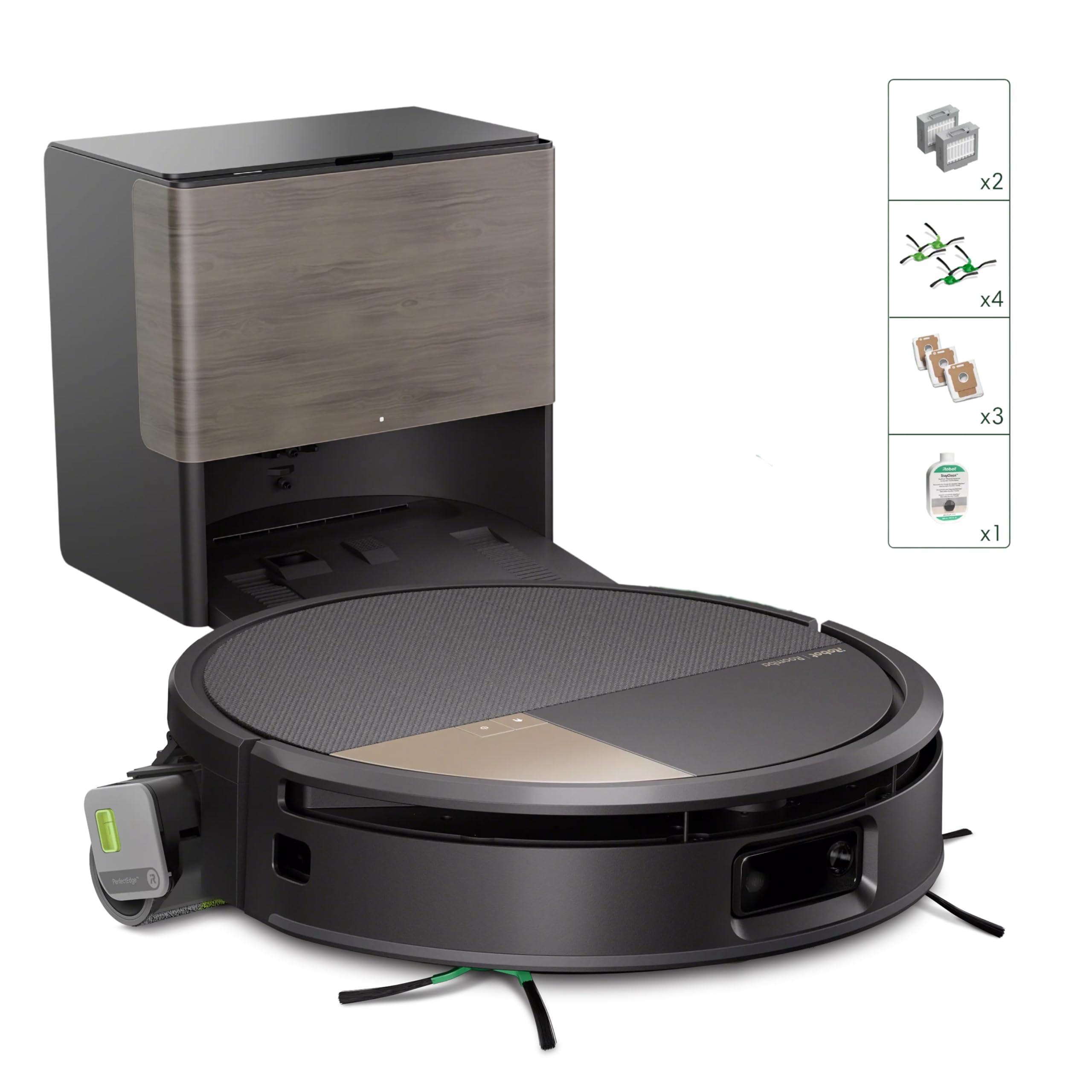
Image: The iRobot Roomba Max 706 Combo Robot and its AutoWash Dock, along with included accessories like the power cord, extra dust bags, and cleaning concentrate.
4. Орнотуу
4.1 Пакеттен чыгаруу
- Бардык компоненттерди таңгактан кылдаттык менен алып салыңыз.
- Remove any protective films or packing materials from the robot and the AutoWash Dock.
4.2 Dock Placement
- Place the AutoWash Dock on a hard, level surface against a wall.
- Ensure there is at least 0.5 meters (1.5 feet) of clear space on either side of the dock and 1.2 meters (4 feet) in front of the dock.
- Plug the power cord into the dock and then into a wall outlet.
- Avoid placing the dock near stairs or obstacles that could block the robot's path.
4.3 Алгачкы заряддоо
- Place the Roomba Max 706 Combo robot onto the AutoWash Dock, ensuring the charging contacts align.
- The robot will begin charging automatically. Allow it to charge for at least 3 hours before its first use, or until the battery indicator shows a full charge.
4.4 iRobot Home тиркемесине туташуу
- Download the iRobot Home app from your device's app store.
- Каттоо эсебин түзүү же кирүү үчүн колдонмону ачып, экрандагы нускамаларды аткарыңыз.
- Select "Add a Robot" and choose your Roomba Max 706 Combo from the list.
- Follow the app's prompts to connect your robot to your home Wi-Fi network. This enables smart features, scheduling, and remote control.
5. Иштөө нускамалары
5.1 Тазалоо режимдери
The Roomba Max 706 Combo offers versatile cleaning modes:
- Вакуум гана: For dry debris on carpets and hard floors.
- Швабра гана: For wet cleaning hard floors. Ensure the cleaning concentrate tank is filled.
- Combo (Vacuum & Mop): Simultaneously vacuums and mops hard floors. The unique protective cover helps keep carpets dry during mopping.
- SmartScrub: Activates for extra thorough scrubbing on stubborn stains.
- Turbo Carpet Mode: Automatically increases suction power when on carpets for deeper cleaning.
Select your desired mode via the iRobot Home app.
5.2 Тазалоо ишин баштоо
- Роботтон: Press the CLEAN button on the robot to start a standard cleaning cycle.
- Колдонмодон: Open the iRobot Home app, select your robot, and tap "CLEAN". You can also choose specific rooms or zones to clean.
- Үн менен башкаруу: If connected to a compatible smart assistant (Alexa, Google Assistant, Siri), use voice commands like "Alexa, ask Roomba to clean the living room."
5.3 Акылдуу навигация жана карта түзүү
The Roomba Max 706 Combo uses ClearView Pro LiDAR and PrecisionVision AI Technology for advanced navigation:
- LiDAR навигациясы: Creates detailed 3D maps of your home for efficient cleaning paths and room recognition.
- PrecisionVision жасалма интеллекти: Detects and avoids common obstacles like cables, socks, and pet waste, ensuring uninterrupted cleaning.
- Акылдуу карта түзүү: The robot learns your home layout over time, allowing for customized cleaning zones and keep-out areas via the app.
6. Техникалык тейлөө
Regular maintenance ensures optimal performance of your Roomba Max 706 Combo and AutoWash Dock.
6.1 Emptying the Dirt Container
- The AutoWash Dock automatically empties the robot's dirt container into a disposable bag.
- Replace the dock's vacuum bag when the indicator light illuminates or approximately every 75 days, depending on usage.
- To replace: Open the dock's lid, pull up on the bag tab to seal and remove, then insert a new bag.
6.2 Cleaning the Mop Roller
- The PowerSpin mop roller is self-cleaning by the AutoWash Dock.
- Periodically inspect the mop roller for debris or hair buildup. Remove and clean manually if necessary.
- To remove: Open the robot's mop module cover, unclip the roller, and slide it out. Clean with water and allow to air dry completely before reinserting.
6.3 Щеткаларды жана чыпканы тазалоо
- Double Rubber Brushes: Remove the brush frame from the robot's underside. Pull out the brushes and remove any hair or debris.
- Corner and Edge Brushes: Use a small screwdriver to remove the screw holding the side brush. Pull off the brush and clean any tangled hair.
- HEPA чыпкасы: The filter is located in the robot's dirt bin. Tap it against a trash can to remove debris. Replace the filter every 2-3 months, or as needed.
6.4 AutoWash Dock Maintenance
- Суу резервуарлары: Regularly empty and rinse the dirty water tank. Refill the clean water tank with water and the recommended iRobot cleaning concentrate.
- Drying Vent: Ensure the hot air drying vent on the dock is clear of obstructions.
- Заряддоо байланыштары: Wipe the charging contacts on both the robot and the dock with a clean, dry cloth periodically.
7. Кыйынчылыктарды
If your Roomba Max 706 Combo encounters an issue, consult the following table for common problems and solutions.
| Көйгөй | Мүмкүн себеп | Чечим |
|---|---|---|
| Робот заряддалбай жатат | Charging contacts are dirty or misaligned. Dock is unplugged. | Wipe charging contacts on robot and dock. Ensure dock is plugged in and robot is properly seated. |
| Начар тазалоо көрсөткүчү | Brushes or filter are dirty. Dirt bin is full. Mop roller is clogged. | Clean brushes and filter. Empty dirt bin. Clean mop roller. |
| Робот бат-баттан тыгылып калат | Obstacles in path. Sensors are dirty. | Clear floor of cables, small objects. Wipe robot's sensors with a clean, dry cloth. |
| Mop leaves streaks or foam | Incorrect cleaning solution. Mop roller dirty. Too much solution. | Use only iRobot cleaning concentrate. Clean mop roller. Adjust solution level in app if available. |
| AutoWash Dock not emptying/washing | Dust bag full. Water tanks empty/full. Dock nozzle clogged. | Replace dust bag. Fill clean water tank, empty dirty water tank. Check for clogs in dock's cleaning mechanism. |
For persistent issues or specific error codes, refer to the iRobot Home app or contact iRobot Customer Support.
8. Техникалык шарттар
| Өзгөчөлүк | Деталь |
|---|---|
| Бренд | iRobot |
| Модель аты | iRobot Roomba Max 706 Combo Robot + AutoWash Dock |
| Модель номери | X188040 |
| Продукциянын өлчөмдөрү (L x W x Y) | 45L x 34.4W x 47H сантиметр |
| Элемент Салмагы | 5.72 килограмм |
| Түс | Кара |
| Power Source | Батарея менен иштейт |
| Батарея түрү | Литий ион |
| Тtage | 12.8 вольт |
| Сыйымдуулугу (Суу багы) | 260 миллилитр |
| Чыпка түрү | HEPA |
| Навигация технологиясы | LiDAR Navigation, PrecisionVision AI |
| Башкаруу ыкмасы | App Control, Voice Control (Alexa, Google Home, Siri) |
| Surface Recommendation | Килем, катуу полдор |
| Өзгөчөлүктөр | Multi-Floor Mapping, Scheduling, Smart Mapping, Heated Mopping, Self-Cleaning Mop Roller, Auto-Emptying Dock |
9. Кепилдик жана Кардарларды колдоо
iRobot provides a limited warranty for this product. Please refer to the warranty card included in your package or visit the official iRobot webСиздин аймакка тиешелүү деталдуу кепилдик шарттары жана шарттары үчүн сайт.
For technical assistance, troubleshooting, or to order replacement parts, please contact iRobot Customer Support:
- Webсайт: Visit www.irobot.com/support (or your regional iRobot support site).
- Телефон: Refer to the iRobot Home app or the iRobot webжергиликтүү байланыш номерлери үчүн сайт.
When contacting support, please have your robot's serial number and model number (X188040) ready.