
Bikevee Bikevee Cycling GPS Computer & Bikevee Out Front Mount
User Manual
Bikevee Wireless Cycling GPS Computer
Model: Bikevee Cycling GPS Computer & Out Front Mount
1. Киришүү
This manual provides detailed instructions for the Bikevee Wireless Cycling GPS Computer, a device designed to track and display various cycling data. It features a 2.4-inch LCD display with auto backlight, IPX7 waterproofing, and multi-satellite GPS tracking for accurate data collection.
1.1 Негизги өзгөчөлүктөрү
- Узартылган батареянын иштөө мөөнөтү: Equipped with a 650mAh rechargeable battery, providing up to 28 hours of continuous use.
- Precision GPS Tracking: Utilizes 5-satellite systems (GPS, BDS, GLONASS, Galileo, QZSS) for stable and accurate signal reception.
- Туруктуу жана суу өткөрбөйт: IPX7 waterproof rating ensures resistance to rain and splashes.
- Таза дисплей: 2.4-inch LCD screen with automatic backlight for visibility in various lighting conditions.
- Comprehensive Data: Tracks speed (MPH/KM/H), distance, time, temperature, altitude, gradient, and more.
1.2 Кутуда эмне бар
Пакетте бардык компоненттер бар экенин текшериңиз:
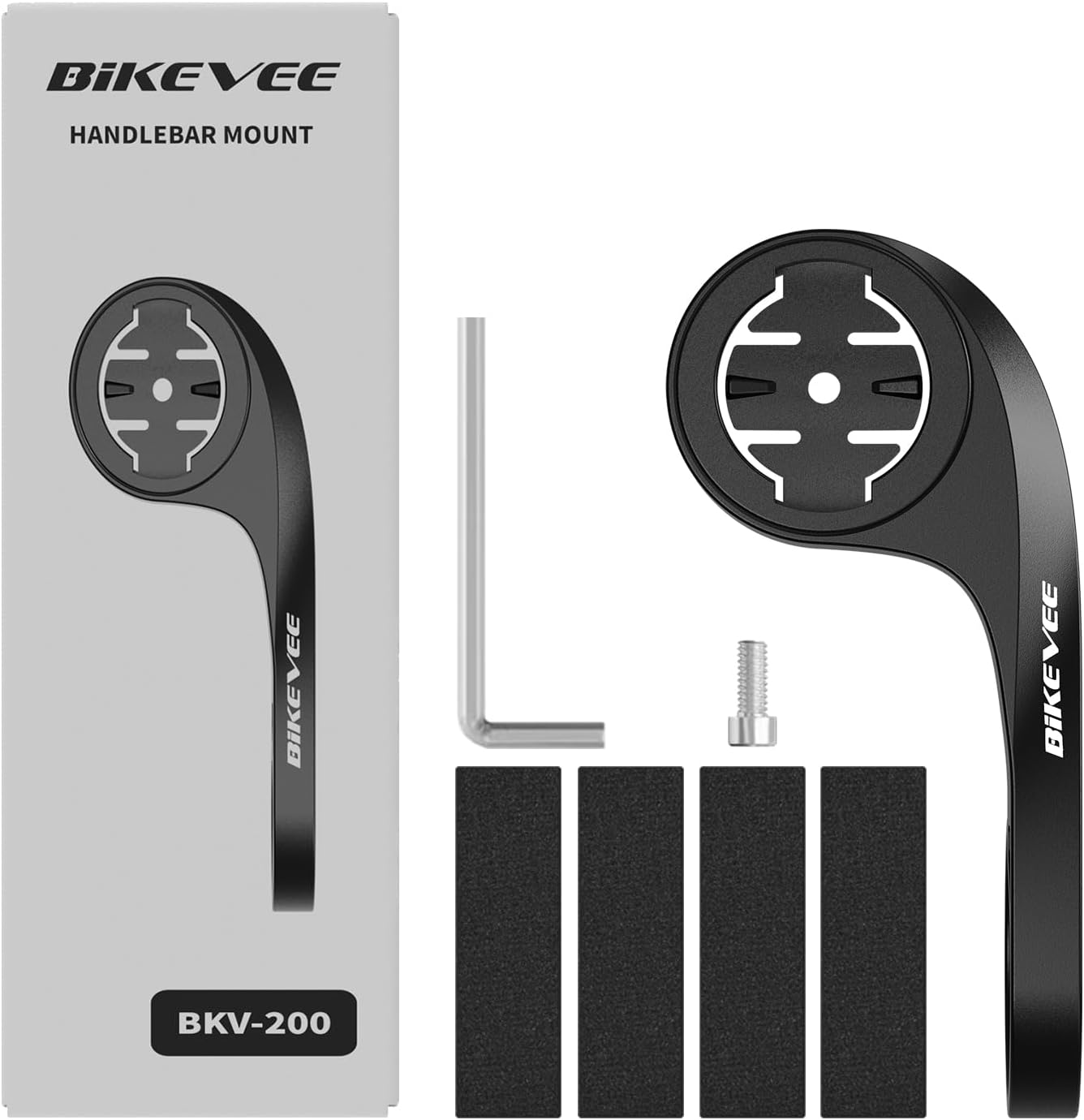
Figure 1.1: Package Contents. Includes Bike Computer, Charging Cable, Rubber Rings, Mount, Rubber Pad, and User Manual.
- Bikevee GPS Cycling Computer
- Стандарттык велосипед орнотуу
- Out Front Mount
- Резина төшөктөр
- Заряддоо кабели (Type-C)
- Монтаждоо үчүн резина шакекчелер
- User Manual
2. Орнотуу жана орнотуу
2.1 Аппаратты заряддоо
Before first use, fully charge the Bikevee GPS Computer. Connect the provided Type-C charging cable to the device's charging port and a USB power source. The battery indicator on the screen will show charging status.
2.2 Аппаратты орнотуу
The Bikevee GPS Computer comes with both a standard bike mount and an out front mount. Choose the mount that best suits your preference and bicycle setup.
2.2.1 Standard Bike Mount Installation
- Place the rubber pad on your bicycle's handlebar or stem.
- Кадимки велосипед бекиткичин резина төшөктүн үстүнө коюңуз.
- Secure the mount using the provided rubber rings, wrapping them around the handlebar/stem and hooking them onto the mount.
- Align the Bikevee GPS Computer with the mount's grooves and twist clockwise until it locks into place.
2.2.2 Out Front Mount Installation

Figure 2.1: Bikevee Out Front Mount.
- Place the rubber pad around your bicycle's handlebar where you intend to install the mount.
- Position the out front mount over the rubber pad.
- Use the provided Allen key to tighten the screw on the mount's clamp around the handlebar until it is secure.
- Align the Bikevee GPS Computer with the mount's grooves and twist clockwise until it locks into place.
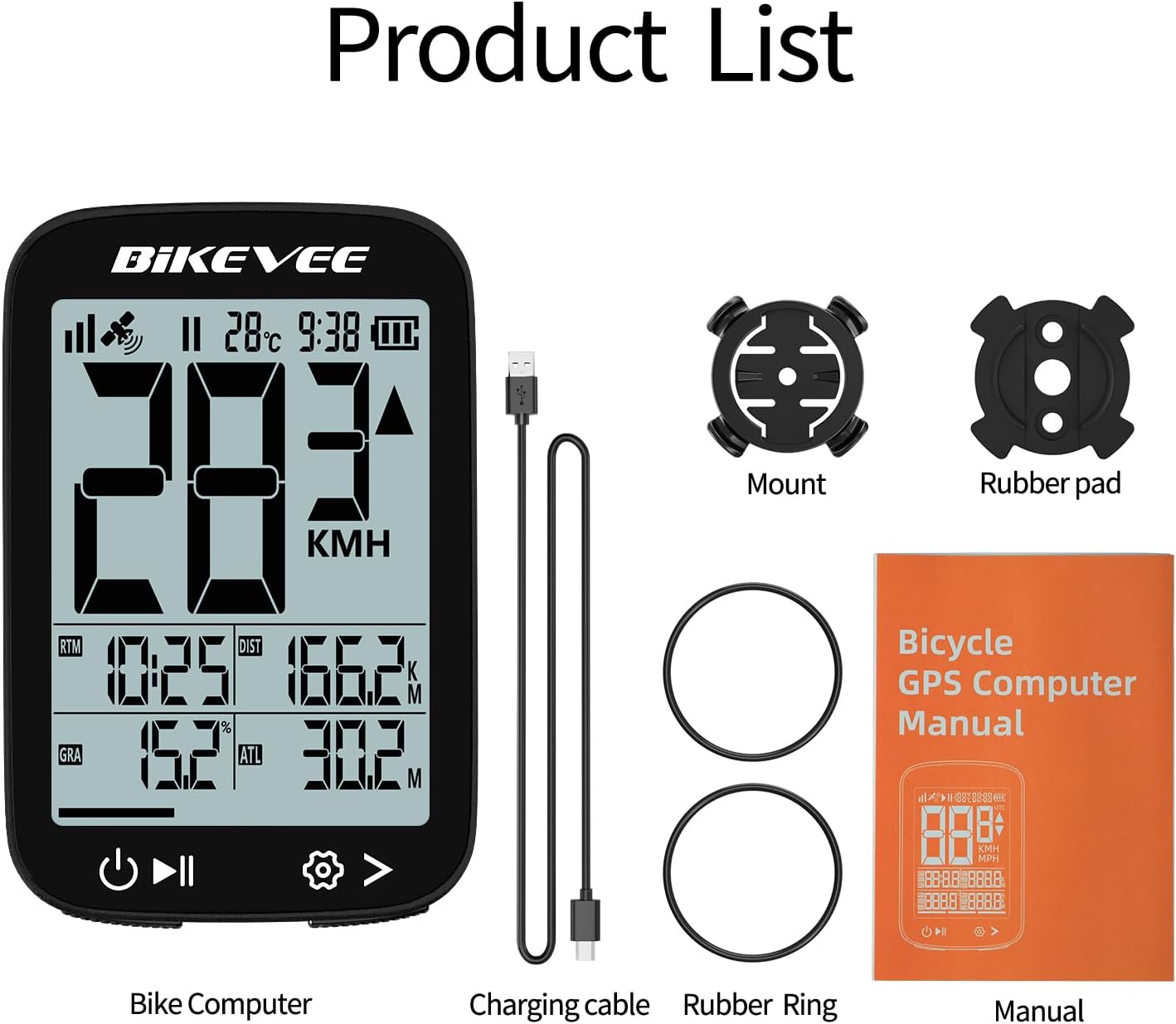
Figure 2.2: Handlebar Mount Components.
2.3 Баштапкы күйгүзүү жана жөндөөлөр
- Күйгүзүү: Press and hold the power button (usually located at the bottom left) until the screen illuminates.
- Бирдикти тандоо: Upon first power-on or after a reset, you may be prompted to select your preferred unit of measurement (MPH or KM/H). Use the navigation buttons to select and confirm.
- GPS алуу: Take the device outdoors to an open area to allow it to acquire GPS satellite signals. This may take a few moments. A stable GPS signal icon will appear once connected.
3. Иштөө нускамалары
3.1 Негизги операция
- Күйгүзүү/өчүрүү: Күйгүзүү же өчүрүү үчүн сол баскычты басып, кармап туруңуз.
- Start/Pause/Stop Ride: Press the middle button to start recording a ride. Press again to pause. Press and hold to stop and save the ride data.
- Барактарды которуу: Use the right button to cycle through different data display pages.
- Арткы жарык: The device features an automatic backlight that adjusts based on ambient light conditions.
3.2 Data Display and Interpretation
The Bikevee GPS Computer displays up to 14 types of cycling data, providing comprehensive insights into your ride.
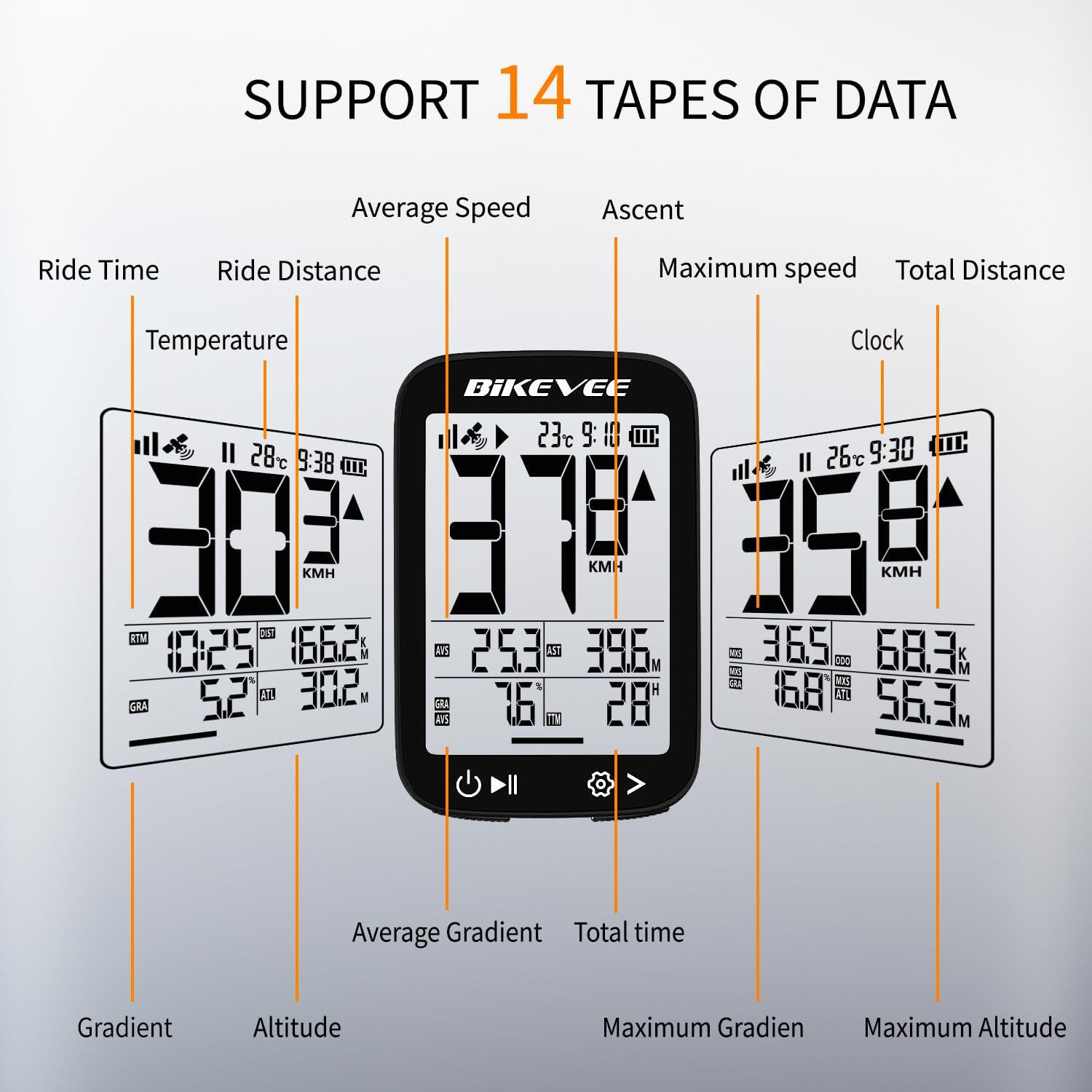
Figure 3.1: Supported Data Types Display.
- Учурдагы ылдамдык: Displays your real-time speed (MPH or KM/H).
- Орточо ылдамдык: The average speed for the current ride.
- Максималдуу ылдамдык: The highest speed recorded during the current ride.
- Айдоо убактысы: Duration of the current active ride.
- Ride Distance: Учурдагы сапар учурунда басып өткөн аралык.
- Total Distance (Odometer): Cumulative distance recorded by the device.
- Температура: Айлана-чөйрөнүн температурасы.
- Саат: Учурдагы убакыт.
- Өтүү: Total elevation gained during the ride.
- Градиент: Current incline or decline percentage.
- Бийиктиги: Current elevation above sea level.

Figure 3.2: Display Icons and Their Meanings.
- Satellite Signal: GPS сигналынын күчүн көрсөтөт.
- IPX7: Confirms waterproof rating.
- Батарея деңгээли: Батареянын калган зарядын көрсөтөт.
- Автоматтык арткы жарык: Indicates auto backlight feature is active.
- C түрү: Denotes the charging port type.
- Speed Comparison: Arrow indicates if current speed is higher or lower than average speed.
4. Техникалык тейлөө жана кам көрүү
4.1 Аппаратты тазалоо
Оптималдуу иштешин жана көрүнүшүн сактоо үчүн, түзмөктү үзгүлтүксүз тазалап туруңуз:
- Экранды жана корпусту жумшак, d менен сүртүңүзamp кездеме.
- Avoid using abrasive cleaners, solvents, or chemical sprays, as these can damage the device's surface or internal components.
- Ensure the charging port cover is securely closed to prevent dust and water ingress.
4.2 Сууга туруктуулук (IPX7)

4.1-сүрөт: IPX7 суу өткөрбөөчү функциясы.
The Bikevee GPS Computer has an IPX7 waterproof rating, meaning it is protected against temporary immersion in water (up to 1 meter for 30 minutes). However, it is important to note:
- Аппаратты көпкө сууга салбаңыз.
- Жогорку басымдагы суу агымдарынан алыс болуңуз.
- Ensure the charging port cover is sealed before exposure to water.
4.3 Батареяга кам көрүү жана сактоо
- Аппаратты колдонбогондо салкын, кургак жерде сактаңыз.
- Түзмөктү узак убакыт бою өтө жогорку температурага (ысык же муздак) дуушар кылбаңыз.
- For long-term storage, charge the battery to approximately 50% to preserve battery health.
5. Кыйынчылыктарды
If you encounter issues with your Bikevee GPS Computer, refer to the following common problems and solutions:
| Көйгөй | Мүмкүн себеп | Чечим |
|---|---|---|
| Түзмөк күйбөйт. | Батарея аз. | Берилген Type-C кабелин колдонуп, аппаратты толугу менен заряддаңыз. |
| No GPS signal or inaccurate readings. | Тоскоолдук view of sky; initial signal acquisition. | Move to an open outdoor area. Wait a few minutes for signal acquisition. Avoid dense forests or tunnels. |
| Дисплей күңүрт же окулбайт. | Auto backlight setting; low battery. | Ensure sufficient battery charge. The backlight adjusts automatically; try moving to a different lighting condition. |
| Түзмөк катып калат же жооп бербей калат. | Программанын катасы. | Perform a soft reset by pressing and holding the power button for 10-15 seconds until the device restarts. |
6. Техникалык шарттар
Detailed technical specifications for the Bikevee Wireless Cycling GPS Computer:

Figure 6.1: Device Dimensions and Weight.
- Модел: Bikevee Cycling GPS Computer
- Дисплей: 2.4-inch LCD, Automatic Backlight
- Батарея: 650 мАч кайра заряддалуучу литий-иондук
- Батареянын иштөө мөөнөтү: 28 саатка чейин (үзгүлтүксүз колдонуу)
- GPS Systems: GPS, BDS, GLONASS, Galileo, QZSS (5-satellite tracking)
- Суу өткөрбөйт рейтинги: IPX7
- Өлчөмдөрү: Approximately 70mm (Height) x 45mm (Width) / 2.76in x 1.77in
- Салмагы: Approximately 50g / 0.11lb
- Заряддоо порту: C түрүндөгү USB
- Data Types Supported: 14 types (e.g., Speed, Distance, Time, Temperature, Altitude, Gradient)
7. Кепилдик маалыматы
The Bikevee Wireless Cycling GPS Computer is covered by a limited manufacturer's warranty. This warranty typically covers defects in materials and workmanship under normal use. Please retain your proof of purchase for warranty claims.
For specific warranty terms and conditions, including duration and coverage details, please refer to the warranty card included with your product or contact Bikevee customer support directly.
8. Кардарларды колдоо кызматы
If you have any questions, require technical assistance, or need to report an issue with your Bikevee Wireless Cycling GPS Computer, please contact our customer support team.
- Онлайн колдоо: Visit the official Bikevee webКөп берилүүчү суроолор, көйгөйлөрдү аныктоо боюнча колдонмолор жана байланыш формалары үчүн сайт.
- Электрондук почта колдоо: Продуктуңуздун таңгагына же расмий өкүлгө кайрылыңыз webкардарларды колдоо электрондук почта дареги үчүн сайт.
When contacting support, please be prepared to provide your product model number (Bikevee Cycling GPS Computer) and a detailed description of the issue.
Ask a question about this manual
Ask about setup, troubleshooting, compatibility, parts, safety, or missing instructions. Manuals+ will review the question and use this page’s manual context to help answer it.