
1. Киришүү
This manual provides essential information for setting up, operating, and maintaining your NIMO 17.3" IPS FHD Gaming Laptop. Designed for both productivity and entertainment, this laptop features an AMD Ryzen 7 8745HS processor, 64GB DDR5 RAM, and a 2TB PCIe 4.0 SSD, ensuring a responsive and powerful user experience.
Image 1.1: NIMO 17.3" FHD Gaming Laptop overview, highlighting key features.
2. Кутуда эмне бар
Сураныч, кутудан чыгарылганда бардык буюмдар бар экенин текшериңиз:
- 1 x NIMO N177 Laptop
- 1 x Type-C 100W PD Fast Charger
- 1 x User Manual
- Windows 11 Home (Pre-installed)
3. Баштапкы орнотуу
3.1 Күйгүзүү жана заряддоо
- Connect the provided 100W Type-C PD Fast Charger to the laptop's USB-C port and a power outlet.
- Ноутбуктун капкагын ачыңыз. Ноутбук автоматтык түрдө күйүшү мүмкүн же сиз кубат баскычын басышыңыз керек болушу мүмкүн.
- Allow the battery to charge fully before initial use. A 15-minute charge can provide approximately 2 hours of use.

Image 3.1: Illustration of the laptop charging process and battery life.
3.2 Windows 11 Configuration
Follow the on-screen prompts to complete the Windows 11 setup process. This includes selecting your region, connecting to a Wi-Fi network, and creating a user account.
3.3 Манжа изин окугучту орнотуу
For enhanced security and quick login, set up the integrated fingerprint reader:
- Windows Орнотуулары > Каттоо эсептери > Кирүү параметрлери бөлүмүнө өтүңүз.
- Select 'Fingerprint recognition (Windows Hello)' and follow the instructions to register your fingerprint.

Image 3.2: The backlit keyboard and fingerprint sensor for secure login.
4. Ноутбугуңузду иштетүү
4.1 Аткаруучулук жана көп тапшырма
Your NIMO laptop is equipped with an AMD Ryzen 7 8745HS processor (8-core/16-thread, up to 4.9GHz) and 64GB DDR5 RAM, providing robust performance for demanding applications, gaming, and seamless multitasking. The 2TB PCIe 4.0 SSD ensures fast boot times and rapid data access.

Image 4.1: Details of the AMD Ryzen 7 8745HS processor.

Image 4.2: Laptop demonstrating seamless multitasking with ample storage and RAM.
4.2 Дисплей
The 17.3" FHD (1920x1080) IPS anti-glare display offers immersive visuals with vibrant colors and wide viewing angles. The ultra-thin bezel design provides an 85% screen-to-body ratio for an expansive viewтажрыйбасы.

Image 4.3: The 17.3" FHD IPS display for visual clarity.
4.3 Баскычтоп жана сенсордук такта
The full-size keyboard includes a numeric keypad and features backlighting for comfortable typing in various lighting conditions. The precision gesture touchpad allows for intuitive navigation and supports multi-touch gestures.
4.4 Webcam
The integrated 2MP webcam is suitable for video calls and online meetings. For privacy, the laptop includes a physical privacy switch to disable the webпайдаланылбаган учурда камера.

Image 4.4: Privacy-focused camera convenience with a built-in switch.
5. Байланыш
5.1 Порттор жана интерфейстер
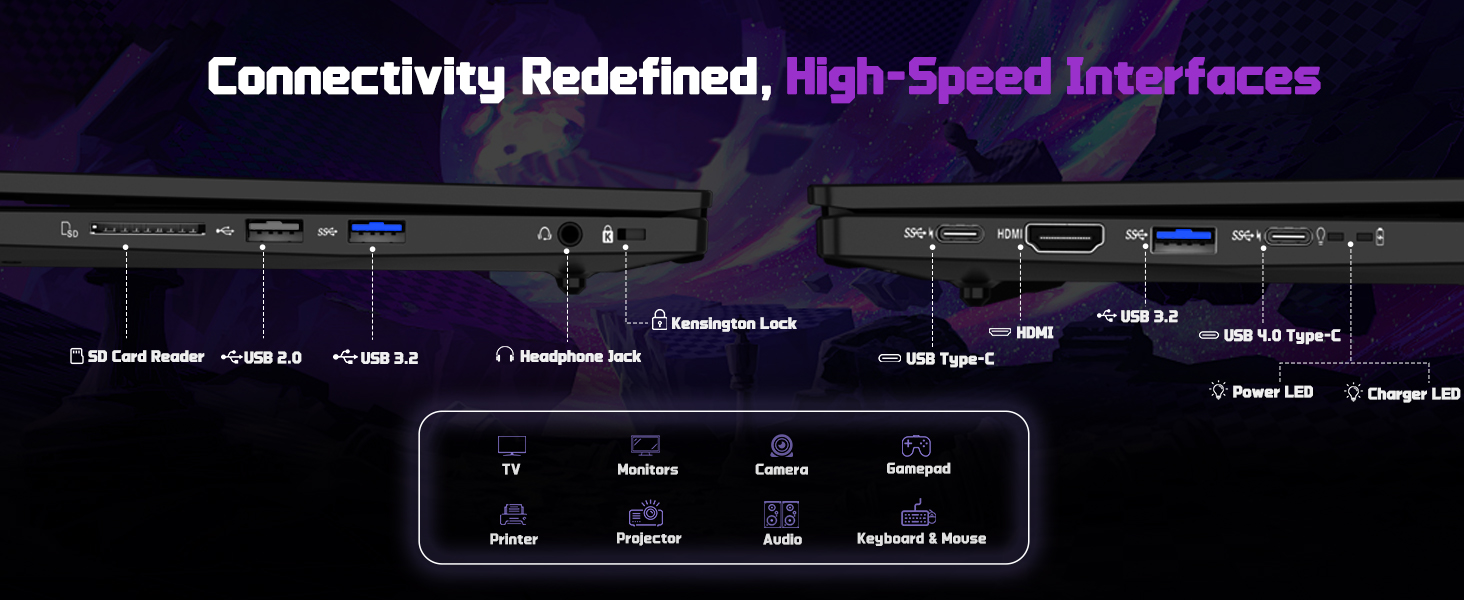
The NIMO N177 laptop offers a variety of ports for connecting peripherals and external displays:
- 1 x USB 2.0 порту
- 3 x USB 3.0 порттору
- 1 x USB 4.0 Type-C Port (supports 100W PD charging, data transfer, and display output)
- 1 x HDMI порт
- 1 x Наушник уячасы
- 1 x SD карта окугуч
- 1 x Kensington Lock Slot

Image 5.1: Detailed diagram of the laptop's high-speed interfaces.
5.2 Зымсыз байланыш
The laptop supports 802.11a/b/g/n/ac Wi-Fi for reliable wireless internet access and Bluetooth for connecting wireless accessories.
6. Техникалык тейлөө
6.1 Тазалоо
- Экранды жана сырткы беттерди тазалоо үчүн жумшак, түксүз чүпүрөктү колдонуңуз.
- Катуу химиялык заттарды же абразивдүү материалдарды колдонуудан алыс болуңуз.
- For the screen, use a specialized screen cleaner and a microfiber cloth.
6.2 Программалык камсыздоо жаңыртуулары
Regularly check for and install Windows updates and driver updates to ensure optimal performance and security. You can find driver updates on the NIMO official webсайт.
6.3 Сактоо жана иштетүү
Store the laptop in a cool, dry place. Avoid exposing it to extreme temperatures, direct sunlight, or excessive moisture. Handle the laptop with care to prevent physical damage.
7. Кыйынчылыктарды
If you encounter issues with your NIMO laptop, try the following common troubleshooting steps:
- Кубат жок: Ensure the charger is securely connected to both the laptop and a working power outlet. Check if the power adapter's LED indicator is on.
- Дисплей маселелери: Эгерде экран бош болсо, ноутбук иштеп жатканын текшерүү үчүн тышкы мониторду туташтырып көрүңүз. Windows'то дисплей жөндөөлөрүн тууралаңыз.
- Жай аткаруу: Керексиз тиркемелерди жаап, фондук процесстерди текшерип, жетиштүү бош орунду камсыз кылыңыз.
- Туташуу көйгөйлөрү: For Wi-Fi issues, restart your router and the laptop. For peripheral issues, ensure drivers are updated and connections are secure.
- Система жооп бербейт: Ноутбукту мажбурлап өчүрүү үчүн кубат баскычын 10-15 секунд басып туруңуз, андан кийин өчүрүп-күйгүзүңүз.
For persistent issues, refer to the support section or contact NIMO customer service.
8. Техникалык шарттар
| Өзгөчөлүк | Спецификация |
|---|---|
| Бренд | NIMO |
| Модель аты | NIMO N177L |
| Screen Size | 17.3 дюйм |
| Screen Resolution | 1920 x 1080 пиксел (FHD IPS) |
| Процессор | AMD Ryzen 7 8745HS (8 Cores, up to 4.9 GHz) |
| RAM | 64 ГБ DDR5 (4800 МГц) |
| Катуу диск | 2 TB SSD (PCIe 4.0) |
| Графикалык сопроцессор | AMD Radeon 780M (интеграцияланган) |
| Операция системасы | Windows 11 Home |
| Зымсыз түрү | 802.11a/b/g/n/ac |
| USB порттору | 1 x USB 2.0, 3 x USB 3.0, 1 x USB 4.0 Type-C |
| Өзгөчөлүктөр | Арткы жарык клавиатура, манжа изин окугуч, HD аудио, сандык баскычтоп |
| Батареянын орточо иштөө мөөнөтү | 15.5 Hours (75Wh) |
| Элемент Салмагы | 3.84 фунт |
| Продукциянын өлчөмдөрү | 15.66 x 9.99 x 0.74 дюйм |
| Түс | Кара |
9. Кепилдик жана колдоо
9.1 Кепилдик маалыматы
Your NIMO laptop is backed by a 2 жылдык кепилдик. This warranty covers manufacturing defects and ensures your satisfaction. The product also includes partial U.S. assembly.
9.2 Кайтаруу саясаты
NIMO offers hassle-free 90 күндүк кайтаруу from the date of purchase. Please refer to your purchase documentation for detailed return instructions.
9.3 Кардарларды колдоо
Our dedicated support team is available to assist you with any questions or issues. You can contact us via:
- Электрондук почта: service@nimopc.com
- Биздин чиновник website or product page (for contact details).
We aim to provide quick solutions and a worry-free experience.
Сүрөт 9.1: Бүттүview of NIMO's customer commitment and support.