
1. Киришүү
Сатып алганыңыз үчүн рахматasing the Surge Wireless Pro Controller. This controller is designed for multi-platform compatibility, offering an enhanced gaming experience across various devices. Please read this manual carefully before use to ensure proper operation and to maximize your gaming enjoyment.
Негизги өзгөчөлүктөрү:
- Multi-Platform Compatibility: Nintendo Switch/Switch 2 (Note: No C Button/Audio Port support for Switch 2), Windows PC, Steam Deck, Android, and iOS devices.
- Hall Effect Thumb Sticks & Triggers: Provides precise control and reduces the likelihood of stick drift.
- Turbo Functionality: Offers three adjustable turbo levels for rapid-fire control.
- Vibration Feedback: Four adjustable vibration levels for customizable haptic feedback.
- Motion Controls: Supports motion sensing in compatible games.
- Console Wake Up: Ability to wake the Nintendo Switch console from sleep mode (Nintendo Switch only).
- Rechargeable Battery: Built-in 600mAh Li-polymer battery provides up to 10 hours of play.
- USB-C Charging: Includes a 1-meter USB-C charging cable.
2. Пакеттин мазмуну
- 1 x Surge Wireless Pro Controller
- 1 x USB-C заряддоо кабели (1 метр)
- 1 x Instruction Manual
3. Controller Layout
Familiarize yourself with the buttons and features of your Surge Wireless Pro Controller.
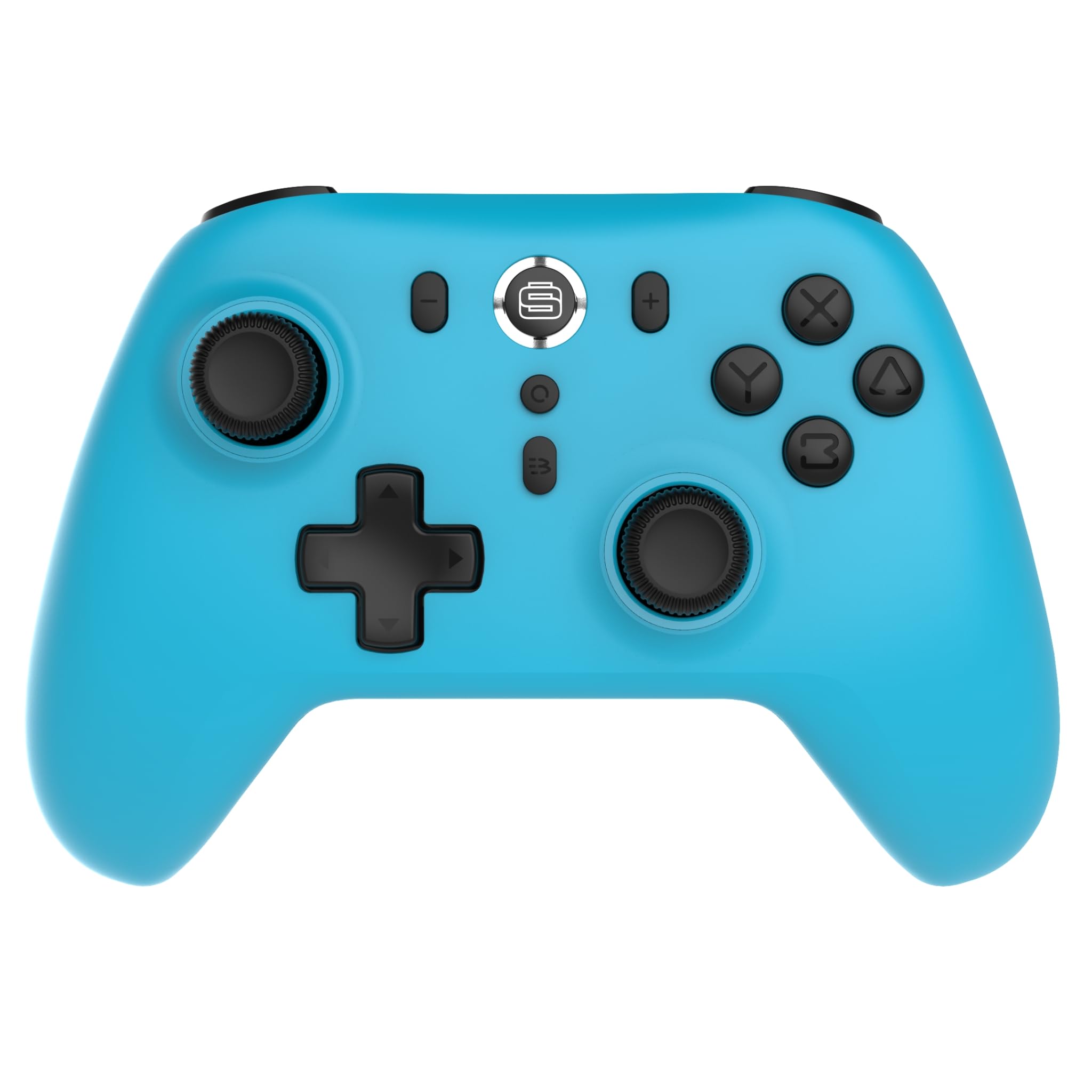
Фронт view of the Surge Wireless Pro Controller, showing the D-pad, left and right analog sticks, A/B/X/Y buttons, Home button, Capture button, Plus and Minus buttons, and the Surge logo button.

Артка view of the Surge Wireless Pro Controller, showing the textured grips and the charging port.
4. Орнотуу жана жупташтыруу
The Surge Wireless Pro Controller supports multiple connection methods depending on your device.

This image displays the various platforms compatible with the Surge Wireless Pro Controller, including Nintendo Switch, Nintendo Switch 2, Windows PC, Android, and iOS.
4.1. Pairing with Nintendo Switch / Switch 2
- HOME Менюсунан тандаңыз Контроллер > Катуу/Тартипти өзгөртүү.
- Контроллерде баскычты басып, кармап туруңуз Башкы бет баскычы for 3-5 seconds until the indicator lights begin to flash rapidly.
- Once paired, the indicator light(s) on the controller will remain solid.
- To wake the console from sleep mode, press the Башкы бет баскычы контроллерде.
4.2. Pairing with Windows PC
- Компьютериңизде Bluetooth иштетилгенин текшериңиз.
- барыңыз Bluetooth & other devices settings сиздин компьютериңизде.
- Тандоо Bluetooth же башка аспапты кошуңуз > Bluetooth.
- Контроллерде баскычты басып, кармап туруңуз Башкы бет баскычы for 3-5 seconds until the indicator lights begin to flash rapidly.
- Select the controller from the list of available devices on your PC.
- Once paired, the indicator light(s) on the controller will remain solid.
4.3. Pairing with Android / iOS Devices
- Android же iOS түзмөгүңүздө Bluetooth'ду иштетиңиз.
- Go to the Bluetooth settings menu on your device.
- Контроллерде баскычты басып, кармап туруңуз Башкы бет баскычы for 3-5 seconds until the indicator lights begin to flash rapidly.
- Select the controller from the list of available devices.
- Once paired, the indicator light(s) on the controller will remain solid.
5. Иштөө өзгөчөлүктөрү
5.1. Hall Effect Thumb Sticks & Triggers
The controller is equipped with Hall Effect technology for its thumb sticks and triggers. This technology uses magnets and electrical conductors to detect position, providing enhanced precision and significantly reducing the risk of stick drift over time compared to traditional potentiometers.

This image highlights the Hall Effect thumbsticks and triggers, emphasizing their role in providing precise inputs and preventing stick drift.
5.2. Турбо функциясы
The Turbo function allows for rapid, repeated input of a button press. This controller features 3 adjustable turbo levels.
- Turbo иштетүү үчүн: басып, кармап туруңуз Турбо баскычы, then press the desired action button (A/B/X/Y, L1/R1, L2/R2, D-pad directions). The button will now rapidly repeat its input when held.
- Турбо ылдамдыгын тууралоо үчүн: With Turbo active on a button, press and hold the Турбо баскычы жана жылдырыңыз Оң аналогдук таякча өйдө же ылдый to cycle through the 3 speed levels.
- Турбо режимин өчүрүү үчүн: басып, кармап туруңуз Турбо баскычы, анан ошол эле аракет баскычын кайра басыңыз.
5.3. Vibration пикир
The controller provides haptic feedback through vibration. You can choose from 4 vibration levels.
- To adjust Vibration level: басып, кармап туруңуз Вибрация баскычы (if present, or a designated button combination, refer to specific button mapping if available) and move the Сол аналогдук таякчаны өйдө же ылдый to cycle through the 4 levels (Off, Low, Medium, High).
5.4. Motion Controls
The controller supports motion controls for compatible games, particularly on Nintendo Switch/Switch 2. This allows for intuitive gameplay where physical movement of the controller translates into in-game actions.

This image visually represents the controller's advanced features, including Turbo Function, Motion Controls, and Rumble Vibration, enhancing the gaming experience.
6. Заряддоо
The controller is equipped with a built-in 600mAh Li-polymer battery, providing up to 10 hours of gameplay on a single charge.

This image shows the controller being held, emphasizing its internal rechargeable battery for extended play sessions.
- Connect the included USB-C charging cable to the controller's USB-C port.
- Кабелдин экинчи учун USB кубат булагына туташтырыңыз (мисалы, консоль, компьютер, USB дубал адаптери).
- The indicator lights on the controller will show charging status (e.g., blinking while charging, solid when fully charged).
- Толук кубаттоо адатта болжол менен 2-3 саатты талап кылат.
7. Техникалык тейлөө
Контроллериңиздин узак мөөнөттүү иштешин жана оптималдуу иштешин камсыз кылуу үчүн, төмөнкү техникалык тейлөө көрсөтмөлөрүн аткарыңыз:
- Тазалоо: Контроллерди сүртүү үчүн жумшак, кургак чүпүрөктү колдонуңуз. өжөр кир үчүн, бир аз гampчүпүрөктү суу менен. Катуу химиялык заттарды же абразивдүү тазалагычтарды колдонуудан алыс болуңуз.
- Сактагыч: Контроллерди түз күн нурунан жана экстремалдык температурадан алыс салкын, кургак жерде сактаңыз.
- Тамчылардан качуу: Контроллерди тамчылардан жана таасирлерден коргоңуз, бул ички компоненттерге зыян келтириши мүмкүн.
- Суюктук таасири: Do not expose the controller to water or other liquids.
8. Кыйынчылыктарды
If you encounter issues with your Surge Wireless Pro Controller, please refer to the following common solutions:
| Көйгөй | Чечим |
|---|---|
| Контроллер күйбөйт. | Контроллер заряддалганын текшериңиз. Аны USB-C кабели аркылуу кубат булагына туташтырыңыз. |
| Controller does not pair. | Ensure the controller is in pairing mode (indicator lights flashing rapidly). Check that Bluetooth is enabled on your device. Try restarting both the controller and the device. |
| Киргизүүнүн кечигүү же ажыратуу. | Ensure the controller is within range of the device. Reduce interference from other wireless devices. Ensure the controller is fully charged. |
| Buttons or sticks are unresponsive. | Try resetting the controller (if a reset button is available, typically a small pinhole on the back). Ensure no debris is obstructing the buttons. |
| Вибрация иштебейт. | Check the vibration settings on the controller and in the game. Ensure the vibration level is not set to 'Off'. |
9. Техникалык шарттар
| Өзгөчөлүк | Деталь |
|---|---|
| Модель номери | SG60095 |
| Батарея түрү | 1 Nonstandard Battery (Li-polymer, 600mAh) |
| Батареянын иштөө мөөнөтү | 10 саатка чейин (болжол менен) |
| Заряддоо порту | USB-C |
| Өлчөмдөр | 20.5 x 14 x 6.6 см |
| Салмагы | 320 г |
| Келип чыккан өлкө | Кытай |
10. Кепилдик жана колдоо
For warranty information and customer support, please refer to the documentation included with your purchase or visit the official Surge webсайт. Кепилдик дооматтар үчүн сатып алганыңыздын далилин сактаңыз.